
DCCStands P5
Dejavoo P5 Low Freestanding Swivel and Tilt Stand User Manual
Model: P5
1. Product Overview
The Dejavoo P5 Low Freestanding Swivel and Tilt Stand is a robust and versatile solution designed to securely hold your Dejavoo P5 payment terminal. Manufactured from sturdy steel with a durable powder-coated finish, this stand enhances customer interaction by allowing the terminal to tilt up to 60 degrees and swivel a full 190 degrees. This flexibility facilitates seamless transactions between customers and merchants, improving overall payment processing efficiency.
Key features include:
- Manufactured from sturdy steel with a durable powder-coated finish for long-lasting use.
- Tilts up to 60 degrees and swivels a full 190 degrees for optimal viewing angles and accessibility.
- Designed to bring the terminal closer to the customer, enhancing convenience.
- Upgradeable in the field with a simple top plate swap for future compatibility.
- Flange cover hides wires, maintaining a neat and professional appearance.
- Minimizes chances of damage and theft to the POS terminal by keeping it secure.

Figure 1.1: Dejavoo P5 Low Freestanding Swivel and Tilt Stand with Round Plate. This image shows the complete stand assembly, highlighting its compact and sturdy design.

Figure 1.2: Key benefits of the stand, including simple installation, extreme durability, and frictionless transactions. The image visually reinforces the product's advantages.
2. Package Contents
Please verify that all items listed below are included in your package:
- Low Swivel and Tilt Stand (Pole stands 5.5” tall)
- 8" x 8" Round Countertop Plate
- Screws for assembly
- Adhesive pad (for alternative securing method)
Note: The Dejavoo P5 payment terminal is not included with this stand.
3. Setup and Installation
The swivel and tilt stand is supplied fully built for a simple installation. There are two primary methods for securing the stand:
3.1. Freestanding Installation with Round Plate
- Unpack the Low Swivel and Tilt Stand and the 8" x 8" Round Countertop Plate from the packaging.
- Align the base of the stand with the pre-drilled holes on the round countertop plate.
- Using the enclosed screws, securely fasten the stand to the plate. Ensure the screws are tightened firmly but do not overtighten.
- Place the assembled freestanding stand on your desired countertop surface. The round plate provides stability and flexibility.
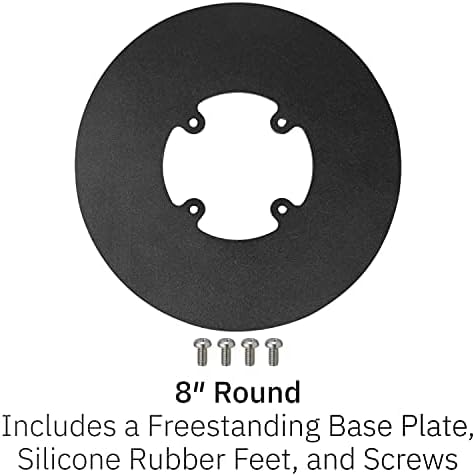
Figure 3.1: The 8-inch round freestanding base plate with included screws. This component provides stability for the stand.
3.2. Adhesive Pad Installation (Optional)
For an alternative securing method, an adhesive pad is included. This method is suitable for surfaces where drilling is not preferred or possible.
- Ensure the desired installation surface is clean, dry, and free of dust or grease.
- Peel off the protective backing from one side of the adhesive pad and apply it firmly to the bottom of the stand's base (if not using the round plate) or to the bottom of the round plate.
- Peel off the remaining protective backing from the adhesive pad.
- Carefully position the stand on the chosen surface and press down firmly for several seconds to ensure a strong bond.
3.3. Attaching the Dejavoo P5 Terminal
Once the stand is secured, attach your Dejavoo P5 payment terminal to the stand's mounting plate. The stand is designed to fit the Dejavoo P5 terminal specifically. Ensure the terminal is securely seated and aligned with the stand's holder.

Figure 3.2: The Dejavoo P5 stand integrated into a point-of-sale environment, demonstrating its sleek design and how it positions the terminal for customer interaction.
4. Operating Instructions
The Dejavoo P5 stand is designed for ease of use and enhanced customer experience. Its swivel and tilt capabilities allow for flexible positioning of the payment terminal.
4.1. Tilting the Terminal
The stand allows the terminal to tilt up to 60 degrees. Gently grasp the payment terminal and adjust its angle forward or backward to achieve the desired viewing position for either the merchant or the customer. This feature is particularly useful for reducing glare or accommodating users of different heights.
4.2. Swiveling the Terminal
The stand can swivel a full 190 degrees. To rotate the terminal, gently turn it left or right. This allows for easy transition of the terminal between the merchant and the customer, streamlining the payment process and improving accessibility.
Always ensure the terminal is securely mounted before adjusting its position.
5. Maintenance
To ensure the longevity and optimal appearance of your Dejavoo P5 stand, follow these simple maintenance guidelines:
- Cleaning: Wipe the stand regularly with a soft, damp cloth. Avoid using abrasive cleaners or solvents, as these can damage the powder-coated finish.
- Inspection: Periodically check all screws and connections to ensure they remain tight. If any looseness is detected, gently tighten the screws.
- Cable Management: Utilize the flange cover to hide and manage cables, preventing tangles and reducing wear on the cables.
- Environment: Store and use the stand in a dry environment, away from extreme temperatures or direct sunlight, to preserve the material integrity.
6. Troubleshooting
This section addresses common issues you might encounter with your Dejavoo P5 stand.
6.1. Stand Feels Unstable
- Check Screws: Ensure all screws connecting the stand to the round plate are securely tightened.
- Surface Stability: Verify that the countertop surface where the stand is placed is flat and stable. Uneven surfaces can cause wobbling.
- Adhesive Pad: If using the adhesive pad, ensure the surface was clean and dry before application, and that the pad is firmly pressed down.
6.2. Terminal Not Securely Held
- Correct Model: Confirm that you are using a Dejavoo P5 terminal. This stand is specifically designed for this model.
- Proper Seating: Ensure the terminal is correctly seated within the stand's holder. It should fit snugly.
6.3. Difficulty Tilting or Swiveling
- Obstructions: Check for any obstructions around the stand or terminal that might impede movement.
- Excessive Force: Avoid applying excessive force. The mechanisms are designed for smooth movement. If movement is stiff, ensure no foreign objects are lodged in the joints.
7. Specifications
| Attribute | Detail |
|---|---|
| Brand | DCCStands |
| Model Compatibility | Dejavoo P5 |
| Material | Alloy Steel |
| Color | Black |
| Mounting Type | Tabletop (Freestanding) |
| Pole Height | 5.5 inches |
| Tilt Angle | Up to 60 degrees |
| Swivel Angle | Full 190 degrees |
| Base Plate Dimensions | 8" x 8" Round |

Figure 7.1: Technical drawing illustrating the dimensions and range of motion (tilt and swivel) of the stand. This provides precise measurements for planning installation.
8. Warranty and Support
This product is manufactured by DCCStands. For specific warranty information or technical support, please refer to the documentation provided with your purchase or contact DCCStands directly through their official channels. Details regarding product registration, troubleshooting assistance, and replacement parts can typically be found on the manufacturer's website or by contacting their customer service department.
For further assistance, please visit the DCCStands brand page on Amazon or their official website.
Ask a question about this manual
Ask about setup, troubleshooting, compatibility, parts, safety, or missing instructions. Manuals+ will review the question and use this page’s manual context to help answer it.