
1. Introduction
This manual provides detailed instructions for the installation, operation, and maintenance of your Broan ALT230BL Elite Atla 2 Range Hood. This under-cabinet range hood features a Captur system for efficient smoke and odor removal, LED lighting, and a quiet blower design. Please read all instructions carefully before beginning installation or operation to ensure proper function and safety.

Image 1.1: Broan ALT230BL Elite Atla 2 Range Hood installed in a kitchen setting. This image illustrates the sleek design and how the unit integrates into a modern kitchen environment, positioned above a cooktop.
2. Important Safety Instructions
WARNING: To reduce the risk of fire, electric shock, or injury to persons, observe the following:
- Install this range hood in accordance with all specified instructions.
- Always disconnect power at the service panel before servicing or cleaning the unit.
- Ensure proper ventilation is provided for combustion gases from fuel-burning equipment to prevent back-drafting.
- Do not use this unit with any solid-state speed control device.
- This unit must be grounded.
- Clean grease filters frequently. Grease should not be allowed to accumulate on the fan or filters.
- Never leave surface units unattended at high settings. Boilovers cause smoking and greasy spillovers that may ignite.
- Use appropriate size cookware.
3. Setup and Installation
The Broan ALT230BL range hood is designed for flexible installation as an under-cabinet, built-in, or wall-mount unit. It can be configured for either ducted or non-ducted (recirculating) operation. For non-ducted installations, charcoal filters (sold separately) are required.
3.1 Mounting
- The EZ1 brackets facilitate a single-person installation, significantly reducing installation time compared to traditional methods.
- Ensure the mounting surface is structurally sound to support the weight of the range hood.
3.2 Electrical Connection
- The range hood can be hardwired directly into your home's electrical system.
- Alternatively, an optional power cord kit (SHCK44, sold separately) can be used for plug-in installation.
- All electrical wiring must comply with local codes and standards.
3.3 Ducting Options
- For ducted installations, connect the hood to appropriate ductwork that vents to the outside.
- For non-ducted (recirculating) installations, install charcoal filters (sold separately). The hood features hidden louvers on top to exhaust filtered air away from cabinetry.
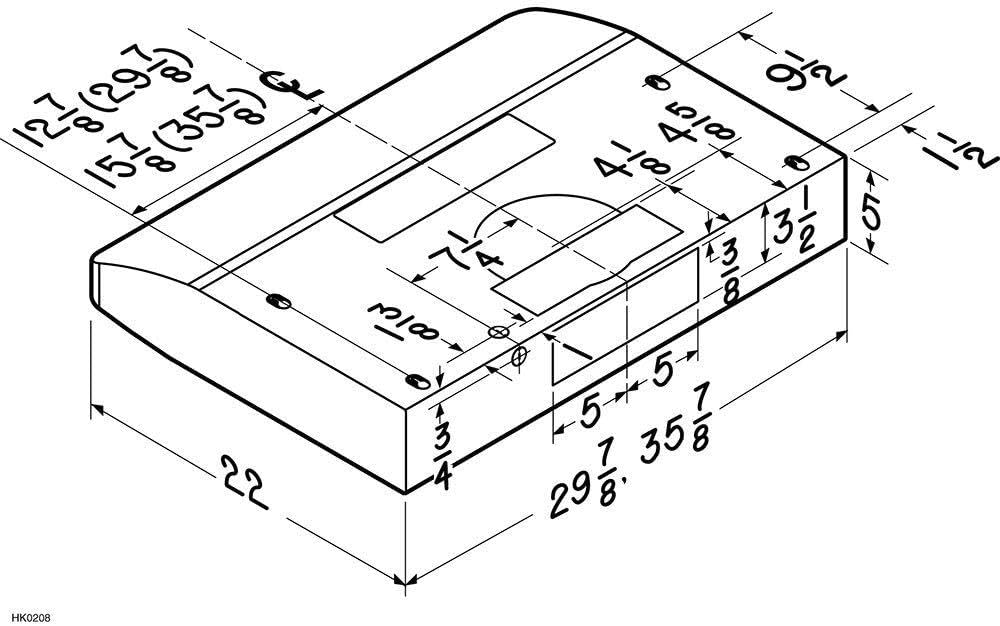
Image 3.1: Dimensional diagram of the Broan ALT230BL range hood. This diagram provides critical measurements for proper planning and installation, including width, depth, and height, as well as locations for mounting points and electrical access.
4. Operating Instructions
Your Broan ALT230BL range hood is equipped with intuitive controls for ease of use.
4.1 Controls
- The hood features tap-touch, 3-speed capacitive controls located on the front panel. These controls offer a smooth, easy-to-clean surface.
- Press the fan speed button to cycle through the three available speeds (low, medium, high) to adjust ventilation as needed.
- An ADA compliant feature allows for remote operation using a standard UL approved wall switch (sold separately).
4.2 Lighting
- The hood includes bright, two-level LED modules for illuminating your cooking surface.
- Press the light button to toggle between the two light levels or to turn the lights off. The LED modules provide a color temperature of 3000 K.
4.3 Ventilation Performance
- The exclusive Broan Captur system, combined with a 375 MAX Blower CFM rating, efficiently pulls smoke and cooking odors from the air.
- The smooth-flow blower wheel design and high-flow filters ensure quiet operation, rated at 1.2 sones at normal speed.

Image 4.1: Front view of the Broan ALT230BL range hood. This image highlights the sleek front panel with the integrated tap-touch controls for fan speed and lighting, demonstrating the user interface.
5. Maintenance
Regular maintenance ensures optimal performance and longevity of your range hood.
5.1 Filter Cleaning
- The deluxe micro-mesh filters are dishwasher-safe for easy cleaning.
- A filter clean reminder feature ensures you are prompted to clean the filters, maintaining high grease removal efficiency.
- For non-ducted installations, replace charcoal filters (sold separately) periodically as recommended by the manufacturer, typically every 3-6 months depending on usage.
5.2 LED Light Modules
- The LED modules are designed for long life and are supported by a 3-year warranty. Refer to the warranty section for details.
- If replacement is needed, contact customer support for genuine replacement parts.
5.3 Surface Cleaning
- Clean the exterior surfaces of the hood with a soft cloth and mild detergent. Avoid abrasive cleaners or scouring pads.
- Ensure the hood is cool and power is disconnected before cleaning.

Image 5.1: Underside view of the Broan ALT230BL range hood. This perspective clearly shows the two deluxe micro-mesh filters and the integrated LED light modules, which are key components for maintenance and operation.
6. Troubleshooting
If your range hood is not operating correctly, consult the following table before contacting customer support.
| Problem | Possible Cause | Solution |
|---|---|---|
| Fan does not operate | No power to the unit; Fan speed not selected. | Check circuit breaker/fuse; Ensure unit is plugged in or hardwired correctly; Press fan speed button. |
| Lights do not work | No power to the unit; LED module failure. | Check circuit breaker/fuse; Press light button; Contact customer support for replacement LED modules. |
| Poor ventilation performance | Grease filters are dirty; Incorrect fan speed selected; Obstruction in ductwork (ducted models); Saturated charcoal filters (non-ducted models). | Clean or replace grease filters; Select a higher fan speed; Check ductwork for blockages; Replace charcoal filters. |
| Excessive noise | Loose mounting; Obstruction in blower; Dirty filters. | Ensure unit is securely mounted; Check blower for foreign objects; Clean filters. |
7. Specifications
| Feature | Specification |
|---|---|
| Model Number | ALT230BL |
| Brand | Broan-NuTone |
| Air Flow Capacity | 300 Cubic Feet Per Minute (CFM) |
| Noise Level | 1.5 Sones |
| Controls Type | Tap-Touch Capacitive |
| Number of Speeds | 3 |
| Light Source Type | LED (Two-level, 3000 K Color Temperature) |
| Filter Type | Deluxe Micro-Mesh (Dishwasher-safe) |
| Mounting Type | Under Cabinet, Built-In, Wall Mount |
| Ventilation Type | Convertible (Ducted or Non-Ducted) |
| Product Dimensions (D x W x H) | 22" x 30" x 5" |
| Included Components | LED Lights, Mesh Filter |
| UPC | 026715263929 |
8. Warranty Information
The Broan ALT230BL Elite Atla 2 Range Hood is manufactured to high-quality standards. The LED modules are supported by a 3-year warranty from the date of purchase. For specific details regarding the full product warranty, please refer to the warranty card included with your product or visit the official Broan-NuTone website.
9. Customer Support
For technical assistance, replacement parts, or warranty claims, please contact Broan-NuTone customer service. Have your model number (ALT230BL) and date of purchase ready when you call.
You can find contact information and additional resources on the official Broan-NuTone website: www.broan-nutone.com