
1. Introduction
Welcome to the user manual for your new Konka Smart TV LED 43" Full HD. This television combines a sleek, borderless design with advanced smart features, including Google Assistant and Android TV, to provide an immersive entertainment experience. This manual will guide you through the setup, operation, maintenance, and troubleshooting of your device.
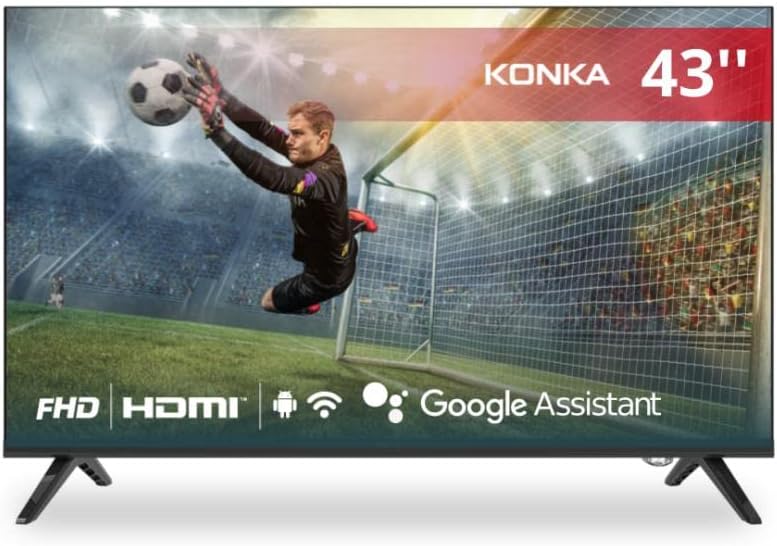
Image 1.1: Front view of the Konka 43-inch Smart TV, showcasing its full HD display and slim bezels.
2. Key Features
- Full HD (1920x1080) Resolution: Experience crisp and clear images.
- Borderless Design: Maximizes screen space for an immersive viewing experience.
- Android TV: Access a vast library of apps from the Google Play Store.
- Google Assistant: Control your TV and smart home devices using voice commands.
- Built-in Chromecast: Easily cast content from your smartphone, tablet, or laptop.
- Multiple Connectivity Options: Equipped with HDMI, USB, Wi-Fi, and Bluetooth.
- High Performance: Powered by a CA55 Quad Core processor for smooth navigation.
- Pre-installed Apps: Includes popular streaming services like YouTube, Netflix, and Prime Video.

Image 2.1: A graphic illustrating key features such as Android 11, stereo audio, Bluetooth connectivity, Google Assistant, and built-in Chromecast.
3. Setup Guide
3.1. Unpacking the TV
Carefully remove the TV and all accessories from the packaging. Ensure all components listed in the packing list are present.
3.2. Attaching the Stand
Place the TV face down on a soft, flat surface to prevent screen damage. Align the support feet with the corresponding slots on the bottom of the TV and secure them with the provided screws. Refer to the diagram below for proper attachment.
3.3. Connecting Peripherals
Your Konka Smart TV offers various ports for connecting external devices.
- HDMI Ports: Connect Blu-ray players, game consoles, or set-top boxes. Your TV has 3 HDMI inputs.
- USB Ports: Connect USB drives for media playback. Your TV has 2 USB inputs.
- Power Connection: Plug the power cord into the TV's power input and then into a wall outlet.
- Network Connection: Connect to your home network via Wi-Fi or an Ethernet cable (not included).

Image 3.1: Rear view of the Konka Smart TV, highlighting the location of HDMI, USB, and other connectivity ports.

Image 3.2: Detailed view of the TV's input ports, including HDMI and component video inputs, along with the TV stand.
4. Operating Instructions
4.1. Initial Setup
Upon first power-on, the TV will guide you through the initial setup process:
- Language Selection: Choose your preferred language.
- Network Connection: Connect to your Wi-Fi network or use an Ethernet cable.
- Google Account Sign-in: Sign in with your Google account to access Android TV features and the Google Play Store.
- Google Assistant Pairing: Follow on-screen instructions to pair your remote for voice control. (Tip: Press the Google Assistant button, then press and hold OK and Volume+ until a green light flashes on the remote, then pair via Bluetooth.)
- Channel Scan: Scan for available TV channels if connecting an antenna.
4.2. Using the Remote Control
The included remote control features dedicated buttons for popular apps and Google Assistant, allowing for quick access and voice commands.
4.3. Smart TV Features
- Android TV Interface: Navigate through the intuitive Android TV home screen to find apps, movies, and shows.
- Google Assistant: Press the Google Assistant button on your remote and speak your commands to search for content, control playback, or get information.
- Chromecast Built-in: Use the Cast icon in compatible apps on your mobile device or computer to stream content directly to your TV.
- App Installation: Download and install new applications from the Google Play Store.

Image 4.1: The Konka Smart TV displayed in a home entertainment setup, demonstrating its integration into a modern living space.
5. Maintenance
- Cleaning the Screen: Use a soft, lint-free cloth specifically designed for electronics. Do not use abrasive cleaners or sprays directly on the screen.
- Cleaning the Body: Wipe the TV's body with a soft, dry cloth.
- Software Updates: Ensure your TV is connected to the internet to receive automatic software updates, which improve performance and add new features. You can also manually check for updates in the TV settings.
- Ventilation: Ensure adequate ventilation around the TV to prevent overheating. Do not block the ventilation openings.
6. Troubleshooting
This section addresses common issues you might encounter with your Konka Smart TV.
| Problem | Possible Cause | Solution |
|---|---|---|
| No power | Power cord disconnected; Power outlet issue | Check power cord connection; Try a different outlet |
| No picture, but sound is present | Incorrect input source; Loose HDMI/AV cable | Press the 'Input' or 'Source' button on the remote; Reconnect cables securely |
| No sound, but picture is present | Volume muted or too low; External audio system issue | Unmute or increase volume; Check connections to external audio devices |
| Remote control not working | Dead batteries; Obstruction; Not paired (for voice commands) | Replace batteries; Remove obstructions; Re-pair remote for voice functions |
| Wi-Fi connection issues | Incorrect password; Router issues; Signal interference | Verify password; Restart router; Move TV closer to router or reduce interference |
| Apps are slow or freezing | Too many apps running; Low storage; Outdated app version | Close unused apps; Clear cache; Update apps; Restart TV |
If the problem persists after trying these solutions, please contact customer support.
7. Specifications
Detailed technical specifications for the Konka Smart TV LED 43" Full HD.
| Feature | Specification |
|---|---|
| Model Number | KDG43RR680LN |
| Screen Size | 43 Inches (110 cm diagonal) |
| Display Technology | LED Full HD |
| Resolution | 1920 x 1080 (FHD) Pixels |
| Aspect Ratio | 16:9 |
| Refresh Rate | 60 Hz |
| Contrast Ratio | 1200:1 |
| Brightness | 200 cd/m² |
| Response Time | 8 Milliseconds |
| Operating System | Android |
| Processor | CA55 Quad Core |
| Audio Output | 8W x 2 |
| Connectivity | 3 x HDMI, 2 x USB, Wi-Fi, Bluetooth |
| Power Source | AC/DC (Bivolt) |
| Product Dimensions (W x H x D) | 111 x 70 x 2 cm (approx.) |
| Product Weight | 7.5 Kilograms |
| Included Components | Remote control, Support feet |
8. Warranty and Support
8.1. Warranty Information
Your Konka Smart TV LED 43" Full HD comes with a 1-year manufacturer's warranty from the date of purchase. This warranty covers manufacturing defects and malfunctions under normal use. Please retain your proof of purchase for warranty claims.
8.2. Customer Support
For technical assistance, warranty claims, or any other inquiries, please refer to the contact information provided with your product packaging or visit the official Konka support website. When contacting support, please have your TV's model number (KDG43RR680LN) and serial number ready.