
Introduction
Thank you for choosing the Camelion BC-0906S Universal Battery Charger. This manual provides essential information for the safe and efficient operation of your new charger. Please read it thoroughly before use and retain it for future reference.
The BC-0906S is designed to charge various types of rechargeable Ni-MH and Ni-Cd batteries, featuring 6 independent charging channels for versatile use.
Safety Information
- Use this charger only for Ni-MH and Ni-Cd rechargeable batteries. Attempting to charge other battery types (e.g., alkaline, lithium) may cause explosion, rupture, or leakage, leading to personal injury or property damage.
- Do not disassemble, modify, or repair the charger. Refer all servicing to qualified personnel.
- Do not expose the charger to rain, moisture, or extreme temperatures. Operate it in a dry, well-ventilated area.
- Ensure proper polarity when inserting batteries. Incorrect insertion can damage the charger and batteries.
- Unplug the charger from the power outlet when not in use or before cleaning.
- Keep out of reach of children.
- Do not short-circuit the battery terminals.
- If a battery becomes excessively hot during charging, discontinue charging immediately and remove the battery carefully.
Product Overview
The Camelion BC-0906S is a universal battery charger equipped with six independent charging channels, allowing for simultaneous charging of different battery sizes and types. It supports Ni-MH and Ni-Cd batteries.

This image displays the Camelion BC-0906S Universal Battery Charger with different types of rechargeable batteries (AA, AAA, C, D, and 9V) placed in its independent charging slots. It highlights the multi-battery compatibility of the device.
Key Features:
- 6 Independent Charging Channels
- Supports Ni-MH and Ni-Cd batteries
- Compatible with D, C, AA, AAA, and 9V battery sizes
- Automatic charge termination
Components:
- Battery Charging Slots (for D, C, AA, AAA, and 9V batteries)
- Charging Status Indicators (LEDs)
- Integrated Power Cord
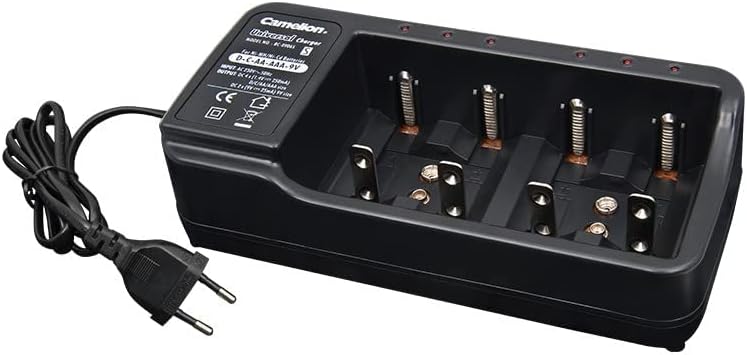
This image shows the Camelion BC-0906S Universal Battery Charger from an angled view, clearly displaying its integrated power cord and plug. This illustrates how the charger connects to a power source.
Setup
- Unpack the Charger: Carefully remove the charger from its packaging.
- Connect to Power: Plug the integrated power cord of the charger into a standard AC power outlet (100-240V AC, 50/60Hz).
- Insert Batteries: Insert rechargeable Ni-MH or Ni-Cd batteries into the appropriate charging slots. Ensure correct polarity (+ and -) as indicated on the charger and batteries. The charger has dedicated slots for D, C, AA, AAA, and 9V batteries.
Operating Instructions
Once batteries are correctly inserted and the charger is plugged in, the charging process will begin automatically.

This diagram illustrates the charging capabilities of the Camelion BC-0906S charger. It indicates support for 1-4x AA, 1-4x AAA, 1-4x C or D, and 1-2x 9V Ni-MH/Ni-Cd batteries. It also shows the input/output specifications and regulatory marks.
Charging Process:
- Each charging channel operates independently.
- The LED indicator for each slot will illuminate to show that charging is in progress.
- Charging time varies depending on the battery capacity and its current charge level.
- The charger is designed to automatically terminate charging once batteries are fully charged to prevent overcharging. Consult the charger's specific LED behavior (e.g., LED changes color or turns off) for full charge indication, if applicable.
Removing Batteries:
Once charging is complete, unplug the charger from the power outlet. Carefully remove the charged batteries from their slots.
Maintenance
- Cleaning: Disconnect the charger from the power source before cleaning. Use a soft, dry cloth to wipe the exterior of the charger. Do not use liquid cleaners or solvents.
- Storage: Store the charger in a cool, dry place away from direct sunlight and moisture when not in use.
- Battery Care: For optimal battery life, avoid completely draining batteries before recharging.
Troubleshooting
| Problem | Possible Cause | Solution |
|---|---|---|
| Charger not powering on / LEDs not lighting up | No power connection; Faulty outlet; Damaged charger. | Ensure charger is securely plugged in. Try a different power outlet. If issue persists, charger may be faulty. |
| Battery not charging | Incorrect battery type; Incorrect polarity; Battery is dead or damaged; Poor contact. | Ensure battery is Ni-MH or Ni-Cd. Check battery polarity. Try a different battery. Clean battery terminals and charger contacts. |
| Batteries get excessively hot during charging | Damaged battery; Overcharging (unlikely with automatic termination); Incorrect battery type. | Immediately remove the battery. Do not use the battery again. Ensure correct battery type is used. |
Specifications
| Feature | Detail |
|---|---|
| Model | BC-0906S |
| Product Dimensions | 10 x 7 x 6 cm |
| Item Weight | 0.3 Kilograms |
| Color | Black |
| Input | AC 100-240V, 50/60Hz |
| Output | DC 1.4V (AA/AAA/C/D), DC 9V |
| Compatible Battery Types | Ni-MH, Ni-Cd |
| Supported Battery Sizes | D, C, AA, AAA, 9V |
| Manufacturer | Camelion |
| Country of Origin | China |
| UPC | 873999006380, 873999007684 |
Warranty and Support
For warranty information and technical support, please refer to the official Camelion website or contact your local retailer. Keep your purchase receipt as proof of purchase for any warranty claims.
For further assistance, you may visit the Camelion Store on Amazon.
