
Introduction
This manual provides detailed instructions for the installation, operation, and maintenance of your SuperlightingLED ES32 Motion Sensor Stair Light Kit. This intelligent lighting system features 3000K warm white linear COB LED strips designed for indoor staircases, offering motion-activated illumination and customizable settings. Please read this manual thoroughly before installation and use to ensure proper function and safety.
Product Overview & What's in the Box
The ES32 Motion Sensor Stair Light Kit is a complete solution for illuminating your stairs. It includes all necessary components for installation and operation.

Image: All components included in the SuperlightingLED ES32 Motion Sensor Stair Light Kit, laid out on a surface. This includes 20 COB LED strips, an ES32 LED controller, a 12V 200W UL-Listed LED power supply with a US AC plug, 2 motion sensors, 2 motion sensor extension cords, and 20 DuPont extension cords.
The kit includes:
- 20x 4Ft COB LED Strips (cuttable)
- 1x ES32 LED Stair Lighting Controller
- 4x Motion Sensors (2 primary, 2 spare)
- 2x 16.4ft Motion Sensor Extension Cords
- 20x 16.4ft DuPont Extension Cords
- 1x Meanwell 12 Volt 200W UL-Listed LED Power Supply
- 1x US AC Plug
Setup & Installation
This section guides you through the process of setting up and installing your stair light kit. Ensure all components are present before beginning.
1. Power Supply Configuration
The Meanwell 12 Volt 200W UL-Listed LED Power Supply is pre-set for 115V input for U.S. customers. The AC plug is pre-installed for direct connection to a standard outlet. For use in Europe or Asia, the input voltage switch on the power supply must be changed to 230V. For U.S. use, do not change this setting.
2. Motion Sensor Placement
Install the two primary PIR motion sensors at the top and bottom ends of your staircase. Mount them on the wall using drilled holes, ensuring the sensing direction is unobstructed. This allows the system to detect movement direction for sequential lighting.

Image: A wiring diagram illustrating the connection of the ES32 controller, LED strips, power supply, and two PIR motion sensors. PIR Sensor #1 is shown at the bottom of the stairs, and PIR Sensor #2 at the top, indicating their optimal placement for motion detection.
3. Connecting LED Strips to Controller
The power supply and controller are pre-connected for plug-and-play use. The ES32 controller has output ports for steps 1 to 16 (top row) and steps 17 to 32 (bottom row). Each COB LED strip comes with a pre-attached connector. Simply connect the strip's connector to the corresponding port connector on the controller. It is recommended to mark the step number on each connected LED strip for easier installation. If you have fewer than 20 steps, connect only the required number of ports.
Video: An unboxing and connection guide for the SuperlightingLED ES32 Motion Sensor Stair Light Kit. This video demonstrates how to connect the LED strips to the controller and the power supply, highlighting the pre-attached connectors and the ease of assembly.
4. Extending Cables
If the standard cable lengths are insufficient, use the provided extension cords. Connect the extension wire between the controller and the LED strip, or between the motion sensor and its respective input port on the controller.
Video: This segment from the unboxing and connection guide demonstrates how to extend the cables for both the motion sensors and the COB light strips using the provided extension cords, ensuring proper connection for longer distances.
5. Customizing LED Strip Length
The COB LED strips are cuttable to fit your stair width (suitable for 1-4 ft wide stairs). Cut along the designated black lines, which are spaced every 0.75 ft (2.5cm), to achieve the desired length. The strips have an adhesive backing for easy attachment to your steps.
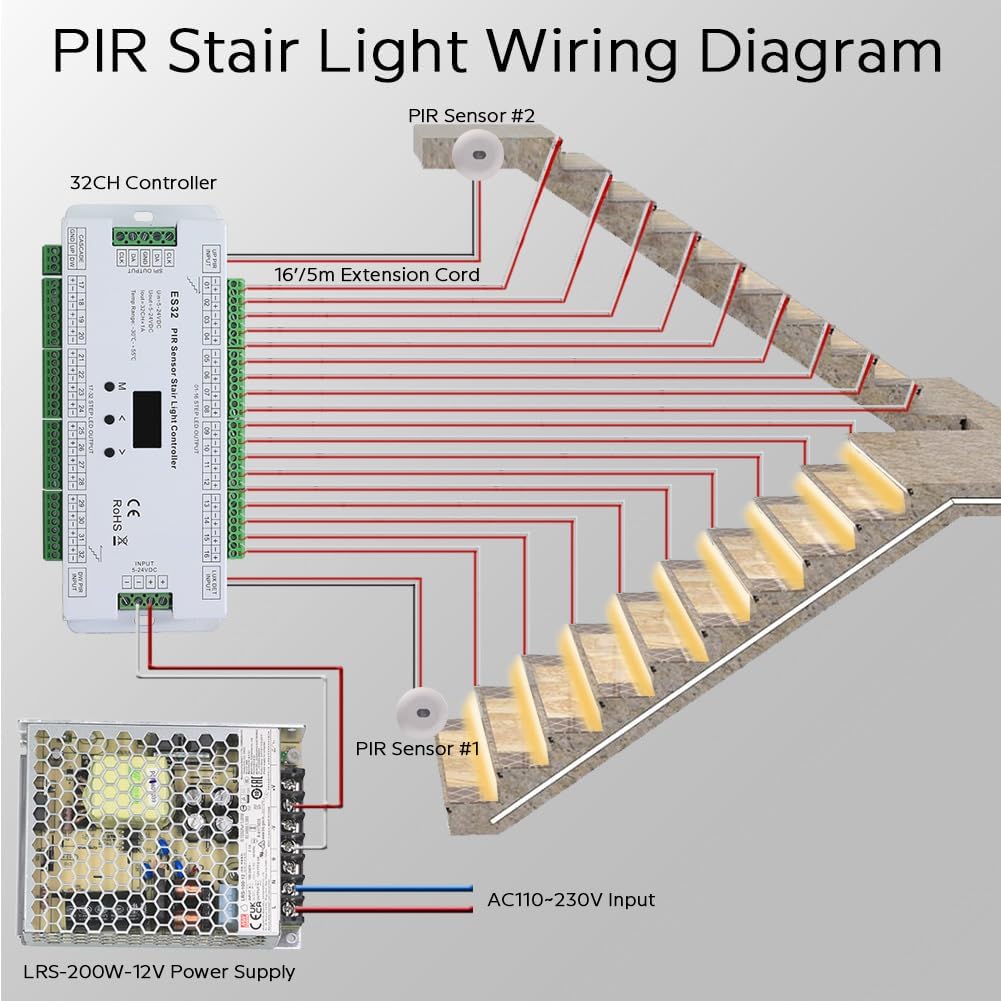
Image: A close-up view of a COB LED strip, highlighting the cuttable sections marked by black lines every 2.5cm. A caliper measures the strip's width at 8.00mm, and a hand demonstrates peeling off the adhesive backing for installation.
Operating Instructions
The ES32 controller allows for customization of lighting modes, brightness, speed, and light sensor sensitivity.
1. Basic Controller Setup
To enter the settings menu, long-press the 'M' button on the controller. Use the '<' and '>' buttons to navigate and adjust settings. Short-press 'M' to switch between setting rows.
Video: A detailed guide on how to set up the ES32 controller. It shows how to access the settings menu, switch between different modes (White Step, Color Flow), adjust the number of steps, brightness, speed, and off-delay, and configure the LuxSet for light sensor sensitivity.
2. Lighting Modes
The controller offers three primary white light modes:
- Mode 1: On One By One - Lights activate sequentially as you step up or down the stairs.
- Mode 2: Five On, All Off - Five steps light up simultaneously, then all turn off.
- Mode 3: All On, One Off - All steps light up, then turn off one by one.
- Mode 4: All On - All steps illuminate simultaneously and remain on.
You can switch between these modes using the controller's buttons as demonstrated in the setup video.
3. Adjusting Brightness and Speed
Within each mode, you can adjust the brightness and speed of the lighting effects using the '<' and '>' buttons in the settings menu. The brightness can be set from 0 to 8, and speed from 1 to 9.
4. LuxSet (Light Sensor Sensitivity)
The LuxSet feature allows you to control the light sensor sensitivity and on/off behavior based on ambient light levels. Adjust this setting to ensure the lights activate appropriately in your environment.
Maintenance
To ensure the longevity and optimal performance of your stair light kit, follow these maintenance guidelines:
- Keep the LED strips and motion sensors clean and free from dust or obstructions. Use a soft, dry cloth for cleaning.
- Periodically check all connections to ensure they are secure.
- Avoid exposing the components to excessive moisture or extreme temperatures. This product is designed for indoor use only.
Troubleshooting
If you encounter issues with your stair light kit, refer to the following common problems and solutions:
- Lights not turning on or inconsistent activation: Ensure both PIR motion sensors are installed at the top and bottom of the stairs and their sensing directions are not blocked. Verify all wiring connections are correct and secure.
- Delay in lighting or incorrect sequence: Confirm that the number of steps set in the controller matches the actual number of steps with connected LED strips. An incorrect step count can cause delays or improper lighting patterns.
- Lights not turning off: Check the 'Off Mode' and 'Off Delay' settings in the controller. Adjust the 'Off Delay' to a suitable duration.
- Lights always on or not responding to motion: Adjust the 'LuxSet' (light sensor sensitivity) in the controller settings. If the ambient light is too high, the motion sensor might not trigger.
- Wiring errors: Do not change the original wiring configuration. If you suspect a wiring error, carefully review the wiring diagram and ensure all connections match the instructions.
For further assistance, please contact SuperlightingLED customer support.
Specifications
| Feature | Specification |
|---|---|
| Model Number | SCSSLKIT-12V-COB |
| LED Voltage | DC12V |
| LED Color Temperature | 3000K Warm White |
| Color Rendering Index (CRI) | 90+ |
| Stair Width (Strip Length) | 1.2m / 4ft (cuttable) |
| Cut Length | 0.75 ft (2.5cm) |
| Number of Steps Supported | Up to 20 (Adjustable) |
| LED Light Source | COB LED Strip |
| Controller Type | ES32 PIR Sensor Stair Light Controller |
| Power Source | Corded Electric |
| Voltage Input | 12 Volts |
| Wattage | 160 watts |
| Control Method | Remote (via controller settings) |
| Connectivity Technology | Infrared (for motion sensors) |
| Indoor/Outdoor Usage | Indoor |
| Water Resistance Level | Not Water Resistant |
| Material Type | Metal (power supply) |
Warranty & Support
This SuperlightingLED product comes with a 2-year manufacturer's warranty. For warranty claims, technical support, or any questions not covered in this manual, please contact SuperlightingLED customer service through their official channels or the retailer where the product was purchased.