
Dardoo NO.54-Redseat
Dardoo G920 Racing Simulator Cockpit Instruction Manual
Brand: Dardoo | Model: NO.54-Redseat
1. Product Overview
The Dardoo G920 Racing Simulator Cockpit is designed to provide an immersive and stable platform for your sim racing setup. It features a robust construction, extensive adjustability, and broad compatibility with popular racing peripherals, ensuring a comfortable and realistic driving experience.
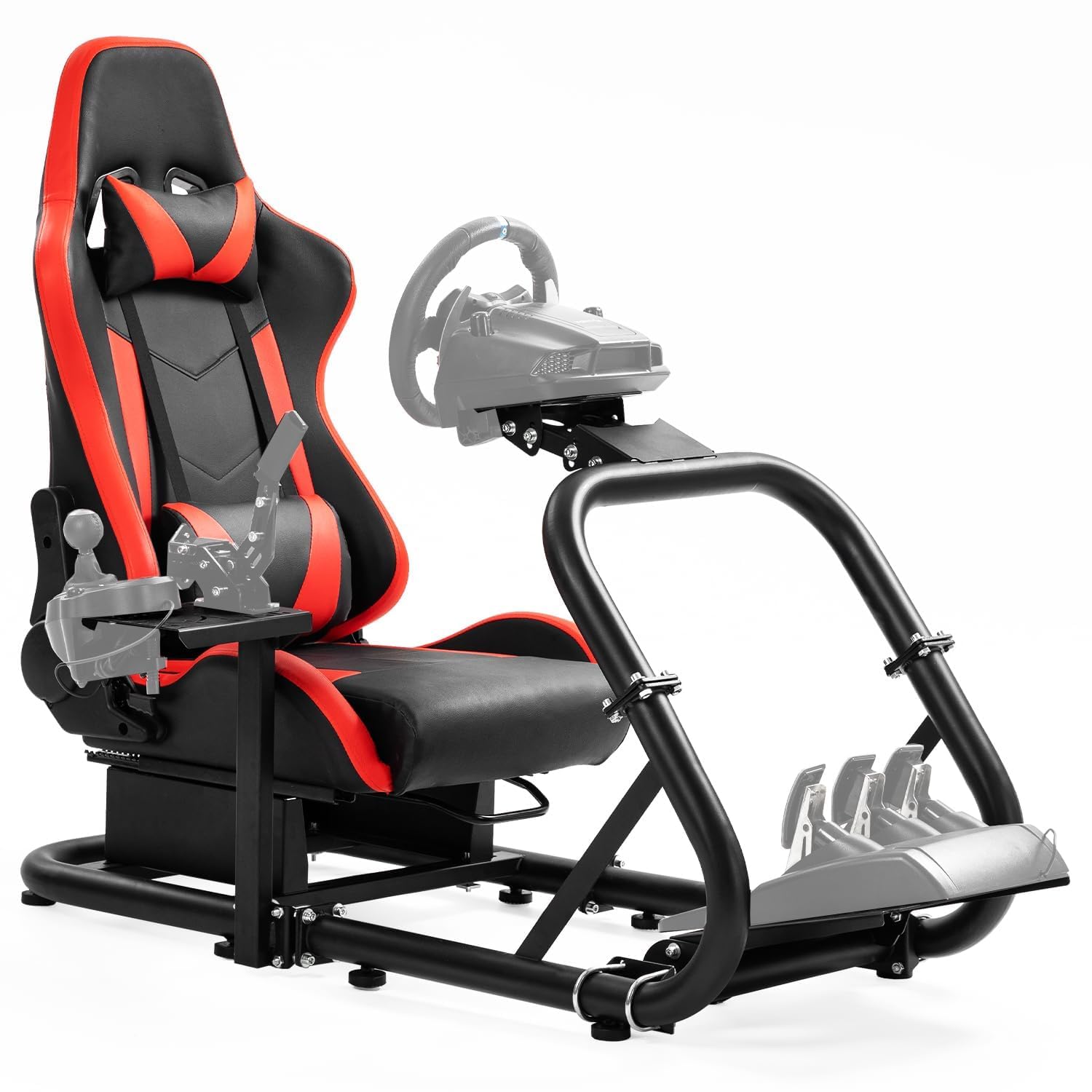
Overall view of the Dardoo G920 Racing Simulator Cockpit.
Key Features
- Fully Adjustable: Steering wheel platform supports dual-level adjustments for height and angle. Customizable pedal angles and shift levers provide maximum comfort.
- Extremely Stable: Designed with 50x50mm large round tubes and 4-hole flanges, offering enhanced stability and durability.
- Ergonomic Gaming Chair: Features a double-locking dual-rail race car seat with easy-to-clean material, neck and lumbar pillows. Reclines from 90° to 180° for a real racing experience.
- High Adaptability: Compatible with Logitech, Fanatec, and Thrustmaster series racing steering wheels, pedals, and gears. Adapts to direct-drive steering wheels and TV bracket mounting, supporting DIY modifications.
- Strong Load-Bearing Capacity: Max load capacity of 500 pounds, suitable for players of all sizes.
2. Setup and Assembly
Before beginning assembly, please ensure all components are present and undamaged. Refer to the official Installation Manual (PDF) for detailed step-by-step instructions and diagrams.
Unpacking and Initial Inspection
The racing cockpit is shipped in two separate packages (Box A: Racing Seat, Box B: Racing Cockpit Stand). Verify both boxes have arrived before proceeding.

The cockpit is delivered in two packages for convenience.
Assembly Overview
Assembly involves connecting the main frame components, attaching the seat, and mounting the various platforms for your peripherals. Tools required are typically included or standard household tools.

Product dimensions for planning your setup space.

The robust 50mm round tube construction ensures stability.
Video Guide
For a visual guide on the product's features and assembly, please watch the official showcase video:
Official product showcase video demonstrating the cockpit's design and features.
3. Operating Instructions and Adjustments
The Dardoo G920 Racing Simulator Cockpit is designed for maximum adjustability to suit various user preferences and peripheral setups.
Adjusting the Steering Wheel Platform
The steering wheel platform can be adjusted for both height and angle to ensure optimal comfort and control during gameplay.

Adjust the steering wheel platform for personalized comfort.
Adjusting the Pedal Platform
The pedal platform allows for customization of both angle and distance, accommodating different driving styles and leg lengths.

Customize pedal position for optimal control.
Adjusting the Shift Lever Platform
The shift lever platform can be positioned on either the left or right side and adjusted for height, providing flexibility for various setups.

Flexible positioning for your shift lever.
Seat Adjustments
The ergonomic racing seat offers extensive recline options (90° to 180°) and features a double-locking dual-rail system for secure positioning. Neck and lumbar pillows are included for enhanced comfort.

The racing seat provides comfort and adjustability.
Peripheral Compatibility
The cockpit is highly adaptable and fits a wide range of racing peripherals from leading brands.

Compatible with a wide range of racing peripherals.

Versatile compatibility with popular racing gear.
4. Maintenance
To ensure the longevity and optimal performance of your Dardoo G920 Racing Simulator Cockpit, regular maintenance is recommended.
- Cleaning: Wipe down the frame and seat with a soft, damp cloth. Avoid abrasive cleaners or solvents that could damage the finish or upholstery.
- Fasteners: Periodically check all bolts, screws, and clamps to ensure they are securely tightened. Loose fasteners can affect stability and safety.
- Moving Parts: Inspect the seat rails, pedal sliders, and steering wheel pivot points for any obstructions or signs of wear. Lubricate if necessary with a silicone-based spray.
- Storage: If storing the cockpit for an extended period, ensure it is clean and dry. Store in a cool, dry place away from direct sunlight.
5. Troubleshooting
This section addresses common issues you might encounter with your racing simulator cockpit.
- Cockpit feels unstable/wobbly: Ensure all assembly bolts and fasteners are securely tightened. Check that the cockpit is placed on a flat, level surface.
- Difficulty adjusting platforms: Loosen the adjustment knobs or bolts sufficiently before attempting to move the platforms. Ensure no cables or other obstructions are interfering with the movement.
- Seat not sliding smoothly: Check the seat rails for debris. Clean the rails and apply a small amount of silicone lubricant if needed. Ensure the double-locking mechanism is fully disengaged when attempting to slide the seat.
- Peripherals not mounting securely: Verify that you are using the correct mounting hardware for your specific peripheral model. Ensure the mounting plates are correctly aligned and all screws are tightened.
If you encounter issues not covered here, please contact Dardoo customer support for assistance.
6. Specifications
| Specification | Detail |
|---|---|
| ASIN | B0BJ6ZDK63 |
| Product Dimensions | 48.5 x 24.7 x 41 inches |
| Item Weight | 77.3 pounds |
| Item Model Number | NO.54-Redseat |
| Manufacturer | Dardoo |
| Country of Origin | China |
| Date First Available | October 14, 2022 |
| Max Load Capacity | 500 pounds |
7. Warranty and Support
Dardoo stands behind the quality of its products. For information regarding warranty coverage, claims, or technical support, please refer to the warranty card included with your product or visit the official Dardoo website. You can also reach out to Dardoo customer service through the platform where you purchased the product.
For additional resources and product information, visit the Dardoo Store on Amazon.
Related documentsNO.54-Redseat


Ask a question about this manual
Ask about setup, troubleshooting, compatibility, parts, safety, or missing instructions. Manuals+ will review the question and use this page’s manual context to help answer it.