1. Introduction
Thank you for choosing the nwm NTT Sonority MWE001 Wired On-Ear Speakers. These innovative speakers are designed to provide a unique audio experience, blending your personal sound with environmental awareness. Featuring PSZ (Personalized Sound Zone) technology, they minimize sound leakage while ensuring you remain connected to your surroundings.
Key Features:
- Balanced Listening Comfort: Open-ear design allows ambient sound and your voice to be heard clearly.
- Minimized Sound Leakage: PSZ Technology contains sound to your ear, reducing disturbance to others.
- Ideal for Communication: Built-in microphone and open-ear design facilitate remote work and online meetings.
- Situational Awareness: Engage in natural conversations and remain aware of your environment while listening.
- Fatigue-Free Extended Use: Ultra-lightweight (approx. 9g without cables) with a stable ear-hook design for prolonged comfort.
2. Package Contents
Please ensure all items are present in your package:
- nwm NTT Sonority MWE001 Wired On-Ear Speakers
- USB-C Audio Cable
- Cable Clip
- User Manual (this document)
3. Product Overview
Familiarize yourself with the components of your nwm NTT Sonority MWE001 speakers.

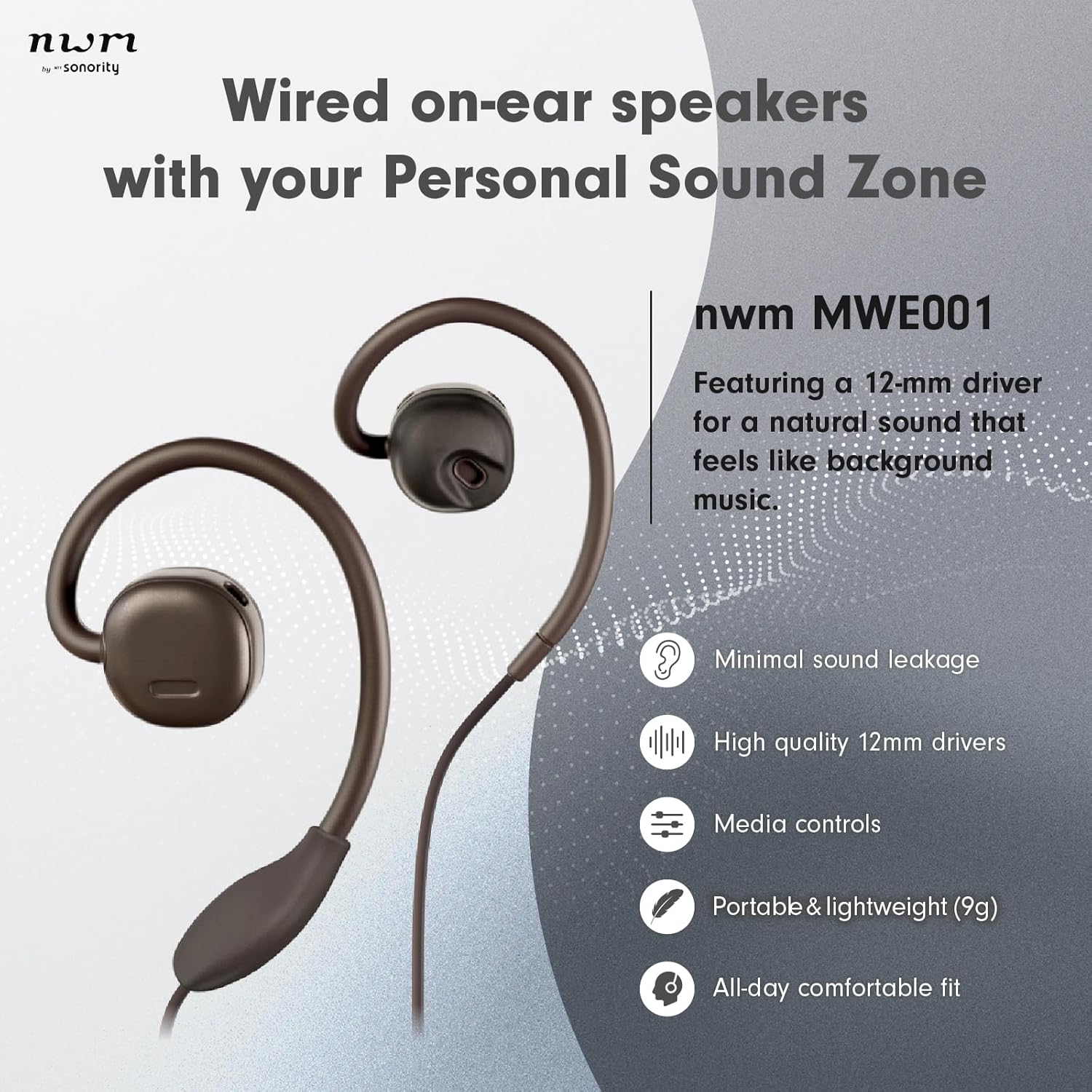
Component Identification:
- Ear Hooks: Flexible design to comfortably fit over your ears.
- Speaker Units: 12mm dynamic drivers positioned to deliver sound without blocking the ear canal.
- In-line Remote: Integrated controls for volume adjustment, call management, and media playback.
- Built-in Microphone: For clear voice transmission during calls and online meetings.
- USB-C Connector: For connecting to compatible audio devices.
4. Setup
4.1 Connecting the Speakers
- Locate the USB-C connector on the speaker cable.
- Insert the USB-C connector firmly into the USB-C audio port of your compatible device (e.g., smartphone, tablet, laptop).
- Ensure the connection is secure for optimal audio transmission.
4.2 Wearing the Speakers
- Identify the left (L) and right (R) speaker units. These are typically marked on the inside of the ear hooks.
- Gently place each ear hook over the top of your respective ear, allowing the speaker unit to rest comfortably near your ear canal without entering it.
- Adjust the ear hooks for a secure and comfortable fit. The flexible design allows for minor adjustments to suit different ear shapes.
- Use the provided cable clip to secure the cable to your clothing if desired, to prevent tangling or snagging during movement.
5. Operating Instructions
5.1 Basic Audio Playback
- Once connected, your device should automatically recognize the speakers.
- Begin playing audio from your device. Sound will be emitted from the speakers.
5.2 Using the In-line Remote
The in-line remote provides convenient control over your audio and calls:
- Volume Up/Down: Press the '+' or '-' buttons to adjust the listening volume.
- Play/Pause: Press the center button once to play or pause audio.
- Next Track: Double-press the center button to skip to the next track.
- Previous Track: Triple-press the center button to go to the previous track.
- Answer/End Call: Press the center button once to answer an incoming call or end an active call.
- Reject Call: Press and hold the center button for approximately 2 seconds to reject an incoming call.
5.3 Understanding PSZ (Personalized Sound Zone) Technology
The nwm NTT Sonority MWE001 incorporates advanced PSZ technology to create a personalized sound field around your ears. This technology works by:
- Emitting sound waves in opposite phases to confine audio reproduction within a set distance from the user's ear.
- Counteracting sound leakage by playing perfectly opposite audio waves, ensuring privacy without blocking ambient sounds.
This allows you to enjoy your audio content while still being able to hear your surroundings and engage in conversations naturally.

Official Product Video: nwm Tech Movie
Official Product Video: nwm NTT Sonority Wired On-Ear Speakers
6. Maintenance
6.1 Cleaning
- Wipe the speaker units and cable with a soft, dry cloth.
- Do not use abrasive cleaners, alcohol, or chemical solvents, as these may damage the product.
- Avoid getting moisture into the speaker openings or USB-C port.
6.2 Storage
- When not in use, store the speakers in a cool, dry place, away from direct sunlight and extreme temperatures.
- Avoid tangling the cable by coiling it neatly.
7. Troubleshooting
If you encounter any issues, please refer to the following common solutions:
| Problem | Possible Cause | Solution |
|---|---|---|
| No sound from speakers. |
|
|
| Sound quality is poor. |
|
|
| Microphone not working. |
|
|
8. Specifications
| Feature | Detail |
|---|---|
| Brand | nwm |
| Model Number | MWE001 |
| Connectivity Technology | Wired |
| Headphones Jack | USB-C (Note: Product specifications also list '3.5 mm Jack' and '3.5mm Audio' for Hardware Interface, but seller videos for this ASIN clearly show a USB-C connector.) |
| Audio Driver Size | 12 Millimeters |
| Item Weight | 9 Grams (without cables) / 0.317 ounces |
| Water Resistance Level | Water Resistant |
| Special Feature | Lightweight, Microphone Included |
| Control Type | Call Control, Remote |
| Ear Placement | On Ear |
| Form Factor | On Ear |
| Material | Polypropylene, Silicon |
| Manufacturer | NTT sonority |
9. Warranty and Support
For warranty information and customer support, please refer to the documentation provided with your purchase or visit the official nwm website. The manufacturer, NTT sonority, is committed to providing high-quality products and support.
Return Policy: This product is eligible for a 30-day refund/replacement policy from the date of purchase.
Protection Plans: Extended protection plans (2-Year and 3-Year) may be available for purchase separately. Please check with your retailer for details.


