
1. Product Overview
The LGIDTECH ZL5 Miboxer 5 in 1 LED Strip Controller is a versatile device designed to manage various types of LED strip lights. It supports Zigbee 3.0 and 2.4G wireless technologies, allowing for flexible control options via smartphone apps (with a gateway), compatible smart home hubs, and Miboxer 2.4G remote controllers.
This controller is compatible with five different LED strip light types: single color, dual white, RGB, RGBW, and RGB+CCT. Users can switch between these output modes using a dedicated button on the device.

Image 1.1: Front view of the LGIDTECH ZL5 Miboxer 5 in 1 LED Strip Controller.

Image 1.2: Detailed view of the ZL5 controller, highlighting its features, dimensions, and connectivity options. The controller supports Zigbee 3.0 and 2.4G, and can be controlled via smartphone app (with gateway) or compatible remotes.
2. Specifications
- Product Name: 5 in 1 LED Strip Controller (Zigbee 3.0 + 2.4G)
- Model Number: ZL5
- Brand: LGIDTECH
- Working Voltage: DC 12~48V
- Output: 6A/Channel
- Total Output: Max 15A
- Work Temperature: -10~40℃ (14℉~104℉)
- Wireless Technology: Zigbee 802.15.4
- Zigbee Wireless Frequency: 2.400-2.480GHz
- Zigbee Control Distance: 100 meters (328 ft) in open area
- 2.4G RF Remote Control Distance: 30 meters (98 ft)
- Dimensions: Approximately 124mm x 38mm x 23mm (Controller), 125mm x 39mm x 25mm (Package)
- Item Weight: 2.39 ounces
3. Setup and Installation
3.1 Wiring Diagram
Ensure the power supply is disconnected before wiring. Connect your LED strip lights and power supply to the controller according to the diagram below. Pay close attention to polarity (V+ and V-) and channel assignments (W, CW, WW, R, G, B).
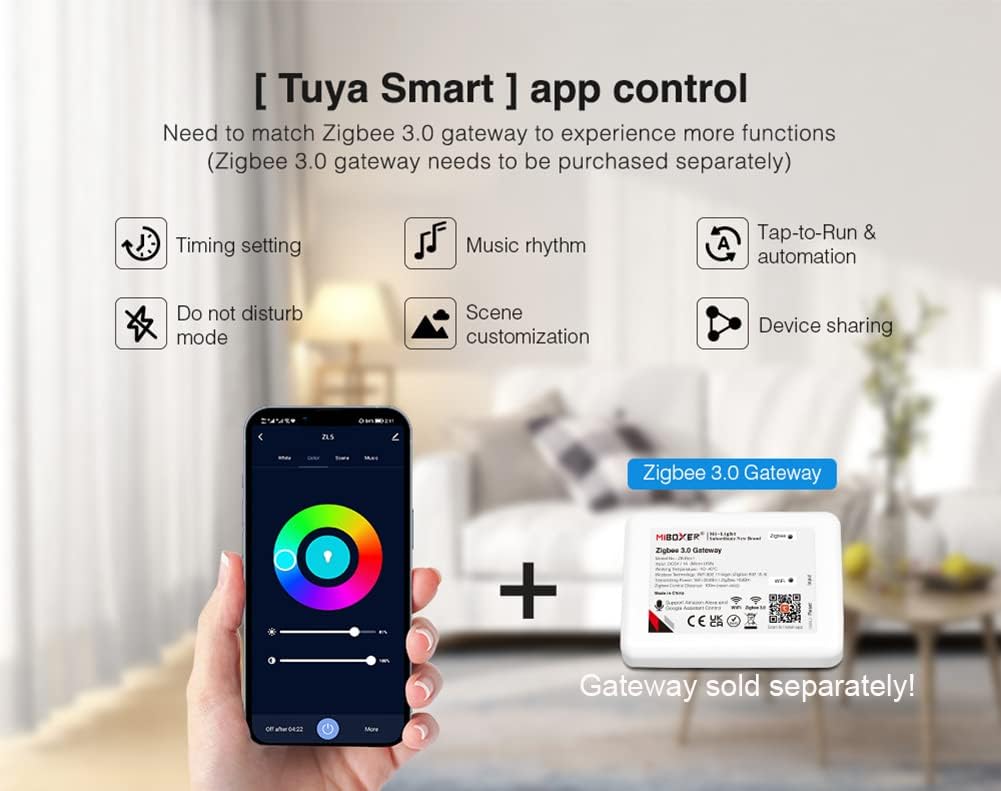
Image 3.1: Wiring diagram for the ZL5 controller. Connect DC 12-48V power input to the left terminals and the LED strip output to the right terminals, matching the V+ and specific color/white channels.
3.2 Output Mode Switching
The ZL5 controller supports 5 different output modes for various LED strip types. To switch modes, press the [SET] button on the controller.
- Press the [SET] button once to activate linking mode (indicator flashes quickly).
- Press the [SET] button briefly to cycle through the 5 output modes: Single Color, Dual White, RGB, RGBW, RGB+CCT. The indicator light will change to reflect the current mode.
- Press and hold the [SET] button for 3 seconds to enter Wi-Fi pairing mode (indicator flashes quickly).

Image 3.2: The 'SET' button on the controller allows users to switch between the five supported output modes for different LED strip types (Single Color, Dual White, RGB, RGBW, RGB+CCT).
4. Operating Instructions
4.1 Zigbee 3.0 Gateway Control
The ZL5 controller is compatible with standard Zigbee 3.0 gateways, enabling smartphone app control and integration into smart home ecosystems. A Zigbee 3.0 gateway is required and sold separately.
- Ensure your Zigbee 3.0 gateway is set up and connected to your network.
- Put the ZL5 controller into linking/pairing mode by pressing the [SET] button once (indicator flashes quickly).
- Follow your gateway's instructions to search for and add new Zigbee devices.
- Once paired, you can control the LED strip lights via the gateway's associated smartphone application, accessing features like timing settings, music rhythm, scene customization, and device sharing.

Image 4.1: Illustration of Tuya Smart app control with a Zigbee 3.0 gateway. The gateway (sold separately) enables advanced functions like timing, music rhythm, and scene customization.
4.2 2.4G RF Remote Control
The controller can also be operated using Miboxer/Mi-Light 2.4G remote controllers. These remotes are sold separately.
- To link a 2.4G remote, power on the ZL5 controller.
- Within 3 seconds of powering on, press the 'ON' button (or a specific linking button, refer to your remote's manual) on the Miboxer 2.4G remote controller three times.
- The LED strip lights connected to the ZL5 controller should flash three times, indicating successful linking.
4.3 Third-Party Voice Control
With a compatible Zigbee 3.0 gateway, the ZL5 controller supports voice control through popular smart assistants like Amazon Alexa and Google Assistant. This allows for hands-free control of ON/OFF, brightness, colors, and color temperature.

Image 4.2: The ZL5 controller supports third-party voice control via Zigbee 3.0 gateways, compatible with Amazon Alexa and Google Assistant devices.
5. Compatibility
5.1 LED Strip Light Compatibility
The ZL5 controller is designed to work with the following LED strip light types:
- Single Color LED Strips
- Dual White (CCT) LED Strips
- RGB LED Strips
- RGBW LED Strips
- RGB+CCT LED Strips
5.2 Gateway Compatibility
The controller is compatible with gateways that support standard Zigbee 3.0 technology, including but not limited to:
- Philips Hue Bridge
- Amazon Echo Plus (2nd Gen)
- Amazon Echo (4th Gen)
- Echo Studio
- Echo Show (2nd Gen)
- IKEA TRADFRI Gateway
5.3 Remote Control Compatibility
The ZL5 controller can be controlled by various Miboxer/Mi-Light 2.4G remote controllers, such as:
- FUT096
- FUT092
- FUT089
- FUT007
- B3, B4, B2, K1
- FUT087, etc.

Image 5.1: A selection of compatible Miboxer/Mi-Light 2.4G remote controllers that can be used with the ZL5 controller. All remotes are sold separately.
6. Maintenance
To ensure optimal performance and longevity of your LGIDTECH ZL5 controller, follow these maintenance guidelines:
- Cleaning: Gently wipe the controller with a dry, soft cloth. Avoid using harsh chemicals, abrasive cleaners, or solvents.
- Environment: Operate the controller within the specified temperature range (-10~40℃). Avoid exposure to extreme temperatures, high humidity, or direct water contact. The device is designed for indoor use.
- Connections: Periodically check all wiring connections to ensure they are secure and free from corrosion.
- Firmware: If available, check the Miboxer or LGIDTECH official website for any firmware updates that may improve performance or add features.
7. Troubleshooting
If you encounter issues with your ZL5 controller, refer to the following common troubleshooting steps:
- No Power:
- Check the power supply connection to the controller and ensure the power source is active.
- Verify the working voltage (DC 12~48V) matches your power supply and LED strip requirements.
- LED Strip Not Responding:
- Confirm the LED strip is correctly wired to the controller, paying attention to V+ and channel polarity.
- Ensure the correct output mode is selected on the controller for your specific LED strip type (Single Color, Dual White, RGB, RGBW, RGB+CCT).
- Test the LED strip with a different power source or controller if possible to rule out a faulty strip.
- Remote Control Not Working:
- Ensure the remote is linked to the controller as described in Section 4.2.
- Check the remote's battery.
- Ensure the remote is within the 30-meter (98 ft) control distance.
- Zigbee Gateway Connection Issues:
- Verify your Zigbee gateway is powered on and connected to your home network.
- Put the ZL5 controller into linking mode (press [SET] button once) and re-attempt pairing through your gateway's app.
- Ensure the controller is within the 100-meter (328 ft) Zigbee control distance from the gateway (in open area, actual range may vary indoors).
- Check for any interference from other 2.4GHz devices.
- Inconsistent Color/Brightness:
- Confirm the LED strip type matches the selected output mode on the controller.
- Ensure the power supply is adequate for the length and type of LED strip being used (Max 15A total output).
8. Warranty and Support
For warranty information, please refer to the specific terms and conditions provided at the time of purchase or contact your retailer. LGIDTECH stands behind its products and offers technical support for any issues you may encounter.
For further assistance, product information, or to view other compatible products, please visit the official Miboxer product page for the ZL5 controller:
You may also contact LGIDTECH customer support directly through the contact information provided on their official website or through your purchase platform.