1. Product Overview
The Somfy Situo 5 RTS Iron is a sophisticated five-channel handheld remote control designed for seamless operation of Somfy motorized shades, blinds, and curtains. Featuring an omni-directional Radio Technology Somfy (RTS) system, it allows for precise control of up to five individual or grouped window coverings. Its stylish dark grey finish and ergonomic design ensure both aesthetic appeal and comfortable handling. The remote includes a customizable "My" button to save and recall your preferred shade positions, enhancing convenience and personalized natural light management.
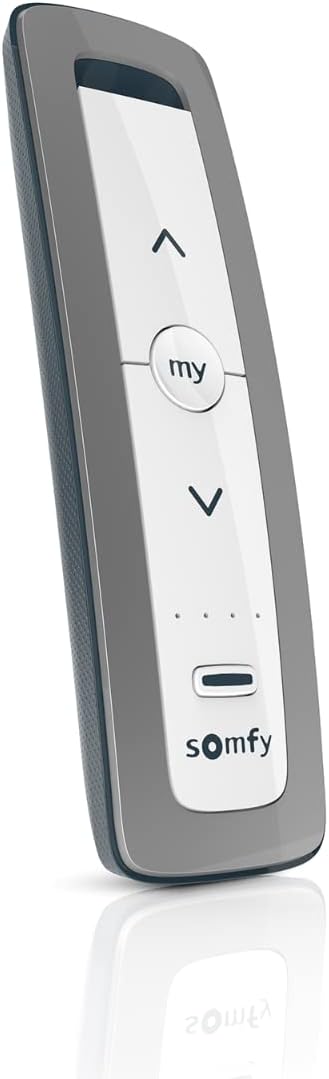
Figure 1: The Somfy Situo 5 RTS Iron remote control, showcasing its sleek design and primary control buttons.
2. Setup and Installation
Setting up your Somfy Situo 5 RTS remote control is designed to be straightforward, allowing for quick integration with your Somfy motorized window coverings. The remote comes with a pre-installed CR2 battery and includes mounting hardware for convenient storage.
2.1. Battery Installation/Verification
The Somfy Situo 5 remote control requires one CR2 Lithium Ion battery, which is included and typically pre-installed. To verify or replace the battery:
- Locate the battery compartment on the back of the remote.
- Open the compartment cover.
- Ensure the CR2 battery is correctly inserted with the positive (+) and negative (-) terminals aligned as indicated.
- Close the battery compartment cover securely.
2.2. Mounting the Remote
The remote includes a discrete wall support for easy organization and accessibility. To mount the remote:
- Choose a convenient location near your motorized shades, such as a wall or a flat surface.
- Use the provided mounting hardware to securely attach the wall support.
- The remote can then be easily placed into or removed from the wall support.

Figure 2: Close-up view of the remote's three main buttons: Up, My, and Down, which offer versatile control options.
3. Operating Your Somfy Situo 5 RTS Remote
The Somfy Situo 5 RTS remote provides intuitive control over up to five individual or grouped Somfy RTS motorized window treatments. Its simple three-button interface, combined with a channel selector, makes operation effortless.
3.1. Basic Controls
- Up Button (▲): Press to raise your shades or open your curtains.
- Down Button (▼): Press to lower your shades or close your curtains.
- "My" Button (○ my ○): This multi-functional button allows you to stop the shade movement at any point or recall your pre-programmed "My" favorite position.
3.2. Channel Selection
The Situo 5 remote can control up to five distinct channels or groups of window coverings. Use the channel selection buttons (small dots below the main buttons) to switch between channels. The illuminated indicator lights will show the currently selected channel.
3.3. Programming Your "My" Favorite Position
The "My" button allows you to save a preferred intermediate position for your shades. This is ideal for achieving specific light filtering or privacy settings with a single press.
- Move your shade to the desired "My" position using the Up or Down buttons.
- Once the shade is in the desired position, press and hold the "My" button until the shade jogs slightly (a brief up and down movement). This confirms the position has been saved.
- To recall this position, simply press the "My" button briefly when the shade is fully open or closed, or at any other position.

Figure 3: The Somfy Situo 5 remote is compatible with a wide range of Somfy RTS products, including interior window treatments, exterior screens, and wall switches.
Video 1: Official Somfy video demonstrating the features and lifestyle integration of the Situo remote control, highlighting its ease of use and design.
4. Care and Maintenance
Proper care and maintenance will ensure the longevity and optimal performance of your Somfy Situo 5 RTS remote control.
- Cleaning: Use a soft, dry cloth to clean the remote's surface. Avoid using abrasive cleaners, solvents, or excessive moisture, as these can damage the finish or internal components.
- Battery Replacement: When the remote's range decreases or it becomes unresponsive, it may be time to replace the CR2 battery. Follow the instructions in Section 2.1 for safe battery replacement. Dispose of old batteries according to local regulations.
- Storage: Store the remote in a dry place, away from direct sunlight, extreme temperatures, and high humidity. Using the provided wall support can help protect the remote from accidental drops or damage.
5. Troubleshooting
If you encounter issues with your Somfy Situo 5 RTS remote control, try the following troubleshooting steps:
| Problem | Possible Cause | Solution |
|---|---|---|
| Remote is unresponsive or has reduced range. | Low or dead battery. | Replace the CR2 battery (refer to Section 2.1). |
| Shade does not respond to remote commands. | Remote is not paired with the shade, or incorrect channel is selected. | Ensure the correct channel is selected. If still unresponsive, re-pair the remote with the shade according to your shade's specific programming instructions. |
| "My" position is not saving or recalling correctly. | Incorrect programming procedure. | Review the "Programming Your 'My' Favorite Position" instructions in Section 3.3 and repeat the process carefully. |
| Interference with remote signal. | Other electronic devices or large metal objects nearby. | Move the remote closer to the shade or away from potential sources of interference. |
If these steps do not resolve the issue, please contact Somfy customer support for further assistance.
6. Product Specifications
| Feature | Detail |
|---|---|
| Model Number | Situo 5 |
| Brand | Somfy |
| Item Weight | 5.6 ounces |
| Product Dimensions | 6.25 x 1.8 x 1 inches |
| Color | Iron (Dark Grey Finish) |
| Battery Type | 1 CR2 Lithium Ion battery (included) |
| Number of Channels | 5 |
| Compatible Devices | Somfy RTS shades, blinds, and curtains |
| Special Feature | Ergonomic design |
| First Available Date | October 13, 2022 |
7. Warranty and Customer Support
7.1. Product Warranty
Somfy products are designed for durability and reliability. For specific warranty details regarding your Situo 5 RTS remote control, please refer to the warranty information provided with your product packaging or visit the official Somfy website. Protection plans are also available for extended coverage.
7.2. Customer Support
For any questions, technical assistance, or support, please contact Somfy customer service. You can find contact information on the official Somfy website or through the retailer where you purchased the product.
You can also visit the Somfy Store on Amazon for more product information and resources.


