
1. Product Overview
The DIGITEN Digital Day-Night Smart Thermostat (Model TTC-1501) is a versatile plug-in temperature controller designed for precise temperature management in various environments. It supports both heating and cooling modes, features a clock function, and allows for dual time cycle settings (day and night) to accommodate specific physiological needs of animals or plants.
Key features include:
- Temperature control for heating or cooling equipment with 15A load capacity.
- Dual time cycle setting for day and night temperatures.
- Wide control range from 0~176°F (0~80°C).
- Includes a 2-meter (6.56 ft) waterproof sensor probe.
- Memory function to save settings during power outages (clock saved until power runs out).
- Large LCD screen with backlight for easy readability.

Figure 1.1: Front view of the DIGITEN Digital Day-Night Smart Thermostat, showing the LCD display, control buttons, and power outlet.

Figure 1.2: The thermostat features a large LCD screen with a backlight, ensuring clear visibility of time and temperature readings.
2. Safety Information
Please read all safety warnings and instructions carefully before using this product to prevent injury or damage. Keep this manual for future reference.
- Do not immerse the main unit in water or expose it to excessive moisture. Only the sensor probe is waterproof.
- Ensure the connected appliance's power consumption does not exceed the thermostat's maximum load capacity (15A, 110V).
- Do not disassemble or attempt to repair the device yourself. Refer to qualified personnel for service.
- Keep out of reach of children.
- Always unplug the thermostat from the power outlet before cleaning or when not in use for extended periods.
3. Product Components and Dimensions
The package includes the Digital Day-Night Smart Thermostat unit with an integrated power outlet and a wired temperature sensor probe.

Figure 3.1: Product dimensions and waterproof sensor detail. The unit measures approximately 12.7cm (5in) in height, with the display section being 6.2cm (2.44in) wide and 3.1cm (1.22in) deep. The waterproof sensor cable is 2m (78.7in) long.
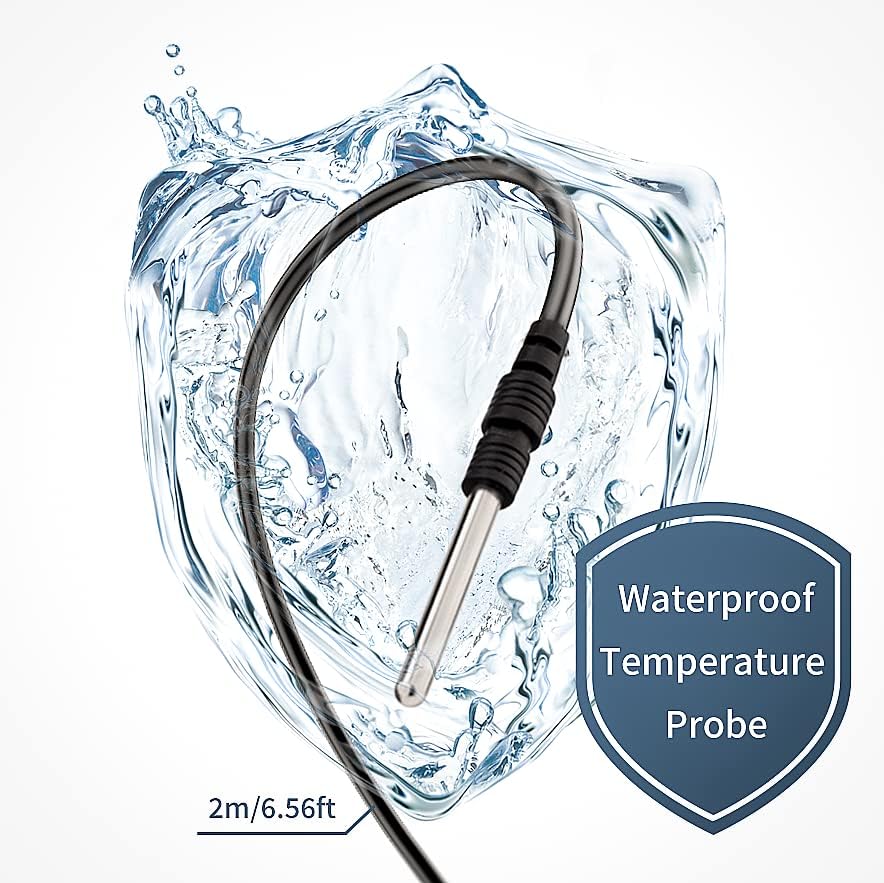
Figure 3.2: Detail of the waterproof temperature probe, designed for reliable temperature tracking in various environments.
4. Setup and Initial Use
- Placement: Choose a suitable location for the thermostat, ensuring it is away from direct heat sources or drafts that could affect temperature readings.
- Sensor Placement: Position the waterproof temperature probe in the area where you need to monitor and control the temperature. Ensure the probe is securely placed and not obstructed.
- Power Connection: Plug the thermostat into a standard 110V AC power outlet. The LCD screen will illuminate.
- Appliance Connection: Plug your heating or cooling appliance into the outlet on the front of the thermostat.

Figure 4.1: Example setup showing the thermostat controlling a heat lamp for a turtle enclosure, ensuring optimal temperature for the pet.
5. Operating Instructions
The thermostat allows for precise control of temperature with day and night settings. Follow these steps to program your device:
5.1. Setting Operating Mode (Heat/Cool)
- Press the MODE button to toggle between "Heat mode" and "Cool mode". The display will show "Heat On" or "Cool On".

Figure 5.1: Visual guide for setting up the thermostat's operating parameters, starting with mode selection.

Figure 5.2: The thermostat allows easy selection between heating and cooling modes with a single button press.
5.2. Programming Day and Night Temperatures and Times
The thermostat supports a 24-hour cycle with distinct day and night temperature settings.
- Press the SET button to begin programming. The "Day" time will flash.
- Use the UP / DOWN buttons to set the desired "Day" time (e.g., 8:00 for 8 AM). Press SET to confirm.
- The "Day" temperature will flash. Use the UP / DOWN buttons to set the target "Day" temperature (e.g., 82.0°F). Press SET to confirm.
- The "Night" time will flash. Use the UP / DOWN buttons to set the desired "Night" time (e.g., 20:00 for 8 PM). Press SET to confirm.
- The "Night" temperature will flash. Use the UP / DOWN buttons to set the target "Night" temperature (e.g., 78.0°F). Press SET to confirm.
- Press SET again to save all settings and exit programming mode.

Figure 5.3: The thermostat allows setting distinct temperatures for day and night periods, optimizing environmental control.

Figure 5.4: Example of a 24-hour temperature cycle: Day (8:00 to 20:00) target temperature 82.0°F, Night (20:00 to 8:00) target temperature 78.0°F.
5.3. Temperature Control Logic
The thermostat operates based on a differential to maintain the target temperature:
- Heat Mode: If the current temperature is 2°F below the target temperature, the thermostat turns ON (indicator light illuminates). It turns OFF when the current temperature reaches or exceeds the target temperature.
- Cool Mode: If the current temperature is 2°F above the target temperature, the thermostat turns ON (indicator light illuminates). It turns OFF when the current temperature reaches or falls below the target temperature.

Figure 5.5: Explanation of how the thermostat activates and deactivates connected appliances in heating and cooling modes based on temperature differentials.
6. Maintenance
To ensure optimal performance and longevity of your DIGITEN thermostat, follow these maintenance guidelines:
- Cleaning: Wipe the unit with a soft, dry cloth. Do not use abrasive cleaners or immerse the unit in water.
- Sensor Care: Periodically check the temperature probe for any damage or debris. Clean it gently if necessary.
- Storage: If storing the thermostat for an extended period, unplug it and store it in a cool, dry place away from direct sunlight.
7. Troubleshooting
If you encounter issues with your thermostat, refer to the following common problems and solutions:
| Problem | Possible Cause | Solution |
|---|---|---|
| Thermostat not turning on. | No power to the outlet. | Check the power outlet with another device. Ensure the thermostat is fully plugged in. |
| Connected appliance not turning on/off as expected. | Incorrect mode (Heat/Cool) selected. Incorrect temperature settings. Appliance not functioning. | Verify the correct mode is selected. Re-check Day/Night temperature and time settings. Test the appliance by plugging it directly into a wall outlet. |
| Temperature reading seems inaccurate. | Sensor probe improperly placed or damaged. External factors affecting sensor. | Ensure the sensor probe is correctly positioned and not damaged. Move the sensor away from direct sunlight, drafts, or heat sources. |
| Settings lost after power outage. | Extended power outage beyond internal battery capacity. | Reprogram the desired settings. The thermostat has a memory function, but the clock may reset after prolonged power loss. |
8. Specifications
| Feature | Detail |
|---|---|
| Model Name | TTC-1501 |
| Brand | DIGITEN |
| Voltage | 110 Volts |
| Wattage | 1650 Watts (15A) |
| Temperature Control Range | 0~176°F (0~80°C) |
| Sensor Probe Length | 2 meters (6.56 feet) |
| Display Type | LCD with Backlight |
| Control Method | Button Control (Touch) |
| Dimensions (L x W x H) | 5.47 x 2.99 x 2.95 inches (Package) |
| Item Weight | 8.1 ounces |
| Specific Uses | Greenhouse, reptile breeding, pet feeding, aquariums, seed germination, fermentation, home brewing |
9. Warranty and Support
DIGITEN provides a one-year warranty for any product quality problems. For technical support, troubleshooting assistance, or warranty claims, please contact DIGITEN customer service through the official channels where you purchased the product.
For more information about DIGITEN products and support, you may visit the DIGITEN Store on Amazon.


