
Introduction
The Alesis Drums Debut Kit is a complete electronic drum set designed for aspiring drummers. It features quiet mesh electric drum pads, a sound module with 120 sounds, and educational tools to help develop drumming skills. This manual provides essential information for setting up, operating, and maintaining your Debut Kit.
What's in the Box
Your Alesis Drums Debut Kit package includes the following components:
- 4 x 6" Mesh Electric Drum Pads
- 3 x 10" Cymbals
- Sturdy Metal Rack
- Drum Module
- Drum Throne (Stool)
- Drum Sticks
- Headphones
- All necessary cabling

Figure 1: Labeled components of the Alesis Drums Debut Kit. Includes 6" mesh heads, 10" cymbals, sturdy metal rack, drum module, drum throne, sticks, headphones, and all cabling.
Setup Instructions
Follow these steps to assemble your Alesis Drums Debut Kit:
- Assemble the Metal Rack: Connect the various sections of the sturdy metal rack according to the diagrams in the quick start guide. Ensure all clamps and screws are tightened securely to provide a stable base for your drum kit.
- Attach Drum Pads and Cymbals: Mount the 6" mesh electric drum pads and 10" cymbals onto the assembled rack. Adjust their positions to your preferred playing comfort. Tighten all mounting hardware.
- Install Drum Module: Securely attach the drum module to the designated mounting point on the rack.
- Connect Cabling: Use the provided cabling to connect each drum pad and cymbal to the corresponding input on the drum module. Ensure all connections are firm.
- Position Foot Pedals: Place the kick drum and hi-hat foot pedals on the floor in comfortable positions for playing. Connect them to the drum module.
- Assemble Drum Throne: Assemble the adjustable drum throne and place it in front of the kit. Adjust the height for comfortable playing posture.
- Connect Headphones: Plug the included headphones into the headphone output on the drum module for private practice.
- Power On: Connect the power adapter to the drum module and a power outlet. Turn on the drum module.
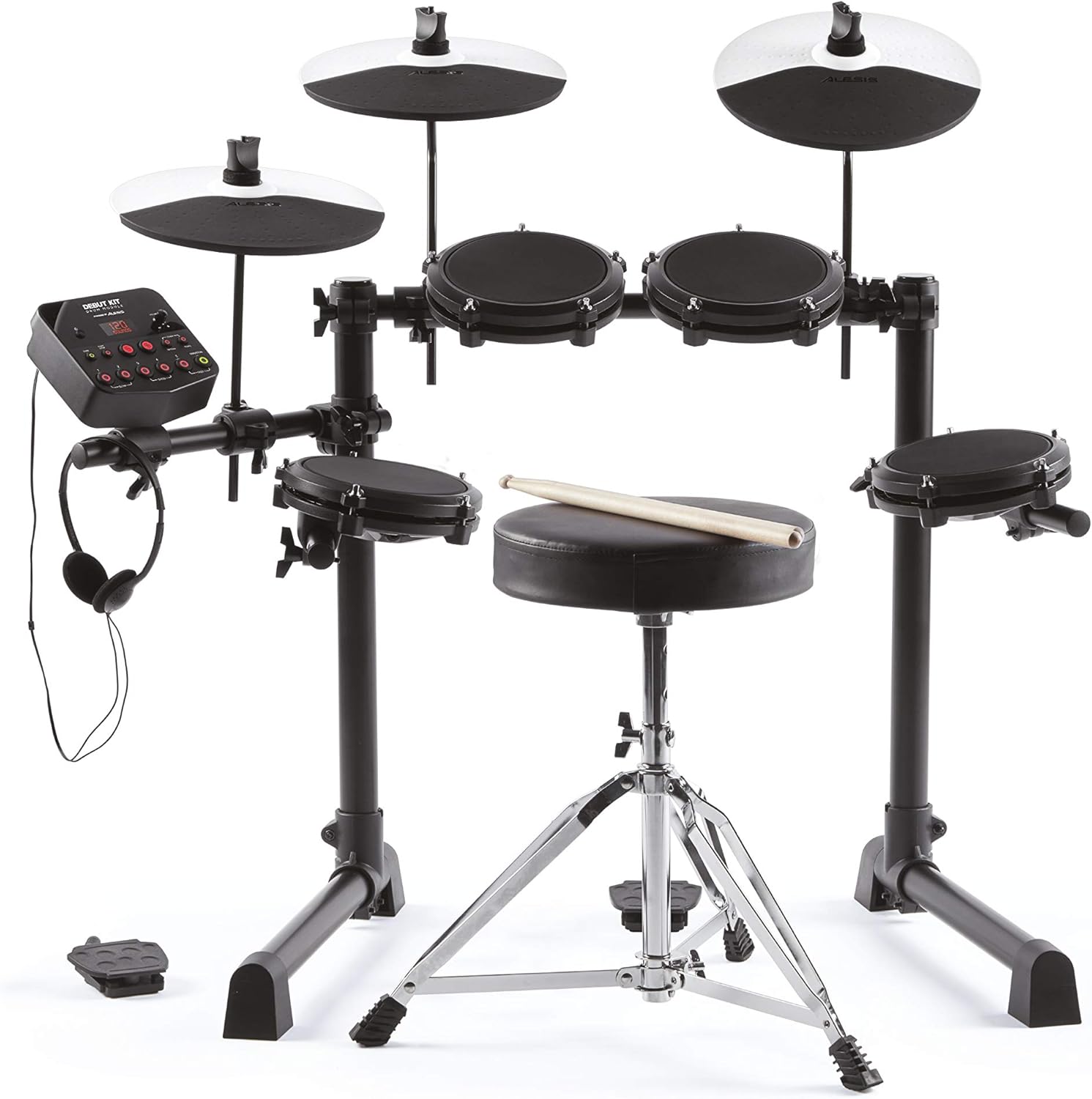
Figure 2: The Alesis Drums Debut Kit fully assembled and ready for use.
Operating Instructions
The Debut Kit module is the central control unit for your drum set. It offers various features to enhance your drumming experience.
- Sound Selection: The module includes 10 classic and modern sounding electric drum set and acoustic drum kit presets, plus 120 individual drum sounds. Use the module controls to navigate and select desired sounds.
- Educational Features: The drum module is packed with powerful educational features, including a drum coach, 30 play-along tracks, and fun exercises designed to help build and improve drum skills. Engage with these features to develop your rhythm and technique.
- Connectivity:
- Headphone Output: For private practice, use the headphone output.
- Stereo 1/4" Outputs: Connect to any drum amplifier using the stereo 1/4" outputs to share your drumming with others.
- USB MIDI Connectivity: The kit features USB MIDI connectivity, enabling learning, performing, and recording on computers or tablets.
- Melodics Lessons: Your kit includes 100 free fun and effective drum lessons for your PC or tablet from Melodics. Utilize these lessons to hone and develop your electric drum set skills.

Figure 3: A child using the Alesis Drums Debut Kit with headphones, demonstrating the educational features of the drum module.
Maintenance
Proper maintenance ensures the longevity and optimal performance of your Alesis Drums Debut Kit.
- Cleaning: Use a soft, dry cloth to clean the drum pads, cymbals, module, and frame. Avoid using abrasive cleaners or solvents, as these can damage the surfaces.
- Storage: When not in use, store the drum kit in a cool, dry place away from direct sunlight and extreme temperatures. If disassembling for storage, ensure all components are packed securely.
- Cable Care: Avoid bending or crimping cables excessively. Store cables neatly to prevent tangling and damage.
- Mesh Head Tension: The mesh heads are designed for durability. If needed, slight adjustments to tension can be made, but avoid over-tightening.
Troubleshooting
If you encounter issues with your Debut Kit, refer to the following common troubleshooting tips:
- No Sound:
- Ensure the drum module is powered on and the volume is turned up.
- Check all cable connections from pads/cymbals to the module.
- If using headphones, ensure they are fully plugged in and functioning correctly.
- If using an external amplifier, ensure it is powered on, connected correctly, and its volume is up.
- Inconsistent Triggering:
- Verify that all cables are securely connected.
- Check the sensitivity settings on the drum module (refer to the module's specific guide for detailed instructions).
- Module Not Responding:
- Turn the module off, wait a few seconds, and then turn it back on.
- Ensure the power adapter is securely connected and receiving power.
Specifications
| Feature | Detail |
|---|---|
| Brand | Alesis |
| Model Name | Debut |
| Included Components | Cymbal, Drumsticks |
| Finish Type | Painted |
| Color | Blue |
| Material | Metal |
| Connector Type | 1/4 inch audio connector |
| First Available | October 13, 2022 |
Warranty & Support
For warranty information and technical support, please refer to the documentation included in your product packaging or visit the official Alesis website. Keep your purchase receipt as proof of purchase for warranty claims.


