
LILYGO T-Internet-POE
Contents
LILYGO T-Internet-POE ESP32-WROOM Development Board User Manual
Model: T-Internet-POE
1. Introduction
The LILYGO T-Internet-POE is a versatile development board designed around the ESP32-WROOM module, integrating a LAN8720A Ethernet adapter with Power over Ethernet (PoE) functionality. This board provides a robust solution for projects requiring network connectivity and processing power, such as IoT devices, home automation, and industrial control systems. Its compact form factor and extensive GPIO availability make it highly adaptable for various embedded applications.
This manual provides essential information for setting up, operating, and maintaining your T-Internet-POE board, along with technical specifications and troubleshooting tips.
2. Setup and Connections
Before powering on your LILYGO T-Internet-POE board, familiarize yourself with its components and connection points. The board is designed for ease of use but requires careful handling due to its sensitive electronic components.
2.1 Board Layout

Figure 2.1: Top view of the LILYGO T-Internet-POE board, highlighting key components such as the ESP32-WROOM module, LAN8720A Ethernet chip, USB-C port for power and data, and a microSD card slot. The board also features reset and boot buttons.

Figure 2.2: Bottom view of the LILYGO T-Internet-POE board, displaying the Power over Ethernet (PoE) components and the pin headers for GPIO access. The board version and manufacturing date are also visible.
2.2 Pinout Diagram
The board provides a 20-needle footprint with 3.3V, V+ power, and 15 ESP32 GPIOs. Refer to the pinout diagram for detailed pin assignments.
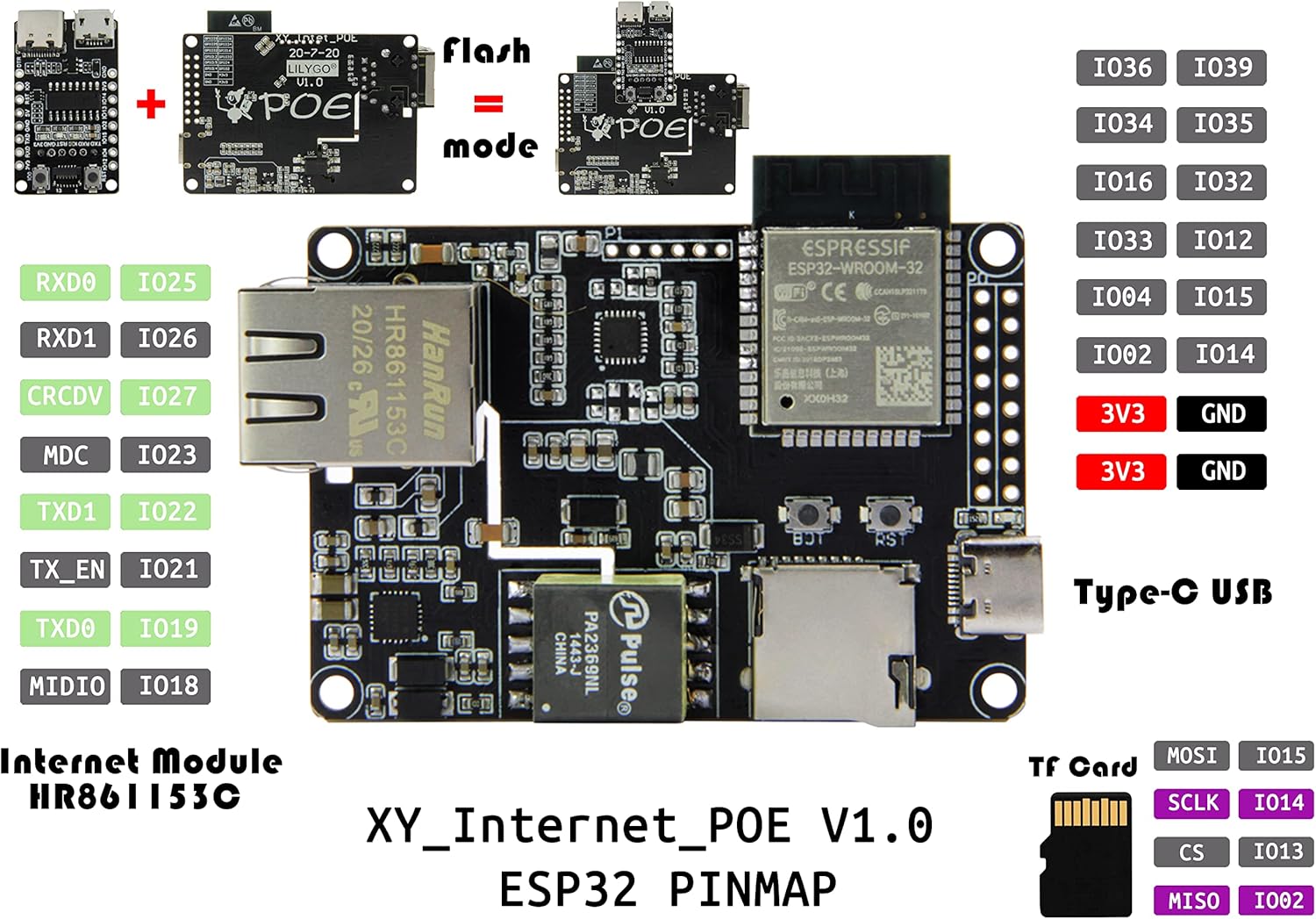
Figure 2.3: Comprehensive pinout diagram for the T-Internet-POE board, illustrating the mapping of ESP32 GPIOs, power pins (3V3, GND), and specific pins for the Ethernet module and TF card interface. This diagram is crucial for connecting external sensors and peripherals.
2.3 Initial Power and Programming
The T-Internet-POE board requires a separate Downloader Expansion Board for programming. The USB-C port on the main board is primarily for power and charging, not for direct programming. Connect the Downloader Expansion Board to the T-Internet-POE module to facilitate firmware uploads and serial communication.

Figure 2.4: The T-Internet-POE board shown connected to its dedicated Downloader Expansion Board. This setup is necessary for flashing new firmware and accessing the serial console for debugging and development.
Ensure proper power supply via the USB-C port or PoE connection. The board supports PoE mode A (powered by data pair) and PoE mode B (powered by backup pair), and features auto MDIX for compatibility with various Ethernet cables.
3. Operation
Once the board is set up and powered, you can begin developing and deploying your applications. The ESP32-WROOM module provides Wi-Fi and Bluetooth connectivity, while the LAN8720A chip handles Ethernet communication.
3.1 Programming the ESP32
Utilize the Downloader Expansion Board to connect the T-Internet-POE to your computer. You can then use standard ESP-IDF, Arduino IDE, or PlatformIO environments to write and upload your code. Refer to the official ESP32 documentation and the LILYGO GitHub repository for detailed programming guides and examples.
3.2 Ethernet and PoE Functionality
The integrated LAN8720A Ethernet chip provides reliable wired network connectivity. Connect a standard Ethernet cable to the RJ45 port. If using Power over Ethernet, ensure your network switch or injector supports PoE (IEEE 802.3af/at compliant) and provides power through either data pairs (Mode A) or backup pairs (Mode B). The board's auto MDIX feature automatically detects and corrects for straight-through or crossover Ethernet cables.
For more advanced usage and code examples, visit the official LILYGO T-ETH-POE GitHub repository: github.com/Xinyuan-LilyGO/LilyGO-T-ETH-POE.
4. Care and Maintenance
To ensure the longevity and optimal performance of your LILYGO T-Internet-POE board, follow these care and maintenance guidelines:
- Electrostatic Discharge (ESD) Protection: Electronic components are sensitive to static electricity. Always handle the board by its edges and use anti-static precautions (e.g., ESD wrist strap, anti-static mat) when working with it.
- Do Not Remove Yellow Sticker: There is a yellow reminder sticker on the board. Do not remove this sticker, as it protects a sensitive chip underneath. Touching the chip directly, especially when powered, can generate static electricity and cause damage.
- Environmental Conditions: Store and operate the board in a dry, dust-free environment. Avoid extreme temperatures and humidity.
- Cleaning: If necessary, gently clean the board with a soft, dry brush or compressed air. Do not use liquids or abrasive cleaners.
- Power Supply: Always use a stable and appropriate power supply within the specified voltage range (2.7V ~ 10.1V for PoE PD Voltage input).

Figure 4.1: Important notice regarding the yellow protective sticker and the necessity of using a Downloader Expansion Board for programming. The sticker protects a sensitive chip from static discharge.
5. Troubleshooting Common Issues
This section addresses common issues you might encounter with your LILYGO T-Internet-POE board.
- Board Not Responding/Programming Issues:
- Ensure the Downloader Expansion Board is correctly connected and recognized by your computer.
- Verify that the correct drivers (e.g., for CH340C if applicable) are installed.
- Check your IDE/toolchain settings for the correct board and port selection.
- Ensure the board is in programming mode (usually by holding the BOOT button while pressing and releasing RST, then releasing BOOT).
- Ethernet Connectivity Problems:
- Confirm the Ethernet cable is securely connected to both the board and the network device.
- If using PoE, verify that the PoE injector or switch is active and providing power.
- Check your network configuration in your ESP32 code (IP address, gateway, DNS).
- Refer to the LILYGO GitHub repository for specific Ethernet configuration examples for your board revision.
- Unstable Operation:
- Ensure adequate power supply. Insufficient current can lead to instability.
- Check for short circuits or incorrect wiring if external components are connected.
- Review your code for potential memory leaks or infinite loops.
6. Technical Specifications
Below are the detailed technical specifications for the LILYGO T-Internet-POE board:
| Feature | Specification |
|---|---|
| MCU | ESP32-WROOM-32E |
| Flash Memory | 4MB |
| Wireless Connectivity | Wi-Fi: 802.11 b/g/n/, BLE V4.2 |
| Ethernet Chip | LAN8720A (Single-Chip Ethernet Physical Layer Transceiver) |
| PoE PD Voltage Input Range | 2.7V ~ 10.1V (Si3404) |
| Onboard Buttons | RST + BOOT |
| Storage | Support TF Card (MicroSD) |
| USB Interface | Type-C (Power only; requires Downloader for programming) |
| Downloader Chip (Optional) | CH340C |
| Dimensions (L x W x H) | 75 x 40 x 20 mm (approx. 2.95 x 1.57 x 0.79 inches) |
| Mounting Holes | Compatible with 4 x M2.5 or 4-40 screws |
6.1 Product Dimensions

Figure 6.1: Dimensional drawing of the LILYGO T-Internet-POE board, indicating its length, width, and height in millimeters, along with the dimensions of the separate downloader module.
7. Support and Resources
For further assistance, detailed documentation, and community support, please refer to the following resources:
- Official LILYGO GitHub Repository: The primary source for code examples, schematics, and updated information for the T-Internet-POE board. Visit github.com/Xinyuan-LilyGO/LilyGO-T-ETH-POE.
- LILYGO Official Store: For product information and purchasing, visit the LILYGO store on Amazon: LILYGO Amazon Store.
While specific warranty information is not provided in this manual, please refer to the retailer's return policy and LILYGO's official channels for any warranty-related inquiries.
Ask a question about this manual
Ask about setup, troubleshooting, compatibility, parts, safety, or missing instructions. Manuals+ will review the question and use this page’s manual context to help answer it.