
Enzemit X6D Mini Camera
Contents
Enzemit X6D Mini Camera Instruction Manual
Model: X6D Mini Camera
Brand: Enzemit
Introduction
Welcome to the instruction manual for your Enzemit X6D Mini Camera. This compact and versatile camera is designed for home security and personal monitoring, offering high-definition video recording, night vision, and motion detection capabilities. Please read this manual thoroughly before operating the device to ensure proper use and optimal performance.

Image: The Enzemit X6D Mini Camera, showcasing its compact design and integrated stand.
Product Overview
Key Features
- Wireless WiFi 4K camera with 6x 940nm infrared LEDs (3-5 meters distance), 1080P high-definition resolution, and 150° wide-angle lens.
- Motion detection alarm for security monitoring.
- 1000mAh large capacity battery for approximately 3 hours of continuous use and up to 6 months standby.
- Imported high-definition optical glass lens for clear and bright picture quality.
- Automatic loop video recorder supporting TF card storage.
Package Contents
- 1 x X6D Mini Camera
- 1 x Charging Cable
- 1 x User Manual
Setup
Charging the Camera
Before first use, fully charge the camera using the provided charging cable. Connect the cable to the DC port on the camera and a standard USB power adapter (not included). The charging indicator light will show the charging status.
Inserting a TF Card
The X6D Mini Camera supports TF (microSD) cards up to 32GB for local storage. Locate the TF card slot on the side of the camera. Gently insert the TF card with the gold contacts facing down until it clicks into place.

Image: Illustration of TF card insertion and its role in local video storage. The camera records locally and loops video even without network or during power failure.
Powering On/Off
Locate Button 1 on the camera. Press and hold Button 1 to power the camera on or off.
Initial Connection (AP Hotspot Mode)
The camera features an AP (Access Point) hotspot. This allows you to connect your mobile phone directly to the camera's Wi-Fi network to view live monitoring and playback recordings even without an internet connection. Refer to the specific instructions in the included user manual for connecting via AP hotspot.

Image: The camera's AP hotspot feature, enabling direct connection to a smartphone for monitoring and playback without internet access.
Operating Instructions
Video Recording
The camera automatically records video to the inserted TF card. It supports 1080P HD resolution and features automatic loop recording, overwriting the oldest files when the card is full.

Image: Demonstrates the 1080P HD resolution capability of the camera, providing clear and detailed video quality.
Motion Detection
The X6D Mini Camera is equipped with smart motion detection. When movement is detected within the monitoring range, the camera will automatically push an alarm notification to your mobile application, allowing you to stay informed of any activity.

Image: Illustrates the smart motion detection feature, where the camera detects movement and sends an alarm to the mobile app.
Night Vision
The camera features HD light sensing night vision with 6 built-in 940nm SMD infrared lamps. The lens sensitivity automatically switches to night mode in low-light conditions, providing clear visibility up to 3-5 meters in complete darkness.

Image: Depicts the automatic day and night vision conversion, highlighting the camera's ability to capture clear images in dim environments using infrared illumination.
Wide Viewing Angle
With a 150° wide-angle lens, the camera captures a broad field of view, reducing blind spots and allowing for comprehensive monitoring of your space.
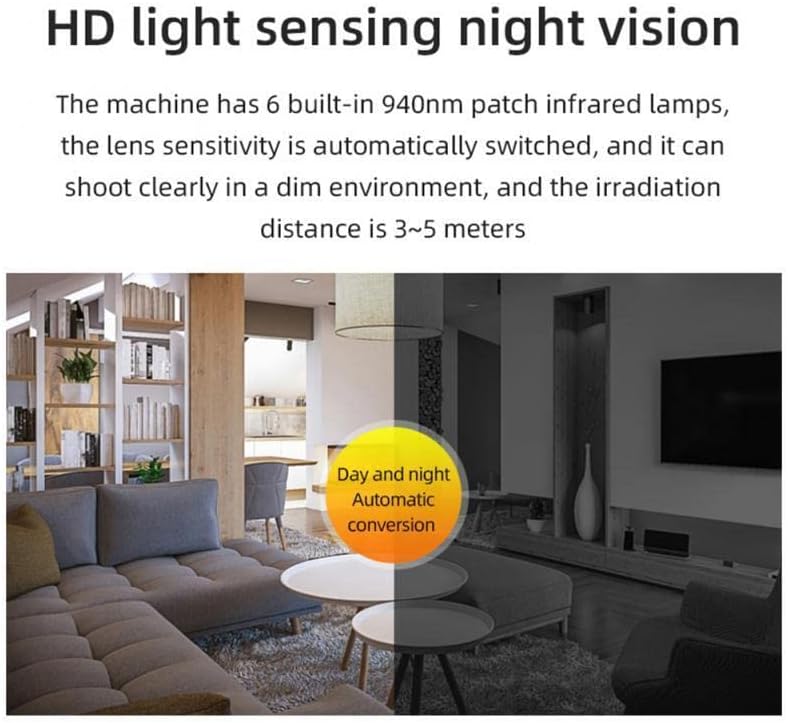
Image: Visual representation of the camera's 150° wide viewing angle, demonstrating its ability to cover a large area and minimize blind spots.
Maintenance
- Keep the camera clean by wiping it with a soft, dry cloth. Avoid using liquid cleaners or solvents.
- Ensure the lens is free from dust and smudges for optimal image quality.
- Store the camera in a cool, dry place when not in use.
- Regularly check the TF card for available space and format it periodically to maintain performance.
Troubleshooting
| Problem | Possible Cause | Solution |
|---|---|---|
| Camera does not power on. | Battery is depleted. | Charge the camera fully using the provided charging cable. |
| Camera does not record. | TF card is full or not inserted correctly. | Ensure TF card is properly inserted. Format or replace the TF card. |
| Poor video quality. | Lens is dirty; insufficient lighting. | Clean the lens. Ensure adequate lighting or utilize night vision in dark conditions. |
| Cannot connect to Wi-Fi/App. | Incorrect Wi-Fi settings; camera not in AP hotspot mode. | Verify Wi-Fi password. Ensure camera is in AP hotspot mode for direct connection, or follow app instructions for network setup. |
| Battery life is short. | Continuous recording; frequent motion detection alerts. | Optimize settings to reduce continuous recording if not needed. Reduce sensitivity of motion detection if false alarms are frequent. |
| No audio capture. | Microphone issue or setting. | The product description indicates a built-in microphone. Check app settings for audio recording options. If issue persists, contact support. |
Specifications
| Feature | Detail |
|---|---|
| Material | ABS |
| Dimensions | Approx. 31x31x31 mm (1.22x1.22x1.22 inch) |
| Color | Black/White (Optional) |
| Image Sensor | 1/4 Inch CMOS Sensor |
| Minimum Illumination | 0.3~0.5lux (color), 0lux (black and white) |
| Lens | 0309 Integrated Module |
| Viewing Angle | 150° Wide-Angle |
| Night Vision | 6 x 940nm SMD Infrared Lamps, 3~5 Meters Irradiation Distance |
| Video Compression | Standard AVI |
| Resolution | 1080p@30fps |
| Audio Input | Built-in -38dB Microphone |
| Network Protocol | TCP/IP, HTTP, TCP, UDP, DHCP, DNS, NTP, RTSP, P2P, etc. |
| Wireless Network | IEEE802.11b/g/n (2.4~2.4835GHz) |
| Storage Function | Support T-flash Card (up to 32GB) |
| Alarm Detection | Motion Detection |
| Rated Voltage | DC5V±5% |
| Power Consumption | Working 155mA |
| Working Temperature | -10~50℃ |
| Working Humidity | <90% |
| Battery Capacity | 1000mAh Lithium Ion (included) |
| Item Weight | 5 ounces |
| Connectivity Protocol | Wi-Fi |
| Indoor/Outdoor Usage | Indoor |
Warranty and Support
For warranty information and technical support, please refer to the contact details provided with your purchase or visit the official Enzemit website. Keep your proof of purchase for warranty claims.
Documents and downloads
Ask a question about this manual
Ask about setup, troubleshooting, compatibility, parts, safety, or missing instructions. Manuals+ will review the question and use this page’s manual context to help answer it.