
Introduction
This manual provides essential instructions for the safe and efficient operation, installation, and maintenance of your Forno 24-inch Microwave Drawer Oven, Model FMWDR3000-24. Please read all instructions thoroughly before using the appliance and retain this manual for future reference.
Important Safety Instructions
To reduce the risk of fire, electric shock, injury to persons, or exposure to excessive microwave energy when using your appliance, follow basic precautions, including the following:
- Read all instructions before using the appliance.
- Do not operate the oven if the door is damaged, or if the oven is malfunctioning.
- Do not attempt to service or repair the oven yourself. Contact qualified service personnel.
- Do not heat liquids or other foods in sealed containers as they are liable to explode.
- Always use microwave-safe cookware.
- Supervise children closely when the appliance is in use.
- Ensure proper ventilation around the microwave.
Product Features
The Forno Microwave Drawer Oven is designed for convenience and performance, offering a sleek, built-in solution for your kitchen.
- Space-Saving Design: Seamlessly installs built-in under a counter or in a wall.
- Cooking Power: 1,000 watts of cooking power for efficient heating.
- Capacity: 1.2 cubic feet interior capacity.
- Control Panel: Easy-to-use glass touch controls and LED display.
- Door Operation: Touch open door for convenience.
- Material: Heavy-duty food-grade 430 stainless steel construction.
- Pre-programmed Modes: Includes Defrost, Popcorn, Beverage heating, Melt, and Soften functions.
- Power Levels: 11 adjustable power levels.
- Child Safety Lock: For enhanced safety.

Figure 1: Front view of the Forno 24-inch Microwave Drawer Oven.

Figure 2: Angled view of the Forno 24-inch Microwave Drawer Oven in a closed position.

Figure 3: Visual representation of key features including stainless steel construction, glass touch controls, high efficiency, child safety lock, and multiple cooking modes.
Installation
Proper installation is crucial for the safe and optimal performance of your microwave drawer oven. This appliance is designed for built-in installation under a counter or in a wall cabinet. Ensure the installation area meets the specified dimensions and electrical requirements.
Cutout Dimensions
The required cutout dimensions for installation are:
- Width: 22.5 inches
- Height: 15 inches
- Depth: 23 inches
A minimum clearance of 3 inches between the microwave and the outer wall is required for proper ventilation.
Electrical Requirements
The unit is powered by 120 volts and requires a 15 amp circuit with a three-pronged outlet.
Installation Steps
- Prepare the cabinet cutout according to the specified dimensions.
- Ensure the power cord is accessible and can reach the outlet. The power cord is located on the left side of the unit and extends to 53 inches.
- Plug the unit into a grounded 120V, 15A outlet.
- Gently slide the microwave drawer oven into the prepared cutout frame.
- Secure the microwave to the cabinet using the provided mounting brackets and screws.
Video 1: This video provides detailed installation measurements and steps for the Forno FMWDR3000-24 Microwave Drawer Oven, including external dimensions, internal cutout requirements, and power cord specifications.

Figure 4: Overall product dimensions of the microwave drawer oven.
Operation
Your Forno Microwave Drawer Oven offers intuitive controls for various cooking needs.
Opening and Closing the Drawer
To open the microwave drawer, press the OPEN button on the control panel. To close, press the CLOSE button. The drawer also features a touch-open mechanism for convenience.

Figure 5: Front view of the microwave drawer oven with the drawer in the open position.
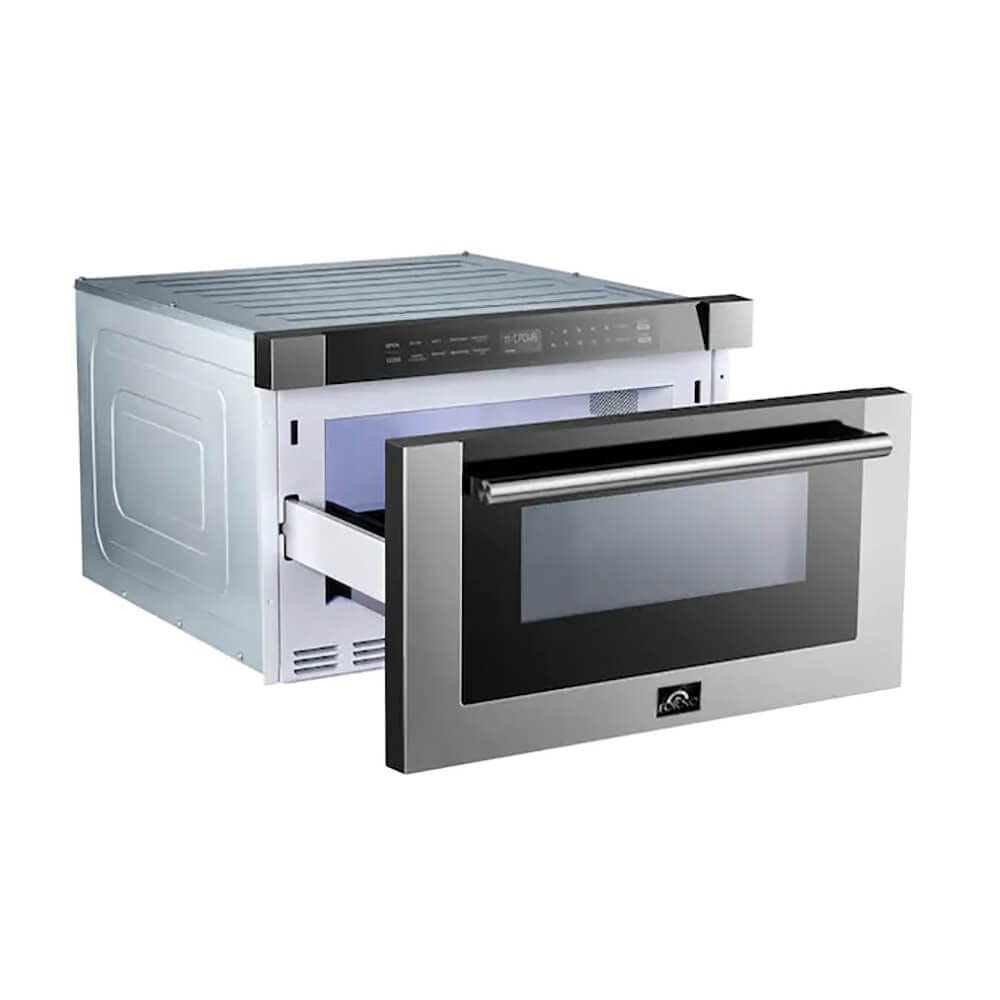
Figure 6: Angled view of the microwave drawer oven with the drawer open, showing the interior.

Figure 7: Top-down view into the open microwave drawer, highlighting the spacious interior.
Cooking Functions
- Quick Start: Press the START +30SEC. button to begin cooking for 30 seconds at full power. Each subsequent press adds 30 seconds.
- Power Levels: Select from 11 power levels (1-10, 0 for lowest) to adjust cooking intensity.
- Time Cook: Enter desired cooking time using the number pad, then select a power level if different from full power, and press START.
- Pre-programmed Settings: Utilize dedicated buttons for common tasks: Melt (butter, chocolate, ice cream, cheese, marshmallows), Popcorn, Defrost (Weight/Time), and Beverage. Follow on-screen prompts for specific selections.
- Clock/Kitchen Timer: Set the current time or use the kitchen timer for general timing needs.
Video 2: This video demonstrates the various operational features of the Forno 24-inch Microwave Drawer Oven, including opening/closing the drawer, setting cooking times, and using pre-programmed functions like melt, popcorn, and defrost.
Maintenance
Regular cleaning and maintenance will ensure the longevity and optimal performance of your microwave drawer oven.
- Interior Cleaning: Wipe the interior with a damp cloth and mild detergent after each use. For stubborn stains, place a bowl of water with lemon slices inside and microwave for a few minutes to loosen food particles.
- Exterior Cleaning: Clean the stainless steel exterior with a soft cloth and a non-abrasive stainless steel cleaner. Avoid harsh chemicals or abrasive pads.
- Control Panel: Wipe the glass touch control panel with a soft, damp cloth. Do not spray cleaners directly onto the panel.
- Drawer Rails: Keep the drawer rails free of food debris to ensure smooth operation.
Troubleshooting
Before contacting customer service, please refer to the following common issues and solutions:
| Problem | Possible Cause | Solution |
|---|---|---|
| Oven does not start | Power cord not plugged in; circuit breaker tripped; door not closed properly. | Ensure plug is secure; reset circuit breaker; close door firmly. |
| Food not heating evenly | Improper stirring; food density; incorrect power level. | Stir food during cooking; use appropriate power level for food type. |
| Drawer not opening/closing | Obstruction in drawer path; control panel issue. | Check for obstructions; try pressing the OPEN/CLOSE buttons again. |
Specifications
| Feature | Detail |
|---|---|
| Product Dimensions (D x W x H) | 23.4" x 23.62" x 14.96" |
| Item Weight | 79.1 pounds |
| Manufacturer | Forno |
| Model Number | FMWDR3000-24 |
| Color | Stainless Steel |
| Capacity | 1.2 Cubic Feet |
| Special Features | Defrost, Timer, Turntable |
| Installation Type | Built-In |
| Wattage | 1500 watts |
| Material | Stainless Steel |
| Included Components | Range (Microwave Drawer Oven), Power Cord, Mounting Bracket |
Warranty and Support
Forno stands behind its appliances with a comprehensive warranty and dedicated customer support.
- Warranty: The Forno 24-Inch Microwave Drawer Oven offers an industry-leading 2-year factory part and labor warranty. Please retain your proof of purchase for warranty claims.
- Customer Support: For assistance with installation, operation, troubleshooting, or warranty claims, please contact Forno customer support. Refer to the official Forno website or your purchase documentation for contact details.


