
WANLUTECH LT-40P
Contents
User Manual
Mini Laser Distance Meter LT-40P
WANLUTECH
1. Introduction
Thank you for choosing the WANLUTECH LT-40P Mini Laser Distance Meter. This compact and versatile tool is designed for precise distance, area, volume, and Pythagorean measurements, featuring an LCD backlight and USB charging. Please read this manual carefully before use to ensure proper operation and to maximize the lifespan of your device.
2. Safety Information
WARNING: Laser Radiation
- This product is a Class II laser product.
- Do not stare directly into the laser beam.
- Output power is less than 1mW.
- Avoid direct eye exposure.
- Do not disassemble or modify the device.
- Keep out of reach of children.
3. Package Contents
Please check the package for the following items:
- 1x WANLUTECH LT-40P Laser Distance Meter
- 1x USB Charging Cable
- 1x Lanyard
- 1x User Manual

Image: The LT-40P Laser Measure, USB charging cable, lanyard, and user manual.
4. Product Overview
The LT-40P is a compact and lightweight laser distance meter with an aluminum alloy housing, designed for portability and durability. It features a clear LCD backlight display for easy reading in various lighting conditions.
Device Components and Display

Image: Detailed diagram of the LT-40P showing its display elements and physical dimensions.
- Laser Mode Indicator: Shows if the laser is active.
- Front and Rear Reference: Indicates the measurement starting point.
- Battery Indicator: Displays current battery level.
- Angle Value: Shows real-time angle.
- Laser Strength Indicator: Indicates signal strength.
- Max/Min Value: Displays maximum and minimum values in continuous measurement.
- Current Value: Shows the current measurement result.
5. Setup and Basic Operation
5.1. Charging the Device
The LT-40P features a micro-USB charging port. Connect the provided USB cable to the device and a power source (e.g., computer USB port, USB wall adapter) to charge. The battery indicator on the display will show charging status.

Image: The LT-40P connected for USB charging.
5.2. Power On/Off and LCD Backlight
- Power On: Short press the main button (center button) to turn on the device.
- Power Off: Long press the power button (right button) to turn off the device. The device will also automatically power off after a period of inactivity to save battery.
- LCD Backlight: The LCD backlight automatically illuminates when the device is active, ensuring clear data visibility even in dark environments.

Image: The LT-40P's LCD screen with its backlight activated.
5.3. Switching Measurement Units (m / in / ft)
In the off state, press and hold the power-on button for 2 seconds to enter the measurement unit switching mode. Repeatedly press the button to cycle through meters (m), inches (in), and feet (ft).
5.4. Switching Measurement Reference (Front/Rear)
In the power-on state, press the function button (left button, labeled F/R) for about 1 second to switch the measurement reference point between the front edge and the rear edge of the device. The display will indicate the active reference.
Video: This video demonstrates how to switch measurement units and reference points on the WANLUTECH Laser Measure.
6. Measurement Modes
The LT-40P supports various measurement modes to suit different needs. After powering on, short press the function button (F/R) for about 0.5 seconds to switch between different measurement modes.

Image: Overview of the multi-function measurement capabilities of the LT-40P.
6.1. Single Measurement
In the power-on state, press the main button for about 0.5 seconds to enter the single measurement mode. Short press again to start the measurement. The result will be displayed instantly.
6.2. Consecutive Measurement
Long press the main button for about 1 second to enter the consecutive measurement mode. In this mode, the meter will automatically display the maximum and minimum values of the measured data as you move the device. This is useful for finding the shortest or longest distance to a surface.
6.3. Area Measurement
To measure area, short press the main button to measure the first side (e.g., length), then press again to measure the second side (e.g., width). The device will automatically calculate and display the area based on these two measurements.
6.4. Volume Measurement
For volume measurement, short press the main button to measure the length, then the width, and finally the height. The meter will automatically calculate and display the volume based on these three measurements.
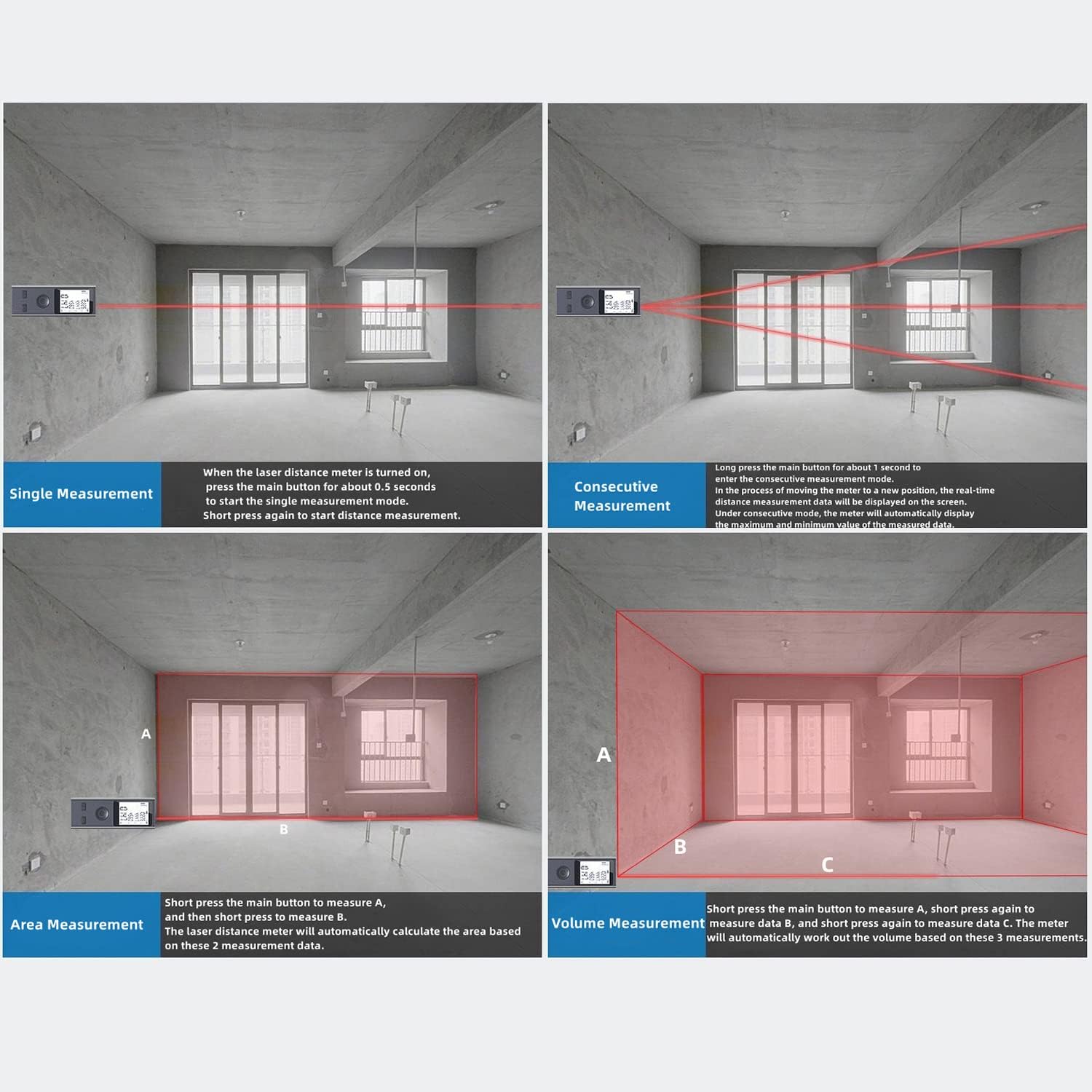
Image: Visual examples of Single, Consecutive, Area, and Volume measurement modes.
6.5. Pythagorean Measurement
The LT-40P supports various Pythagorean modes for indirect measurements.
- Primary Pythagorean Mode: Short press the main button to measure data C (hypotenuse), and then press again to measure data B (one leg). The meter automatically calculates the length of data A (the other leg).
- Secondary Pythagorean Mode (Data Addition): Measure data C, then data B, then data E. After three data points are measured, the meter automatically calculates the length of the right angle edge (A1+A2).
- Secondary Pythagorean Mode (Data Subtraction): Measure data E, then data C, then data B. After three data points are measured, the meter automatically calculates the length of the right angle edge A.
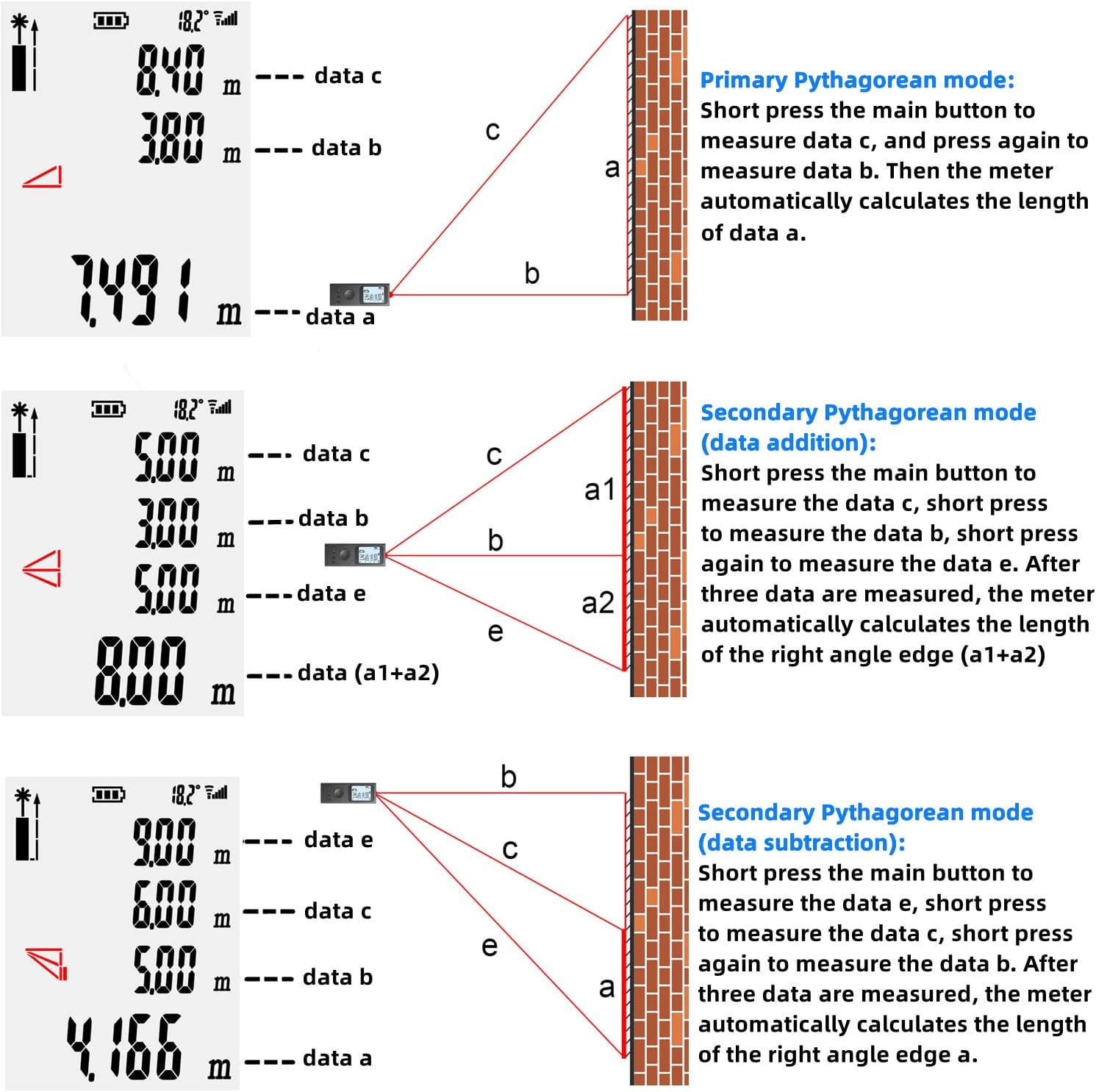
Image: Detailed explanation of Primary and Secondary Pythagorean measurement modes.
6.6. Angle Measurement Mode
In this mode, the built-in electronic angle sensor automatically calculates the angle (θ). Short press the main button to measure data D (hypotenuse). The meter then automatically calculates data A (adjacent side) and data B (opposite side).

Image: Illustration of the Angle Measurement Mode.

Image: Auto-measuring feature demonstrating horizontal and vertical angle display.
7. Maintenance
- Cleaning: Use a soft, damp cloth to clean the device. Do not use abrasive cleaners or solvents.
- Storage: Store the device in a cool, dry place away from direct sunlight and extreme temperatures.
- Battery: Charge the device regularly, even if not in use, to maintain battery health.
- Protection: The device has an IP54 international protection rating, meaning it is protected from dust and splashing water. However, it is not fully waterproof; avoid submerging it in water.
8. Troubleshooting
| Problem | Possible Cause | Solution |
|---|---|---|
| Device does not power on. | Low battery. | Charge the device using the provided USB cable. |
| Inaccurate measurements. | Incorrect reference point selected; Obstruction in laser path; Unstable surface. | Verify the front/rear reference setting; Ensure clear laser path; Place the device on a stable surface. |
| Display is dim or unreadable. | Low battery; Excessive ambient light. | Charge the device; Move to a less brightly lit area or use the backlight feature. |
| Device is difficult to hold or operate due to small size. | Ergonomic challenge for some users. | Utilize the included lanyard for better grip and to prevent loss. Practice holding the device steadily. |
| No running memory of previous measurements. | This model does not feature extensive data storage. | Manually record measurements as needed. |
9. Specifications
| Feature | Detail |
|---|---|
| Model | LT-40P |
| Brand | WANLUTECH |
| Measuring Range | 131ft (40m) |
| Measurement Units | m / in / ft |
| Laser Class | Class II |
| Output Power | <1mW |
| Material | Aluminum |
| Color | Gray |
| Item Weight | 0.988 ounces (28 Grams) |
| Product Dimensions | 2.2 x 0.47 x 0.83 inches |
| Battery Type | Rechargeable Lithium-Ion |
| Charging Port | Micro-USB |
| International Protection Rating | IP54 |
10. Warranty and Support
Warranty Information
This product comes with a 1-year warranty from the date of purchase.
Customer Support
For any questions or product support, please contact WANLUTECH customer service:
- Find your order on your Amazon account, view order details, and click 'get product support' to message us.
- You can also find "WANGLU TESTER" on the product detail page, click on it, and then message us directly.
Documents and downloads
Ask a question about this manual
Ask about setup, troubleshooting, compatibility, parts, safety, or missing instructions. Manuals+ will review the question and use this page’s manual context to help answer it.