Introduction
Thank you for choosing the PETEMPO WiFi 5L Automatic Pet Feeder. This intelligent feeder is designed to simplify your pet care routine by providing automated and scheduled meals, ensuring your beloved companions are fed consistently and healthily. With its advanced features, including app control, anti-stuck design, and dual power supply, you can have peace of mind knowing your pets are well-cared for, even when you're away.
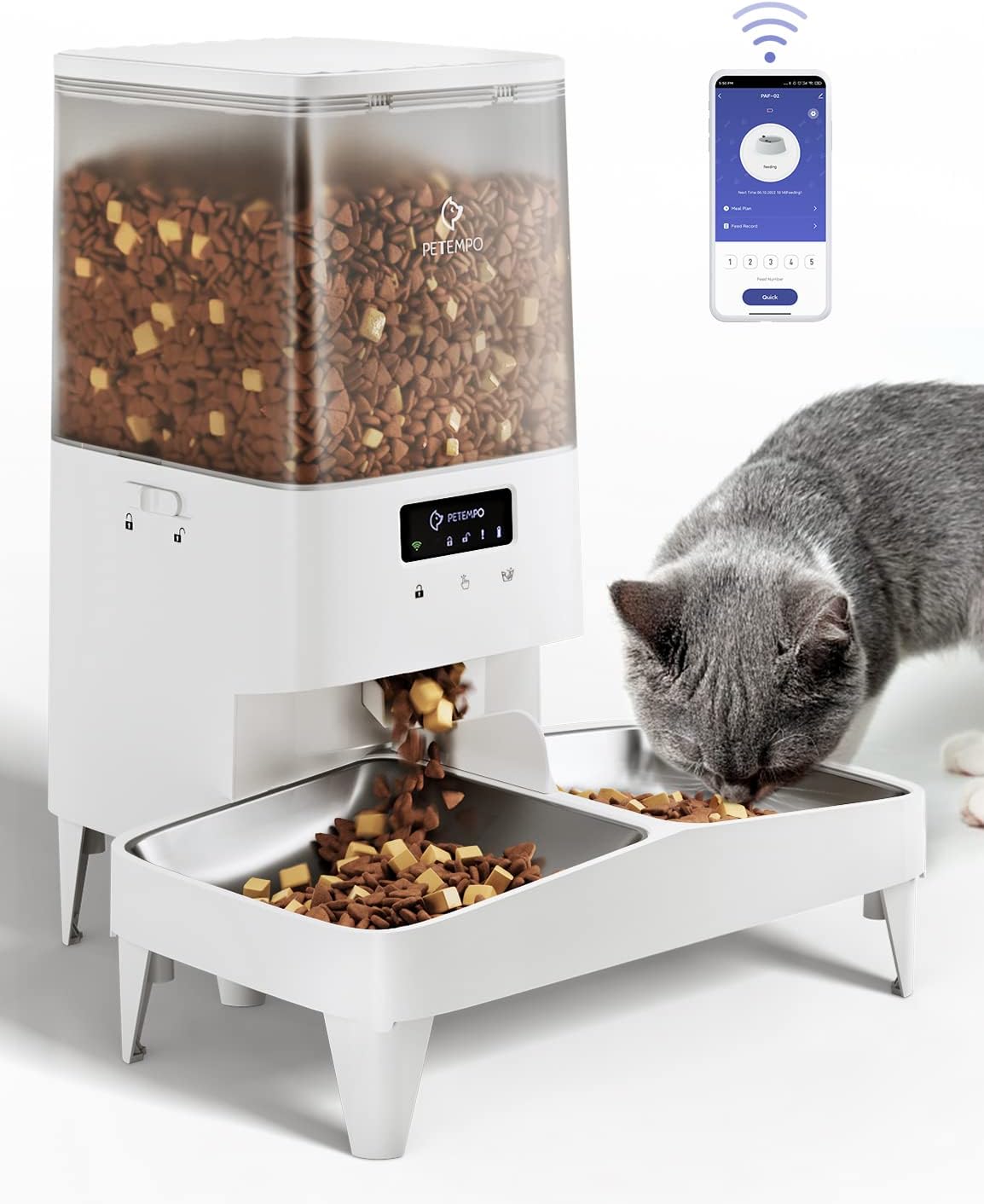
Image: The PETEMPO WiFi 5L Automatic Pet Feeder in use, with a cat enjoying its meal.
Product Features
- Easy-to-operate APP: Connects to 2.4 GHz WiFi. Compatible with Android and iOS systems, allowing programming and monitoring of feeding via the TUYA App. Control multiple feeders from one app or one feeder from different phones. Scheduled meals continue even if WiFi disconnects.

Image: The PETEMPO feeder with a smartphone displaying the easy-to-use app settings for scheduling.

Image: Screenshot of the app showing options for customizing feeding schedules.
- Always Healthy Feeding: Program up to 10 meals per day, with 1 to 60 portions (approx. 10g per portion). Scientific dosing prevents food pile-up, promoting healthy eating habits. Sealing lids and drying bags maintain food freshness. Stainless steel bowls help prevent feline acne, and the elevated bowl option reduces stress on pet joints and spine.

Image: The app interface for customizing a feeding plan to prevent overeating.

Image: Comparison of two feeder heights (1.8" and 3.9") to reduce joint and spine compression for pets.
- Clog-Free Design: The motor reverses when blocked, significantly reducing food jams. Compatible with dry, mixed, and air-dried food (dry food only) in sizes from 3-18mm. Mix your pet's favorite kibble for enjoyment.
Video: Demonstrates the clog-free design of the feeder, showing how kibble is dispensed smoothly.

Image: Illustration of the feeder's internal mechanism, ensuring kibbles are dropped by gravity without clogging.

Image: Visual guide to the applicable kibble size range (0.1-0.7 inches) for the feeder.
- Feed 1 or More: The 5L capacity can feed 1 adult cat for up to 30 days or 2 adult cats for 15 days. Ideal for short trips. Easily switch between single or double bowl configurations for multi-pet households.

Image: Two cats sharing the spacious, pet-friendly bowls, demonstrating the feeder's suitability for multiple pets.

Image: Different feeder setups illustrating adaptability for various cat heights and numbers.
- Dual Power Supply: Recommended USB power cord for continuous supply. Three D-type batteries (not included) serve as backup power. The feed schedule and current time are saved via backup power during outages, eliminating the need for re-setting.

Image: Illustration of the dual power supply system, including the battery compartment and USB-C power adapter.
- Auto-lock Panel: Prevents pets from accessing too much food. The control panel automatically locks if no operation is done for 60 seconds, or can be manually locked/unlocked by pressing for 3 seconds.

Image: A cat interacting with the auto-lock panel, highlighting the feature that prevents unauthorized access to food.
- Pest-proof and Moisture-proof: Features a rubber ring sealing and a drying pack to keep food fresh. The secure rotor and sealed food outlet prevent pests from entering.

Image: Detailed view of the pest-proof and moisture-proof features, including the rubber ring sealing, drying pack, and secure rotor.

Image: Illustration of the pest-proof design, where the dispenser seals the food outlet when not in use.
- Easy to Observe: Transparent food container allows instant monitoring of remaining food amount, ensuring timely refills.

Image: Close-up of the transparent food container, highlighting the ease of observing the remaining food level.
- Quiet Operation: The feeder operates at 45 dB, ensuring it does not disturb your pet's eating or resting.

Image: The feeder operating quietly, demonstrating its low noise level (45 dB) that won't disturb pets.
Setup Guide
1. Unpacking and Assembly
- Carefully remove all components from the packaging.
- Assemble the food bowl(s) and attach them to the main feeder unit. Ensure they are securely in place.
- If using the elevated setup, attach the leg extensions to the feeder base.
2. Power Supply
- Connect the USB power cord to the feeder and plug it into a wall outlet.
- For backup power, open the battery compartment at the bottom of the feeder and insert three D-type alkaline batteries (not included). Ensure correct polarity.
3. App Download and Connection
- Download the "TUYA Smart" or "Smart Life" app from your smartphone's app store (iOS or Android).
- Register or log in to your account.
- Add the device: Follow the in-app instructions to add your PETEMPO feeder. Ensure your phone is connected to a 2.4 GHz WiFi network during the pairing process.
- Once connected, the feeder's WiFi indicator light will be solid.
Operating Instructions
1. Filling the Food Container
- Open the top lid of the feeder.
- Pour dry kibble into the container. Ensure the kibble size is between 3-18mm.
- Close the lid securely to maintain freshness and prevent pests.
2. Setting a Feeding Schedule (via App)
- Open the TUYA Smart/Smart Life app and select your PETEMPO feeder.
- Navigate to the "Schedule" or "Meal Plan" section.
- Tap "Add" to create a new feeding time.
- Set the desired time, number of portions (1-60), and frequency (e.g., daily, specific days).
- Save the schedule. You can set up to 10 meals per day.
Image: The app interface for setting and managing customized feeding schedules.
3. Manual Feeding (via App)
- On the main feeder screen in the app, locate the "Quick Feed" or "Feed Now" option.
- Select the number of portions you wish to dispense immediately.
- Confirm the action.
4. Auto-Lock Panel
- The control panel automatically locks after 60 seconds of inactivity.
- To manually lock/unlock, press and hold the lock button on the feeder for 3 seconds.
Maintenance
1. Cleaning the Feeder
- Disconnect the power supply before cleaning.
- Remove the food container, lid, and stainless steel bowls. These parts are washable.
- Wash the removable parts with mild soap and water. Rinse thoroughly and air dry completely before reassembling.
- The feeder base, which contains electronic components, is NOT washable. Wipe it clean with a damp cloth.

Image: Demonstrates easy disassembly of the food dispenser for cleaning, noting that only the feeder base is non-washable.
2. Replacing the Drying Pack
- Periodically check the drying pack located under the lid.
- Replace it every 1-2 months, or as needed, to ensure optimal food freshness.
Troubleshooting
| Problem | Possible Cause | Solution |
|---|---|---|
| Feeder not dispensing food. | Food container empty; kibble stuck; power issue; incorrect schedule. | Refill food; check for clogs and clear them; ensure power is connected and batteries are fresh; verify schedule in app. |
| App cannot connect to feeder. | Incorrect WiFi band (not 2.4 GHz); weak WiFi signal; incorrect pairing steps. | Ensure phone is on 2.4 GHz WiFi; move feeder closer to router; re-attempt pairing following app instructions. |
| Food not fresh. | Lid not sealed properly; drying pack needs replacement. | Ensure lid is securely closed; replace the drying pack. |
| Feeder makes unusual noise. | Kibble stuck in dispenser mechanism. | Disconnect power, remove food, and inspect the dispensing mechanism for obstructions. |
Specifications
| Feature | Detail |
|---|---|
| Model Name | PAF-02 |
| Capacity | 5 Liters (approx. 21 cups / 1.2 gallons) |
| Material | Stainless Steel (bowls), Plastic (body) |
| Color | White |
| Item Dimensions (LxWxH) | 9 x 7.8 x 14.5 inches |
| Item Weight | 6.2 Pounds |
| Power Supply | USB-C (main), 3 x D-type batteries (backup) |
| Kibble Size Compatibility | 3-18mm (0.1-0.7 inches) |
| App Compatibility | Android, iOS (via TUYA Smart/Smart Life App) |
| WiFi Frequency | 2.4 GHz |
| Noise Level | 45 dB |
| Care Instructions | Hand Wash Only (removable parts) |
Warranty and Support
This PETEMPO Automatic Pet Feeder comes with a 1-Year Warranty from the date of purchase. This warranty covers manufacturing defects and malfunctions under normal use.
For technical support, troubleshooting assistance, or warranty claims, please contact PETEMPO customer service through the contact information provided in your product packaging or visit the official PETEMPO website. Please have your model number (PAF-02) and proof of purchase ready when contacting support.


