1. Introduction
Thank you for choosing the Pokitter PKT-HDPRO 5L Warm and Cool Mist Humidifier. This device is designed to improve air quality and comfort in your home by maintaining optimal humidity levels. It features both warm and cool mist options, a large 5-liter water tank, and an essential oil diffuser function. Please read this manual thoroughly before operation to ensure safe and efficient use.
2. Important Safety Instructions
To reduce the risk of fire, electric shock, or injury, always follow these basic safety precautions:
- Always place the humidifier on a firm, flat, waterproof surface at least 12 inches (30 cm) away from walls and appliances.
- Do not immerse the humidifier in water or other liquids.
- Unplug the humidifier before filling, cleaning, or moving it.
- Do not operate the humidifier with a damaged cord or plug.
- Keep the humidifier out of reach of children and pets.
- Use only clean, cool tap water or distilled water. Do not add hot water.
- Do not add essential oils directly into the water tank; use the designated essential oil tray.
- Do not block the mist outlet.
- If the humidifier emits an unusual smell or sound, discontinue use immediately and unplug it.
3. Product Overview
The Pokitter PKT-HDPRO humidifier combines advanced features for optimal performance and user convenience.

Image 3.1: The Pokitter PKT-HDPRO humidifier shown with its remote control, highlighting its sleek design and digital display.
Key features include:
- Remote Control: Convenient operation from a distance.
- Top Fill Design: Easy and mess-free water refilling.
- 12-Hour Timer: Programmable shut-off for energy saving.
- Whisper Quiet Operation: Operates at less than 30dB for undisturbed sleep.
- Essential Oil Diffuser: Integrated tray for aromatherapy.
- Sleep Mode: Dims display and maintains quiet operation.
- Child Lock: Prevents accidental changes to settings.
- 6 Output Levels: Adjustable mist intensity for both warm and cool mist.

Image 3.2: Diagram illustrating the hybrid humidifier's key features, including remote control, top fill, timer, quiet operation, essential oil diffuser, sleep mode, child lock, and six output levels.
The humidifier also features a ceramic heating unit for efficient warm mist production and an accurate external sensor for precise humidity control.

Image 3.3: An internal view of the humidifier highlighting the ceramic heating unit, which enhances mist production efficiency.
4. Setup
4.1 Unpacking
- Carefully remove the humidifier from its packaging.
- Remove all packaging materials, including any protective films or stickers.
- Inspect the humidifier for any signs of damage. If damaged, do not operate and contact customer support.
4.2 Placement
- Place the humidifier on a flat, stable, and waterproof surface.
- Ensure it is at least 12 inches (30 cm) away from walls, furniture, and electronic devices.
- Avoid placing it directly on carpet or near heat sources.
4.3 Filling the Water Tank
The Pokitter PKT-HDPRO features a convenient top-fill design.
- Ensure the humidifier is unplugged before filling.
- Remove the top cover.
- Pour clean, cool tap water or distilled water directly into the water tank opening. Do not exceed the maximum fill line.
- Replace the top cover securely.

Image 4.1: A hand demonstrating the hassle-free top-fill method for the humidifier, pouring water directly into the top opening.
5. Operating Instructions
The humidifier can be operated using the touch control panel on the unit or the included remote control.
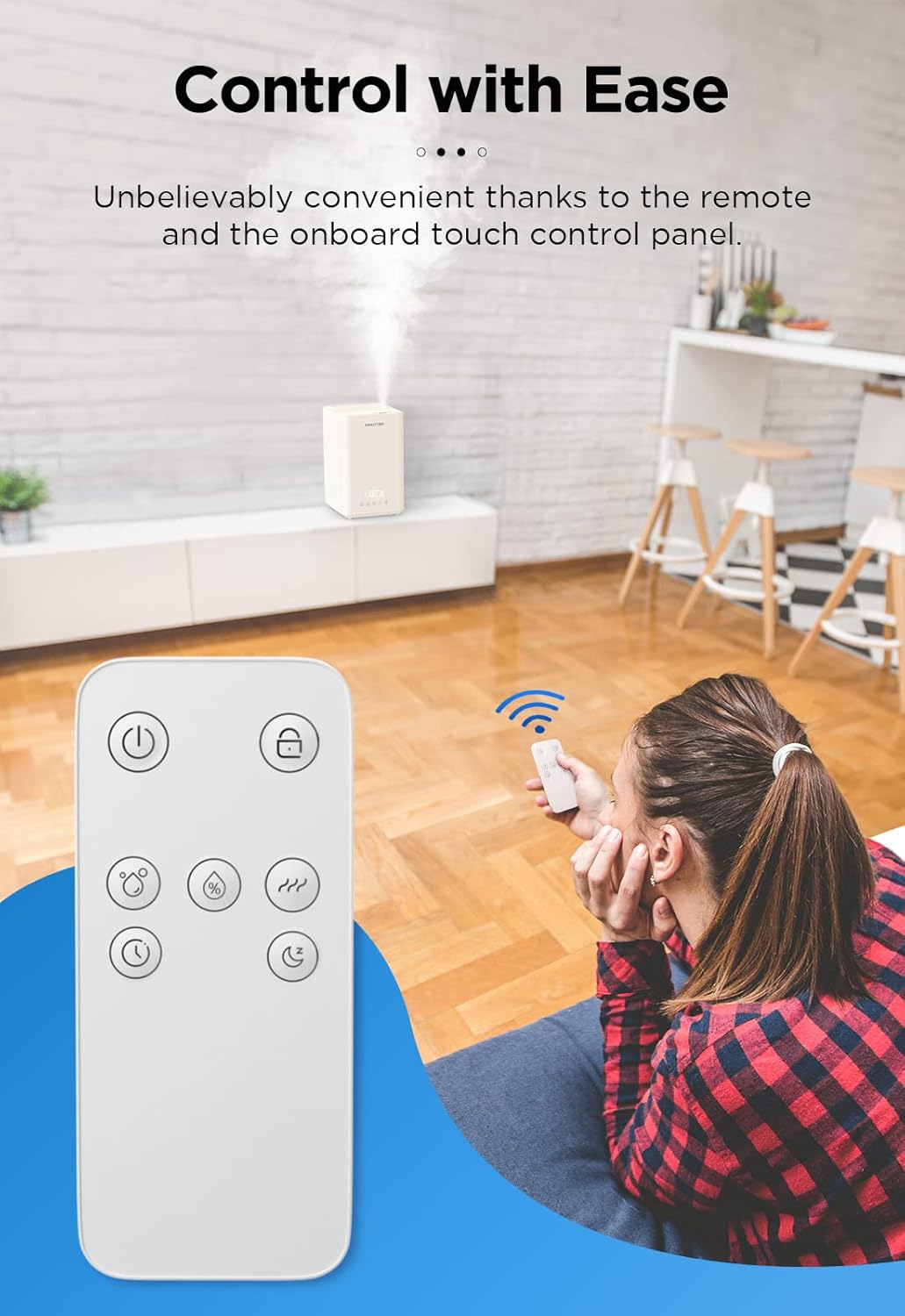
Image 5.1: A user operating the humidifier with the remote control, demonstrating ease of use from a distance.
5.1 Power On/Off
- Plug the power cord into a suitable electrical outlet.
- Press the Power button (U) on the control panel or remote to turn the unit on or off.
5.2 Mist Output and Type (Warm/Cool)
The humidifier offers 6 mist output levels, combining 3 intensity levels with warm or cool mist options.

Image 5.2: A visual representation of the humidifier producing both warm and cool mist, alongside a table detailing mist output rates for low, medium, and high settings.
- Press the Mist button (MIST icon) to cycle through low, medium, and high mist output levels.
- Press the Warm Mist button (WAVE icon) to activate or deactivate the warm mist function. When activated, the humidifier will produce warm mist.
5.3 Timer Function
- Press the Timer button (CLOCK icon) to set the operating time from 1 to 12 hours. The humidifier will automatically turn off when the set time expires.
5.4 Sleep Mode
- Press the Sleep Mode button (MOON icon) to enter sleep mode. In this mode, the display lights will dim, and the humidifier will operate at its quietest setting. Press again to exit.
5.5 Child Lock
- Press and hold the Child Lock button (LOCK icon) for 3 seconds to activate or deactivate the child lock. When activated, the control panel buttons will be unresponsive.
5.6 Essential Oil Diffuser
- Locate the essential oil tray on the side or back of the humidifier.
- Add a few drops of your preferred essential oil onto the aroma pad within the tray.
- Close the tray. The mist will carry the aroma into the air.
- Do not add essential oils directly into the water tank.
6. Maintenance
Regular cleaning is essential for optimal performance and hygiene.
6.1 Daily Maintenance
- Unplug the humidifier.
- Empty any remaining water from the tank.
- Wipe the tank and base with a clean, dry cloth.
6.2 Weekly Cleaning
- Unplug the humidifier.
- Remove the top cover and empty the water tank.
- Fill the water tank with 1 cup (250ml) of white vinegar and let it soak for 30 minutes to loosen mineral buildup.
- Use a soft brush or cloth to clean the inside of the tank and the heating element (if applicable).
- Rinse the tank thoroughly with clean water until the vinegar smell is gone.
- Wipe the exterior with a soft, damp cloth.
- Clean the essential oil tray and replace the aroma pad if necessary.
6.3 Storage
- Before storing, ensure the humidifier is completely clean and dry.
- Store in a cool, dry place.
7. Troubleshooting
If you encounter issues, please refer to the following common problems and solutions:
| Problem | Possible Cause | Solution |
|---|---|---|
| No mist or low mist output | Low water level; mineral buildup; mist outlet blocked | Refill water tank; clean the humidifier as per maintenance instructions; ensure mist outlet is clear. |
| Unusual odor | New unit odor; dirty water; mineral buildup | Run for a few hours; replace water; clean the humidifier. |
| Water leakage | Overfilled tank; improper placement; damaged tank | Do not overfill; place on a flat surface; contact support if damaged. |
| Humidifier not turning on | Not plugged in; power outage; child lock activated | Check power connection; verify power supply; deactivate child lock. |
8. Specifications
- Model: PKT-HDPRO
- Brand: Pokitter
- Capacity: 5 Liters (1.32 Gallons)
- Product Dimensions: 26.75 x 24.69 x 35.05 cm (10.53 x 9.72 x 13.8 inches)
- Product Weight: 2.88 kg (5.58 lb)
- Effective Range: 20-35 m² (215-376 ft²)
- Runtime: Up to 40 hours
- Noise Level: ≤ 30dB
- Material: BPA-free Plastic
- Voltage: 1.2E+2 Volts (AC)
- Special Features: Adjustable Humidity Control, Aroma Diffuser, Digital Display, Low Water Indicator, Removable Tank

Image 8.1: The humidifier positioned in a living room, illustrating its suitability for large spaces with its 5-liter capacity and up to 40 hours of runtime.
9. Warranty and Support
Pokitter products are manufactured to high-quality standards. For warranty information or technical support, please refer to the warranty card included with your purchase or visit the official Pokitter website. Please have your model number (PKT-HDPRO) and purchase date available when contacting support.


