
1. Introduction
Thank you for choosing the FEELWORLD FW568 V3 6-inch DSLR Camera Field Monitor. This monitor is designed to provide high-quality video monitoring for DSLR cameras and camcorders, featuring a Full HD 1920x1080 IPS display, 4K HDMI input and loop output, and various professional monitoring functions. This manual will guide you through the setup, operation, and maintenance of your device to ensure optimal performance.
2. Product Features
- Compact and Lightweight Design: The FW568 V3 is small, lightweight, and offers excellent image quality. It features a high native resolution of 1920 x 1080 with a 16:9 display, 450 cd/m2 brightness, 1000:1 contrast ratio, and uniform full-screen display without discrepancies.
- 4K HDMI Input and Loop Output: The FW568 V3 features 4K HDMI input and loop output, allowing it to not only display live signals but also send them to other monitors simultaneously. This enables viewing live images on multiple screens while maintaining original video quality.
- Intuitive Controls and Menus: On top of the monitor, there are three customizable function keys that can be set for general functions. The monitor automatically saves previously defined settings and retains original settings upon next power-on, eliminating the need for reset, making it convenient and easy to use.
- Wide Viewing Angle for Comprehensive View: The IPS monitor provides an excellent visual experience, offering consistent image clarity and colors from a 160-degree vertical and horizontal viewing angle. This wide viewing angle allows multiple crew members to easily view the screen simultaneously.
- Multiple Power Modes: In addition to the 12V DC power input (using a 12V/1.5A adapter), the FW568 V3 also features a compatible F970/LP-E6 dual-purpose battery plate and supports 5V Type-C input, which can be powered by mobile phone chargers or power banks (at least 5V/2A).
3. What's in the Box
The following items are included with your FEELWORLD FW568 V3 monitor:
- FEELWORLD FW568 V3 Field Monitor
- Micro HDMI Cable
- Sunshade
- Tilt Arm
- Operation Manual
- Type-C to USB Adapter

An overview of the FEELWORLD FW568 V3 monitor mounted on a camera setup, alongside its packaging and various accessories like the Micro HDMI cable, sunshade, tilt arm, manual, and Type-C to USB adapter.
4. Setup
4.1 Mounting the Monitor
The FW568 V3 monitor can be mounted to your camera or rig using the included tilt arm. The tilt arm attaches to a standard hot shoe or cold shoe mount on your camera or cage.
- Attach the tilt arm to your camera's hot shoe or a compatible mounting point.
- Secure the monitor to the 1/4-inch screw on the tilt arm.
- Adjust the angle of the monitor for optimal viewing.

The monitor shown with the included tilt arm accessory, which allows for flexible positioning and mounting.
4.2 Powering the Monitor
The FW568 V3 offers multiple power options:
- DC 12V Input: Connect a 12V/1.5A DC power adapter to the DC IN port.
- Battery Plate: The monitor features a dual-purpose battery plate compatible with Sony F970 series and Canon LP-E6 batteries. Attach a charged battery to the plate.
- Type-C 5V Input: For portable power, connect a 5V/2A (minimum) power bank or mobile phone charger to the Type-C port.

Images showing the Sony NPF Series and Canon LP-E6 dual-purpose battery plates on the back of the monitor, along with an illustration of powering the monitor via a Type-C power bank.
4.3 Connecting Video Sources
Use the provided Micro HDMI cable to connect your camera or video source to the monitor.
- Connect one end of the HDMI cable to your camera's HDMI output.
- Connect the other end to the HDMI IN port on the FW568 V3 monitor.
- If you need to loop out the signal to another monitor, connect an HDMI cable from the HDMI OUT port to the secondary display.

A detailed view of the monitor's connectivity ports, including HDMI In/Out, DC In 12V, DC Out 8.4V, 3.5mm earphone slot, and USB Upgrade port. It also highlights 4K HDMI format support.
5. Operating Instructions
5.1 Power On/Off
Press and hold the power button located on the top of the monitor to turn the device on or off.
5.2 Menu Navigation
The monitor features an intuitive menu system controlled by buttons on the top panel.
- Press the MENU button to access the main menu.
- Use the < and > buttons to navigate through menu options.
- Press the MENU button again to confirm a selection or enter a sub-menu.
- The F1/V, F2/A, and F3 buttons are customizable function keys. You can assign frequently used features to these buttons for quick access.

An image illustrating the monitor's intuitive menu interface and the physical control buttons located on the top, including custom function keys (F1, F2, F3).
5.3 Advanced Monitoring Features
The FW568 V3 includes several professional tools to assist with accurate exposure and focus.
- 3D LUT Support: Load custom 3D LUTs via the USB port to preview your footage with desired color grades.
- All Scopes Mode: Access waveform, vector scope, and histogram displays simultaneously for comprehensive video signal analysis.
- Peaking Focus Assist: Highlights sharp edges in red, green, or blue to help achieve precise focus.
- False Color: Helps set proper exposure by displaying different exposure levels as distinct colors.
- Exposure (Zebras): Indicates overexposed areas with zebra patterns.
- Center Marker & Safety Markers: Aids in framing and composition.

Two monitors side-by-side, demonstrating the 'All Scopes Mode' feature, which includes waveform, vector scope, and histogram for precise video analysis.

A comparison image showing the visual difference 'Before Loading' and 'After Loading' a 3D LUT, demonstrating the monitor's ability to apply custom color profiles.
6. Maintenance
To ensure the longevity and optimal performance of your FEELWORLD FW568 V3 monitor, follow these maintenance guidelines:
- Cleaning: Use a soft, dry cloth to clean the monitor's exterior. For the screen, use a specialized screen cleaning solution and a microfiber cloth. Avoid harsh chemicals or abrasive materials.
- Storage: When not in use, store the monitor in a cool, dry place, away from direct sunlight and extreme temperatures. Use the included sunshade or a protective case to prevent scratches and dust accumulation.
- Handling: Handle the monitor with care. Avoid dropping it or subjecting it to strong impacts.
- Firmware Updates: Periodically check the FEELWORLD official website for any available firmware updates. Updates can improve performance and add new features. Use the USB Upgrade port for this purpose.
7. Troubleshooting
If you encounter issues with your FW568 V3 monitor, refer to the following common problems and solutions:
| Problem | Possible Cause | Solution |
|---|---|---|
| No image on screen | No power; Incorrect HDMI connection; Incorrect input selected. | Ensure power is connected and turned on. Check HDMI cable connections. Verify the correct HDMI input is selected in the monitor menu. |
| Image is distorted or flickering | Faulty HDMI cable; Incompatible resolution/frame rate; Loose connection. | Try a different HDMI cable. Ensure your camera's output resolution and frame rate are supported by the monitor. Re-seat HDMI connections. |
| Monitor does not turn on | Battery depleted; Power adapter not connected; Faulty power source. | Charge or replace the battery. Ensure the DC adapter is securely connected and functional. Try powering via Type-C with a power bank. |
| Buttons are unresponsive | Temporary software glitch; Physical damage. | Try restarting the monitor. If the issue persists, contact customer support. |
8. Specifications
Detailed technical specifications for the FEELWORLD FW568 V3 monitor:
| Feature | Detail |
|---|---|
| Brand | FEELWORLD |
| Model | FW568 V3 |
| Manufacturer Warranty | 1 year |
| Package Dimensions (L x W x H) | 18.6 x 12.5 x 8.3 centimeters |
| Included Parts | Field Monitor |
| Item Model Number | FW568 V3 |
| ASIN | B0BHT7HKVB |
| Date First Available on Amazon.fr | October 10, 2022 |
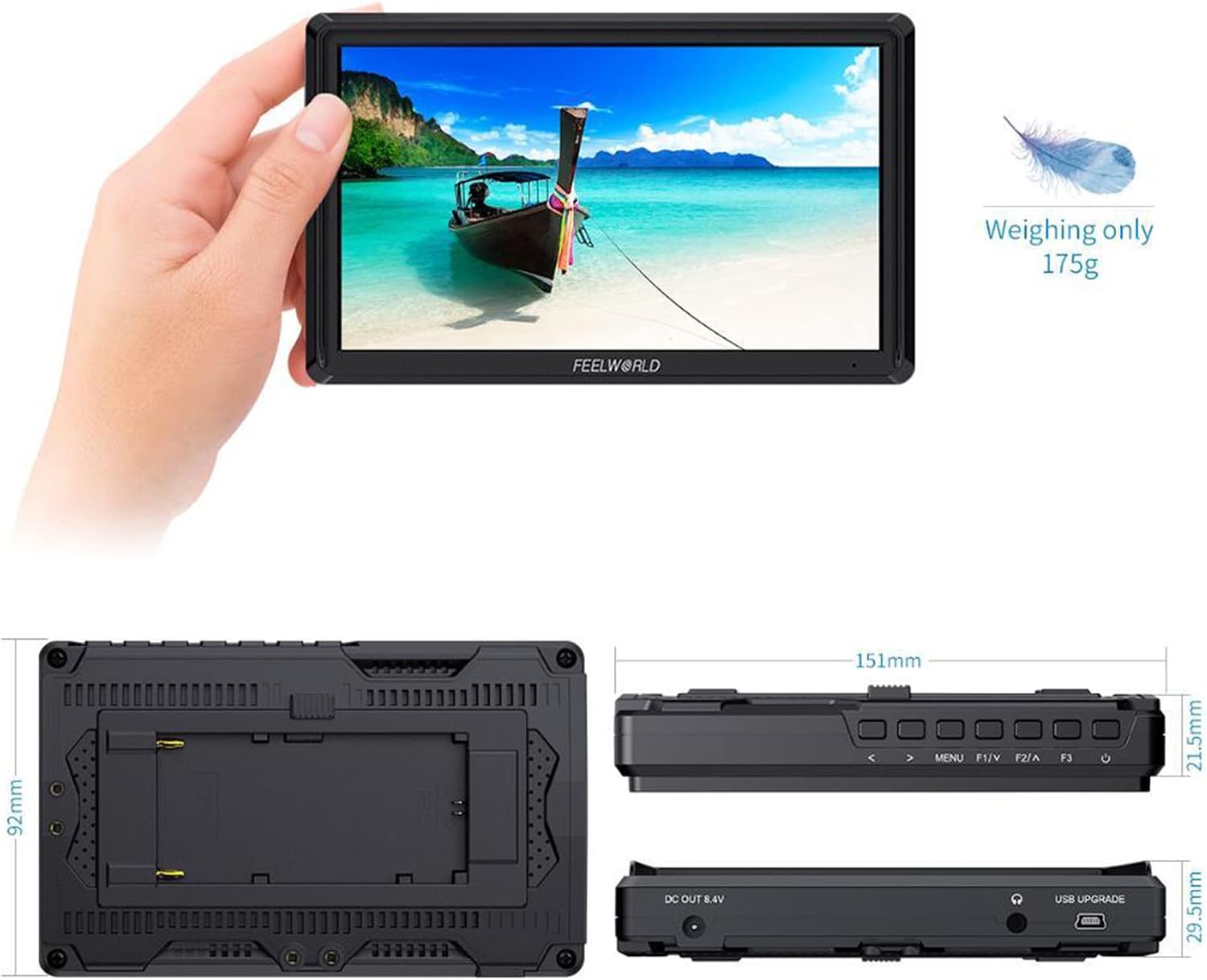
The image displays the FEELWORLD FW568 V3 monitor held in a hand, highlighting its compact size and light weight of 175g. Detailed dimensions are provided: 151mm length, 92mm width, and 21.5mm thickness, along with port locations.

This image shows the monitor displaying vibrant colors, emphasizing its visual quality. Key specifications like 450nit brightness, 367 PPI, and a 1000:1 contrast ratio are overlaid.

An illustration demonstrating the 160-degree wide viewing angle of the IPS monitor, ensuring consistent image clarity and color from various perspectives.

A diagram illustrating the Cinematic Color Rec.709 standard supported by the monitor, indicating accurate color reproduction.
9. Warranty and Support
9.1 Warranty Information
The FEELWORLD FW568 V3 monitor comes with a 1-year manufacturer's warranty. This warranty covers defects in materials and workmanship under normal use. It does not cover damage caused by misuse, accidents, unauthorized modifications, or natural disasters. Please retain your proof of purchase for warranty claims.
9.2 Customer Support
For technical assistance, troubleshooting, or warranty inquiries, please contact FEELWORLD customer support through their official website or the contact information provided with your product packaging. Ensure you have your product model number (FW568 V3) and purchase details ready when contacting support.
For more information and resources, visit the official FEELWORLD website: www.feelworld.cn


