1. Introduction
This manual provides essential information for the safe and efficient operation of your OUKITEL WP18 Pro Rugged Smartphone. Designed for durability, this device features a robust build, a large battery, and advanced functionalities to support various demanding environments.

Figure 1: OUKITEL WP18 Pro Rugged Smartphone
The OUKITEL WP18 Pro is a rugged smartphone built to withstand harsh conditions, featuring a durable exterior and a large battery capacity.
2. What's in the Box
Verify that all items are present in the packaging:
- OUKITEL WP18 Pro Phone
- 18W Fast Charger
- 2A TYPE-C Data Cable
- SIM Tray Ejector
- Packing Box, Manual, Warranty Card
- Color Protective Film
3. Key Features
- Massive 12500mAh Battery: Provides extended usage with up to 37 days standby, 70 hours calling, 48 hours music, and 22 hours video playback. Supports OTG for reverse charging other devices.

Figure 2: Illustrates the 12500mAh battery capacity, offering extended standby, call, video, and music times.
- Rugged Durability (IP68 & IP69K & MIL-STD-810G): Designed to be waterproof (up to 1.5 meters), dustproof, and drop-proof (from 1.5 meters). Operates in temperatures from -10°C to 70°C.

Figure 3: Demonstrates the phone's resistance to water, extreme temperatures, and drops, highlighting its rugged design.
- Android 12 System: Experience a cleaner interface, enhanced privacy protection, and a smoother user experience.

Figure 4: Shows the OUKITEL WP18 Pro running Android 12, emphasizing the user interface and system features.
- 5.93" TFT HD+ Display with Corning Gorilla Glass: Offers a wide visual experience with 720*1440 resolution and 400NIT brightness.

Figure 5: Highlights the 5.93-inch HD+ display with Corning Gorilla Glass, providing a clear and durable viewing experience.
- 13MP Main Camera & Underwater Mode: Capture high-quality photos and videos with the 13MP main camera and 5MP front camera. Features a dedicated underwater recording mode.

Figure 6: Details the camera specifications, including the 13MP rear camera and 5MP front camera, suitable for various photography needs.
- 4GB RAM + 64GB ROM (Expandable to 1TB): Ample storage for apps, images, and videos.
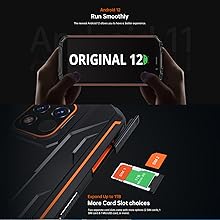
Figure 7: Illustrates the phone's memory and storage capabilities, including 4GB RAM, 64GB ROM, and support for 1TB expansion via TF card.
- 4G Dual SIM & Fingerprint Unlock: Supports two Nano SIM cards or one Nano SIM and one TF card. Features a side-mounted fingerprint sensor for easy access.
4. Setup Guide
4.1 Inserting SIM/TF Card
- Locate the SIM card tray on the side of the phone.
- Insert the SIM tray ejector tool into the small hole next to the tray and push gently until the tray pops out.
- Place your Nano SIM card(s) and/or TF card into the designated slots on the tray. Ensure correct orientation.
- Carefully push the tray back into the phone until it is flush with the device.
4.2 Initial Power On and Setup
- Press and hold the Power button (located on the side) until the OUKITEL logo appears.
- Follow the on-screen prompts to select your language, connect to Wi-Fi, and set up your Google account.
- Configure security settings, including fingerprint unlock, for convenient and secure access.
5. Operating Instructions
5.1 Basic Navigation
- Touchscreen: Tap to select, swipe to scroll, pinch to zoom.
- Power Button: Press to wake/sleep, long press for power options.
- Volume Buttons: Adjust media and call volume.
5.2 Camera Usage
The OUKITEL WP18 Pro features a 13MP main camera and a 5MP front camera.
- Open the Camera app from your home screen or app drawer.
- Select between Photo, Video, and other modes (e.g., Panorama, Beauty).
- For underwater photography, activate the dedicated "Underwater Mode" if available in the camera settings to optimize touch response and image quality in wet conditions.
- Tap the shutter button to capture photos or start/stop video recording.
Video 1: OUKITEL WP18 Pro Rugged Phone Features Overview. This video demonstrates the phone's ruggedness, battery life, and camera capabilities.
5.3 OTG Functionality (Reverse Charging)
Your OUKITEL WP18 Pro can act as a power bank to charge other devices.
- Connect the OTG cable (not included) to your WP18 Pro's USB-C port.
- Connect the other end of the OTG cable to the device you wish to charge.
- Ensure the OTG setting is enabled in your phone's USB preferences if charging does not begin automatically.

Figure 8: Shows the OUKITEL WP18 Pro utilizing its reverse charging feature to power another device, demonstrating its power bank capability.
6. Maintenance and Care
- Waterproof and Dustproof Care:
- Ensure all port covers (USB-C, headphone jack) are securely closed before exposing the phone to water or dust.
- After exposure to water, especially saltwater, rinse the phone with clean fresh water and dry thoroughly before opening any ports or charging.
- Drop-proof Design: While designed to be drop-proof, extreme impacts can still cause damage. Avoid unnecessary drops.
- Battery Longevity: To maximize battery life, avoid fully discharging the battery frequently. Use the provided 18W fast charger for optimal charging.
- Screen Protection: The Corning Gorilla Glass provides scratch resistance, but a protective film (included) is recommended for additional safeguarding.
7. Troubleshooting
| Problem | Possible Cause | Solution |
|---|---|---|
| Phone does not power on. | Low battery; software crash. | Charge the phone for at least 30 minutes. Perform a forced restart by holding the Power button for 10-15 seconds. |
| Cannot connect to network. | SIM card issue; network settings. | Ensure SIM card is correctly inserted. Check network settings (Settings > Network & internet > Mobile network). Restart the phone. |
| Battery drains quickly. | Background apps; high brightness; poor signal. | Close unused apps. Reduce screen brightness. Disable Wi-Fi/Bluetooth when not in use. Check for app updates. |
| Phone is slow/unresponsive. | Too many apps; low storage. | Clear cache and data of frequently used apps. Uninstall unnecessary apps. Free up storage space. Restart the phone. |
8. Specifications
| Feature | Detail |
|---|---|
| Product Dimensions | 6 x 3 x 0.8 inches |
| Item Weight | 14.7 ounces |
| Item Model Number | WP18 Pro |
| Batteries | 1 Lithium Polymer batteries required (included) |
| Operating System | Android 12.0 |
| Wireless Communication Technologies | Cellular, NFC |
| Connectivity Technologies | Bluetooth, Wi-Fi, NFC |
| GPS | True |
| Special Features | Supports USB OTG, Rugged Body, Fast Charging Support, Built-In GPS, Water Resistant |
| Human Interface Input | Touchscreen |
| Scanner Resolution | 720 x 1440 |
| Other Camera Features | Rear, Front |
| Audio Jack | 3.5 mm |
| Form Factor | Bar |
| Color | Green |
| Battery Power Rating | 55.6 Watt Hours |
| Phone Talk Time | 65 Hours |
| Phone Standby Time (with data) | 800 hours |
| Manufacturer | OUKITEL |
| Date First Available | October 10, 2022 |
| Memory Storage Capacity | 64 GB |
| Standing Screen Display Size | 5.93 Inches |
| RAM Memory Installed Size | 4 GB |
| Battery Capacity | 12500 Milliamp Hours |
| Screen Size | 5.93 Inches |
| Resolution | 720 x 1440 |
| Wireless Carrier | T-Mobile |
| Cellular Technology | 4G |
9. Warranty and Support
OUKITEL offers a comprehensive support package for your WP18 Pro smartphone:
- 30-Day No-Reason Return: If you are not satisfied, you can return the product within 30 days.
- One-Year Free Warranty: Covers manufacturing defects for one year from the date of purchase.
- Long-Term Technical Support: Ongoing assistance for any technical issues you may encounter.
- 24-Hour Online Customer Service: Dedicated support available around the clock for your convenience.
For support, please refer to the contact information provided in your warranty card or visit the official OUKITEL website.


