
RovyVon A28
Contents
RovyVon Aurora A28 2nd USB-C EDC Flashlight User Manual
Model: A28
Silver (Sidelight: UV+Red+White)
Introduction
The RovyVon Aurora A28 2nd Generation USB-C EDC Flashlight is a compact and powerful illumination tool designed for everyday carry. This upgraded model features convenient USB-C charging and an enhanced 850mAh battery for extended runtime. It boasts a 6500K cool white main emitter with a maximum output of 1000 lumens, suitable for various lighting needs from night running to camping. Additionally, the Aurora A28 includes versatile sidelights: a warm white light for reading, a red light for signaling or maintaining night vision, and a 365nm UV light for authentication purposes. Its dual-button design ensures simple and intuitive operation, providing quick access to different modes including momentary on and moonlight.

Image: The RovyVon Aurora A28 2nd USB-C EDC Flashlight, showcasing its compact design and transparent body.
What's in the Box
- User Manual x1
- Warranty Card x1
- Pocket Clip x1
- USB C-A Cable x1
- USB C Cover x1
Specifications
| Feature | Value |
|---|---|
| Brand | RovyVon |
| Model Number | A28 |
| Color | Silver (Sidelight: UV+Red+White) |
| Power Source | Battery Powered |
| Light Source Type | LED |
| Material | Polycarbonate |
| White Brightness (Max) | 1000 Lumens |
| Product Dimensions | 0.8"D x 0.8"W x 2.9"H |
| Voltage | 3.7 Volts |
| Light Path Distance | 150 Meters |
| Battery Capacity | 850mAh Lithium Polymer |
| Item Weight | 36.5 Grams (1.29 ounces) |
| Runtime (Moonlight Mode) | 152 hours |
| Water Resistance Level | IPX8 Water Resistant |
| Color Temperature | 6500 Kelvin |
| Special Features | USB C Charge, Adjustable Light Modes |
Setup
1. Charging the Flashlight
Before first use, or when the battery is low, charge the RovyVon Aurora A28 using the provided USB-C cable. The flashlight features an upgraded 850mAh battery for extended use.
- Connect the USB-C end of the cable to the flashlight's charging port.
- Connect the USB-A end to a compatible power source (e.g., phone charger, laptop, power bank, wall adapter).
- The charging indicator light will show the charging status:
- Blue: Charging in progress.
- Green: Fully charged.
- A full charge typically takes approximately 1 hour.

Image: Illustration of the 850mAh battery capacity upgrade and USB-C charging port.

Image: Close-up of the flashlight showing the blue charging indicator light.
2. Unlocking the Flashlight
The Aurora A28 features a lockout mode to prevent accidental activation and conserve battery life, especially when carried in a pocket or bag. To unlock the flashlight:
- From the off state, long press the bottom button for 3 seconds to unlock the device.
- To engage lockout mode, long press the top button for 5 seconds from any state.

Image: Visual guide on how to lock and unlock the flashlight using the top and bottom buttons.

Image: Depiction of the flashlight in lockout mode, preventing accidental activation.
Operating Instructions
The RovyVon Aurora A28 features a dual-button design for intuitive control of its various lighting modes.
1. Main Light Operation (Top Button)
- Momentary On (Turbo): From off, long press the top button for instant access to the brightest (Turbo) mode. Release to turn off.
- Moonlight Mode: From off, single click the top button to activate Moonlight mode (0.5 lumens). This provides a very dim light, ideal for not disturbing others.
- Cycle Brightness Levels: From Moonlight mode, single click the top button to cycle through Low (10 lm), Medium (100 lm), High (400 lm), and Turbo (1000 lm).
- Strobe/SOS: From any main light mode, double click the top button to activate Strobe mode. Double click again for SOS mode. Single click to return to the previous brightness level.
- Turn Off: Long press the top button from any main light mode to turn off the flashlight.

Image: Diagram illustrating the functions of the two control buttons.

Image: Icons representing Moonlight, Low, Medium, High, Turbo, and Strobe/SOS modes with their respective runtimes.
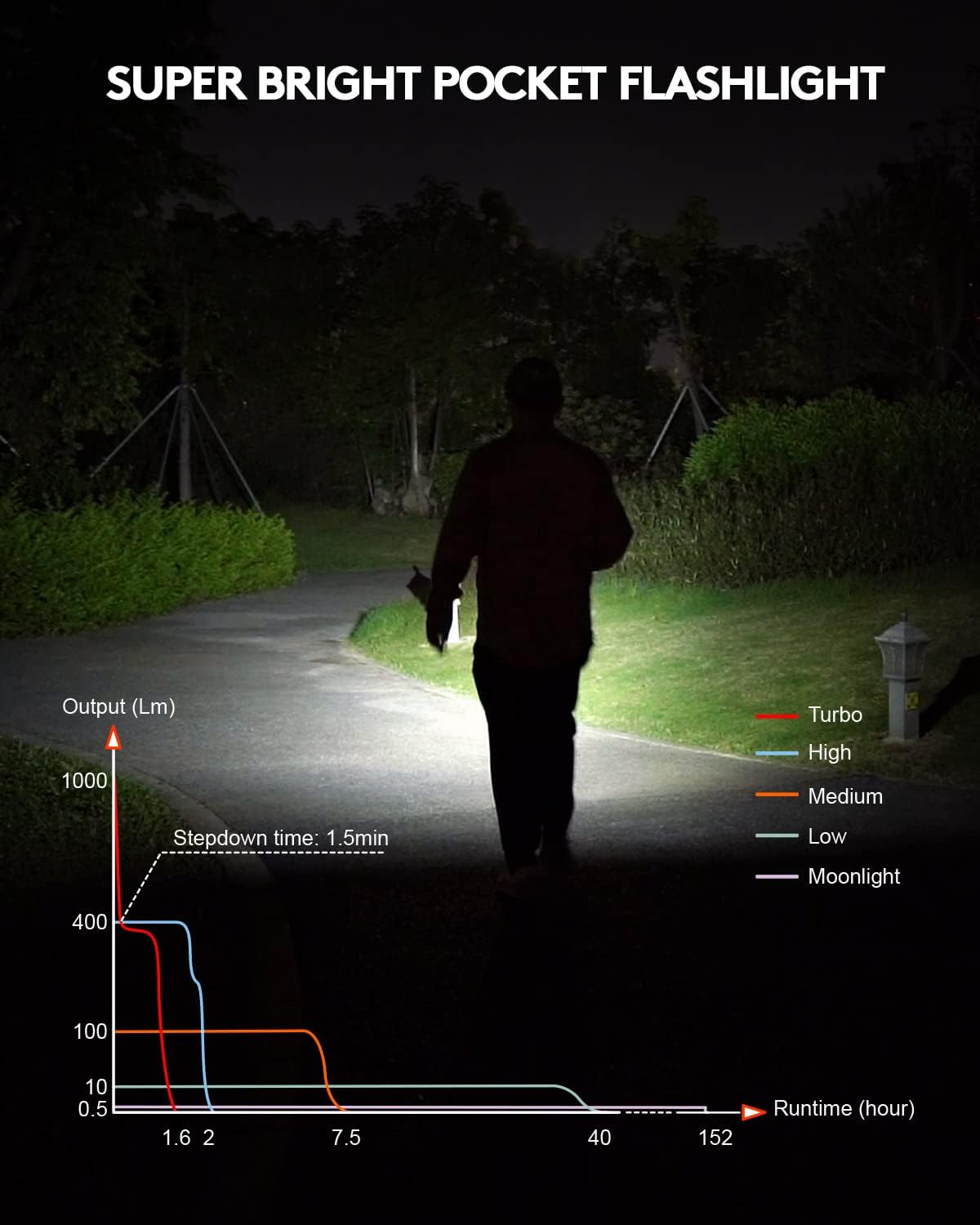
Image: Graph showing the output (lumens) and runtime (hours) for different main light modes.
2. Sidelight Operation (Bottom Button)
The Aurora A28 features three distinct sidelights for various applications:
- Activate Sidelights: From off, double click the bottom button to turn on the sidelights.
- Cycle Sidelight Colors: Single click the bottom button to cycle through Warm White, Red, and 365nm UV light.
- Warm White Sidelight: Ideal for reading or general close-up illumination.
- Red Sidelight: Useful for signaling, night running, walking dogs, or emergencies, as it preserves night vision.
- 365nm UV Sidelight: Perfect for authenticating currency, checking documents, or detecting certain substances.
- Turn Off: Long press the bottom button from any sidelight mode to turn off the sidelights.

Image: The RovyVon A28 flashlight highlighting its versatile sidelights (white, red, UV).

Image: Examples of sidelight use, including reading with white light, UV light for detection, and red light for signaling.

Image: The 365nm UV light being used to check a banknote for security features.

Image: The UV light illuminating a scorpion, demonstrating its ability to reveal fluorescent properties.
3. Magnetic Pocket Clip and Tail Base
The Aurora A28 comes with a removable, two-way magnetic pocket clip, enhancing its versatility:
- Attachment: The clip allows you to attach the flashlight to pockets, belts, or backpack straps.
- Hands-Free Lighting: The magnetic tail base enables you to attach the flashlight to metal surfaces for convenient hands-free illumination, directing light where needed.

Image: The flashlight with its removable, two-way magnetic pocket clip attached to a surface and a pocket.

Image: The flashlight standing upright on a metal surface due to its magnetic tail base.

Image: The flashlight magnetically attached to a vertical metal surface, providing hands-free lighting.
Maintenance
- Cleaning: Wipe the flashlight with a soft, damp cloth to remove dirt and debris. Avoid using harsh chemicals or abrasive materials.
- Battery Care: To maintain optimal battery life, charge the flashlight regularly, even if not in frequent use. Avoid fully depleting the battery for extended periods.
- Water Resistance: The Aurora A28 is IPX8 water resistant, meaning it can withstand continuous immersion in water up to a specified depth (typically 2 meters for 30 minutes). Ensure the USB-C port cover is securely closed before exposing the flashlight to water.

Image: The flashlight submerged in water, illustrating its IPX8 water resistance rating.
Troubleshooting
- Flashlight not turning on:
- Ensure the flashlight is unlocked (long press bottom button for 3 seconds).
- Check battery level and charge the device if necessary.
- Light is dim or flickering:
- The battery may be low; recharge the flashlight.
- Ensure the lens is clean and free from obstructions.
- Charging indicator not working:
- Verify the USB-C cable is properly connected to both the flashlight and the power source.
- Try a different USB-C cable or power source.
- Accidental activation in pocket:
- Engage the lockout mode by long pressing the top button for 5 seconds before storing.
Warranty and Support
The RovyVon Aurora A28 comes with a Warranty Card included in the package. Please refer to the warranty card for specific terms and conditions regarding your product's coverage.
For further assistance, technical support, or warranty claims, please visit the official RovyVon store or contact their customer service through the details provided on the warranty card or their official website.
You can also visit the RovyVon Store on Amazon for more product information and support resources.
Documents and downloads
Ask a question about this manual
Ask about setup, troubleshooting, compatibility, parts, safety, or missing instructions. Manuals+ will review the question and use this page’s manual context to help answer it.