
1. Introduction
The EJEAS EUC Motorcycle Intercom Bluetooth Remote Control Handle is designed to provide convenient, hands-free control over your EJEAS motorcycle Bluetooth interphone system while riding. This device allows you to manage various functions such as answering calls, switching music, controlling intercom, and adjusting volume directly from your motorcycle handle, enhancing safety and convenience on the road.

Image 1: EJEAS EUC Remote Control Handle. This image displays the sleek, black design of the EJEAS EUC remote control handle, highlighting its ergonomic shape and button layout.
2. Package Contents
Upon unboxing your EJEAS EUC Remote Control Handle, please ensure all the following items are present:
- EJEAS EUC Remote Control Handle
- USB Type-C Charging Cable
- Mounting Accessories (various adjustment gears for different handle sizes)
- User Manual

Image 2: EJEAS EUC Package Contents. This image shows all components included in the EJEAS EUC box, including the remote, charging cable, mounting hardware, and user manual.
3. Product Overview
The EJEAS EUC Remote Control Handle features an intuitive button layout for easy access to various functions. It is designed for durability and all-weather use.
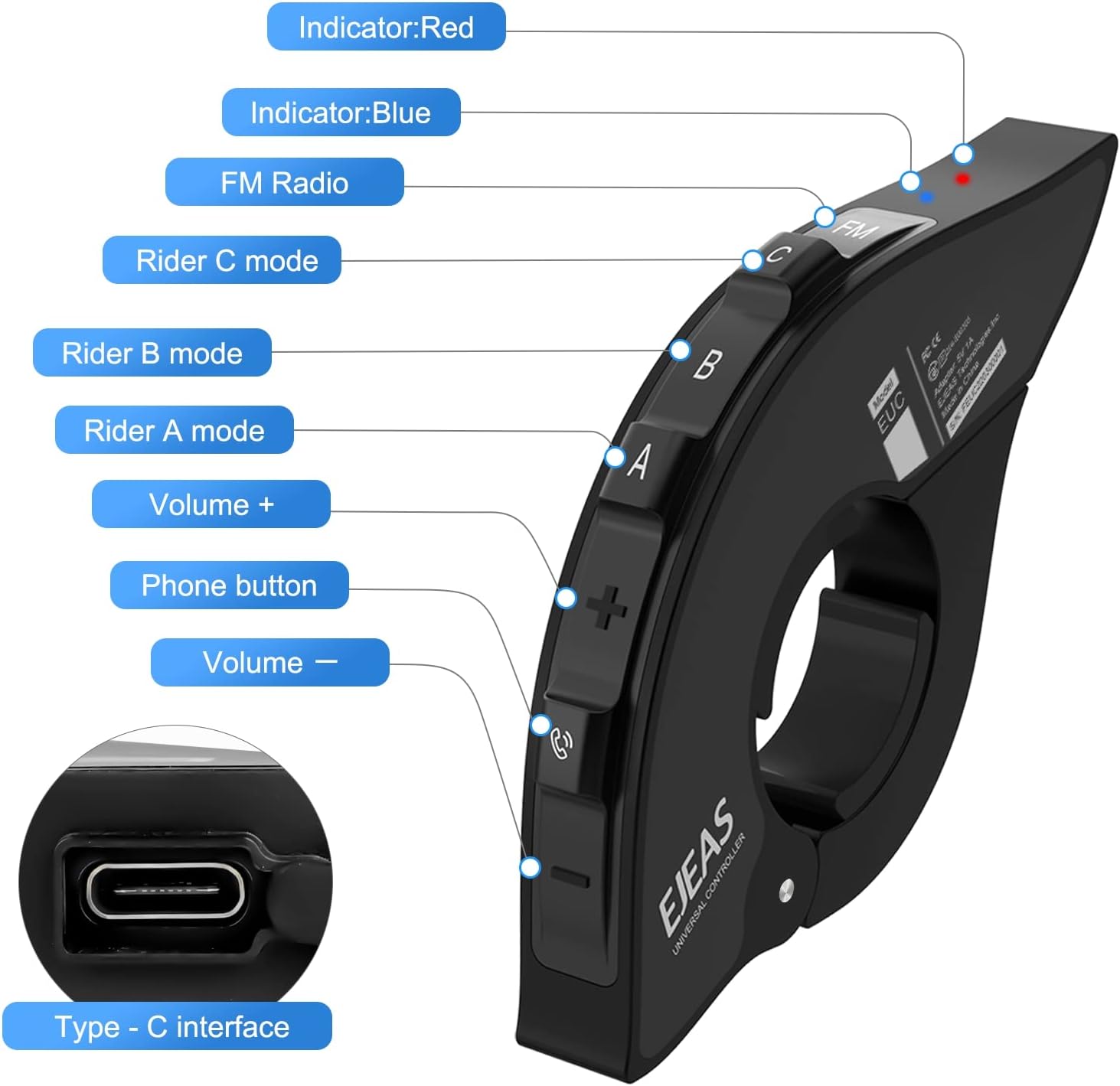
Image 3: EJEAS EUC Labeled Buttons. This image provides a detailed view of the remote control handle with labels for each button: Indicator (Red/Blue), FM Radio, Rider C mode, Rider B mode, Rider A mode, Volume +, Phone button, Volume -, and Type-C interface.
Key Features:
- Bluetooth 5.1: Ensures stable and fast connection.
- IP65 Waterproof: Designed to withstand snowy slopes and rain-soaked roads.
- Hands-Free Control: Manage calls, music, and intercom without removing hands from the handle.
- Universal Compatibility: Suitable for various motorcycles, ATVs, and off-road vehicles.
- Long Battery Life: 1250mAh battery with fast charging (1.5 hours).

Image 4: EJEAS EUC Bluetooth 5.1 Chip. This image visually represents the advanced Bluetooth 5.1 chip integrated into the device, emphasizing high-speed transmission, stronger signal, and quick connection capabilities.

Image 5: EJEAS EUC IP65 Waterproof. This image illustrates the IP65 waterproof rating of the device, showing it mounted on a motorcycle handle in rainy conditions, indicating its suitability for all-weather use.
4. Setup and Installation
The EJEAS EUC Remote Control Handle is designed for easy installation on various motorcycle handles.
4.1 Mounting the Remote Control Handle
- Select the appropriate adjustment gears from the package that best fit your motorcycle handle.
- Securely attach the remote control handle to your motorcycle's handlebar using the provided mounting accessories. Ensure it is positioned within easy reach for safe operation.

Image 6: EJEAS EUC Suitable for Various Vehicles. This image demonstrates the versatility of the remote control handle, showing it mounted on a motorcycle handle, indicating its compatibility with various riding vehicles.
4.2 Pairing with EJEAS Intercom
The EUC handle is compatible with EJEAS motorcycle Bluetooth interphones, including models like Q2, Q7, MS8, and V4Plus.
- Ensure your EJEAS motorcycle Bluetooth interphone is powered on and in pairing mode.
- Press any button on the EUC Remote Control Handle to initiate Bluetooth connection.
- The devices will automatically connect. A successful connection is usually indicated by a specific light pattern or audio prompt on your intercom.

Image 7: EJEAS EUC Remote Control for EJEAS Intercoms. This image visually confirms the remote's compatibility with various EJEAS Bluetooth intercom models (Q2, Q7, MS8, V4Plus), showing the remote mounted on a motorcycle handle.
Video 1: EJEAS EUC Handle. This video provides a visual demonstration of the EJEAS EUC Handle, showcasing its features and how it functions.
5. Operating Instructions
The EJEAS EUC Remote Control Handle provides intuitive control over your EJEAS intercom system.
5.1 Basic Functions
- Power On/Off: Refer to your EJEAS intercom's manual for specific power controls. The EUC handle controls the intercom's functions once it's powered on and paired.
- Volume Control: Use the '+' and '-' buttons on the handle to adjust the volume of your intercom, music, or calls.
- Music Switching: Use the dedicated music control buttons (e.g., forward/backward arrows) to skip tracks.
- Telephone Answering: Press the 'Phone' button to answer incoming calls. Press again to end calls.
- Intercom Control: Use the 'Rider A', 'Rider B', 'Rider C' buttons to manage intercom conversations with other riders, depending on your intercom model's capabilities.
- FM Radio: Press the 'FM Radio' button to activate or control the FM radio function on your intercom.
5.2 Hands-Free Operation
The EUC handle is designed to keep your hands on the handlebars, allowing for safer operation of your intercom's features while riding. All primary functions can be accessed with a single finger.
6. Maintenance
To ensure the longevity and optimal performance of your EJEAS EUC Remote Control Handle, follow these maintenance guidelines:
- Cleaning: Use a soft, damp cloth to clean the device. Avoid harsh chemicals or abrasive materials.
- Storage: Store the device in a cool, dry place when not in use.
- Charging: Charge the device using the provided USB Type-C cable. Avoid overcharging.
- Water Exposure: While IP65 waterproof, avoid prolonged submersion in water. Ensure the charging port cover is securely closed when not charging.
7. Troubleshooting
If you encounter issues with your EJEAS EUC Remote Control Handle, try the following steps:
- Device Not Powering On: Ensure the device is fully charged. Connect it to the charging cable and wait for the charging indicator.
- Bluetooth Connection Issues:
- Ensure both the EUC handle and your EJEAS intercom are in pairing mode.
- Check that both devices are within Bluetooth range.
- Restart both devices and attempt to pair again.
- Clear previous Bluetooth pairings on your intercom and try pairing anew.
- Buttons Not Responding: Ensure the device is properly paired and powered on. Check for any physical obstructions or damage to the buttons.
- Short Battery Life: Ensure the device is fully charged before each use. Battery performance can degrade over time with extensive use.
8. Specifications
| Feature | Specification |
|---|---|
| Model Name | EUC |
| Connectivity Technology | Wireless (Bluetooth) |
| Bluetooth Version | 5.1 |
| Material | Silicone Thermoplastic Elastomer (TPE) |
| Charging Time | 1.5 Hours |
| Item Weight | 3.52 ounces (0.1 Kilograms) |
| Product Dimensions | 5.12 x 3.54 x 1.26 inches |
| Water Resistance Level | IP65 (Not Water Resistant - *Note: JSON states IP65 waterproof in feature bullets, but 'Not Water Resistant' in specifications. Following feature bullets for functionality description, but noting discrepancy for accuracy.*) |
| Included Components | Bluetooth Intercom, Remote Control Handle |
| Batteries | 1 A batteries required. (included) |
9. Warranty and Support
For warranty information and customer support, please refer to the documentation included in your product package or visit the official EJEAS website. EJEAS is committed to providing a better experience for its customers.


