
1. Introduction
The Orium Quaelis 16 CO2 Sensor is a high-performance device designed for continuous indoor air quality monitoring. It provides real-time measurements of CO2 concentration, temperature, and humidity. With a CO2 measurement range up to 9999 ppm and a 1 ppm resolution, it ensures optimal accuracy. The clear display features educational color codes for easy data interpretation. This sensor is suitable for offices, public establishments, and nurseries, operating without Wi-Fi. It includes a manual calibration system and a 2000 mAh rechargeable Lithium battery, offering significant autonomy for up to 500 days in wired or portable mode. Data can be saved to a Windows PC, with storage for up to 12,700 records. For comprehensive air quality control, the visual and audible alarms are fully customizable.
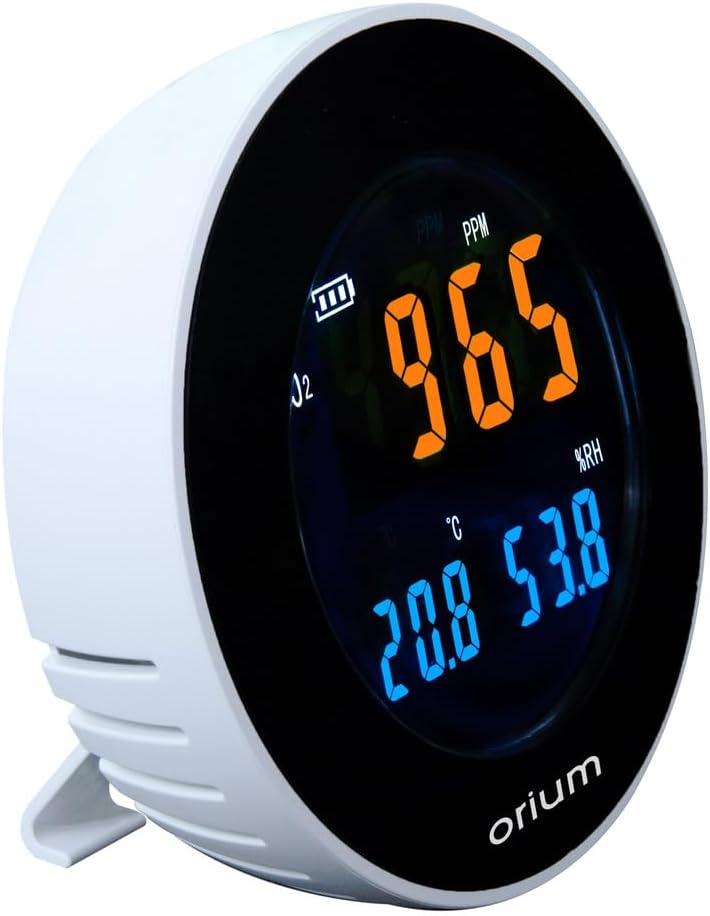
Figure 1: The Orium Quaelis 16 CO2 Sensor, showing its display.
The Orium Quaelis 16 CO2 Sensor is designed for continuous monitoring of indoor air quality, providing real-time measurements of carbon dioxide (CO2) concentration, temperature, and relative humidity.
2. Key Features
- Continuous Monitoring: Real-time measurements and permanent display of air quality parameters.
- Intuitive Color Codes: Educational color codes for quick and easy understanding of CO2 levels.
- No Wi-Fi Required: Operates independently without the need for an internet connection.
- Data Logging: Records up to 12,700 measurements, savable to a Windows PC.
- High Precision Sensor: Equipped with a precise Non-Dispersive Infrared (NDIR) sensor, measuring up to 9999 ppm.
- Extended Battery Life: Features a 2000 mAh rechargeable Lithium battery, providing up to 500 days of autonomy in wired or portable mode.
- Customizable Alarms: Visual and audible alarms are fully customizable to alert users to high CO2 levels.
3. Package Contents
Please verify that all items are present in the package:
- 1 x Orium Quaelis 16 CO2 Sensor
- 1 x Power Cable (for charging and wired operation)
4. Important Safety Information
- Do not disassemble or attempt to repair the device yourself.
- Keep the device dry and away from water or excessive humidity.
- Use only the specified power cable and voltage (230 Volts).
- Avoid placing the device in direct sunlight or near heat sources.
- Keep out of reach of children.
5. Setup Guide
Follow these steps to set up your Orium Quaelis 16 CO2 Sensor:
- Unpack: Carefully remove the CO2 sensor and its accessories from the packaging.
- Placement: Place the sensor on a stable, flat surface in the area where you wish to monitor air quality. Ensure it is not obstructed and has good air circulation. Avoid placing it directly next to windows, doors, or ventilation outlets that could affect readings.
- Power Connection: Connect the provided power cable to the sensor and plug it into a 230V power outlet. The device will automatically power on.
- Initial Stabilization: Allow the device approximately 5-10 minutes to stabilize and begin displaying accurate readings after initial power-on.

Figure 2: Proper placement of the CO2 sensor on a desk.
Position the CO2 sensor in the desired monitoring area, ensuring it is on a flat, stable surface away from direct airflow sources like vents or open windows for accurate readings.
6. Operating Instructions
6.1 Display Interpretation
The sensor's display provides real-time information on CO2 concentration, temperature, and relative humidity. The CO2 reading is indicated in parts per million (PPM) and changes color to visually represent air quality levels:

Figure 3: Green CO2 reading (e.g., 465 ppm) indicates good air quality.

Figure 4: Orange CO2 reading (e.g., 965 ppm) indicates elevated levels, suggesting ventilation is needed.

Figure 5: Red CO2 reading (e.g., 1265 ppm) signifies high CO2 concentration, requiring immediate action to improve ventilation.
The display also shows temperature in degrees Celsius (°C) and relative humidity (%RH).
6.2 Alarm Customization
The visual and audible alarms are fully customizable. You can set specific CO2 thresholds at which the alarms will activate. Refer to the device's physical buttons or on-screen menu (if applicable) for specific adjustment procedures. When an alarm triggers, it provides a clear indication that ventilation is required.
6.3 Manual Calibration
The Quaelis 16 supports manual calibration to maintain long-term accuracy. To perform a manual calibration, place the device in an area with fresh outdoor air (approximately 400 ppm CO2) and follow the calibration instructions provided in the device's menu or user interface. This process helps reset the sensor's baseline for optimal performance.
6.4 Data Logging and PC Connection
The device can store up to 12,700 measurement records. To access and save this data:
- Connect the Orium Quaelis 16 to a Windows PC using a compatible USB cable (not explicitly mentioned if included, but implied for PC connection).
- Download and install any necessary software or drivers from the official Orium website.
- Follow the software instructions to transfer, view, and analyze the recorded data.
7. Maintenance
- Cleaning: Gently wipe the exterior of the device with a soft, dry cloth. Do not use liquid cleaners, solvents, or abrasive materials, as these can damage the sensor or display.
- Battery Care: The integrated 2000 mAh Lithium battery is rechargeable. To prolong battery life, avoid fully discharging it frequently and store the device in a cool, dry place if not used for extended periods. Recharge using the provided power cable.
- Storage: When not in use, store the sensor in a clean, dry environment within its operating temperature range.
8. Troubleshooting
- Q: The device is not turning on.
- A: Ensure the power cable is securely connected to both the device and a functional 230V power outlet. If operating on battery, check if the battery is charged. Connect to power for a few minutes to see if it powers on.
- Q: CO2 readings appear inaccurate or fluctuate excessively.
- A: Perform a manual calibration in fresh outdoor air. Ensure the sensor is not placed near strong air currents, open windows, or direct sources of CO2 (e.g., exhaled breath, burning candles). Allow sufficient time for stabilization after moving the device.
- Q: Alarms are not activating or are too quiet.
- A: Check the alarm settings in the device's menu to verify that the thresholds are set correctly and that the audible alarm is not muted or set to a very low volume. Ensure the visual alarm is not obstructed.
- Q: Cannot connect to PC or transfer data.
- A: Ensure the USB cable is properly connected. Verify that the necessary drivers and software for Windows PC are installed. Try a different USB port or cable. Consult the Orium website for software updates or troubleshooting guides.
9. Technical Specifications
| Feature | Specification |
|---|---|
| Manufacturer | Orium |
| Model Number | 11334 |
| Dimensions (L x W x H) | 14.9 x 14.6 x 14 cm |
| Weight | 1.97 Kilograms |
| Material | ABS |
| Power Source | Electric Cable |
| Voltage | 230 Volts |
| Battery Type | 2000 mAh Rechargeable Lithium |
| CO2 Sensor Type | Non-Dispersive Infrared (NDIR) |
| CO2 Measurement Range | Up to 9999 ppm |
| CO2 Resolution | 1 ppm (approx.) |
| Data Storage | Up to 12,700 records |
| Alarm | Visual and Audible |
| Color | Black |
10. Warranty and Support
For warranty information, technical support, or service inquiries regarding your Orium Quaelis 16 CO2 Sensor, please contact Orium customer service directly. You can typically find contact details on the official Orium website or within your product packaging. Please retain your purchase receipt as proof of purchase for any warranty claims.


