
SCULPFUN S30 Pro Laser Engraver
SCULPFUN S30 Pro Laser Engraver Instruction Manual
Model: S30 Pro Laser Engraver
1. Product Overview
The SCULPFUN S30 Pro is an advanced laser engraving and cutting machine designed for precision and efficiency. It features an innovative auto-controlled air assist system and a powerful 10000mW laser output, making it suitable for a wide range of materials and creative projects.

Figure 1.1: SCULPFUN S30 Pro Laser Engraver and example projects.
2. Safety Precautions
WARNING: Laser engravers are powerful tools. Failure to follow safety guidelines can result in serious injury or property damage.
- Always wear appropriate laser safety goggles (Class 4) when operating the machine.
- Ensure the work area is well-ventilated to dissipate fumes and smoke.
- Never leave the machine unattended during operation.
- Keep flammable materials away from the laser's path.
- Do not engrave or cut unknown materials. Some materials can produce toxic fumes or catch fire.
- Keep children and pets away from the operating machine.
- Ensure the machine is properly grounded.
3. Package Contents
Verify all components are present before assembly.

Figure 3.1: Complete package contents of the S30 Pro.
- SCULPFUN S30 Pro Laser Engraver Frame Components
- 10W Laser Module
- Air Assist Pump and Hose
- Power Adapter and Cable
- USB Cable
- Safety Goggles
- Tool Kit (wrenches, screws, etc.)
- Test Material Samples
- User Manual
4. Setup and Assembly
Follow these steps for initial setup and assembly of your SCULPFUN S30 Pro.

Figure 4.1: Overview of S30 Pro components and assembly.
- Frame Assembly: Connect the aluminum profiles to form the main frame. Ensure all screws are tightened securely.
- Laser Module Installation: Mount the laser module onto the gantry. Connect the laser cable to the main control board.
- Air Assist System Connection: Connect the air hose from the air assist pump to the nozzle on the laser module. Plug the air pump into the designated port on the control board.
- Power and Data Connection: Connect the power adapter to the machine and a power outlet. Connect the USB cable from the machine to your computer.
- Software Installation: Install the recommended operating software, LightBurn, on your computer. Ensure the correct drivers are installed for machine recognition.
For a visual guide on assembly and initial operation, refer to the official product video:
Video 4.1: SCULPFUN S30 Series Overview and DIY Project Examples. This video demonstrates the assembly process, key features, and various applications of the S30 series laser engraver.
5. Operating Instructions
The S30 Pro offers precise control for both engraving and cutting tasks.
5.1 Automatic Air Assist System
The S30 Pro features an intelligent 32-bit motherboard that allows for automatic control of the air assist system via LightBurn software (M8 command). This optimizes air flow for different operations, ensuring cleaner results.

Figure 5.1: Automatic air assist control via LightBurn M8 switch.

Figure 5.2: Benefits of automatic air assist for clean edges.
5.2 Engraving and Cutting Performance
The 10W laser module provides significant power for various materials. The ultra-fine laser focus (0.06x0.08mm) and 0.005mm industrial linear guide ensure high precision and smooth results without wavy lines.
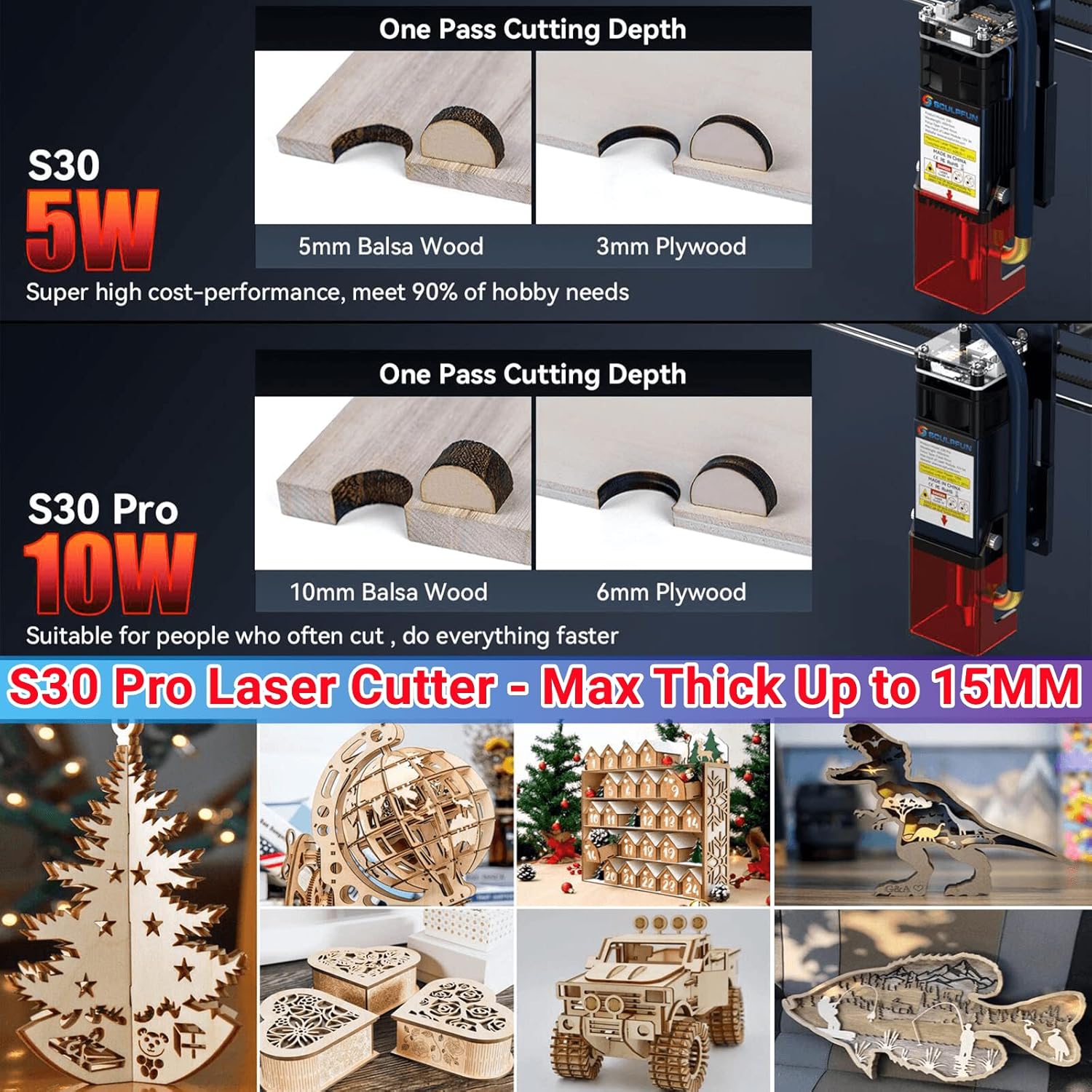
Figure 5.3: One-pass cutting capabilities of S30 Pro.
The S30 Pro can engrave and cut a wide variety of materials, including:
- Wood (walnut, cherry, MDF, balsa, plywood)
- Acrylic board
- Cardboard, non-woven fabric, bamboo
- Leather, some plastic boards, PCB boards
- Aluminum oxide, 304 stainless steel, ceramic, dark stone, rubber, glass

Figure 5.4: Examples of materials suitable for engraving and cutting.
6. Maintenance
Regular maintenance ensures optimal performance and extends the lifespan of your laser engraver.
- Lens Cleaning: Periodically clean the laser lens to maintain engraving quality. Use a soft, lint-free cloth and lens cleaning solution.
- Lens Replacement: The S30 Pro features an innovative replaceable lens design, significantly extending the laser's service life. Replace the lens when wear is observed or engraving quality degrades.
- Rail Lubrication: Apply a small amount of lubricant to the linear guide rails occasionally to ensure smooth movement of the laser module.
- General Cleaning: Keep the machine free of dust and debris, especially around moving parts and the laser module.
7. Troubleshooting
This section addresses common issues you might encounter.
| Problem | Possible Cause | Solution |
|---|---|---|
| Laser not firing | Power cable loose, software issue, laser module fault | Check power connections, restart software/computer, contact support if issue persists. |
| Poor engraving/cutting quality | Incorrect focus, dirty lens, wrong power/speed settings, material issue | Adjust laser focus, clean lens, optimize power/speed settings for material, ensure material is flat. |
| Machine not recognized by computer | USB cable issue, driver not installed, software port setting | Try a different USB port/cable, reinstall drivers, check COM port settings in software. |
| Wavy lines in engraving | Loose belts, unstable frame, linear guide issue | Check and tighten belts, ensure machine is on a stable surface, inspect linear guides for obstructions. |
8. Specifications
- Model: S30 Pro Laser Engraver
- Diode Laser Output Power: 10W (Light Energy)
- Machine Power: Approximately 84W
- Laser Focus: 0.06x0.08mm
- Laser Wavelength: 455±5nm
- Focusing Method: Fixed focus column + sliding device
- Engraving Accuracy: 0.005mm
- Standard Engraving Area: 410x400mm (expandable)
- Operating Software: LightBurn (with air assist function M8), LaserGRBL, Benbox, GrblController, LiteFire
- Supported Operating Systems: Windows, MAC
- Supported File Formats: NC, BMP, JPG, PNG, DXF, and other image formats
- Data Transmission Method: USB connection or Bluetooth wireless connection
- Air Pump Type: Mainboard-controlled air pump
- Air Pump Voltage: 12V
- Air Pump Airflow: 30L/min
- Air Hose Inner Diameter: 7.5mm
- Item Weight: 15 pounds
- Package Dimensions: 24.52 x 9.45 x 8.86 inches
- Manufacturer: SCULPFUN, Co, Ltd
- Country of Origin: China
9. Warranty and Support
For warranty information and technical support, please refer to the documentation provided with your product or visit the official SCULPFUN website. Keep your purchase receipt as proof of purchase.
Manufacturer: SCULPFUN, Co, Ltd
Related documentsS30 Pro Laser Engraver


Ask a question about this manual
Ask about setup, troubleshooting, compatibility, parts, safety, or missing instructions. Manuals+ will review the question and use this page’s manual context to help answer it.