
Introduction
The Xiaomi Redmi Pad L83 is a WiFi-only tablet designed for entertainment and productivity. It features a 10.61-inch display, an Octa-Core MediaTek Helio G99 processor, and a large 8000mAh battery. This manual provides essential information to help you set up, operate, and maintain your device.
What's in the Box
Upon unboxing your Xiaomi Redmi Pad, you should find the following items:
- 1 x Xiaomi Redmi Pad L83 Tablet
- 1 x Car Charger
- 1 x USB Cable
Video: Unboxing and First Review of the Xiaomi Redmi Pad. This video demonstrates the contents of the product packaging and initial impressions of the device.
Setup
- Power On: Press and hold the Power button located on the top edge of the tablet until the Xiaomi logo appears.
- Initial Configuration: Follow the on-screen prompts to select your language, region, and connect to a Wi-Fi network.
- Google Account Setup: Sign in with your Google account or create a new one to access Google services and the Play Store.
- Screen Lock: Set up a screen lock method (Pattern, PIN, Password, or Face Unlock) for security. Note that Face Unlock is less secure than other methods.
- Software Updates: Ensure your tablet is running the latest software by checking for updates in the Settings menu.
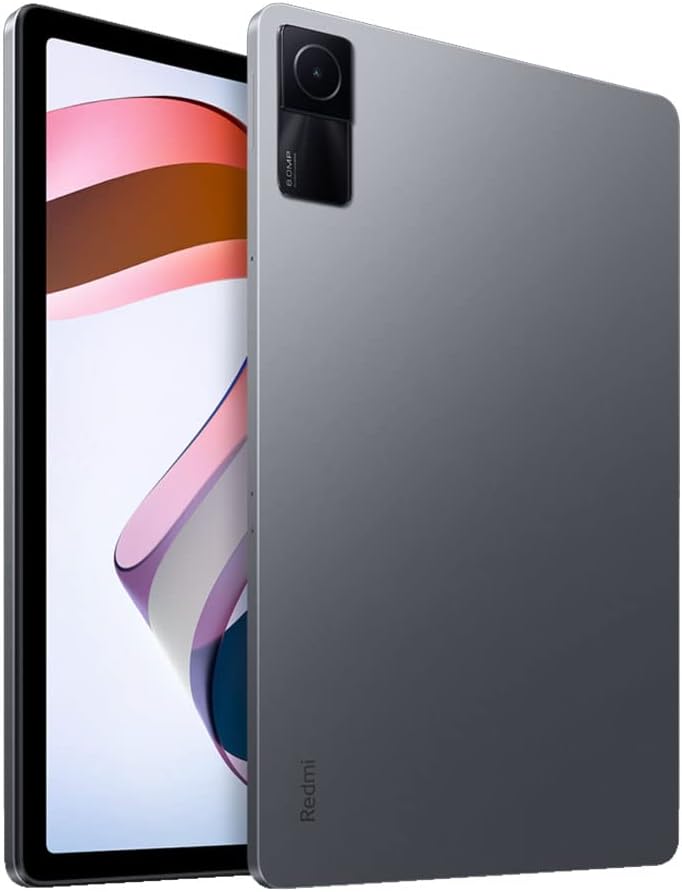
Image: Front view of the Xiaomi Redmi Pad, showing the display and the location of the SIM/microSD card tray on the side.
Operating Instructions
Display & Audio
The Redmi Pad features a 10.61-inch IPS display with a resolution of 2000x1200 pixels and a 90Hz refresh rate, offering a smooth visual experience. It supports Dolby Atmos audio through its quad speakers, providing immersive sound for media consumption.
- Display: 10.61-inch, 2000x1200 resolution, 90Hz refresh rate, 400 nits (typ) brightness.
- Audio: Quad speakers with Dolby Atmos support for rich sound.
Video: A comprehensive review of the Xiaomi Redmi Pad, highlighting its display quality, audio performance, and overall user experience.
Performance & Gaming
Powered by the MediaTek Helio G99 Octa-core processor, the Redmi Pad delivers smooth performance for daily tasks and medium-graphic gaming. It is available with 3GB, 4GB, or 6GB of RAM and 64GB or 128GB of storage, expandable via microSD card.
- Processor: MediaTek Helio G99 Octa-core.
- RAM: 3GB, 4GB, or 6GB options.
- Storage: 64GB or 128GB, expandable via microSD.
Video: A detailed comparison between the Redmi Pad and Samsung Galaxy Tab S6 Lite 2022, focusing on performance, display, and overall value for money.
Software & Updates
The tablet runs MIUI 13 based on Android 12. Xiaomi promises two major Android updates and three years of security updates, ensuring your device remains up-to-date and secure.
- Operating System: Android 12 with MIUI 13.
- Updates: Two major Android updates and three years of security updates.
Camera
The Redmi Pad is equipped with an 8MP rear camera and an 8MP front camera (105° FOV with FocusFrame). Both cameras are suitable for casual photography, video calls, and document scanning.
- Rear Camera: 8MP, Full HD Video Recording.
- Front Camera: 8MP (FOV - 105°), ideal for video calls.

Image: Back view of the Xiaomi Redmi Pad, showcasing the single 8MP rear camera module.
Battery Life
With an 8000mAh battery, the Redmi Pad offers extended usage times, making it suitable for long commutes or entertainment sessions. It supports 18W fast charging.
- Battery Capacity: 8000mAh.
- Charging: 18W fast charging.
Maintenance
- Cleaning: Use a soft, lint-free cloth to clean the screen and body. Avoid harsh chemicals.
- Software Updates: Regularly check for and install system updates to ensure optimal performance and security.
- Storage Management: Periodically clear unnecessary files and apps to free up storage space and improve device speed.
- Battery Care: Avoid extreme temperatures and fully draining the battery frequently to prolong its lifespan.
Troubleshooting
- Device Unresponsive: If the tablet becomes unresponsive, press and hold the Power button for about 10 seconds to force a restart.
- Wi-Fi Connectivity Issues: Try restarting your Wi-Fi router and the tablet. If the issue persists, forget the network in Wi-Fi settings and reconnect.
- App Crashes: Clear the cache and data of the problematic app in Settings > Apps. If it continues, uninstall and reinstall the app.
- Slow Performance: Close background apps, clear cache, and ensure sufficient free storage. Consider a factory reset as a last resort (back up your data first).
- Contact Support: For persistent issues, refer to the Xiaomi support website or contact customer service.
Product Specifications
| Feature | Specification |
|---|---|
| Brand | XIAOMI |
| Model Name | Redmi Pad |
| Model Number | L83 |
| Screen Size | 10.61 Inches |
| Display Resolution | 2000x1200 |
| Display Refresh Rate | 90 Hz |
| Processor | MediaTek Helio G99 Octa-core (2.2 GHz) |
| RAM Memory | 4 GB (available in 3GB, 4GB, 6GB variants) |
| Storage Capacity | 128 GB (available in 64GB, 128GB variants) |
| Operating System | Android 12 (MIUI 13) |
| Rear Camera | 8 MP |
| Front Camera | 8 MP (105° FOV) |
| Battery Capacity | 8000 mAh |
| Connectivity | Wi-Fi 5, Bluetooth v5.3, USB-C |
| Audio | Quad Speakers, Dolby Atmos supported |
Warranty & Support
The Xiaomi Redmi Pad L83 comes with a limited warranty. For detailed warranty terms and conditions, please refer to the warranty card included in the box or visit the official Xiaomi support website.
For technical support, troubleshooting assistance, or service requests, please contact Xiaomi customer support through their official channels.


