
Introduction
This instruction manual provides comprehensive guidance for the safe and effective use of your PHILIPS Bhs378/10 Kerashine Straightener and PHILIPS HP6388 Touch-Up Trimmer. Please read all instructions carefully before first use and retain this manual for future reference.
Important Safety Information
Always observe the following basic safety precautions when using electrical appliances:
- Do not use these appliances near water, such as in bathtubs, showers, or basins.
- Always unplug the straightener after use and before cleaning.
- Keep the straightener out of reach of children.
- Do not use the straightener if the cord is damaged.
- Ensure the trimmer is dry before inserting or replacing batteries.
- Do not attempt to repair the appliances yourself. Contact authorized service personnel.
PHILIPS Bhs378/10 Kerashine Straightener
Product Overview
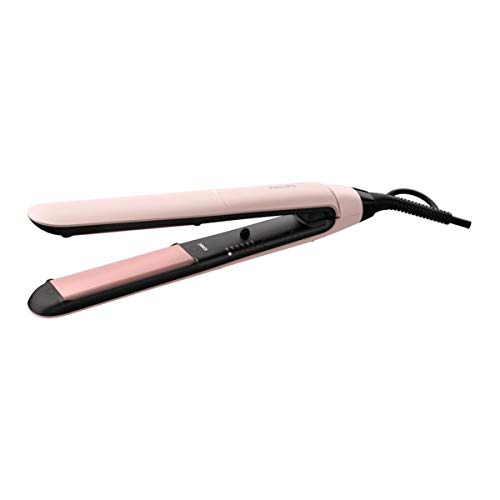
Image: The PHILIPS Bhs378/10 Kerashine Straightener in pink and black, shown closed.
Setup
- Unpack the straightener and remove all packaging materials.
- Inspect the appliance for any visible damage. Do not use if damaged.
- Plug the power cord into a suitable electrical outlet.
Operating Instructions
- Power On/Off: Press and hold the power button to turn the straightener on or off.
- Temperature Settings: Use the temperature control buttons to select your desired heat setting. The straightener offers 6 LED temperature settings, ranging from 160°C to 230°C.
- Fast Heat-up: The straightener is ready to use in 30 seconds.
- ThermoProtect Technology: This technology distributes heat evenly across the plates, preventing overheating and protecting your hair.
- Ionic Care: The straightener features ionic care for shiny, frizz-free hair.
- Keratin Ceramic Plates: The 100mm long keratin ceramic plates ensure smooth gliding and shiny results.
- Auto Shut-off: For safety, the straightener automatically shuts off after 60 minutes of inactivity.
- Key-lock Function: Activate the key-lock function to prevent accidental temperature changes during use or for safe storage.

Image: Close-up of the straightener plates highlighting Philips SilkPro Care technology and ceramic plates for smooth, straight hair.

Image: Diagram illustrating even heat distribution across the straightener plates to minimize heat damage, a feature of Philips SilkPro Care technology.
Maintenance
- Always unplug the straightener and allow it to cool completely before cleaning.
- Wipe the plates and exterior with a soft, damp cloth. Do not use abrasive cleaners or solvents.
- Ensure the straightener is completely dry before storing.
- Store in a dry place, away from moisture.
Troubleshooting
| Problem | Possible Cause | Solution |
|---|---|---|
| Straightener does not heat up. | Not plugged in correctly or power outlet issue. | Check power connection. Try a different outlet. |
| Straightener turns off unexpectedly. | Auto shut-off activated. | This is a safety feature. Turn the straightener back on if needed. |
Specifications
- Model: Bhs378/10
- Temperature Range: 160°C - 230°C (6 settings)
- Plate Material: Keratin Ceramic
- Plate Length: 100mm
- Heat-up Time: 30 seconds
- Auto Shut-off: Yes
- Voltage: Universal
- Dimensions (LxWxH): 7.5 x 34 x 12 cm
- Item Weight: 560 g
PHILIPS HP6388 Touch-Up Trimmer
Product Overview

Image: The PHILIPS HP6388 Touch-Up Trimmer in white with a pink accent, shown with its protective cap.
Setup
- Unpack the trimmer and accessories.
- Install the included battery by twisting the bottom cap and inserting the battery with the correct polarity.
- Attach the desired trimming head (e.g., 1/3" trimming head for facial hair) or eyebrow comb for specific grooming needs.
Operating Instructions
- Power On/Off: Slide the power switch to turn the trimmer on or off.
- Eyebrow Trimming: Attach the eyebrow comb. Select the desired length setting (2mm or 4mm) by adjusting the comb. Gently move the trimmer against the direction of hair growth to trim eyebrows to a uniform length.
- Facial Hair Removal: Use the 1/3" trimming head for precise removal of facial hair, such as upper lip hair. Hold the skin taut and move the trimmer gently over the area.
- Body Hair Touch-Up: The trimmer can also be used for quick touch-ups on other body areas.

Image: A woman using the PHILIPS HP6388 Touch-Up Trimmer to shape her eyebrows and remove upper lip hair.

Image: A close-up of a woman using the PHILIPS HP6388 Touch-Up Trimmer with the comb attachment for perfectly trimmed eyebrows.
Maintenance
- After each use, turn off the trimmer and remove the trimming head.
- Use the included cleaning brush to remove any hair from the trimming head and the trimmer body.
- The trimming head can be rinsed under running water, but ensure the main body of the trimmer remains dry.
- Ensure all parts are dry before reassembling or storing.
- Replace the battery when the trimmer's performance diminishes.
Troubleshooting
| Problem | Possible Cause | Solution |
|---|---|---|
| Trimmer does not turn on. | Battery is dead or incorrectly inserted. | Replace the battery or check its polarity. |
| Poor trimming performance. | Trimming head is clogged with hair or dull. | Clean the trimming head thoroughly. Consider replacing the head if it remains dull. |
Specifications
- Model: HP6388
- Power Source: Battery Powered
- Battery Run Time: 60 minutes
- Length Settings: 2mm, 4mm (with comb attachment)
- Trimming Range: 1 - 4 mm
- Trimming Head Size: 1/3 inch
- Material: Plastic
Warranty and Support
Your PHILIPS Bhs378/10 Kerashine Straightener and HP6388 Touch-Up Trimmer come with a warranty. Please refer to the included warranty card for detailed terms and conditions.
For product support, troubleshooting assistance, or to inquire about replacement parts, please visit the official PHILIPS website or contact PHILIPS customer service in your region. Contact information can typically be found on the PHILIPS website or in the packaging materials.


