1. Introduction
The MOUNTAINONE pipe inspection camera system is designed to provide clear visual inspection of hard-to-reach areas such as pipes, drains, and industrial conduits. It combines a high-definition camera probe with a 9-inch IPS color monitor, offering a comprehensive solution for professional and DIY inspection needs.
This system is equipped with a DVR function for recording video and capturing photos, and features a durable, waterproof design suitable for various challenging environments.

Figure 1.1: The complete MOUNTAINONE pipe inspection camera kit, including the monitor, cable, and camera head, housed in a durable aluminum case.
2. Package Contents
Please verify that all items listed below are included in your package:
- 1 x 9-inch IPS Monitor (with DVR function)
- 1 x AHD Camera Head
- 1 x 16GB TF Card (pre-installed or included separately)
- 1 x 30M Fiberglass Cable
- 1 x Camera Proof Cover (protective cover)
- 1 x 2600mAh Battery Box
- 1 x Charger
- 1 x Connection Cable
- 1 x Screwdriver
- 1 x User Manual (English)

Figure 2.1: Visual representation of the included accessories: camera head, cable, aluminum box, screwdriver, camera protective covers, and power adapter.
3. Product Features
- 9-inch IPS Color Monitor: Features a high-resolution IPS display for clear viewing, even in bright outdoor conditions, thanks to the included sun visor.
- AHD 720P Waterproof Camera: Equipped with an IP68 waterproof stainless steel camera head (17mm x 32mm) with a 90° wide viewing angle, ensuring durability and clear imaging in wet environments.
- Adjustable LED Illumination: Six adjustable LED lights provide ample illumination for dark inspection areas, enhancing visibility and image quality.
- DVR Recording Function: Built-in TF card slot (16GB card included) allows for live video viewing, recording of video (MP4) and photos (JPG), and audio recording. Recorded inspections can be played back directly on the monitor.
- Durable Fiberglass Cable: The inspection cable is made of high-intensity fiberglass (3.8mm diameter), offering anti-corrosion, cold-resistant, and durable properties. Available in selectable lengths (e.g., 30M).
- Portable Design: All components are stored in a robust, padded aluminum case, making the kit easy to transport and protect.
- Long Battery Life: Powered by a 12V 2600mAh Li-battery, providing approximately 4 hours of continuous operation.
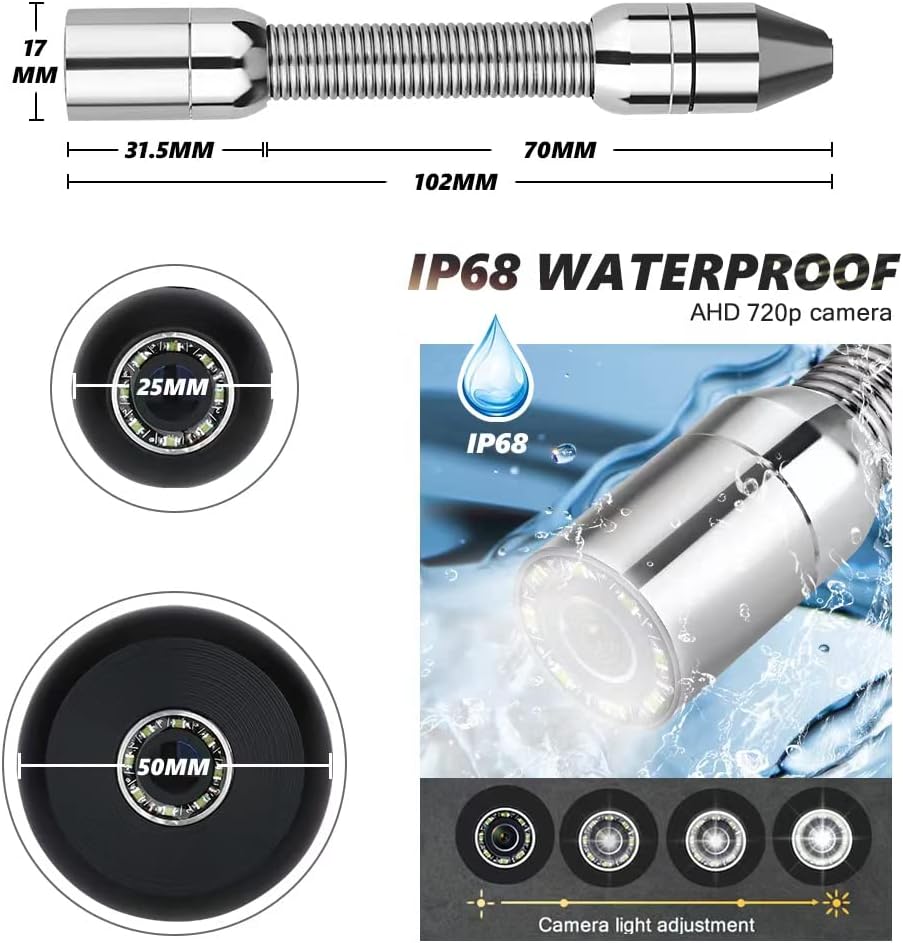
Figure 3.1: Details of the camera head, including dimensions (17mm diameter, 31.5mm length), IP68 waterproofing, and adjustable LED lights for optimal illumination.

Figure 3.2: Illustration of the flexible fiberglass cable's internal structure and available lengths (10M, 20M, 30M).

Figure 3.3: Dimensions of the aluminum carrying case (264mm x 189mm x 117mm) and the camera head (17mm diameter, 102mm total length including spring).
4. Setup Guide
- Charge the Battery: Connect the charger to the battery box and a power outlet. Ensure the battery is fully charged before first use (approximately 4 hours for a full charge).
- Insert TF Card: Locate the TF card slot on the monitor unit. Insert the provided 16GB TF card firmly until it clicks into place. This card is essential for recording video and photos.
- Connect Camera and Cable:
- Attach the camera head to the end of the fiberglass cable. Ensure a secure connection.
- Connect the other end of the fiberglass cable to the designated port on the monitor unit.
- Attach Protective Cover: Select the appropriate camera protective cover (25mm or 50mm) and securely attach it to the camera head. This protects the camera and helps guide it through pipes.
- Power On: Press the "POWER ON/OFF" button on the monitor to turn on the system. The camera feed should appear on the screen.
5. Operating Instructions
5.1 Basic Operation
- Power On/Off: Press the "POWER ON/OFF" button to turn the device on or off.
- LED Light Adjustment: Use the "LED" button to adjust the brightness of the camera's LED lights. Cycle through different brightness levels to optimize visibility in various conditions.
- Menu Navigation: Use the "MENU/ENT" button to access the system menu. Use the arrow buttons ("<" and ">") to navigate through menu options and "MENU/ENT" to confirm selections.
5.2 DVR Functions (Recording and Playback)
- Video Recording: Press the "REC/-" button to start video recording. Press it again to stop recording. A recording indicator will typically appear on the screen. Videos are saved in MP4 format.
- Quick Photo Capture: Press the "PHOTO" button to capture a still image of the current view. Photos are saved in JPG format.
- Image Zoom: Press the ">" button to zoom in on the image from 0 to 5 times magnification. This allows for closer inspection of details.
- Playback:
- Press the "PLAY/+" button to enter playback mode.
- Use the "<" and ">" buttons to navigate through recorded videos and photos.
- Press "MENU/ENT" to play a selected file.
- Press "PLAY/+" again to exit playback mode.
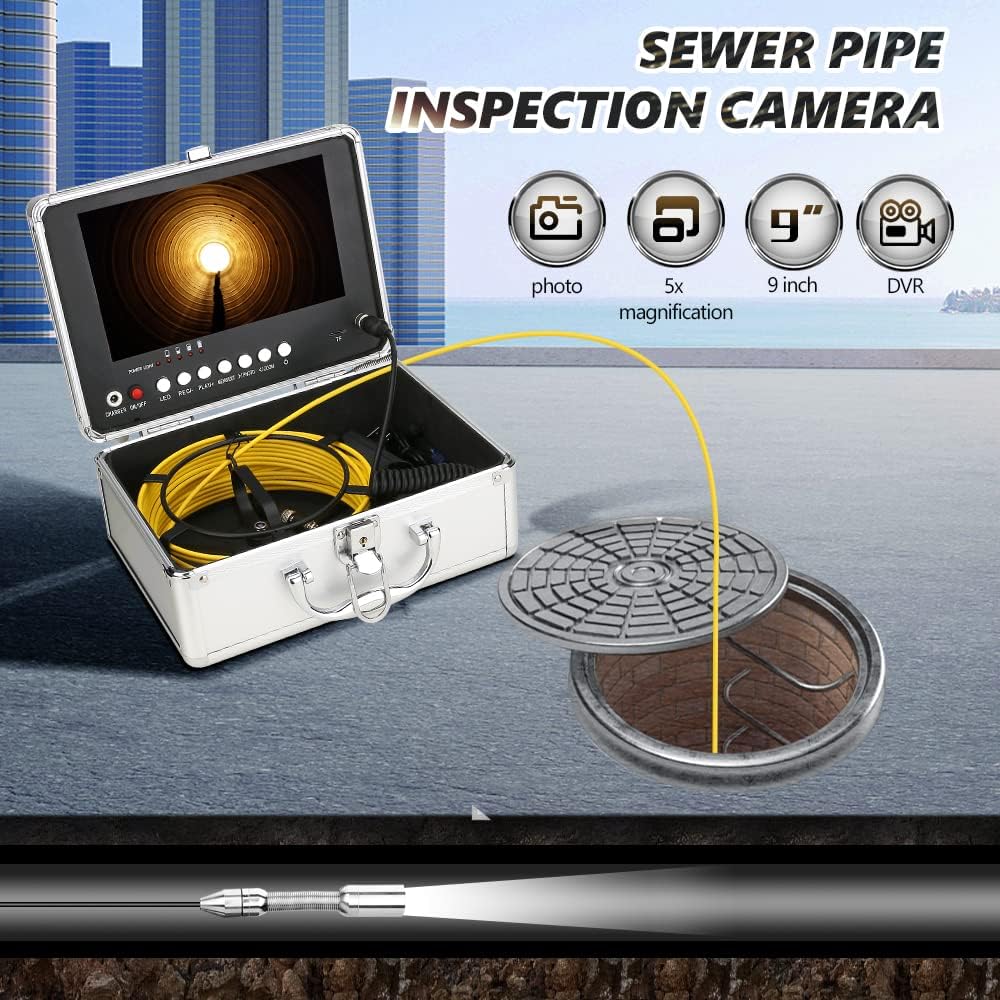
Figure 5.1: An example of the MOUNTAINONE inspection camera being used to inspect a sewer pipe, demonstrating its application.
6. Maintenance
- Cleaning the Camera Head: After each use, especially in dirty environments, carefully clean the camera head with a soft, damp cloth. For stubborn debris, a mild detergent can be used, but ensure no liquid enters the camera body through non-sealed areas.
- Cleaning the Cable: Wipe down the fiberglass cable with a damp cloth as you reel it back into the case to remove any dirt or residue.
- Monitor Care: Clean the monitor screen with a soft, lint-free cloth. Avoid abrasive cleaners or solvents.
- Battery Care: Store the battery in a cool, dry place. If not used for extended periods, charge the battery periodically (e.g., every 3 months) to maintain its lifespan.
- Storage: Always store the entire kit in its original aluminum case to protect it from dust, moisture, and physical damage.
- Avoid Extreme Temperatures: Do not expose the device to extreme hot or cold temperatures, as this can affect performance and battery life.
7. Troubleshooting
| Problem | Possible Cause | Solution |
|---|---|---|
| No image on monitor |
|
|
| Cannot record video/photo |
|
|
| Poor image quality |
|
|
| Battery drains quickly |
|
|
8. Technical Specifications
| Monitor | 9-inch IPS Color Monitor with Sun Visor |
| Camera Resolution | AHD 720P |
| Camera Diameter | 17mm |
| Camera Material | Stainless Steel |
| Viewing Angle | 90° |
| LED Lights | 6 adjustable white LEDs |
| Waterproof Rating | IP68 (Camera Head) |
| Cable Length | 30M (Fiberglass) |
| Cable Diameter | 3.8mm |
| Battery | 12V 2600mAh Lithium-ion |
| Continuous Use Time | Approx. 4 hours |
| Charger | AC100-240V DC12.6V |
| TF Card Support | Max 64GB (16GB included) |
| Video Format | MP4 |
| Photo Format | JPG |
| Case Dimensions | 264 x 189 x 117 mm |
| Total Weight | Approx. 3.5 kg |
| Model Number | F9DC17 |
9. Warranty and Support
Specific warranty details for this product are not provided in this manual. Please refer to the product packaging or the seller's website for warranty information.
For technical support, troubleshooting assistance, or inquiries regarding replacement parts, please contact MOUNTAINONE customer service through the retailer where the product was purchased or visit the official MOUNTAINONE website for contact information.
When contacting support, please have your product model number (F9DC17) and purchase details readily available.
