1. Introduction
This manual provides essential instructions for the safe and efficient operation of your ALLWEI SGR-PPS2400-3 LiFePO4 Power Station. Please read this manual thoroughly before using the product and retain it for future reference. This power station is designed to provide reliable power for various applications, including home backup, outdoor activities, and emergency power outages.
2. Safety Instructions
Always observe the following safety precautions to prevent injury or damage to the product:
- Do not disassemble, repair, or modify the unit.
- Keep the unit away from fire or heat sources.
- Avoid exposure to water or high humidity.
- Do not use or store the unit in direct sunlight or high temperatures.
- Ensure proper ventilation during use and charging.
- Keep out of reach of children and pets.
- Use only approved accessories and charging cables.
3. Product Features
The ALLWEI SGR-PPS2400-3 Power Station offers a range of advanced features:
- High Power Output: 2400W AC inverter (3600W power lifting) with pure sine wave output, capable of powering most appliances under 3600W.
- ATS UPS Function: Automatic Transfer Switch (ATS) and Uninterruptible Power Supply (UPS) functionality ensures seamless power transition during outages, activating within 10ms.
- Expandable Battery Capacity: Base 2048Wh capacity, expandable up to 10.24kWh with additional ALLWEI SGR-B200 PRO batteries (sold separately).
- Long Lifespan Battery: Utilizes LiFePO4 batteries with over 3500 cycles, providing a 10-year lifespan. Integrated BMS and MPPT for multiple protections.
- Fast Charging: Achieves 0-80% charge in 45 minutes and full charge in 1.5 hours (Q Mode) via 2400W max AC input. Supports car, solar panel, AC, and combined AC/Solar charging.
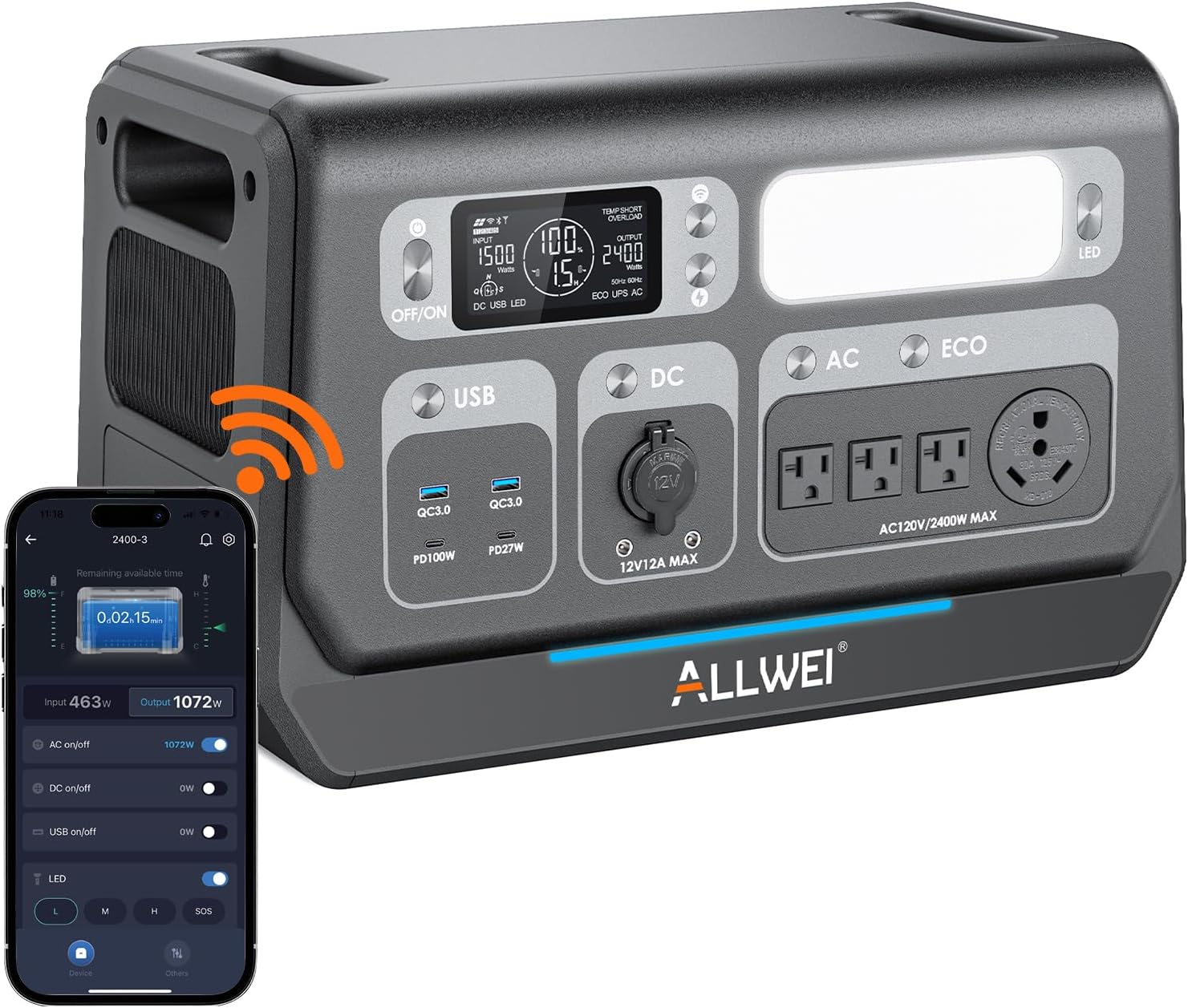
- Smart App Control: Monitor real-time status, toggle switches, activate charging modes, and perform firmware upgrades remotely via the dedicated mobile application.
- Multiple Output Ports: Features 11 outlets including 1x 125V/30A RV, 3x 20A AC, 2x USB-A, 2x USB-C (PD100W + PD27W), 1x Cigarette Lighter, and 2x 12V/12A DC ports.
4. Package Contents
Upon unpacking, please verify that all items are included:
- 1x ALLWEI 2400W LiFePO4 Portable Power Station
- 1x AC Power Cable
- 1x Car Cigarette Cable
- 1x Conversion Cable
- 2x User Manuals
- 1x XT60 DC Cable
- 1x MC4 Cable with XT60

5. Setup
Before initial use, ensure the power station is fully charged. Connect the power station to a wall outlet using the provided AC charging cable. The display will indicate charging status.
5.1 Product Overview

6. Operating Instructions
6.1 Charging the Power Station
The power station supports multiple charging methods:
- AC Wall Outlet: Connect the AC power cable to a wall outlet. The power station can charge from 0-80% in 45 minutes and fully in 1.5 hours (Q Mode) with a max 2400W input.
- Solar Panels: Connect compatible solar panels (up to 1200W max input) using the MC4 to XT60 cable. Charging times vary based on solar panel wattage and sunlight conditions. For example, two 200W solar panels can charge the unit in 6-7 hours in full sun.
- Car Charger: Use the car cigarette cable to charge from your vehicle's 12V or 24V outlet. Charging times are approximately 14-16 hours for 12V and 7-8 hours for 24V.


6.2 Powering Devices
The power station provides multiple output ports for various devices:
- AC Outlets: Use the 120V AC outlets for household appliances. The 125V/30A RV outlet is suitable for RVs.
- DC Outlets: The 12V/12A DC ports and cigarette lighter port are ideal for car appliances and other DC-powered devices.
- USB Ports: Utilize the USB-A (QC3.0) and USB-C (PD100W, PD27W) ports for fast charging of smartphones, tablets, and laptops.

6.3 UPS and ATS Function
The Uninterruptible Power Supply (UPS) and Automatic Transfer Switch (ATS) functions provide continuous power during grid outages:
- Connect the power station to a wall outlet and your critical devices to the power station's AC output ports.
- Activate the ATS mode via the Landbook App.
- In the event of a power outage, the system will automatically switch to battery power within 0.1 seconds, ensuring uninterrupted operation of connected devices.
- When grid power is restored, the system automatically reactivates the ATS function, switching back to grid power.


6.4 Smart App Control
Download the Landbook App from Google Play or the Apple App Store to manage your power station remotely. The app allows you to:
- Monitor real-time status (input/output wattage, battery level).
- Remotely toggle switches for AC, DC, and USB outputs.
- Activate different charging modes.
- Conduct remote firmware upgrades.
- Customize settings to your preference.

6.5 Expandable Capacity
Increase the power station's capacity by connecting additional ALLWEI SGR-B200 PRO batteries (sold separately). The system can expand up to 10240Wh, providing extended power for longer durations.

7. Maintenance
- Store the power station in a cool, dry place away from direct sunlight.
- Charge the unit to 80% every 3-6 months to maintain battery health if not in regular use.
- Clean the exterior with a dry, soft cloth. Do not use abrasive cleaners or solvents.
- Ensure ventilation ports are clear of dust and debris.
8. Troubleshooting
If you encounter issues, refer to the following common problems and solutions:
| Problem | Possible Cause | Solution |
|---|---|---|
| Unit not turning on | Low battery; Power button not pressed correctly | Charge the unit; Press and hold the power button for 3 seconds |
| AC output not working | AC output not enabled; Overload protection activated | Press the AC button to enable; Reduce load, restart unit |
| Slow charging via solar | Insufficient sunlight; Panels not optimally angled; Incorrect connection | Ensure direct sunlight; Adjust panel angle; Check cable connections |
| App not connecting | Bluetooth/Wi-Fi off; App outdated; Unit not in pairing mode | Enable Bluetooth/Wi-Fi; Update app; Refer to app instructions for pairing |
For further assistance, please contact customer support.
9. Specifications
| Feature | Detail |
|---|---|
| Brand | ALLWEI |
| Model Name | SGR-PPS2400-3 |
| Wattage | 2400 watts (3600W Power Lifting) |
| Battery Type | LiFePO4 |
| Capacity | 2048Wh (Expandable to 10.24kWh) |
| AC Input | 1500W Max (2400W Max in Q Mode) |
| Solar Input | 1200W Max |
| AC Output Voltage | 120 Volts (AC) |
| Total Power Outlets | 11 |
| Lifespan | 3500+ cycles (to 80% capacity) |
| Dimensions (L x W x H) | 18.3" x 10.2" x 11.6" |
| Item Weight | 51 Pounds |
| Special Feature | Portable, UPS/ATS Function, Smart App Control |
10. Warranty and Support
The ALLWEI SGR-PPS2400-3 Power Station comes with a 5-Year Premium Warranty, exceeding the industry standard of 2 years.
For any assistance, technical support, or warranty claims, please contact us at:
Email: support@allweipower.com
We also offer a 30-Day No-Hassle Return policy.