
Dragonhawk XDYHA
Contents
Dragonhawk Tattoo Gun Kit Instruction Manual
Model: W085D Tattoo Kit -1
Introduction
Welcome to the Dragonhawk Tattoo Gun Kit. This wireless tattoo machine is designed for beginners, offering an affordable and user-friendly experience. This manual provides detailed instructions to help you set up, operate, and maintain your tattoo kit safely and effectively. Please read this manual thoroughly before first use.
Safety Information
For external use only.
Always ensure a sterile environment and proper hygiene practices when using the tattoo kit. Use only new, sterile needles and dispose of them properly after each use. Consult with a professional for proper tattooing techniques and safety protocols.
What's Included
Your Dragonhawk Tattoo Gun Kit includes the following components:

Complete Tattoo Kit Overview

S11 Tattoo Machine

B2 Tattoo Battery

20 Tattoo Needles

0.5 oz Black Tattoo Ink

20 Ink Cups

Marker Pen

Glove

Grip Cover

Transfer Paper

Practice Skin
Setup Instructions
Follow these steps to set up your Dragonhawk S11 Tattoo Machine:
- Charge the B2 Battery: Ensure the B2 tattoo battery is fully charged before use. Connect it to the provided charger.
- Attach the Battery: The B2 battery connects via RCA. Securely attach the battery to the S11 tattoo machine.
- Insert Cartridge Needle: Choose the appropriate cartridge needle for your work (lining, shading, or color packing). Twist and push the cartridge firmly into the S11 tattoo pen until it clicks into place.
- Power On: Long-press the power button on the B2 battery to turn on the machine. The voltage display will illuminate.
- Adjust Voltage: Use the '+' and '-' buttons on the battery to adjust the voltage between 5-12V according to your tattooing needs.

Visual guide for connecting the battery and cartridge to the S11 machine.
Operating Instructions
The Dragonhawk S11 tattoo pen is designed for versatile use across various tattooing styles.
Basic Operation
- Power On/Off: Long-press the power button on the B2 battery to turn the machine on or off.
- Voltage Adjustment: Short-press the '+' or '-' buttons to increase or decrease the voltage in precise increments. The current voltage will be displayed on the screen.
- Needle Depth Adjustment: Rotate the grip of the S11 tattoo machine to adjust the needle depth. Turn clockwise to extend the needle and counter-clockwise to retract it.
- Start/Stop: Once the desired voltage and needle depth are set, the machine is ready for use. The machine will operate when the power is on.
Optimizing Performance
- The S11 tattoo pen excels in lining, shading, and color packing. Experiment with different voltages and needle configurations to achieve desired results.
- The B2 Super Battery provides up to 5 hours of continuous use. Monitor the battery indicator on the screen to ensure uninterrupted operation.
- The machine's lightweight design (148g) and 32mm grip ensure comfort during extended sessions.
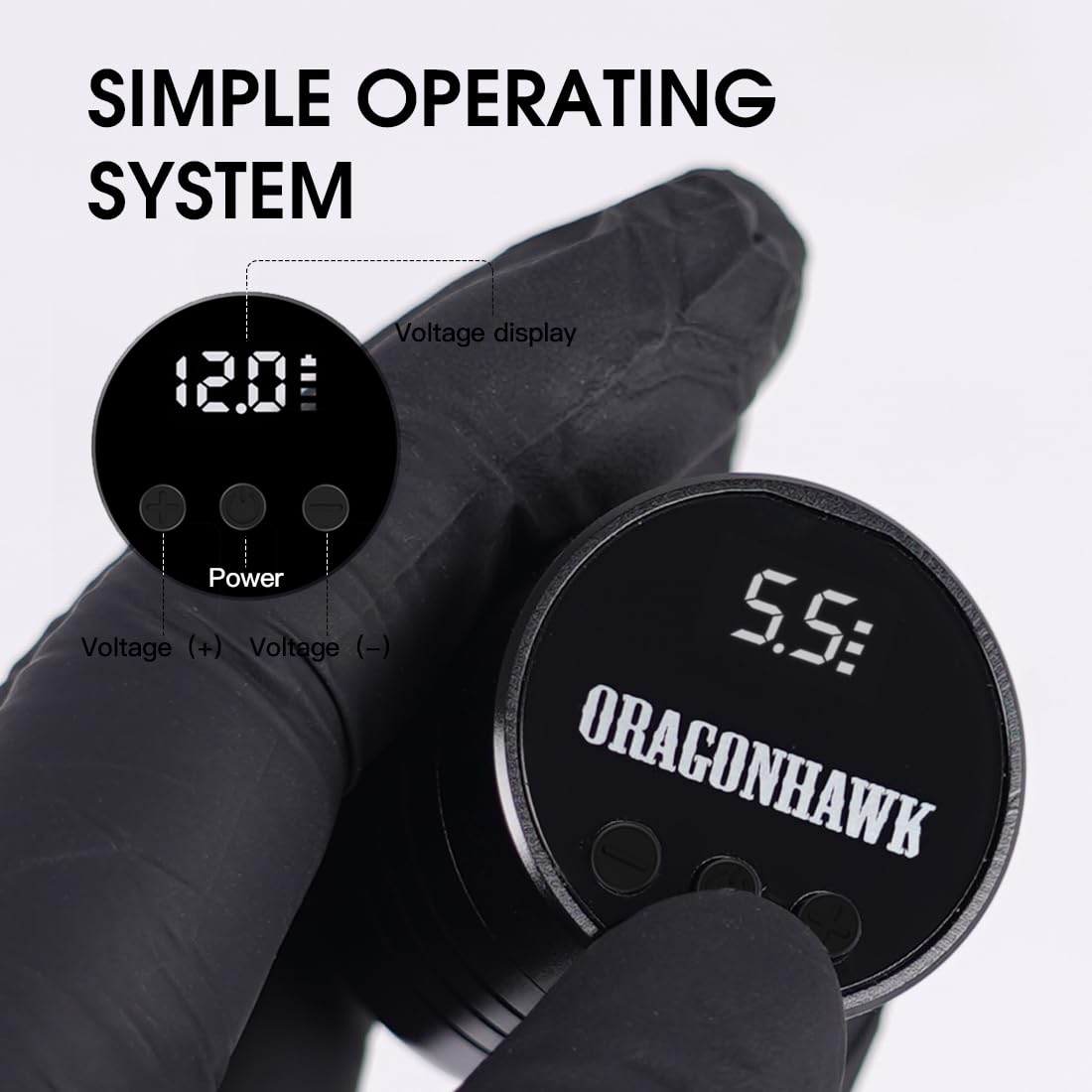
Simple Operating System: Voltage display and controls.

Instant Start Up Mode: Lightweight B2 battery.
Maintenance
Proper maintenance ensures the longevity and optimal performance of your Dragonhawk tattoo machine:
- Cleaning: After each use, thoroughly clean the machine's exterior with a suitable disinfectant. Do not immerse the machine in liquids.
- Needle Disposal: Always dispose of used needles in a designated sharps container.
- Storage: Store the machine and its components in a clean, dry place away from direct sunlight and extreme temperatures.
- Lubrication: The S11 machine features a brushless motor designed for durability. Regular lubrication of moving parts is generally not required, but refer to the manufacturer's guidelines for any specific recommendations.
Troubleshooting
If you encounter issues with your Dragonhawk Tattoo Gun Kit, refer to the following common troubleshooting tips:
- Machine Not Turning On:
- Ensure the B2 battery is fully charged.
- Verify the battery is securely connected to the machine.
- Long-press the power button firmly.
- Inconsistent Power/Stuttering:
- Check battery charge level.
- Ensure the cartridge needle is properly seated and not damaged.
- Clean any debris from the needle housing or machine connections.
- Needle Not Extending/Retracting:
- Verify the cartridge is correctly inserted.
- Ensure the grip is rotated correctly for depth adjustment.
- Check if the needle is bent or obstructed.
- Unusual Noise or Vibration:
- This could indicate a loose component or a damaged cartridge. Disassemble and reassemble carefully, checking all connections.
- If the issue persists, contact customer support.
For any issues not resolved by these steps, please refer to the Warranty and Support section.
Specifications
| Feature | Detail |
|---|---|
| Model Number | XDYHA |
| Machine Weight | 148 g |
| Motor | Mcore-A1 |
| Stroke Length | 3.5 mm |
| Battery Capacity (B2) | 1300mAh |
| Adjustable Voltage | 5-12 V |
| Battery Connection | RCA |
| Battery Weight | 53 g |
| Continuous Use (S11) | Up to 4,000 hours |
| Compatibility | All standard cartridge needles |

Detailed parameters of the S11 Tattoo Pen Machine.
Warranty and Support
Dragonhawk is committed to providing professional-grade tattoo gear with precision and durability. For any inquiries or issues with your order, please reach out through Amazon's messaging system. Dragonhawk's coverage is included for peace of mind.
Additional Resources
- Video Tutorials: Visit Youtube.com/@Dragonhawkofficial for video tutorials, setup guides, and professional tips on machine maintenance and technique.
Ask a question about this manual
Ask about setup, troubleshooting, compatibility, parts, safety, or missing instructions. Manuals+ will review the question and use this page’s manual context to help answer it.