
Important Safety Information
Please read these instructions fully and carefully before using the Beurer MP84 Professional Manicure & Pedicure Nail Drill Kit. Retain this manual for future reference. Always ensure the device is used in a safe manner to prevent injury or damage.
Product Overview
The Beurer MP84 Professional Manicure & Pedicure Nail Drill Kit is a comprehensive 14-piece cordless electric nail file designed for professional-grade nail care at home. It features a powerful motor, adjustable speed settings, and a built-in LED light for precise application.
- Cordless Operation: Equipped with a rechargeable lithium-ion battery, offering up to 2 hours of use per charge.
- Versatile Attachments: Includes 10 high-quality sapphire and felt attachments for various tasks such as sanding, buffing, polishing, and cuticle care.
- Dual Rotation: Supports both clockwise and counterclockwise rotation for precise and comfortable use on all nails.
- Integrated LED Light: A built-in LED light illuminates the treatment area, enhancing visibility and accuracy.
- Adjustable Speed: Offers 3-speed settings, making it suitable for both beginners and experienced users.
- Convenient Storage: Comes with a charging case that neatly stores the drill and all accessories.
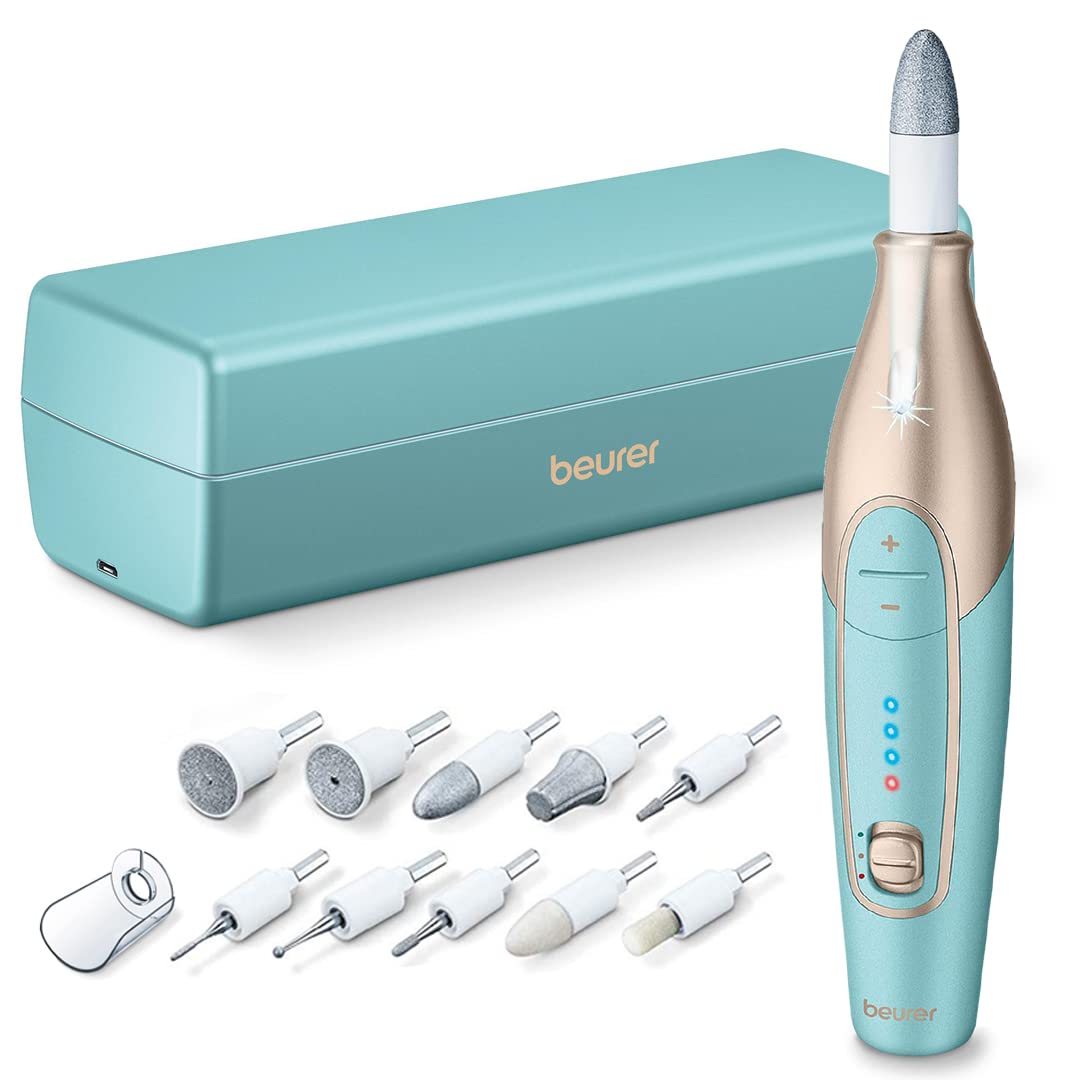
The Beurer MP84 kit includes the cordless nail drill, a charging and storage case, and 10 high-quality attachments for comprehensive nail care.
Package Contents
Verify that all items listed below are present in your package:
- Nail Drill Unit
- 10 Attachments
- USB Cable
- Charging & Storage Case
- Dust Shield
- Instruction Manual

This image displays all components included in the Beurer MP84 kit: the main nail drill unit, 10 distinct attachments, a USB charging cable, the combined charging and storage case, a protective dust shield, and the instruction manual.
Components and Attachments
Device Components

A detailed view of the Beurer MP84 nail drill alongside its full set of 10 interchangeable attachments, each designed for specific manicure and pedicure tasks.
Understanding the 10 Attachments
| Attachment | Description |
|---|---|
| Crystal Callus File | Coarse crystal callus attachment to quickly remove thick hard skin and large calluses on the sole of the foot and heel. |
| Round Sapphire Cutter | Suitable for removing corns. Take care to remove the corn slowly, layer by layer to prevent damage to the healthy skin beneath. |
| Nail Cutter | Suitable for exposing ingrown nails and removing dead nail parts. When using this attachment, use at a low speed. |
| Pointed Grinder | Removes ingrown nails. Carefully guide the pointed grinder to the part to be treated and remove parts of the nail as necessary. |
| Cylindrical Grinder | Grinds and smoothens toenails. Apply the milling cutter horizontally to the nail surface and remove the unwanted toenail layer using slow circular movements. |
| Sapphire Cone | Removes dry skin and calluses from feet and manicures toenails. |
| Sapphire Rasp | Fast removal of thick or large calluses on the feet. Intended for use on large areas. |
| Protective Nail Dust Cap | Keeps nail dust and skin cells under control. |
The device offers dual rotation for enhanced control and precision:

The Beurer MP84 features dual rotation, allowing for both clockwise and counterclockwise movement, which provides versatility and precision for various nail care needs.
Adjustable speed settings allow for customized treatment:

The device offers three adjustable speed settings, indicated by LED lights, providing control for different levels of intensity during use.
The innovative charging and storage case provides convenience:

The included case serves a dual purpose, functioning as both a protective storage solution for the nail drill and its attachments, and a charging station for the device.
A built-in LED light enhances visibility during use:

A built-in LED light illuminates the treatment area, ensuring clear visibility and precise application during manicure and pedicure procedures.
The ergonomic design ensures comfortable handling:

The ergonomic design of the Beurer MP84 ensures a comfortable and secure grip, preventing slipping during extended use.
Setup and Charging
Before first use, fully charge the device. Connect the USB cable to the charging port on the case and plug the other end into a suitable USB power adapter (not included). The indicator lights on the device will show charging progress. A full charge typically takes approximately 3 hours.

The Beurer MP84 can be conveniently charged by placing it in its dedicated charging and storage case, connected via the USB cable.
Operating Instructions
Attaching and Removing Bits
- Ensure the device is turned off before attaching or removing any bits.
- Select the desired attachment.
- Insert the attachment firmly into the opening at the top of the drill unit until it clicks into place.
- To remove, gently pull the attachment straight out.
Adjusting Speed and Rotation
- Press the power button to turn on the device. The LED lights will indicate the current speed setting.
- Use the '+' and '-' buttons to adjust the speed. There are three speed levels available.
- To change the rotation direction (clockwise or counterclockwise), press the dedicated rotation button. This allows for comfortable use on both hands and feet.
- Always start with the lowest speed setting and gradually increase as needed, especially when treating sensitive areas or if you are new to using the device.
Care, Maintenance, and Disposal
Regular cleaning and proper storage will extend the life of your Beurer MP84 kit.
- Always clean the device while charging.
- Use a slightly damp cloth to wipe down the main unit. Do not use abrasive cleaners or immerse the device in water.
- Clean the attachments after each use. You can use a small brush to remove dust and debris.
- Store the device and attachments in the provided charging and storage case when not in use to protect them from dust and damage.
- Dispose of the device and its battery in accordance with local regulations for electronic waste. Do not dispose of with household waste.
Troubleshooting
If you encounter any issues with your Beurer MP84, refer to the following common troubleshooting tips:
- Device not turning on: Ensure the battery is fully charged. Connect the device to the charger and allow sufficient time for charging.
- Attachments not spinning: Check that the attachment is securely inserted into the drill unit. Ensure no debris is obstructing the mechanism.
- Reduced performance: The battery might be low. Recharge the device. Also, ensure the correct attachment is being used for the specific task.
- Unusual noise or vibration: Turn off the device immediately. Check for any loose attachments or foreign objects. If the issue persists, discontinue use and contact customer support.
Technical Specifications
| Feature | Specification |
|---|---|
| Model Number | MP84 |
| Power Source | Battery Powered (Rechargeable Lithium-ion) |
| Item Weight | 0.55 Kilograms (1.21 Pounds) |
| Product Dimensions | 1.4"L x 1.4"W x 4.9"H |
| Attachments Included | 10 |
| Speed Settings | 3 (up to 4,400 rpm) |
| GTIN / UPC | 850018808491 |
Warranty and Support
Beurer products are designed for reliability and performance. For warranty information, product registration, or technical support, please refer to the warranty card included in your package or visit the official Beurer North America website. Keep your purchase receipt as proof of purchase.
For further assistance, you may contact Beurer customer service through their official channels. Contact details are typically available in the product manual or on the brand's website.