Introduction
Thank you for purchasing the MAJESTIC ST43VD V1 Smart LED Ultra HD TV. This manual provides essential information for setting up, operating, and maintaining your television. Please read this manual thoroughly before using the product and keep it for future reference.
Important Safety Information
Always follow basic safety precautions when using this product to reduce the risk of fire, electric shock, and injury to persons.
- Do not expose this appliance to rain or moisture.
- Do not block any ventilation openings.
- Do not place the TV on an unstable cart, stand, tripod, bracket, or table.
- Refer all servicing to qualified service personnel.
- Unplug this apparatus during lightning storms or when unused for long periods of time.
- Ensure proper grounding for the power plug.
Package Contents
Please check that all items are present and in good condition:
- MAJESTIC ST43VD V1 Smart LED Ultra HD TV
- Remote Control (with batteries)
- Support Stands (2 pieces)
- Instruction Manual
- Power Cable
Product Overview
Front View
The front of the television features the 43-inch Ultra HD display and the integrated VIDAA Smart TV interface.

Front view of the MAJESTIC ST43VD V1 Smart TV, showcasing its 43-inch Ultra HD screen and the intuitive VIDAA operating system with various streaming application shortcuts.
Rear View and Connections
The rear of the TV includes mounting points and various input/output ports for connectivity.
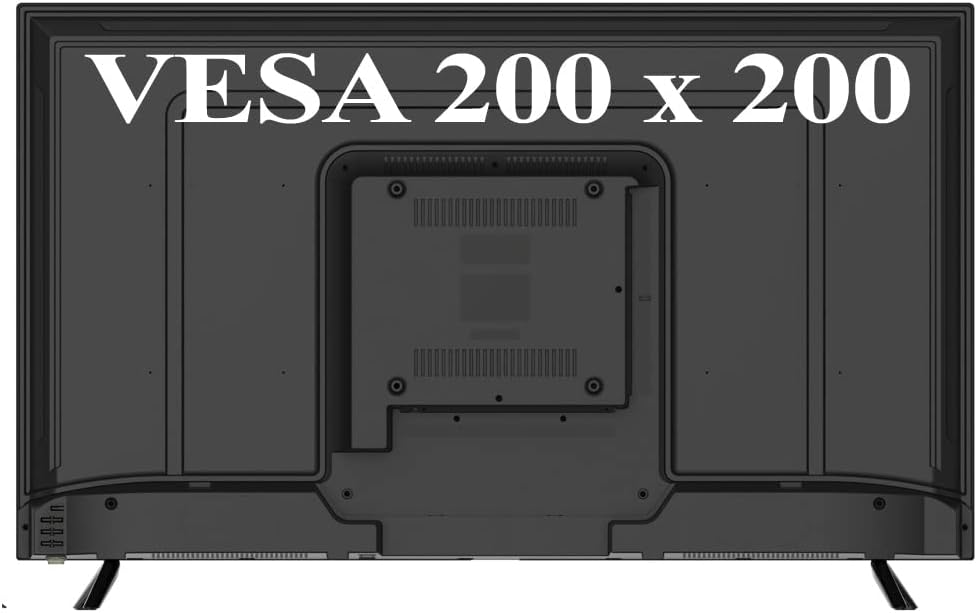
Rear view of the MAJESTIC ST43VD V1 Smart TV, highlighting the VESA 200x200 mounting pattern for wall installation and the location of connectivity ports.
The TV features:
- 3 x HDMI inputs
- 2 x USB inputs for multimedia playback
- 1 x AV (RCA) input
- 1 x RJ45 Network input
- 1 x Optical Digital Audio Output
- 1 x 3.5mm Headphone Output
- 1 x 75 ohm Antenna Input (DVB-T/T2)
- 1 x Satellite LNB Antenna Input (DVB-S/S2)
- 1 x CI+ Slot (for CAM module, not included)

Side view of the MAJESTIC ST43VD V1 Smart TV, illustrating its sleek design and slim profile.
Setup Guide
1. Attaching the Stand
- Carefully place the TV face down on a soft, flat surface to prevent screen damage.
- Align the support stands with the corresponding slots on the bottom of the TV.
- Secure the stands using the provided screws.
2. Wall Mounting (Optional)
This TV supports VESA 200x200 wall mounts. Ensure you use a compatible wall mount kit (not included) and follow the instructions provided with the mount. Remove the support stands before wall mounting.
3. Connecting Power
Connect the power cable to the TV's power input and then to a suitable AC 100-240V, 50/60Hz power outlet.
4. Connecting Antennas/Cables
- Terrestrial Antenna: Connect a 75 ohm coaxial cable from your terrestrial antenna to the "Antenna" input on the TV.
- Satellite Dish: Connect a satellite cable from your LNB to the "LNB Satellite" input on the TV.
- External Devices: Connect devices like Blu-ray players, game consoles, or set-top boxes to the HDMI, AV, or USB ports as needed.
5. Initial Setup Wizard
Upon first power-on, the TV will guide you through an initial setup process. This includes:
- Language selection
- Network connection (Wi-Fi or Ethernet)
- Channel scanning (DVB-T/T2, DVB-S/S2)
- Time zone settings
Operating Your TV
Remote Control
The included remote control allows you to navigate the TV's features and settings. Ensure batteries are correctly inserted.

The remote control for the MAJESTIC ST43VD V1 TV, featuring dedicated buttons for popular streaming services and essential TV functions.
Key remote control functions:
- Power Button: Turns the TV on/off.
- Input Button: Selects input source (HDMI, AV, TV).
- Navigation Buttons (Up/Down/Left/Right/OK): Navigates menus and confirms selections.
- Volume +/-: Adjusts volume.
- Channel +/-: Changes channels.
- Netflix, YouTube, Prime Video, Plex, Media, Browser: Dedicated buttons for quick access to applications.
- Menu/Settings: Accesses TV settings.
- Exit: Exits current menu or application.
- EPG (Electronic Program Guide): Displays program information.
- Teletext: Accesses teletext services.
Smart TV Features (VIDAA OS)
Your MAJESTIC ST43VD V1 TV runs on the VIDAA operating system, providing access to a wide range of smart features and applications.
- Wi-Fi Connectivity: Connect to your home network wirelessly for internet access.
- Streaming Applications: Pre-installed support for popular streaming apps such as YouTube, Netflix, and Prime Video. Additional apps may be available through the VIDAA app store.
- Web Browser: Browse the internet directly on your TV.
- Multimedia Playback: Play photos, music, and videos from USB devices.
Channel Management
- Automatic Channel Control (LCN): Automatically organizes channels based on local broadcast standards.
- EPG (Electronic Program Guide): View upcoming program schedules for digital channels.
Maintenance
- Cleaning the Screen: Gently wipe the screen with a soft, lint-free cloth. For stubborn marks, use a screen cleaner specifically designed for TVs, applied to the cloth, not directly to the screen.
- Cleaning the Cabinet: Wipe the TV cabinet with a soft, dry cloth. Do not use abrasive cleaners or solvents.
- Ventilation: Ensure the ventilation openings are not blocked to prevent overheating.
- Power Cord: Regularly check the power cord for any damage.
Troubleshooting
| Problem | Possible Cause | Solution |
|---|---|---|
| No power | Power cord not connected; power outlet not working. | Ensure power cord is securely connected. Test outlet with another device. |
| No picture, but sound is present | Incorrect input source selected; backlight issue. | Press the "Input" button on the remote to select the correct source. |
| No sound, but picture is present | Volume muted or too low; audio cable not connected properly. | Unmute volume or increase it. Check audio cable connections. |
| Cannot connect to Wi-Fi | Incorrect password; router issue; TV too far from router. | Verify Wi-Fi password. Restart router. Move TV closer to router or use Ethernet. |
| Remote control not working | Batteries dead or incorrectly inserted; obstruction. | Replace batteries. Ensure line of sight to TV's IR sensor. |
Technical Specifications
| Feature | Specification |
|---|---|
| Model Name | ST43VD V1 |
| Screen Size | 43 Inches |
| Display Technology | LED (DIRECT LED backlight) |
| Resolution | ULTRA HD (3840 x 2160) |
| Aspect Ratio | 16:9 |
| Brightness | 200 cd/m² |
| Contrast Ratio | 4000:1 |
| Response Time | 8 ms |
| Refresh Rate | 60 Hz |
| Operating System | VIDAA |
| Connectivity | Integrated Wi-Fi, RJ45 Ethernet |
| Tuners | Analog PAL (DK/I/BG), Digital Terrestrial DVB-T/T2 UHD, Satellite DVB-S/S2 UHD |
| HDMI Ports | 3 |
| USB Ports | 2 |
| Other Inputs/Outputs | AV (RCA) x1, Optical Digital Audio Out, 3.5mm Headphone Out, CI+ Slot |
| Supported Internet Services | Netflix, YouTube, Prime Video, Plex |
| Power Supply | AC 100-240V (50/60Hz) |
| Dimensions (without stand) | 97.3 (L) x 56.6 (H) x 7.5 (D) cm |
| Dimensions (with stand) | 97.3 (L) x 61.7 (H) x 20.7 (D) cm |
| Weight | 6.7 kg |
| Color | Black |
Warranty and Support
For warranty information and technical support, please refer to the warranty card included with your product or contact MAJESTIC customer service. Keep your proof of purchase for warranty claims.
Manufacturer: NEW MAJESTIC SPA


