
1. Introduction
This manual provides instructions for the RETROSUN RM-YD024 Replacement Remote Control. This remote is designed as a direct replacement for various Sony Bravia Smart TV models, offering immediate functionality without complex setup procedures.
Compatible Sony TV Models include:
- KDL-40Z4100
- KDL-40VL160
- KDL-40XBR7
- KDL-46VL160
- KDL-46Z4100
- KDL-46XBR8
- KDL-52XBR7
- KDL-55XBR8
- KDL-70XBR7
And other compatible Sony Bravia Smart TV models.
2. Product Features
- No Programming Required: Operates immediately after battery insertion.
- Sensitive Keys: Designed for responsive and accurate input.
- High-Grade Construction: Made from durable ABS material with soft plastic buttons.
- Ergonomic Design: Comfortable to hold and use.
- Infrared Connectivity: Reliable signal transmission.
- Extended Range: Effective control up to 10 meters (33 feet).

Image: The RETROSUN RM-YD024 remote control showcasing its key features: no setup required, soft plastic buttons, and durable ABS material construction.
3. Setup
3.1 Battery Installation
- Locate the battery compartment on the back of the remote control.
- Slide the battery cover downwards and remove it.
- Insert two (2) 1.5V AA alkaline batteries, ensuring the positive (+) and negative (-) terminals match the diagrams inside the compartment.
- Replace the battery cover by sliding it back into position until it clicks securely.

Image: Detailed view of the battery compartment, illustrating the correct orientation for inserting two 1.5V AA batteries.
3.2 Initial Use
The RETROSUN RM-YD024 remote control is designed for immediate use with compatible Sony TVs. No programming or pairing is required. Once batteries are installed, point the remote towards your television and begin operation.

Image: The remote control demonstrating its plug-and-play functionality, requiring no programming or pairing for immediate use.
4. Operating Instructions
The RM-YD024 remote control provides full functionality for your compatible Sony TV. Below are the general functions of the buttons:
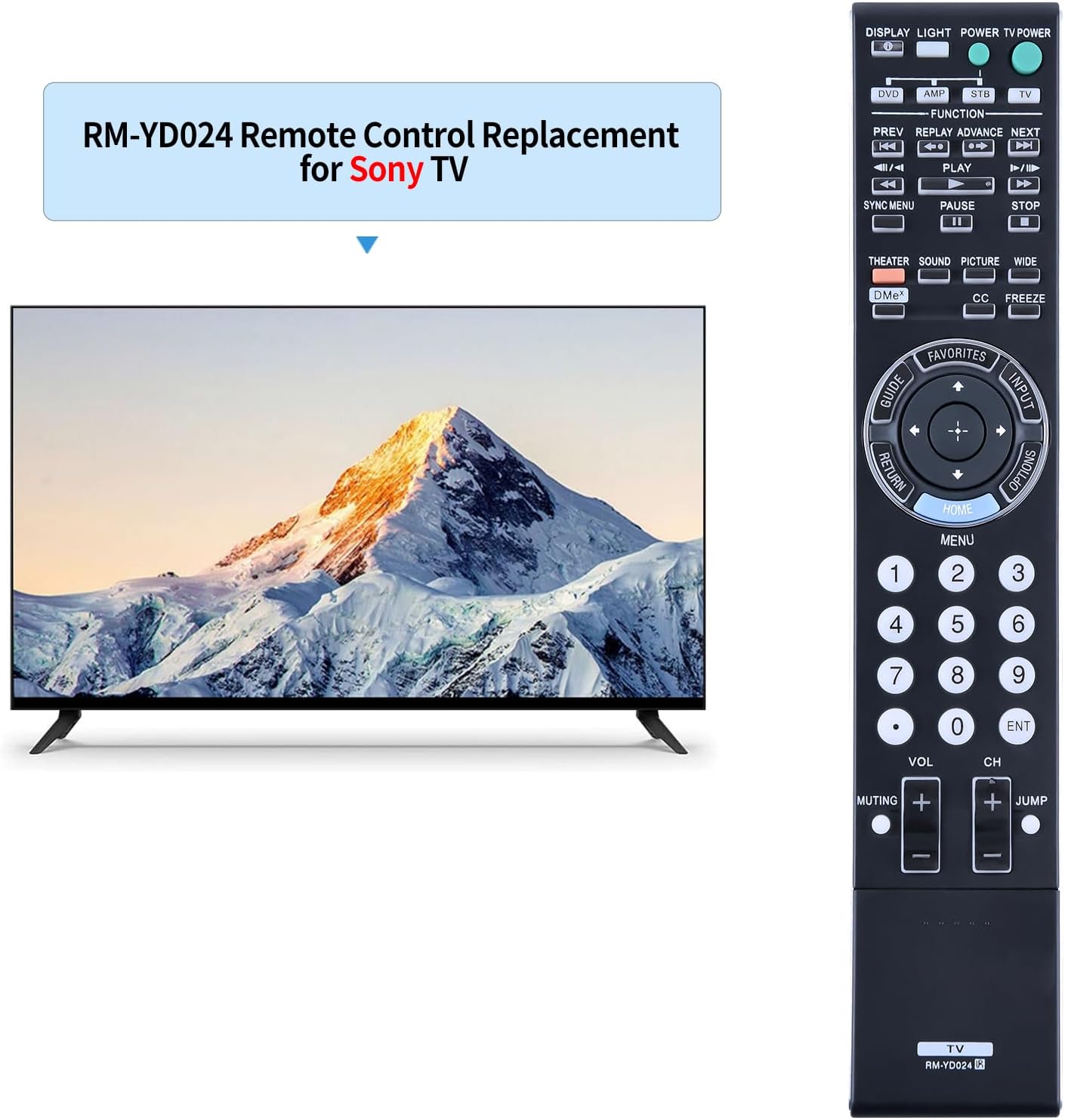
Image: A clear view of the RETROSUN RM-YD024 remote control, displaying the layout and labels of all its buttons.
- POWER: Turns the TV on or off.
- DISPLAY / LIGHT: Displays on-screen information or activates backlight (if applicable).
- FUNCTION (DVD, AMP, STB, TV): Selects the device to control (e.g., TV).
- Playback Controls (PREV, REPLAY, ADVANCE, NEXT, PLAY, PAUSE, STOP): Controls media playback functions.
- SYNC MENU: Accesses the Sync Menu for connected devices.
- THEATER / SOUND / PICTURE / WIDE: Accesses various picture and sound modes.
- DME+: Digital Media Extender Plus function.
- CC / FREEZE: Closed Captioning and Freeze frame functions.
- GUIDE: Opens the electronic program guide.
- FAVORITES: Accesses favorite channels or content.
- INPUT: Cycles through available input sources (HDMI, AV, etc.).
- OPTIONS: Displays context-sensitive options menu.
- Navigation Pad (Up, Down, Left, Right, HOME, MENU, ENTER): Navigates through menus and confirms selections. The HOME button typically opens the main smart TV interface.
- Number Buttons (0-9): Direct channel selection.
- VOL (+/-): Adjusts the volume level.
- CH (+/-): Changes channels.
- MUTING: Mutes or unmutes the TV sound.
- JUMP: Switches between the current and previously viewed channel.
- RETURN: Returns to the previous screen or menu.
The remote utilizes infrared technology for precise control, effective up to 10 meters (33 feet) from the television.

Image: Demonstrating the remote's long-distance control capability, effective up to 10 meters (33 feet).
5. Maintenance
5.1 Battery Replacement
When the remote control's performance degrades or it stops responding, it is likely time to replace the batteries. Follow the battery installation steps in Section 3.1. Always replace both batteries simultaneously with new 1.5V AA alkaline batteries.
5.2 Cleaning
To clean the remote control, use a soft, dry cloth. For stubborn dirt, slightly dampen the cloth with water or a mild, non-abrasive cleaner. Avoid using harsh chemicals, solvents, or abrasive materials, as these can damage the remote's surface or internal components.
6. Troubleshooting
- Remote not responding:
- Ensure the batteries are inserted correctly with the correct polarity (+/-).
- Replace old batteries with new 1.5V AA alkaline batteries.
- Check for any obstructions between the remote control and the TV's infrared receiver.
- Ensure you are within the effective operating range (up to 10 meters).
- Limited range or intermittent response:
- Replace batteries, as low battery power can affect range.
- Ensure there are no strong light sources (e.g., direct sunlight, fluorescent lights) interfering with the infrared signal.
- Clean the remote's infrared emitter and the TV's infrared receiver to remove any dust or dirt.
7. Specifications
| Feature | Specification |
|---|---|
| Brand | RETROSUN |
| Model Number | RM-YD024 |
| Compatible Devices | Television (Sony Bravia Smart TV models) |
| Connectivity Technology | Infrared |
| Controller Type | Button Control |
| Maximum Number of Supported Devices | 1 |
| Maximum Range | 10 Meters (33 feet) |
| Battery Type | 2 x 1.5V AA Alkaline Batteries (not included) |
| Special Features | Ergonomic Design |

Image: Front and back views of the remote control, illustrating its physical dimensions.