
1. Introduction
This manual provides comprehensive instructions for the installation, operation, and maintenance of the Canglan Technology SINO KA300 Linear Scale Encoder, specifically the 320mm effective travel model. This precision instrument is designed to work in conjunction with SINO DRO (Digital Readout) systems to provide accurate linear position feedback for various machinery, enhancing processing accuracy and measurement capabilities.
2. Product Overview
The SINO KA300 Linear Scale Encoder is a robust and accurate device essential for precise dimensional measurement. Its key features include:
- Accurate Measurement: Provides reliable linear position measurement with a resolution of 5µm, ensuring high precision for small changes in position.
- Durable Construction: Manufactured from high-quality materials to withstand demanding industrial and manufacturing environments, ensuring long-term performance.
- Easy Integration: Designed for straightforward installation and seamless integration with SINO DRO digital readouts.
- Versatile Application: Suitable for a broad range of machinery, including milling machines, lathes, grinders, and other precision machining tools.

Figure 2.1: Front view of the SINO KA300 Linear Scale Encoder. This image shows the main body of the linear scale with its silver-colored housing and the attached encoder head.

Figure 2.2: Side view of the SINO KA300 Linear Scale Encoder. This perspective highlights the slim profile of the scale and the cable extending from the encoder head.
3. Specifications
The following table details the technical specifications for the SINO KA300-320mm Linear Scale Encoder:
| Parameter | Value |
|---|---|
| Model | KA300 |
| Effective Travel | 320mm |
| Resolution | 5µm (0.005mm) |
| Actual Physical Length | 426mm |
| Bar Pitch | 0.02mm (50 line pairs/mm) |
| Output Signal | TTL |
| Max. Speed of Response | 60m/min |
| Operating Temperature | 0 to 45°C |
| Working Voltage | ±5V (±5%), 80mA |
Other KA300 linear scale effective travel lengths are available, including 70mm, 120mm, 170mm, 220mm, 270mm, 370mm, 420mm, 470mm, 520mm, 620mm, 670mm, 720mm, 770mm, 820mm, 870mm. The actual physical length is always 106mm longer than the effective travel.
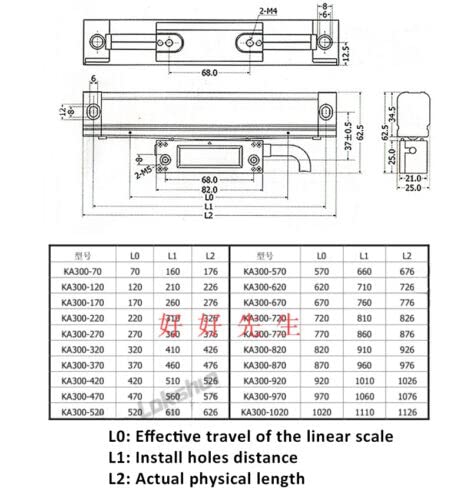
Figure 3.1: Technical drawing illustrating the dimensions of the SINO KA300 Linear Scale. This diagram shows L0 (Effective travel), L1 (Install holes distance), and L2 (Actual physical length) for various KA300 models.
4. Setup and Installation
Proper installation is crucial for the accurate operation of the SINO KA300 Linear Scale Encoder. Follow these general guidelines:
- Mounting Location: Select a stable, vibration-free surface on your machine. Ensure the scale is parallel to the axis of motion it will measure.
- Secure Mounting: Use the provided mounting hardware to firmly attach the scale body to the machine. Refer to Figure 3.1 for mounting hole distances (L1).
- Encoder Head Attachment: Attach the encoder reading head to the moving part of the machine. Ensure there is a small, consistent gap between the reading head and the scale grating. Avoid direct contact.
- Alignment: Carefully align the scale and reading head to ensure smooth, unobstructed movement throughout the entire range of travel. Misalignment can lead to inaccurate readings or damage.
- Cable Connection: Connect the encoder cable to your SINO DRO digital readout unit. Ensure the connector is securely fastened.

Figure 4.1: Close-up view of the SINO KA300 Linear Scale Encoder, showing the encoder head and mounting points. This image provides a detailed look at the components involved in the measurement process.

Figure 4.2: Detailed view of the SINO KA300 Linear Scale Encoder's D-sub connector. This shows the robust design of the cable termination for reliable connection to the DRO.
5. Operating Instructions
Once the SINO KA300 Linear Scale Encoder is properly installed and connected to a compatible SINO DRO unit, follow these steps for operation:
- Power On: Turn on the SINO DRO digital readout unit. The display should initialize and show a numerical reading.
- Zeroing: Move the machine axis to your desired starting point. Press the "Zero" or "Reset" button on the DRO unit to set the current position as zero.
- Measurement: Move the machine axis. The DRO display will show the precise linear displacement from the zero point.
- Absolute/Incremental Modes: Most DRO units offer both absolute and incremental measurement modes. Consult your DRO manual for switching between these modes as needed for your application.
- Unit Conversion: If your DRO supports it, you can switch between metric (mm) and imperial (inches) units.

Figure 5.1: Two SINO KA300 Linear Scale Encoders shown from different angles, highlighting the complete assembly with the protective cable. This illustrates how the encoder head moves along the scale.
6. Maintenance
To ensure the longevity and accuracy of your SINO KA300 Linear Scale Encoder, perform the following maintenance tasks:
- Cleaning: Regularly clean the scale grating and reading head with a soft, lint-free cloth. Use a mild, non-abrasive cleaning solution if necessary. Ensure no dust, chips, or debris accumulate on the scale surface.
- Inspection: Periodically inspect the cable for any signs of wear, cuts, or damage. Check all mounting screws for tightness.
- Environmental Protection: Protect the scale from excessive moisture, extreme temperatures, and corrosive substances.
- Avoid Impact: Prevent any physical impact or shock to the scale or reading head, as this can affect accuracy.
7. Troubleshooting
If you encounter issues with your SINO KA300 Linear Scale Encoder, refer to the following common problems and solutions:
- No Display on DRO:
- Check power supply to the DRO unit.
- Ensure the encoder cable is securely connected to both the scale and the DRO.
- Verify the DRO unit is functioning correctly with other inputs if available.
- Inaccurate Readings:
- Inspect the scale grating and reading head for dirt, debris, or damage. Clean as necessary.
- Check the alignment between the scale and the reading head. Ensure a consistent, small gap.
- Verify that the scale is securely mounted and not flexing.
- Ensure the machine axis movement is smooth and free of binding.
- Intermittent Readings:
- Check for loose cable connections.
- Inspect the cable for damage or kinks.
- Ensure there is no electromagnetic interference from other machinery.
If problems persist after attempting these solutions, contact Canglan Technology customer support for further assistance.
8. Warranty and Support
For information regarding warranty coverage, technical support, or replacement parts for your SINO KA300 Linear Scale Encoder, please refer to the documentation provided with your purchase or contact Canglan Technology directly. Contact details can typically be found on the manufacturer's website or through your point of purchase.
Manufacturer: Canglan Technology
Date First Available: October 3, 2022