
1. Introduction
Thank you for choosing the ATLANTIS SMARTIX F18P Smartwatch. This device is designed to enhance your daily life by providing convenient communication, comprehensive health monitoring, and versatile activity tracking. Featuring a 1.69-inch full-touch TFT display and Bluetooth 5.0 connectivity, the F18P allows you to make and receive calls directly from your wrist, receive notifications, and track various health metrics such as heart rate, blood oxygen (SpO2), and blood pressure.
This manual provides detailed instructions on how to set up, operate, maintain, and troubleshoot your smartwatch to ensure optimal performance and a satisfying user experience. Please read this manual carefully before using your device.
2. Getting Started: Setup
2.1 Package Contents
- ATLANTIS SMARTIX F18P Smartwatch
- Charging Cable
- User Manual
2.2 Charging the Smartwatch
Before first use, fully charge your smartwatch. Connect the magnetic charging cable to the charging points on the back of the watch and plug the USB end into a standard USB power adapter (not included) or a computer USB port.

Image: The smartwatch connected to its magnetic charging cable, indicating the charging process.
A full charge typically takes about 2 hours. The battery icon on the watch screen will indicate charging status. A fully charged battery provides up to 5 days of typical use.

Image: A close-up of the smartwatch screen showing a charging icon and the text "CHARGING".
2.3 App Installation and Pairing
To unlock the full potential of your SMARTIX F18P, download the Da Fit application on your smartphone. The app is compatible with iOS 8.0 or higher and Android 4.4 or higher.
- Scan the QR code in the manual or search for "Da Fit" in the Apple App Store or Google Play Store.
- Install the app on your smartphone.
- Ensure Bluetooth is enabled on your smartphone.
- Open the Da Fit app, register or log in, and follow the on-screen instructions to add your device. Select "SM60-F18P" from the list of available devices.
- Confirm the pairing request on both your phone and the smartwatch.

Image: Screenshots of the Da Fit application interface on a smartphone, showing health data and customization options.
3. Operating Your Smartwatch
3.1 Basic Navigation
The SMARTIX F18P features a 1.69-inch full-touch display and a side button/rotating crown for navigation.
- Touch Screen: Swipe left/right, up/down to navigate through menus and functions. Tap to select.
- Side Button/Crown: Press to wake the screen, return to the home screen, or access the app menu. Rotate to scroll through lists or change watch faces.

Image: A close-up of the smartwatch's side button/crown, illustrating its rotational and press functions for navigation.
3.2 Bluetooth Call Function
The F18P allows you to make and receive calls directly from your wrist when connected to your smartphone via Bluetooth.
- Answering Calls: When a call comes in, the watch will display the caller ID. Tap the green phone icon to answer.
- Making Calls: Access the dialer or contact list on your watch to initiate a call.

Image: A man using the smartwatch to answer a call, demonstrating the Bluetooth call function.

Image: An illustration showing the smartwatch wirelessly connected to a smartphone, enabling direct call answering and speaking from the watch.
3.3 Notifications
Receive instant messages and notifications from various applications directly on your smartwatch display. Compatible apps include WhatsApp, Facebook, Twitter, WeChat, Instagram, Skype, and more.
- Ensure notification permissions are enabled in the Da Fit app and your phone's settings.
- Swipe down from the watch face to view your notification center.
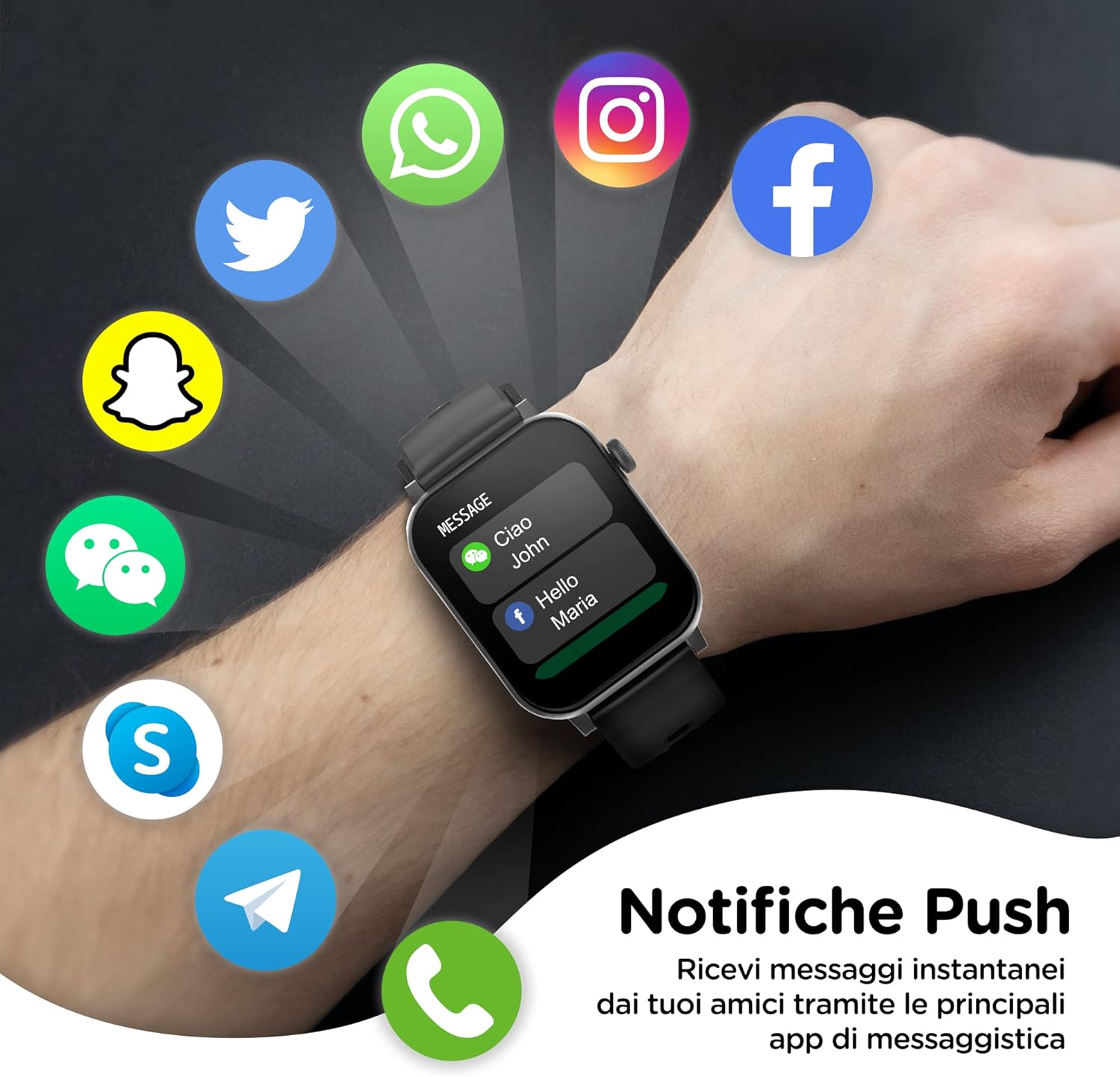
Image: The smartwatch screen showing incoming notifications from popular messaging and social media applications.

Image: An illustration demonstrating how notifications from a smartphone are pushed and displayed on the smartwatch.
3.4 Health Monitoring
The SMARTIX F18P provides comprehensive health tracking features:
- Heart Rate Monitoring: Continuously tracks your heart rate.
- Blood Oxygen (SpO2) Measurement: Measures your blood oxygen saturation levels.
- Blood Pressure Measurement: Provides estimates of your blood pressure. Note: This device is not a medical device. Measurements are for reference only and should not be used for medical diagnosis.
- Sleep Analysis: Monitors your sleep patterns, including deep sleep, light sleep, and awake times.
- Pedometer: Counts your steps and estimates calories burned throughout the day.

Image: The smartwatch screen showing various health metrics including heart rate, blood oxygen, and blood pressure readings.

Image: A visual representation of the smartwatch's health monitoring capabilities, including step count, heart rate, blood pressure, blood oxygen, and sleep tracking.
3.5 Activity Tracking and Sports Modes
The smartwatch supports over 20 sports modes to accurately track your workouts. Select the appropriate mode before starting an activity for precise data collection.
- Common modes include running, walking, cycling, climbing, and more.
- The watch tracks steps, distance, calories burned, and active time.

Image: The smartwatch screen showing a selection of over 20 sports modes for activity tracking, with a person running in the background.
3.6 Other Features
- Weather Forecast: Get real-time weather updates.
- Remote Camera Control: Use your watch as a remote shutter for your phone's camera.
- Music Control: Control music playback on your smartphone (play, pause, skip tracks).
- Alarm: Set alarms directly from your watch.
- Stopwatch/Timer: Built-in timing functions.
- Voice Assistant: Connect to your smartphone's voice assistant.
- Customizable Watch Faces: Choose from hundreds of available watch faces via the Da Fit app.

Image: The smartwatch displaying different customizable watch faces, highlighting the 1.69-inch touch display.
4. Maintenance
4.1 Cleaning Your Smartwatch
Regularly clean your smartwatch and strap to prevent skin irritation and maintain device functionality.
- Wipe the screen and body with a soft, damp, lint-free cloth.
- For the silicone strap, you can use mild soap and water, then rinse thoroughly and dry completely before reattaching to your wrist.
- Avoid using abrasive cleaners or solvents.

Image: A close-up of the smartwatch strap, highlighting its soft-touch material and easy-to-change design.
4.2 Water Resistance
The SMARTIX F18P has an IP67 water resistance rating. This means it is resistant to splashes, rain, and brief immersion in shallow water (up to 1 meter for 30 minutes). However, it is not suitable for swimming, showering with hot water, or diving. Prolonged exposure to water or use in high-pressure water environments may damage the device.
5. Troubleshooting
If you encounter issues with your smartwatch, please refer to the following common solutions:
- Watch not turning on: Ensure the watch is fully charged. Connect it to the charger for at least 30 minutes.
- Cannot pair with phone:
- Ensure Bluetooth is enabled on your phone and the watch.
- Make sure the watch is within the Bluetooth range (approx. 10 meters).
- Restart both your phone and the smartwatch.
- Clear Bluetooth cache on your phone (if applicable) and try pairing again.
- Inaccurate health readings:
- Ensure the watch is worn snugly on your wrist, about one finger's width from your wrist bone.
- Keep the sensor clean and free from debris.
- Avoid excessive movement during measurements.
- Notifications not received:
- Check if the watch is connected to the Da Fit app.
- Ensure notification permissions are granted for the Da Fit app in your phone's settings.
- Verify that app notifications are enabled within the Da Fit app itself.
- Short battery life:
- Reduce screen brightness.
- Disable continuous heart rate monitoring if not needed.
- Limit the number of apps sending notifications to the watch.
If the problem persists, please contact customer support.
6. Specifications
| Feature | Specification |
|---|---|
| Model Number | SM60-F18P |
| Brand | Atlantis |
| Display | 1.69-inch TFT Full Touch Screen |
| Resolution | 240 x 285 dpi |
| Connectivity | Bluetooth 5.0 |
| Battery Capacity | 220 mAh Lithium-ion |
| Battery Life | Up to 5 days (typical use) |
| Water Resistance | IP67 (Splash, rain, and brief immersion resistant) |
| Compatibility | iOS 8.0+ / Android 4.4+ |
| Health Monitoring | Heart Rate, SpO2, Blood Pressure, Sleep Analysis, Pedometer |
| Special Features | Bluetooth Call, Voice Control, Calorie Counter, ECG (for reference), Music Control, Remote Camera |
| Dimensions (Watch Face) | 37.8mm (width) x 10.8mm (thickness) |
| Strap Width | 22mm |
| Total Length (Watch + Strap) | 267mm |
| Weight | 22g |
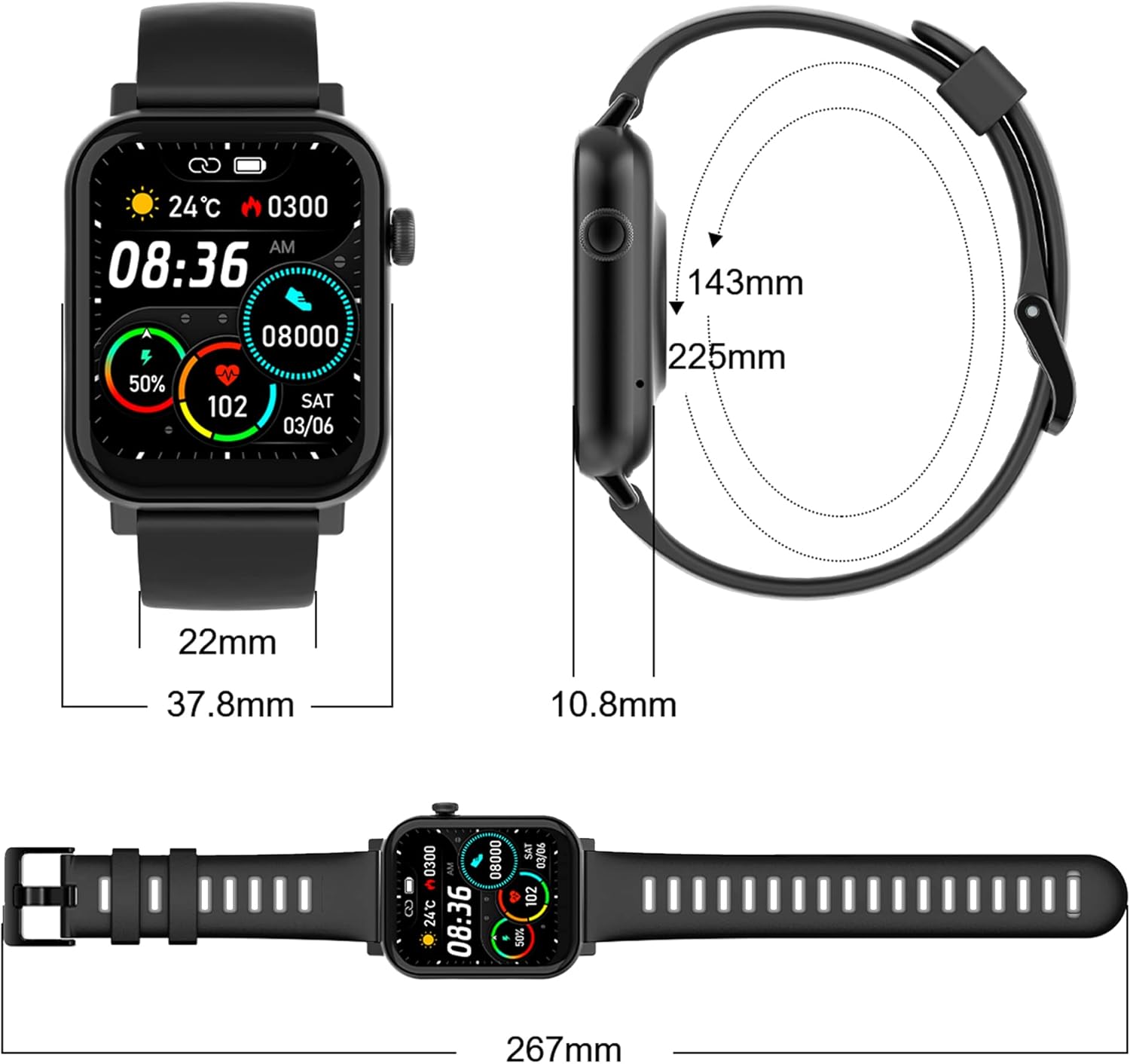
Image: A diagram illustrating the precise dimensions of the smartwatch, including watch face width, thickness, strap width, and total length.
7. Warranty and Support
7.1 Warranty Information
Your ATLANTIS SMARTIX F18P Smartwatch comes with a 2-year Italian warranty, covering manufacturing defects from the date of purchase. Please retain your proof of purchase for warranty claims.
7.2 Technical Assistance
For technical assistance or support, please contact our dedicated support team:
- Phone Support: +39 02-93550066 (Available Monday to Friday, 2:30 PM - 6:00 PM CET)
- Email & Web Ticketing: Visit www.atlantisland.it/help (Active Monday to Friday, 2:30 PM - 6:00 PM CET)
Free product shipping for returns and repairs to and from our Italian service center is provided.

Image: Contact details for Atlantis technical assistance, including phone number, website for email/ticketing, and information about the 2-year warranty.


