
Teverun Blade GT Plus
Teverun Blade GT Plus Electric Scooter User Manual
Model: Blade GT Plus
1. Introduction
Welcome to the user manual for your Teverun Blade GT Plus Electric Scooter. This manual provides essential information for the safe operation, maintenance, and troubleshooting of your scooter. Please read this manual thoroughly before your first ride to ensure proper use and to maximize your riding experience.
Important Safety Notice: Always wear a helmet and appropriate safety gear when riding. Adhere to all local traffic laws and regulations.

Image 1.1: Main view of the Teverun Blade GT Plus Electric Scooter, showcasing its robust design and 11-inch wheels.
2. What's in the Box
Upon opening the package, please verify that all the following items are included:
- Teverun Blade GT Plus Electric Scooter (partially assembled)
- Power Charger
- NFC Cards (for scooter activation)
- User Manual (this document)
- Tool Kit (may vary)

Image 2.1: Included NFC cards and the integrated NFC reader on the handlebar, used for starting the scooter.
3. Setup
3.1 Unpacking and Assembly
Your Teverun Blade GT Plus scooter comes partially assembled. Follow these steps to complete the setup:
- Carefully remove the scooter and all components from the packaging.
- Unfold the handlebar stem and secure it firmly. Ensure all locking mechanisms are engaged.
- Attach any loose components such as mirrors or additional lights if provided and not pre-installed.
- Inspect all screws and bolts to ensure they are tightened.

Image 3.1: The Teverun Blade GT Plus in its unfolded, ready-to-ride configuration.
3.2 Initial Charging
Before your first ride, fully charge the scooter's battery. This helps to prolong battery life.
- Locate the charging ports on the side of the scooter deck.
- Connect the power charger to a standard electrical outlet.
- Connect the charger cable to the scooter's charging port(s). The indicator light on the charger will typically change color (e.g., red to green) when fully charged.
- Disconnect the charger once charging is complete.

Image 3.2: Close-up of the dual charging ports located on the side of the scooter deck, protected by rubber covers.
3.3 NFC Card Setup
The Teverun Blade GT Plus uses NFC cards for activation. To start your scooter, simply tap a registered NFC card on the NFC reader located on the handlebar.
- Your scooter comes with pre-paired NFC cards.
- To add new NFC cards or re-pair existing ones, refer to the scooter's display settings menu for NFC management.
4. Operating Instructions
4.1 Power On/Off and NFC Operation
To power on the scooter, tap your registered NFC card on the NFC reader. The display will illuminate. To power off, tap the NFC card again or hold the power button on the display.

Image 4.1: The left handlebar showing the NFC reader, light controls, and horn button.
4.2 Display Functions (3.5" TFT Color Display)
The 3.5-inch TFT color display provides real-time information about your ride:
- Speed: Current riding speed.
- Battery Level: Remaining battery charge.
- Riding Mode: Indicates single or dual motor mode, and speed settings (e.g., ECO, PAS).
- Odometer/Trip Meter: Total distance traveled or current trip distance.
- Error Codes: Displays diagnostic information if an issue occurs.
Navigate through the display menus using the control buttons near the display to adjust settings such as motor mode, acceleration, and lighting.

Image 4.2: The 3.5-inch TFT color display showing speed, battery status, and other ride parameters.
4.3 Riding Modes and Speed Control
The Teverun Blade GT Plus features a 500W motor with options for dual or single motor operation. The scooter is restricted to 20 km/h by design for compliance with certain regulations.
- Single Motor Mode: Provides extended range (up to 80 km) and is suitable for urban commuting.
- Dual Motor Mode: Offers increased power and acceleration for more demanding terrain or performance riding.
- Use the mode selection button on the handlebar to switch between single and dual motor modes.
- The throttle controls acceleration. Apply it smoothly.

Image 4.3: Overview of the handlebars, showing the central display, throttle, brake levers, and control buttons.
4.4 Braking System
The scooter is equipped with front and rear disc brakes for effective stopping power. Always use both brakes simultaneously for optimal control and safety.
- Apply brake levers gently and progressively.
- Avoid sudden, hard braking, especially at high speeds or on slippery surfaces.
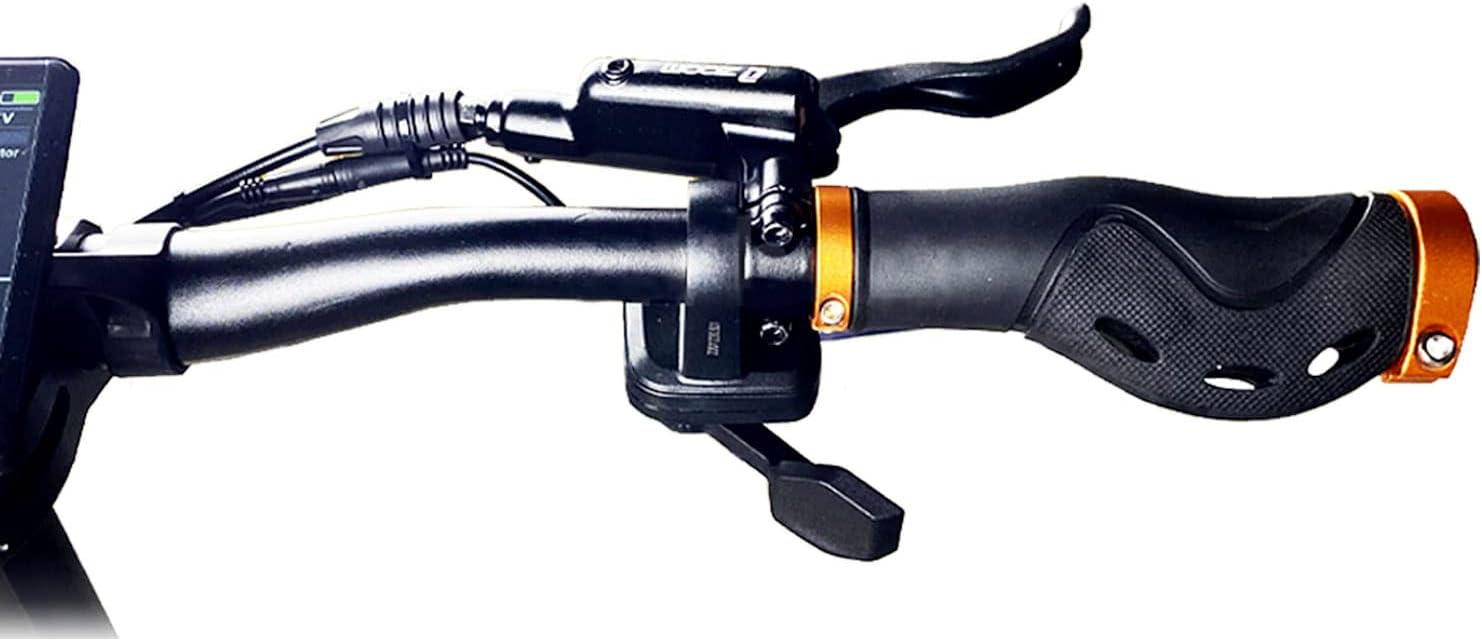
Image 4.4: The right handlebar featuring the brake lever and ergonomic grip.
4.5 Lighting and Safety Features
The scooter features high-performance lighting for visibility and safety.
- Headlight: Located at the front for illuminating your path.
- Taillight and Brake Light: Integrated at the rear for visibility to others and indicating braking.
- Turn Signals: Front and rear turn signals for indicating your direction.
- Activate lights and turn signals using the controls on the left handlebar.

Image 4.5: Rear view of the scooter highlighting the taillights and amber turn signals for enhanced visibility.
5. Maintenance
Regular maintenance ensures the longevity and safe operation of your Teverun Blade GT Plus scooter.
5.1 General Cleaning
- Wipe down the scooter with a damp cloth after each ride to remove dirt and dust.
- Avoid using high-pressure water jets or harsh chemicals, as these can damage electronic components.
- Ensure the charging ports are clean and dry before charging.
5.2 Tire Care
The scooter is equipped with 11-inch tubeless tires.
- Regularly check tire pressure. Maintain the recommended pressure (refer to the tire sidewall or specifications section).
- Inspect tires for wear, cuts, or punctures before each ride.

Image 5.1: Close-up of the front wheel, showing the tubeless tire, suspension system, and integrated headlight.
5.3 Battery Care
- Charge the battery fully after each use, or at least once a month if not in use, to maintain battery health.
- Store the scooter in a cool, dry place, away from direct sunlight and extreme temperatures.
- Do not overcharge or completely drain the battery.
5.4 Brake Adjustment and Inspection
- Periodically check the brake levers for proper tension and responsiveness.
- Inspect brake pads for wear and replace them if necessary.
- Ensure brake cables are free from kinks or damage.

Image 5.2: Detailed view of the rear wheel, showcasing the disc brake caliper and rotor.
6. Troubleshooting
This section addresses common issues you might encounter with your Teverun Blade GT Plus scooter.
6.1 Scooter Does Not Power On
- Ensure the battery is charged.
- Verify that the NFC card is correctly tapped on the reader.
- Check for any loose cable connections.
6.2 Reduced Range or Power
- Check tire pressure; underinflated tires can reduce range.
- Ensure the battery is fully charged. Battery performance can decrease in cold weather.
- Verify you are in the desired motor mode (single motor for maximum range).
6.3 Braking Issues
- Inspect brake pads for wear.
- Check brake cable tension.
- Ensure brake levers are not obstructed.
6.4 Display Error Codes
If an error code appears on the TFT display, consult the specific error code list in the full manufacturer's manual or contact customer support for assistance.
7. Specifications
| Feature | Detail |
|---|---|
| Model | Blade GT Plus |
| Motor Power | 500 W (Dual or Single Motor Function) |
| Max Range | Up to 80 km (with single motor) |
| Restricted Speed | 20 km/h (by design) |
| Display | 3.5" TFT Color Display |
| Start Mechanism | NFC Card Start |
| Tire Type | 11-inch Tubeless Tires |
| Brake Type | Front and Rear Disc Brakes |
| Suspension | Full Suspension |
| Frame Material | Aluminum |
| Max Load Capacity | 120 Kilograms |
| Product Dimensions (L x W x H) | 130 x 60 x 128 cm |
| Item Weight | 36 Kilograms |
| Battery | 1 Lithium-Ion Battery (included) |
| Included Components | Power Charger |
8. Safety Guidelines
Your safety is paramount. Please observe the following guidelines:
- Always wear a certified helmet and other protective gear (knee pads, elbow pads, gloves).
- Familiarize yourself with local laws and regulations regarding electric scooter use.
- Perform a pre-ride check before each use: inspect brakes, tires, lights, and ensure all fasteners are tight.
- Do not ride under the influence of alcohol or drugs.
- Avoid riding in adverse weather conditions (heavy rain, snow, ice).
- Maintain a safe distance from other vehicles and pedestrians.
- Do not perform stunts or ride off-road unless the scooter is specifically designed for it and you have appropriate training and gear.
- Ensure children are supervised and understand safety rules if they are permitted to ride.
9. Warranty and Support
For warranty information, technical support, or service inquiries, please refer to the warranty card included with your purchase or visit the official Teverun website. Keep your proof of purchase for warranty claims.
Related documentsBlade GT Plus

Ask a question about this manual
Ask about setup, troubleshooting, compatibility, parts, safety, or missing instructions. Manuals+ will review the question and use this page’s manual context to help answer it.