
1. Introduction
Welcome to the PANDAAR Restaurant Pager System JT-911. This wireless paging system is designed to enhance customer service efficiency in various environments such as restaurants, food trucks, cafes, and church nurseries. It provides a reliable method for staff to notify customers when their order is ready or when they are needed.
2. Package Contents
Verify that all items are present in your package:
- Charging Base: 1 unit
- Pagers/Buzzers: 16 units
- Power Adapter/Charger: 1 unit
- User Manual: (This document)

3. Product Features
- Extended Range: Operates effectively up to 300 feet indoors and 1,640 feet (approximately 500 meters) outdoors, ensuring stable signal transmission without interference.
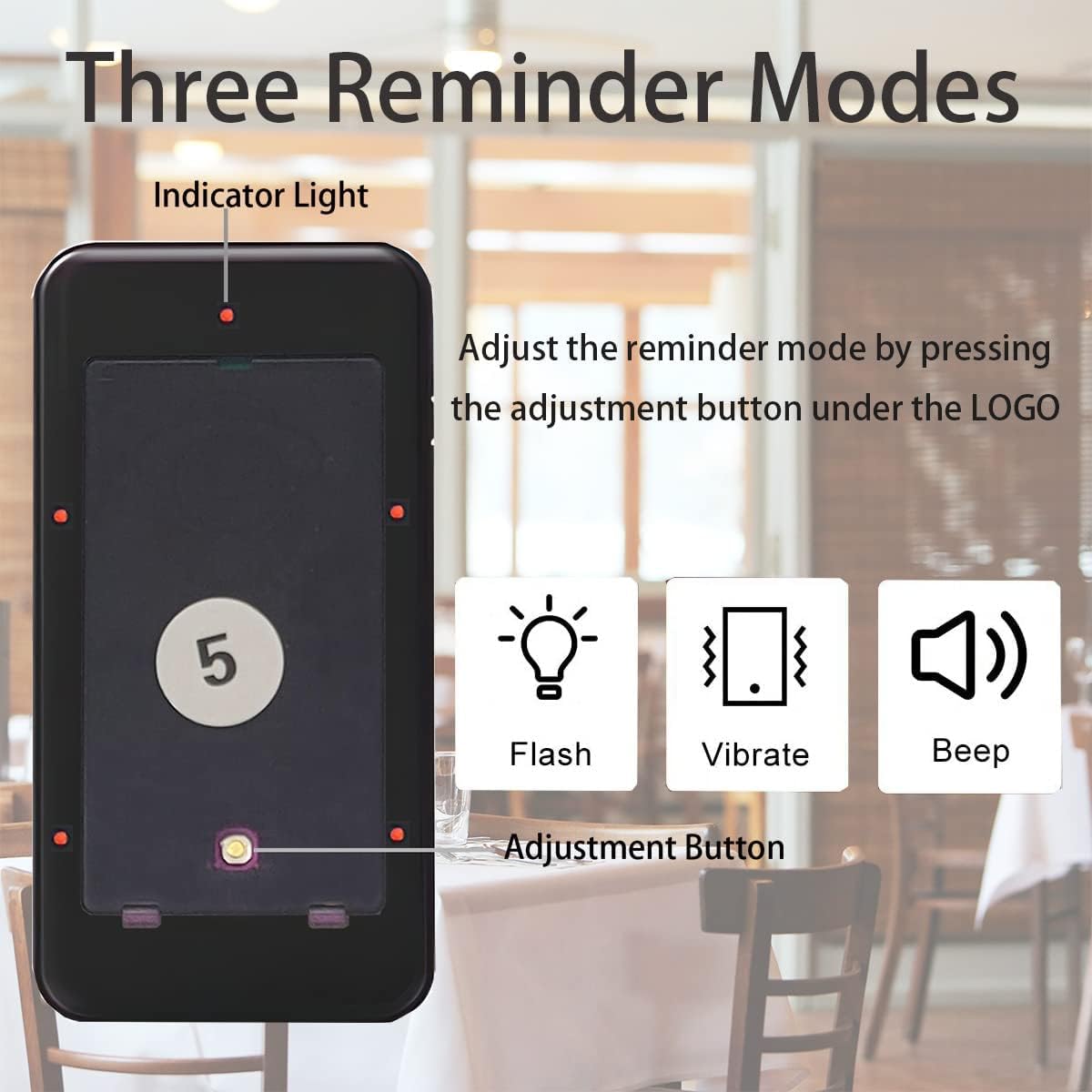
- Multiple Alert Modes: Pagers feature clear and loud alerts including vibration, audible beeps/buzzes, and visual flashes, suitable for various noise levels.
- Long Standby Time: Equipped with rechargeable lithium polymer batteries. Pagers automatically charge when placed on the docking station, ensuring they are always ready for use.
- Durable Design: Constructed from drop-resistant, waterproof, and oil-proof materials for easy cleaning and longevity. Pagers are compact and lightweight with a clear LCD display.
- Customizable: Pagers allow for easy replacement of LOGO stickers for branding.


4. Setup
Follow these steps to set up your PANDAAR Restaurant Pager System:
- Unpack: Carefully remove all components from the packaging.
- Connect Power: Plug the power adapter into the charging base and then into a standard electrical outlet.
- Charge Pagers: Place all 16 pagers into the charging slots on the base. Ensure they are seated correctly. The pagers will begin charging automatically. A red indicator light on the pagers typically signifies charging, turning green or off when fully charged.
- Antenna (if applicable): Ensure the antenna on the charging base is extended for optimal signal range.
5. Operating Instructions
5.1 Basic Paging Process
To call a customer using the pager system:
- Distribute Pagers: Hand a charged pager to each customer, noting the pager number.
- Initiate Call: When an order is ready or a customer needs to be called, locate the corresponding pager number on the keypad of the charging base.
- Enter Number: Press the numerical buttons on the keypad to enter the pager number (e.g., "01" for pager 1).
- Send Call: Press the "Call" button on the keypad.
- Customer Notification: The assigned pager will flash, vibrate, and/or beep (depending on its set mode) to alert the customer.
- Return Pager: Once the customer has been served, they should return the pager to the charging base.
- Clear Call: To stop an active alert or clear a pager from the system, place the pager back on the charging base and press the "Delete" or "Cancel" button on the keypad, then re-enter the pager number and press "Delete" or "Cancel" again.

5.2 Adjusting Pager Reminder Modes
Each pager can be set to different alert modes (Flash, Vibrate, Beep). To adjust:
- Access Adjustment Button: On the back or side of each pager, locate the small adjustment button, often found near the logo area.
- Cycle Modes: Press this button repeatedly to cycle through the available reminder modes. The pager will demonstrate the current mode (e.g., flash only, vibrate only, beep only, or a combination).
- Select Mode: Stop pressing the button when the desired alert mode is active.
5.3 Customizing Pager Logos
The pagers feature a slot for custom logo inserts. To customize:
- Remove Cover: Gently lift or slide off the transparent cover on the pager's display area.
- Insert Logo: Place your pre-printed custom logo into the designated slot.
- Replace Cover: Securely reattach the transparent cover.

5.4 Official Product Video
Watch this video for a visual guide on the PANDAAR Restaurant Pager System:
6. Maintenance
Proper maintenance ensures the longevity and optimal performance of your pager system:
- Cleaning: Wipe the charging base and pagers with a soft, damp cloth. Avoid abrasive cleaners or solvents. The pagers are waterproof and oil-proof, allowing for easy cleaning of spills.
- Battery Care: Always return pagers to the charging base when not in use to maintain optimal battery life. Avoid fully discharging the batteries frequently.
- Storage: Store the system in a cool, dry place away from direct sunlight and extreme temperatures.
7. Troubleshooting
Refer to the table below for common issues and their solutions:
| Problem | Solution |
|---|---|
| Pager not responding |
|
| Short range |
|
| Pager not charging |
|
| Pager alerts continuously | Return pager to base and press the "Delete" or "Cancel" button on the keypad, then re-enter the pager number and press "Delete" or "Cancel" again. |
8. Specifications
- Model: JT-911
- Brand: PANDAAR
- Dimensions (Base): 9.06 x 5.91 x 4.72 inches (230 x 150 x 35 mm)
- Dimensions (Pager): 4.13 x 1.97 x 0.47 inches (105 x 50 x 12 mm)
- Weight (Item): 3.25 pounds
- Power Source: Battery Powered (Rechargeable Lithium Polymer)
- Number of Pagers: 16
- Control Method: Touch Keypad
- Frequency: 315MHz
- Effective Range: Approximately 300 feet (indoor), 1640 feet / 500 meters (outdoor)
- Alert Modes: Flash, Vibrate, Beep/Buzzer
- Color: Black

9. Warranty and Support
For warranty information, technical support, or service inquiries, please contact PANDAAR customer service directly. Refer to the product packaging or the manufacturer's official website for contact details.