

Introduction
The Cable Matters SATA III Data Cable and SATA Power Cable Kit provides a comprehensive solution for building a new computer or upgrading an existing system. This kit includes essential cables and adapters to connect up to two additional drives, offering maximum flexibility for various PC configurations. It supports blazing-fast 6 Gbps data transfer speeds and ensures secure connections with latching connectors.

Image: Overview of the Cable Matters SATA III Data Cable and SATA Power Cable Kit, showing all included components: straight SATA data cable, 90-degree SATA data cable, 15-pin SATA power splitter, and 4-pin Molex to SATA power adapter.
Setup and Installation
This kit is designed for easy plug-and-play installation. Follow these steps to connect your SSDs, HDDs, or optical drives.
1. Connecting SATA Data Cables
The kit includes two 18-inch SATA data cables: one with straight connectors and one with a 90-degree right-angle connector. These cables are universally compatible with SATA I, II, and III devices.
- Identify the SATA data port on your SSD, HDD, or optical drive.
- Connect one end of the SATA data cable (either straight or 90-degree, depending on your case's space and cable management needs) to the data port on your drive. Ensure the latching connector clicks into place for a secure fit.
- Connect the other end of the SATA data cable to an available SATA data port on your motherboard. Again, ensure a secure connection.

Image: Detailed view of the SATA Power & Data Cable Kit, illustrating the Molex to Dual SATA Power Adapter, 15-Pin SATA Power Y-Splitter Cable, standard SATA 3.0 Cable, and 90 Degree SATA 3.0 Cable.

Image: A close-up of the 90-degree SATA III 6.0 Gbps data cable, highlighting its angled connector for tight spaces and indicating its 18-inch length.
2. Connecting SATA Power Cables
The kit provides flexible power options for your drives.
- 15-pin SATA Y-Splitter Cable: This adapter connects two SATA devices to a single SATA power cable from your PC's power supply. Connect the male 15-pin SATA connector to an available SATA power cable from your power supply, then connect the two female 15-pin SATA connectors to the power ports on your drives.
- 4-pin Molex to SATA Power Y-Cable: This adapter allows you to power SATA devices using legacy 4-pin Molex LP4 pins from your power supply. Connect the 4-pin Molex male connector to an available Molex connector from your power supply, then connect the two female 15-pin SATA connectors to the power ports on your drives.
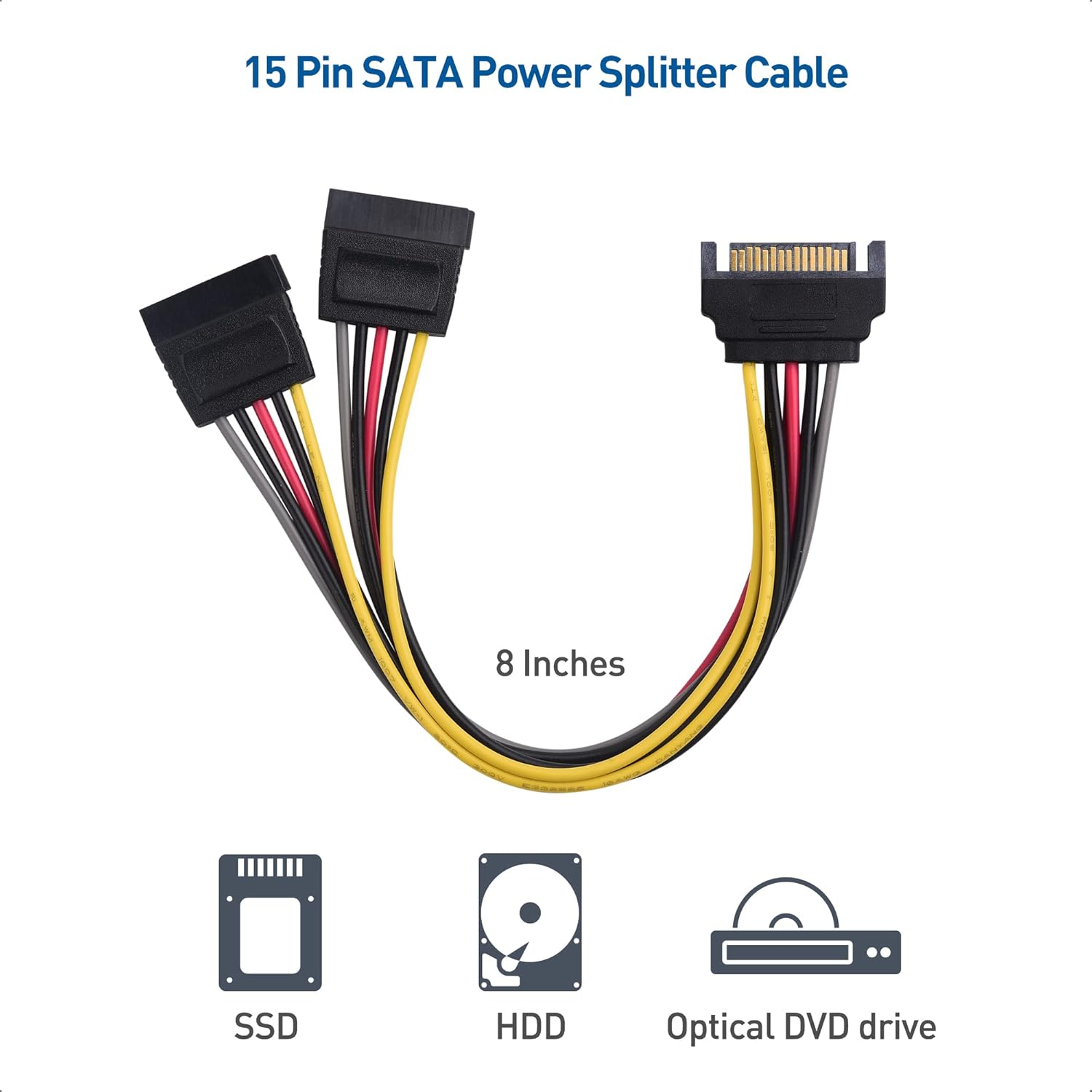
Image: The 15-pin SATA Power Splitter Cable, showing its ability to power two devices (SSD, HDD, Optical DVD drive) from one power supply connection.

Image: The 4-pin Molex to Dual SATA Power Adapter, demonstrating its use for powering SSDs, HDDs, and optical DVD drives from a Molex power source.
Ensure all connections are firm and secure to prevent data loss or power interruptions.
Operating Instructions
Once properly installed, the Cable Matters SATA III Data Cable and SATA Power Cable Kit operates automatically with your system. The cables facilitate high-speed data transfer and reliable power delivery to your connected storage devices.
Data Transfer Speed
The SATA III data cables support data transfer speeds of up to 6 Gbps (600 MB/s), providing superior performance for modern SSDs and high-speed hard drives. This ensures quick boot times, fast application loading, and efficient file transfers.

Image: A straight SATA III 6.0 Gbps data cable, accompanied by a bar chart comparing data transfer speeds of SATA 3.0 (600MB/s), SATA 2.0 (300MB/s), and SATA 1.0 (150MB/s).
Plug and Play Functionality
The kit offers true plug-and-play performance. Once connected, your operating system should automatically detect the new drives, allowing you to format and use them as needed.
Maintenance
These cables are designed for durability and require minimal maintenance. To ensure optimal performance and longevity:
- Keep connectors clean and free from dust or debris.
- Avoid excessive bending or sharp kinks in the cables, especially near the connectors, as this can damage the internal wiring.
- Ensure proper cable management within your PC case to prevent cables from interfering with cooling fans or other components.
- Do not pull on the cables to disconnect them; always grasp the connector housing firmly.
Troubleshooting
If you encounter issues with your Cable Matters SATA kit, consider the following common troubleshooting steps:
- Drive Not Detected:
- Ensure both the SATA data cable and the SATA power cable are securely connected to the drive and the motherboard/power supply.
- Check your motherboard's BIOS/UEFI settings to confirm that the SATA port is enabled and the drive is recognized.
- Try connecting the drive to a different SATA port on the motherboard or using a different set of cables from the kit to rule out a faulty cable or port.
- Slow Data Transfer Speeds:
- Verify that both your drive and motherboard support SATA III (6 Gbps) speeds. If either component is SATA II or I, speeds will be limited to the lowest common denominator.
- Ensure the cables are not excessively long or routed in a way that causes signal interference.
- Loose Connections:
- The latching connectors on the SATA data cables are designed for a secure fit. Ensure they are fully engaged and clicked into place.
- For power connections, ensure the 15-pin SATA and 4-pin Molex connectors are firmly seated.
If problems persist, consult your motherboard or drive manufacturer's documentation for further assistance, or contact Cable Matters customer support.
Specifications
| Feature | Detail |
|---|---|
| Model Number | 104070 |
| Brand | Cable Matters |
| Connector Type | SATA, Molex |
| Cable Type | SATA, Molex Cable |
| Compatible Devices | DVD Player, PC |
| Special Feature | Data Transfer |
| Package Dimensions | 8.78 x 4.06 x 0.63 inches |
| Item Weight | 3.17 ounces |
| Date First Available | September 30, 2022 |
Warranty and Support
For detailed warranty information and customer support, please refer to the official Cable Matters website or contact their customer service directly. You can also visit the Cable Matters store on Amazon for product information and support resources.
Cable Matters Amazon Store: Visit Store