
X88 H96MAX3528-32GB
H96 Max Android 13.0 TV Box User Manual
Model: H96MAX3528-32GB | Brand: X88
1. Introduction
The H96 Max Android 13.0 TV Box is a smart home player designed to deliver a high-quality entertainment experience. Featuring the RK3528 Quad-Core 64bit processor, 4GB DDR4 RAM, and 32GB ROM, it supports 8K Ultra HD video decoding, WiFi 6, Dual 2.4G/5.8G WiFi, and Bluetooth 5.0. This manual provides essential information for setting up, operating, and maintaining your device.

Image 1.1: H96 Max Android TV Box and its remote control.
2. What's in the Box
Upon opening your H96 Max Android 13.0 TV Box package, you should find the following items:
- H96 Max TV Box
- HDMI Cable
- User Guide
- AC Power Adapter
- Remote Control
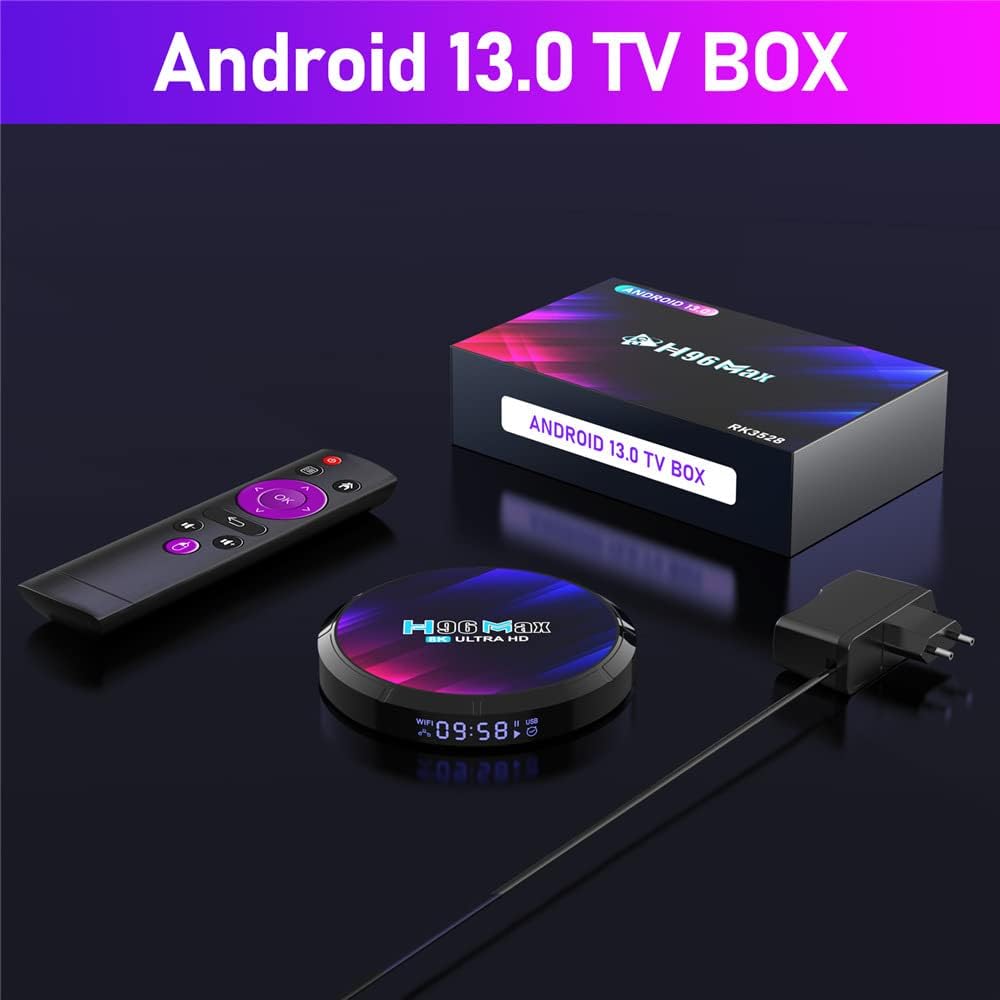
Image 2.1: All components included in the H96 Max TV Box package.
Unboxing Video
Video 2.1: An unboxing video demonstrating the contents of the H96 Max TV Box package and a brief overview of the device's ports.
3. Setup Guide
Follow these simple steps to set up your H96 Max TV Box:
- Connect TV Box to TV: Use the provided HDMI cable to connect the TV Box to an available HDMI port on your television.
- Connect to Power: Plug the AC power adapter into the DC port on the TV Box and then into a wall outlet.
- Connect to Internet: For optimal performance, connect an Ethernet cable from your router to the LAN port on the TV Box. Alternatively, you can connect wirelessly via Wi-Fi through the device settings.
- Power On: Turn on your TV and select the correct HDMI input. The TV Box should automatically power on. If not, press the power button on the remote control.
- Initial Setup: Follow the on-screen prompts to complete the initial setup, including language selection, network configuration, and Google account login.

Image 3.1: Visual guide for connecting the TV Box to your television and internet.
4. Operating Instructions
The H96 Max TV Box runs on Android 13.0, providing a user-friendly interface for accessing various applications and media content.
Key Features:
- 8K Ultra HD Video Decoding: Enjoy stunning visuals with support for 8K resolution, delivering exceptional clarity and detail.
- WiFi 6 Connectivity: Experience faster and more stable internet connections for seamless streaming and online activities.
- Bluetooth 5.0: Connect wireless peripherals such as headphones, game controllers, and keyboards with ease.
- Multi-screen Interaction: Supports Airplay, DLNA, and Miracast for casting content from your mobile devices to your TV.
- 3D Support: Immerse yourself in compatible 3D content for an enhanced viewing experience.

Image 4.1: The H96 Max TV Box supports 8K video decoding for superior picture quality.

Image 4.2: The device supports Airplay, DLNA, and Miracast for seamless content sharing.

Image 4.3: Experience immersive 3D content with the H96 Max TV Box.
Application Scenarios:
The H96 Max TV Box is versatile and can be used for various entertainment and productivity purposes:
- Music Sharing: Stream your favorite music and share it with others.
- Play Games: Enjoy a wide range of Android games on your TV.
- Meetings: Utilize the device for presentations or video conferences.
- Watch Movies: Access popular streaming services and enjoy movies and TV shows in high definition.

Image 4.4: The H96 Max TV Box supports diverse applications for entertainment and productivity.
5. Maintenance
To ensure the longevity and optimal performance of your H96 Max TV Box, follow these maintenance guidelines:
- Cleaning: Use a soft, dry cloth to clean the device. Avoid liquid cleaners or abrasive materials.
- Ventilation: Ensure the device is placed in a well-ventilated area to prevent overheating. Do not block the ventilation holes.
- Power Off: When not in use for extended periods, it is recommended to power off the device and unplug it from the power outlet.
- Software Updates: Regularly check for and install system updates to ensure you have the latest features and security patches.
- Avoid Extreme Conditions: Do not expose the device to extreme temperatures, humidity, or direct sunlight.
6. Troubleshooting
If you encounter issues with your H96 Max TV Box, refer to the following common troubleshooting steps:
- No Power: Ensure the power adapter is securely connected to the device and the wall outlet. Try a different outlet.
- No Signal on TV: Verify that the HDMI cable is properly connected to both the TV Box and the TV. Ensure your TV is set to the correct HDMI input.
- Network Connection Issues: If using Wi-Fi, check your router and ensure the Wi-Fi password is entered correctly. For Ethernet, ensure the cable is securely connected. Restart your router and the TV Box.
- Remote Control Not Responding: Check the batteries in the remote control and replace them if necessary. Ensure there are no obstructions between the remote and the TV Box.
- Apps Crashing/Freezing: Try restarting the TV Box. Clear the cache of the problematic app through the Android settings (Settings > Apps > [App Name] > Storage > Clear Cache).
7. Specifications
| Feature | Detail |
|---|---|
| Brand Name | X88 |
| Model Name | H96MAX3528-32GB |
| Operating System | Android 13.0 |
| Processor | RK3528 Quad-Core 64bit |
| RAM | 4GB DDR4 |
| ROM | 32GB |
| Resolution | 8K Ultra HD |
| Connectivity Technology | USB, Ethernet, WiFi6 (Dual 2.4G/5.8G), Bluetooth 5.0 |
| Connector Type | HDMI |
| Item Weight | 10.6 ounces (0.3 Kilograms) |
| Product Dimensions | 4.17 x 0.7 x 4.17 inches |
| Supported Internet Services | Youtube, Play Store, etc. |
| Controller Type | Remote Control |
8. Warranty and Support
For warranty information and technical support, please refer to the documentation included in your product packaging or contact the manufacturer directly. Keep your purchase receipt as proof of purchase for any warranty claims.
Related documentsH96MAX3528-32GB


Ask a question about this manual
Ask about setup, troubleshooting, compatibility, parts, safety, or missing instructions. Manuals+ will review the question and use this page’s manual context to help answer it.