
Introduction
Thank you for choosing the Drevet LED Desk Lamp, Model H40. This versatile desk lamp is designed to enhance your workspace with adjustable lighting, convenient charging options, and a space-saving design. It features a built-in wireless charger, a USB charging port, and two AC power outlets, making it an ideal solution for home and office environments.
This manual provides detailed instructions for setting up, operating, and maintaining your new desk lamp to ensure optimal performance and longevity.
Setup
- Unpack the Lamp: Carefully remove all components from the packaging. Ensure all parts are present: the lamp unit and power cord.
- Position the Lamp: Place the lamp on a stable, flat surface such as a desk or table.
- Connect Power: Insert the power cord into the power input port on the back of the lamp base, then plug the other end into a standard 110-240V AC wall outlet.
- Adjust the Lamp Arm: The lamp arm is flexible. Gently adjust the arm and lamp head to your desired position.
Operating Instructions
The Drevet LED Desk Lamp features intuitive touch controls located on the base. These controls allow you to power the lamp on/off, adjust brightness, and change lighting modes.
- Power On/Off: Touch the Power button (
 ) on the lamp base to turn the lamp on or off.
- Adjust Brightness: With the lamp on, touch the Brightness button () to cycle through 3 brightness levels.
- Change Lighting Mode (Color Temperature): With the lamp on, touch the Mode button () to switch between 3 color temperature modes (e.g., cool white, warm white, natural light).
- Activate 60-Minute Timer: Touch the Timer button () to activate the 60-minute auto-off timer. The lamp will automatically turn off after 60 minutes.
Light Modes and Brightness
The lamp offers three distinct lighting modes and three brightness levels to suit various tasks and preferences. The 48 high-quality LED beads provide soft, stable, and non-flickering light, designed to be eye-caring.
Image: The Drevet LED Desk Lamp showcasing its three adjustable brightness levels and three distinct color temperature modes for various lighting needs.
- Color Temperature Modes: Easily switch between different light hues to match your activity, whether it's focused work, casual reading, or relaxing.
- Brightness Levels: Adjust the intensity of the light to prevent eye strain and create the perfect ambiance.
Wireless Charging
The lamp base includes a convenient wireless charging pad for compatible devices. The integrated phone stand allows for both horizontal and vertical charging.

Image: A smartphone positioned horizontally on the wireless charging pad of the Drevet LED Desk Lamp, showing the device is actively charging.

Image: A smartphone placed vertically on the adjustable wireless charging stand of the Drevet LED Desk Lamp, illustrating how the stand can be angled for optimal viewing while charging.
- To Charge: Place your compatible smartphone directly onto the wireless charging pad. Ensure the phone is centered for optimal charging.
- Phone Stand: Utilize the pull-out non-slip pad to prop your phone horizontally or vertically while it charges, allowing for hands-free viewing or video calls.
USB Charging Port and AC Outlets
The lamp base is equipped with a USB charging port and two standard AC power outlets to power and charge multiple devices simultaneously.
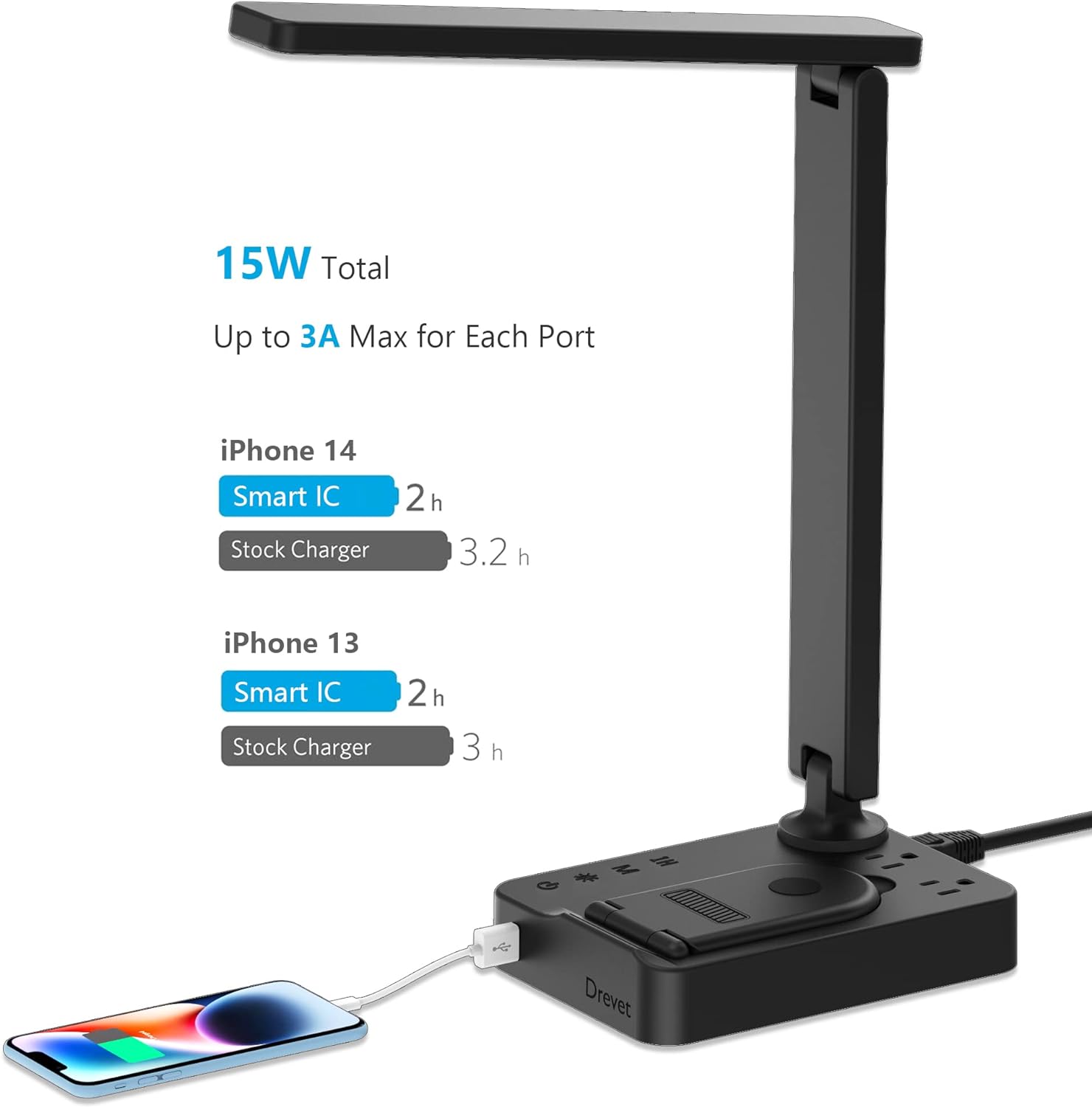
Image: The Drevet LED Desk Lamp demonstrating the efficiency of its USB charging port, showing faster charging times for iPhone 14 and 13 compared to standard chargers.
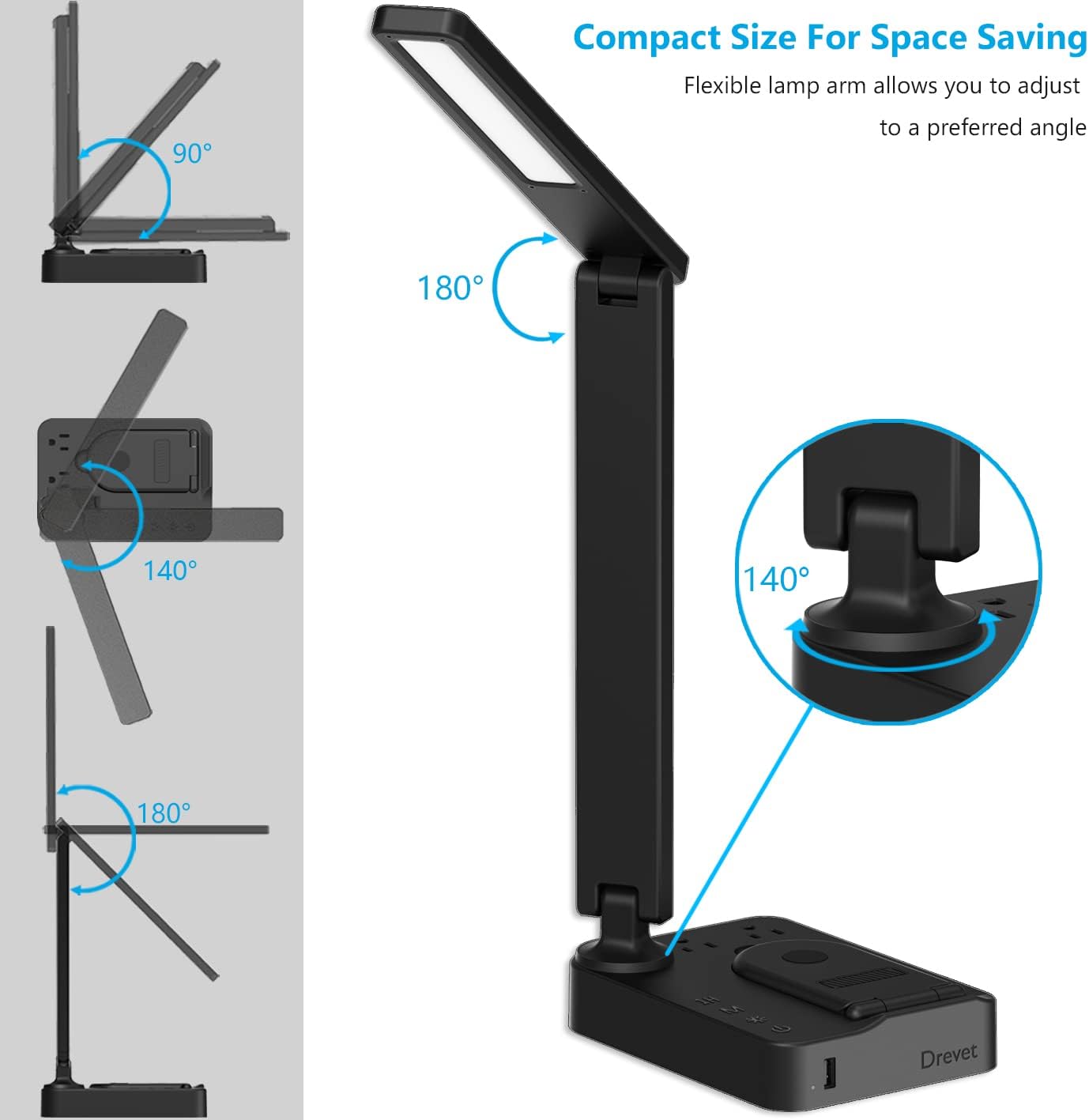
Image: A detailed view of the Drevet LED Desk Lamp's base, clearly showing the two AC power outlets and the single USB charging port for convenient device connectivity.
- USB Charging Port: Connect your mobile phones, tablets, or other USB-powered devices. The USB port provides up to 2.4A (max) output and functions regardless of whether the lamp light is on or off.
- AC Power Outlets: The two 3-prong AC outlets (1250W total output) allow you to power laptops, printers, Bluetooth speakers, and other small appliances directly from the lamp base.
- Safety Note: To ensure safe operation, do not connect electrical appliances with a total power consumption exceeding 1250W to the AC outlets.
Adjustability and Space-Saving Design
The Drevet LED Desk Lamp is designed for maximum flexibility and minimal footprint.

Image: A visual guide demonstrating the extensive adjustability of the Drevet LED Desk Lamp's arm and base, allowing for rotations of 90, 140, and 180 degrees to achieve various lighting angles.
- Flexible Arm: The lamp features a 180° flexible arm and a 90° base axis, allowing you to effortlessly adjust the lamp head and arm to achieve the ideal illuminating angle and coverage for your task.
- Foldable Design: The lamp head and arm can be folded down, making the lamp compact for easy storage in bookshelves, bags, or suitcases, saving valuable desk space.
Maintenance
- Cleaning: Always unplug the lamp before cleaning. Use a soft, dry cloth to wipe the lamp's surfaces. Avoid using abrasive cleaners, solvents, or harsh chemicals, as these can damage the finish.
- Storage: When not in use for extended periods, store the lamp in a clean, dry place. The foldable design allows for compact storage.
Troubleshooting
| Problem | Possible Cause | Solution |
|---|---|---|
| Lamp does not turn on. | No power supply. | Ensure the power cord is securely plugged into both the lamp and a working wall outlet. |
| Wireless charging is not working. | Device not compatible or improperly placed. | Verify your device supports wireless charging. Ensure the device is centered on the charging pad without thick cases interfering. |
| USB port or AC outlets are not providing power. | Overload or internal issue. | Check if the total wattage of connected devices exceeds 1250W. Unplug all devices and replug the lamp. If the issue persists, contact support. |
| Lamp stops responding after a power fluctuation (brownout). | Temporary electronic malfunction. | Unplug the lamp from the wall outlet, wait 10-15 seconds, then plug it back in. This often resets the internal electronics. |
Specifications
| Feature | Detail |
|---|---|
| Model Number | H40 |
| Light Source | 48 LED beads |
| Service Lifetime | > 40,000 Hours |
| LED Max Wattage | 12W |
| Color Temperature | 2700~6600K (3 adjustable settings) |
| Brightness | 600 LM |
| AC Rated Input | 110-240V, 50/60Hz |
| AC Outlet Rated Output | AC 100-240V, 50/60Hz, 1250W |
| USB Output | DC 5V 2.4A (max) |
| Product Dimensions | 13.2"D x 4"W x 12"H |
| Item Weight | 1.57 pounds |
| Material | Plastic |
| Control Method | Touch |
Warranty and Support
Drevet provides a 24-month warranty for this product. If you encounter any quality issues with your desk lamp or are not satisfied with your purchase, please do not hesitate to contact our customer support team. We are committed to assisting you and resolving any concerns you may have.
For support, please refer to the contact information provided with your purchase or visit the official Drevet website.