1. Introduction
The IXTECH Outdoor Bluetooth Speaker (Model IX-E01) is a versatile and portable audio device designed to enhance your outdoor and indoor environments with high-quality sound and ambient lighting. This speaker features a unique design resembling a tiki torch, providing 360° sound and three distinct lighting modes. Its robust construction ensures durability with an IPX5 water resistance rating, making it suitable for various settings from patios to camping trips. The multi-sync capability allows for connecting up to 100 speakers for an immersive surround sound experience.
2. What's in the Box
Upon unpacking your IXTECH Outdoor Bluetooth Speaker, please ensure all components listed below are present and in good condition:
- 2 x IXTECH Bluetooth Speakers
- 2 x Type-C Charging Cables
- 2 x Adjustable Stakes
- 2 x S-Hooks
- 2 x Wall Mounts
- 1 x User Manual

Image: All components included in the IXTECH Outdoor Bluetooth Speaker package.
3. Product Overview
3.1 Speaker Design and Dimensions
The IXTECH E01 speaker features a compact and portable design, resembling a modern lantern or tiki torch. Its dimensions are approximately 3.5 inches (D) x 3.5 inches (W) x 6.7 inches (H), and it weighs about 4.1 pounds. The speaker is constructed from durable plastic and includes a convenient handle for easy portability.
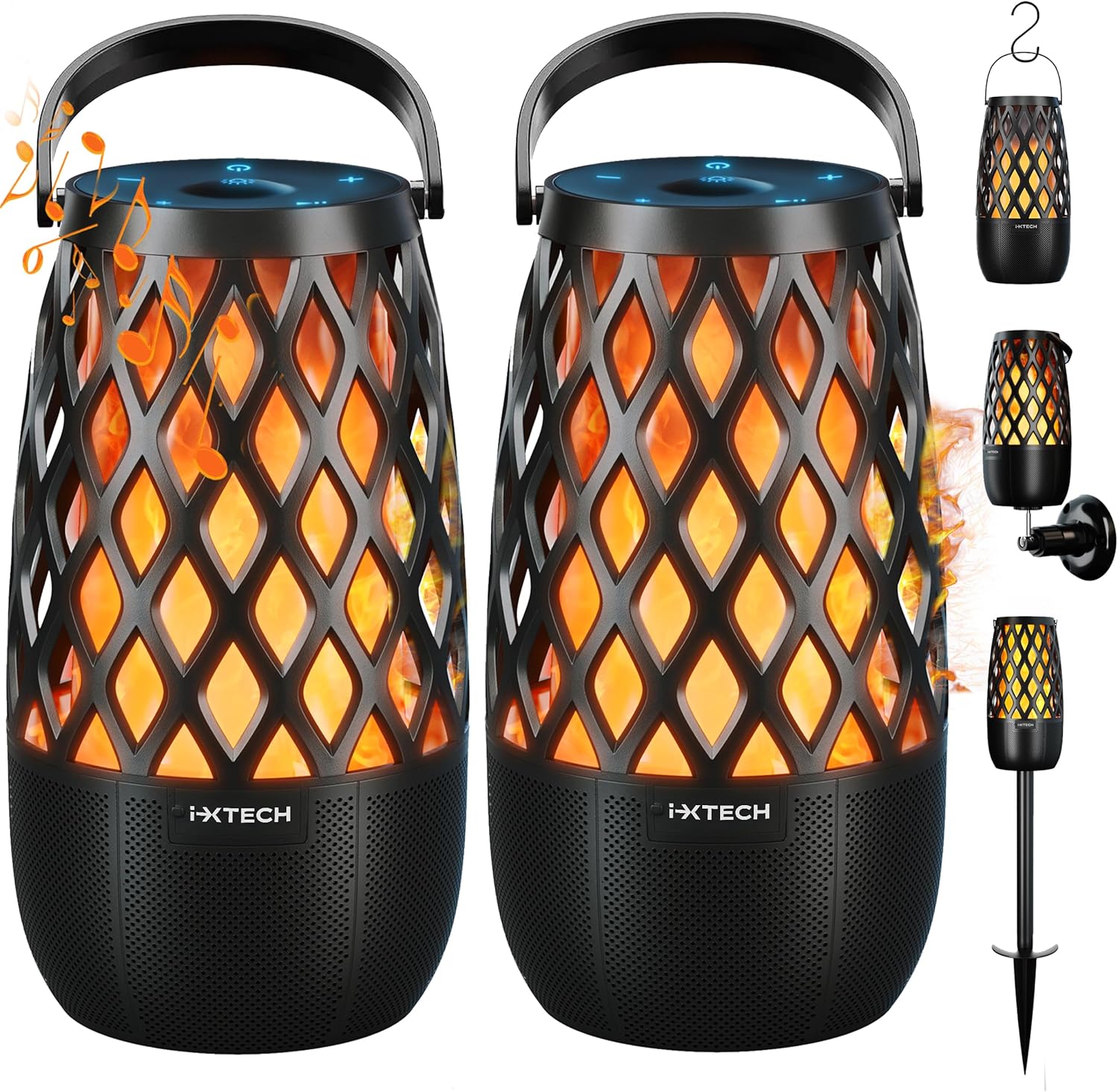
Image: Front view of two IXTECH Outdoor Bluetooth Speakers and their accessories.
3.2 Control Buttons
The speaker's controls are located on the top panel, featuring soft-touch buttons for easy operation:
- On/Off Button: Powers the speaker on or off.
- Bluetooth Connection Button: Initiates Bluetooth pairing mode.
- Start/Pause Button: Plays or pauses audio playback.
- Sound (+) Button: Increases volume.
- Sound (-) Button: Decreases volume.
- Light Mode Change Button: Cycles through the different lighting modes.

Image: Detailed view of the speaker's soft-touch control buttons.
4. Setup
4.1 Initial Charging
Before first use, fully charge your IXTECH speaker. Connect the provided Type-C cable to the speaker's charging port and the other end to a compatible USB power adapter (not included). A full charge takes approximately 2.5 hours. The speaker's 2000mAh battery provides up to 12 hours of music playback or 24 hours of lighting on a single charge.

Image: Speaker connected to a smartphone, illustrating battery life.
4.2 Powering On/Off
To power on the speaker, press and hold the On/Off button until you hear an audible prompt or see the indicator lights activate. To power off, press and hold the same button again.
5. Operating Instructions
5.1 Bluetooth Pairing
- Ensure the speaker is powered on.
- Press the Bluetooth Connection button. The speaker will enter pairing mode, indicated by a flashing blue light.
- On your smartphone, tablet, or other Bluetooth-enabled device, navigate to the Bluetooth settings.
- Select "IXTECH E01" from the list of available devices.
- Once connected, the speaker will provide an audible confirmation, and the blue light will become solid.
5.2 Multi-Sync Wireless Connection
The IXTECH E01 speakers support multi-sync technology, allowing you to connect up to 100 speakers for a synchronized audio experience. This creates an immersive soundscape for larger areas.
- Ensure all speakers you wish to connect are powered on and within range.
- Pair your primary speaker to your device via Bluetooth as described in Section 5.1.
- On the primary speaker, press and hold the Bluetooth Connection button for approximately 3 seconds until you hear a specific tone, indicating it's searching for other speakers.
- On each secondary speaker, quickly double-press the Bluetooth Connection button. They will automatically search for and connect to the primary speaker.
- Once connected, all speakers will play audio synchronously.

Image: Illustration of multiple speakers connected via multi-sync technology.
5.3 Lighting Modes
The speaker features three distinct lighting modes to create different atmospheres. Press the Light Mode Change button to cycle through them:
- Torch Light Mode: Simulates a flickering flame, ideal for a warm, ambient glow.
- Candlelight Mode: A softer, more subtle flickering effect, at approximately 80% brightness.
- Full Brightness Mode: A steady, bright light at 100% brightness.

Image: Visual representation of the three available lighting modes.
6. Installation Options
The IXTECH speaker offers multiple installation methods to suit your environment:
6.1 Adjustable Stake Mounting
For garden, patio, or lawn placement, attach the speaker to the adjustable stake. The stake provides secure placement in soft ground, allowing the speaker to stand upright like a torch.

Image: Speakers installed using adjustable stakes in an outdoor setting.
6.2 S-Hook Mounting
Utilize the included S-hooks to hang the speaker from pergolas, branches, or string lights. This method allows for versatile sound placement and adds to the decorative ambiance.

Image: Speaker hung using an S-hook.
6.3 Wall Mounting
For a more permanent installation, use the provided wall mounts. This saves floor space and allows for strategic placement on walls to optimize sound distribution.
Image: Speakers mounted on a wall.
7. Maintenance
7.1 Cleaning
To clean the speaker, wipe it with a soft, damp cloth. Do not use abrasive cleaners, solvents, or strong chemicals, as these may damage the surface. Ensure the charging port cover is securely closed before cleaning or exposing to water.
7.2 Water Resistance (IPX5)
The IXTECH E01 speaker is rated IPX5 waterproof, meaning it is protected against low-pressure water jets from any direction. It is suitable for outdoor use and can withstand splashes and light rain. Do not submerge the speaker in water.

Image: Speaker demonstrating its IPX5 water resistance.
7.3 Storage
When not in use for extended periods, store the speaker in a cool, dry place away from direct sunlight and extreme temperatures. It is recommended to fully charge the battery before storing to prolong its lifespan.
8. Troubleshooting
| Problem | Possible Cause | Solution |
|---|---|---|
| Speaker does not power on. | Battery is depleted. | Charge the speaker fully using the provided Type-C cable. |
| Cannot pair with Bluetooth device. | Speaker is not in pairing mode; device Bluetooth is off; speaker is too far from device; interference. | Ensure speaker is in pairing mode (flashing blue light). Turn Bluetooth on your device. Move speaker closer to device. Turn off other Bluetooth devices nearby. |
| No sound or low volume. | Volume is too low on speaker or device; speaker not connected. | Increase volume on both the speaker and your connected device. Re-establish Bluetooth connection. |
| Multi-sync connection fails or speakers desynchronize. | Incorrect pairing procedure; speakers are too far apart; interference. | Follow the multi-sync pairing steps carefully (Section 5.2). Ensure speakers are within the maximum range (82 feet). Reduce interference from other wireless devices. |
| Light function not working. | Speaker is off; light mode not selected. | Ensure speaker is powered on. Press the Light Mode Change button to activate and cycle through modes. |
9. Specifications
| Feature | Detail |
|---|---|
| Model Name | IX-E01 |
| Brand | IXTECH |
| Speaker Type | Surround Sound, Outdoor |
| Connectivity Technology | Bluetooth, USB (for charging) |
| Wireless Communication Technology | Bluetooth |
| Maximum Output Power | 10 Watts |
| Water Resistance Level | IPX5 (Waterproof) |
| Battery Type | Lithium Polymer (5 included) |
| Battery Capacity | 2000mAh |
| Charging Time | 2.5 Hours |
| Playtime (Music) | Up to 12 Hours |
| Playtime (Lighting) | Up to 24 Hours |
| Maximum Range | 82 Feet |
| Product Dimensions | 3.5"D x 3.5"W x 6.7"H |
| Item Weight | 4.1 Pounds |
| Material | Plastic |
| Control Method | Touch |
| Number of Items | 2 (in this pack) |
| Included Components | Speakers, Type-C cables, Adjustable stakes, Hooks, Wall mounts, User Manual |
10. Warranty and Support
10.1 Warranty Information
The IXTECH Outdoor Bluetooth Speaker comes with a 12-month warranty from the date of purchase. This warranty covers manufacturing defects and workmanship under normal use. It does not cover damage caused by misuse, accidents, unauthorized modifications, or natural disasters. Please retain your proof of purchase for warranty claims.
10.2 Customer Support
For technical assistance, troubleshooting, or warranty inquiries, please contact IXTECH customer support. Refer to the contact information provided on the product packaging or the official IXTECH website. You can also find additional information and a downloadable PDF user manual at this link.


