
MasterPRO BGMP-9307
MasterPro Rocket 360 Air Fryer User Manual
Model: BGMP-9307
1. Introduction
Thank you for choosing the MasterPro Rocket 360 Air Fryer. This appliance is designed to provide a healthier way to cook your favorite foods with little to no oil, utilizing advanced hot air circulation technology. Please read this manual thoroughly before operating the appliance to ensure safe and efficient use. Keep this manual for future reference.
Important Safety Instructions
- Read all instructions before use.
- Do not immerse the main unit, cord, or plug in water or other liquids to prevent electric shock.
- Close supervision is necessary when any appliance is used by or near children.
- Unplug from outlet when not in use and before cleaning. Allow to cool before putting on or taking off parts.
- Do not operate any appliance with a damaged cord or plug, or after the appliance malfunctions or has been damaged in any manner.
- Do not block any ventilation openings.
- Do not place the appliance against a wall or other appliances. Leave at least 10 cm free space on the back and sides and 10 cm free space above the appliance.
- Do not place anything on top of the appliance.
- Do not use the appliance for any purpose other than described in this manual.
- Extreme caution must be used when moving an appliance containing hot oil or other hot liquids.
2. Product Features
The MasterPro Rocket 360 Air Fryer is designed for healthy and convenient cooking, offering a range of features to enhance your culinary experience:
- Healthy Cooking: Cook foods with up to 90% less fat thanks to its 1500W power and 360° hot air circulation technology, delivering crispy, delicious, and healthy results.
- 6 Cooking Programs: Features 6 different presets for various dishes including fries, ribs, wings, meat, fish, and a baking function.
- Intuitive LED Touch Screen: Easily program temperature from 80°C to 200°C and set the timer up to 60 minutes manually, or select an automatic cooking program.
- Easy Cleaning: Equipped with a removable non-stick basket with a 3.6L capacity, making it simple to remove food residues and clean.
- Professional Choice: MasterPro is committed to continuous improvement through research and experience, bringing professional cooking capabilities to home kitchens.

Image: Front view of the MasterPro Rocket 360 Air Fryer, showcasing its sleek design and LED control panel.
3. Components
Familiarize yourself with the main components of your MasterPro Rocket 360 Air Fryer:
- Main Unit: Houses the heating element, fan, and control panel.
- Non-Stick Basket: The primary cooking container where food is placed. It has a 3.6L capacity.
- Removable Tray/Crisper Plate: Sits at the bottom of the basket, allowing air to circulate around food and collecting excess oil.
- Handle: For safely pulling out and inserting the basket.
- LED Touch Screen: Digital display for setting temperature, time, and selecting programs.
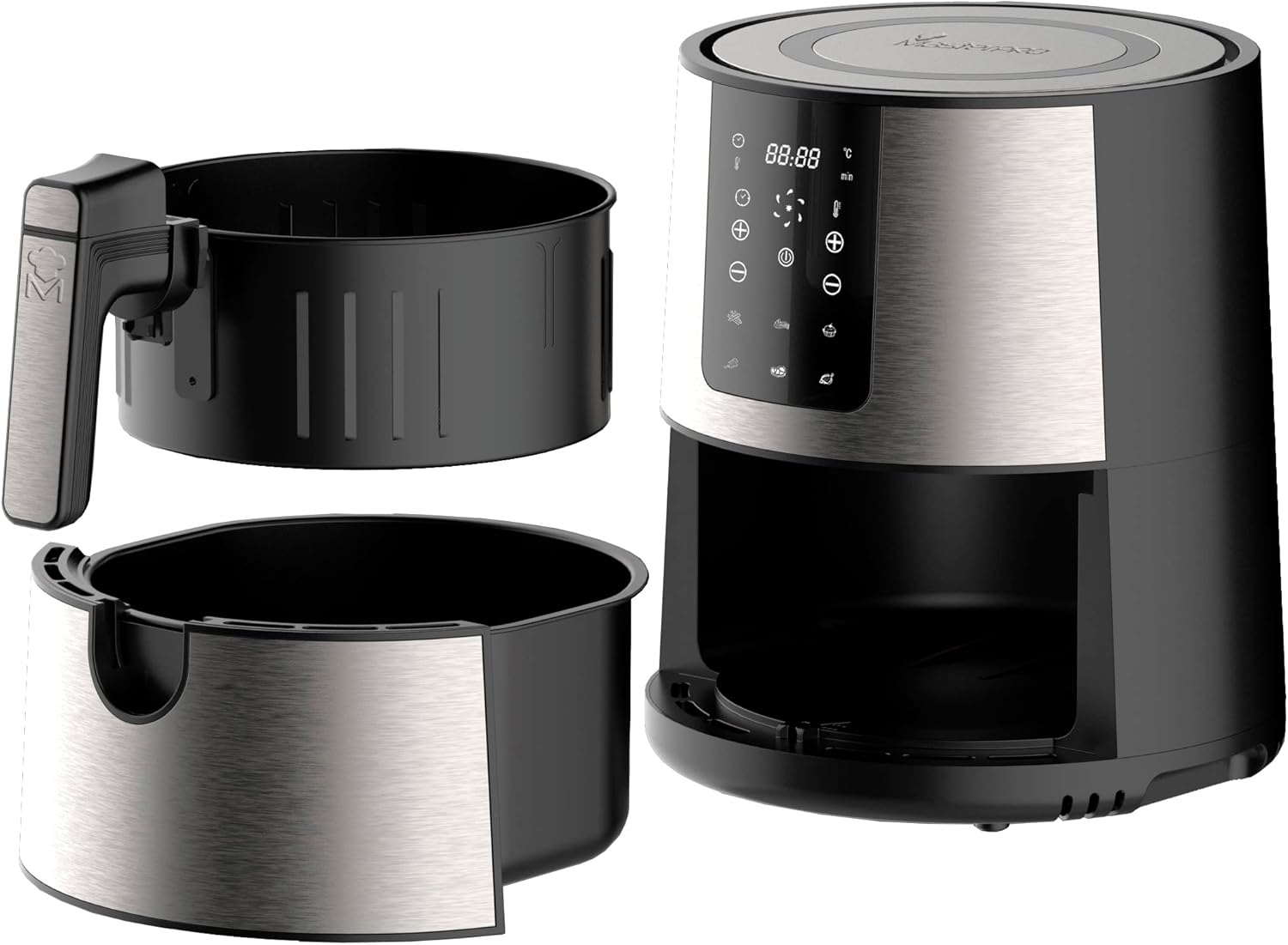
Image: The MasterPro Rocket 360 Air Fryer shown with its non-stick basket and removable crisper plate detached from the main unit.
4. Setup
Before First Use
- Remove all packaging materials, stickers, and labels from the appliance.
- Thoroughly clean the basket and crisper plate with hot water, dish soap, and a non-abrasive sponge.
- Wipe the inside and outside of the appliance with a damp cloth.
- Ensure all parts are completely dry before use.
Placement and Power Connection
- Place the appliance on a stable, horizontal, and heat-resistant surface.
- Ensure there is adequate space around the air fryer for proper ventilation (at least 10 cm on all sides).
- Plug the power cord into a grounded wall outlet. Ensure the voltage indicated on the appliance matches your local voltage.
5. Operating Instructions
Control Panel Overview
The MasterPro Rocket 360 features an intuitive LED touch screen for easy operation:

Image: Detailed view of the air fryer's LED touch screen, showing temperature, time, and program icons.
- Power Button: Turns the appliance on/off and starts/pauses cooking.
- Temperature Control (+/-): Adjusts cooking temperature (80°C - 200°C).
- Time Control (+/-): Adjusts cooking time (up to 60 minutes).
- Preset Program Icons: Select from 6 pre-programmed cooking modes.
Basic Operation
- Prepare Food: Place ingredients in the air fryer basket. Do not overfill.
- Insert Basket: Slide the basket back into the main unit until it clicks into place.
- Power On: Press the Power button to turn on the display.
- Set Temperature and Time: Use the temperature and time control buttons to set your desired cooking parameters. Alternatively, select a preset program.
- Start Cooking: Press the Power button again to start the cooking process.
- Shake Basket (Optional): For even cooking, especially with fries or smaller items, pull out the basket halfway through the cooking time and shake it gently. The air fryer will pause automatically. Return the basket to resume cooking.
- End of Cooking: The air fryer will beep when the cooking time is complete. Carefully pull out the basket and transfer food to a serving plate.
Pre-set Programs
The Rocket 360 offers 6 convenient pre-set programs for common dishes:

Image: The air fryer's display illustrating the six pre-programmed cooking options: Fries, Ribs, Wings, Meat, Fish, and Bake.
| Program | Suggested Temperature | Suggested Time |
|---|---|---|
| Fries | 180°C | 15-20 min |
| Ribs | 170°C | 20-25 min |
| Wings | 190°C | 18-22 min |
| Meat | 180°C | 10-15 min |
| Fish | 160°C | 12-18 min |
| Bake | 160°C | 20-30 min |
Note: Cooking times and temperatures are approximate and may vary based on food quantity, size, and desired crispiness. Always ensure food is cooked thoroughly.
Cooking Tips for Healthier Meals

Image: Burgers being cooked in the air fryer, demonstrating the appliance's ability to prepare meals with significantly less fat.
- For extra crispiness, lightly brush or spray food with a small amount of oil.
- Smaller ingredients usually require a slightly shorter cooking time than larger ingredients.
- For best results with frozen foods, follow package instructions.
6. Cleaning and Maintenance
Regular cleaning will ensure optimal performance and extend the lifespan of your air fryer.
Cleaning the Basket and Tray

Image: A hand demonstrating the easy removal of the air fryer basket, simplifying the cleaning process.
- Always unplug the air fryer and allow it to cool completely before cleaning.
- Remove the basket and crisper plate.
- Wash the basket and crisper plate with hot water, dish soap, and a non-abrasive sponge. The non-stick coating makes cleaning easy.
- For stubborn food residues, soak the basket and tray in hot water with some dish soap for about 10 minutes.
- Rinse thoroughly and dry completely before reassembling or storing.
Cleaning the Main Unit
- Wipe the exterior of the air fryer with a damp cloth. Do not use abrasive cleaners or scouring pads.
- Clean the interior with a damp cloth and mild detergent if necessary.
- Never immerse the main unit in water or any other liquid.
Storage
Store the appliance in a cool, dry place when not in use. Ensure all parts are clean and dry before storage.
7. Troubleshooting
If you encounter any issues with your MasterPro Rocket 360 Air Fryer, please refer to the table below for common problems and solutions:
| Problem | Possible Cause | Solution |
|---|---|---|
| Air fryer does not turn on. | Appliance not plugged in. Power outlet not working. | Ensure the power cord is securely plugged into a working outlet. Try plugging another appliance into the same outlet to check if it's functional. |
| Food is not cooked evenly. | Basket is overloaded. Food not shaken during cooking. | Cook food in smaller batches. Shake the basket halfway through cooking, especially for smaller items. |
| Food is not crispy. | Not enough oil (if applicable). Temperature too low or time too short. | Lightly brush or spray food with a small amount of oil. Increase temperature or cooking time. |
| White smoke coming from the appliance. | Grease residue from previous use. High-fat food being cooked. | Clean the basket and crisper plate thoroughly after each use. For high-fat foods, drain excess fat from the basket during cooking. |
| Basket does not slide into the appliance properly. | Basket is overloaded. Crisper plate not positioned correctly. | Reduce the amount of food in the basket. Ensure the crisper plate is flat at the bottom of the basket. |
If the problem persists after trying these solutions, please contact customer support.
8. Specifications
Detailed technical specifications for the MasterPro Rocket 360 Air Fryer:
| Feature | Value |
|---|---|
| Brand | MasterPRO |
| Model Number | BGMP-9307 |
| Color | Multicolor |
| Product Dimensions (L x W x H) | 68.5 x 35.5 x 42 cm |
| Capacity | 3.6 Liters |
| Power | 1500 Watts |
| Voltage | 1500 Volts |
| Material | Stainless Steel and PVC |
| Automatic Shut-off Function | Yes |
| Special Features | Adjustable Speed Control, Programmable |
| Item Weight | 5.84 Kilograms |
| Recommended Uses | Oil-free frying, grilling, dehydrating, baking |
9. Warranty and Support
Warranty Information
The MasterPro Rocket 360 Air Fryer comes with a 3-year availability for spare parts, ensuring long-term support for your appliance.
Customer Support
For any questions, technical assistance, or warranty claims, please contact MasterPro customer support through the retailer where you purchased the product or visit the official MasterPro website for contact details.
Related documentsBGMP-9307


Ask a question about this manual
Ask about setup, troubleshooting, compatibility, parts, safety, or missing instructions. Manuals+ will review the question and use this page’s manual context to help answer it.