
1. Introduction
Thank you for choosing the MasterPro Airfryer Rocket 1100. This appliance is designed to provide a healthy and efficient way to cook a variety of foods using hot air circulation. Please read this manual thoroughly before operating the appliance and retain it for future reference.
The MasterPro Airfryer Rocket 1100 is an 11-liter, 1800W oil-free air fryer and oven, featuring an intuitive LED touch screen for easy operation and precise temperature control from 80°C to 200°C.
2. Safety Instructions
Important Safeguards:
- Always place the appliance on a stable, heat-resistant surface, away from walls and other appliances to ensure proper ventilation.
- Do not immerse the appliance, cord, or plug in water or any other liquid.
- Keep children and pets away from the appliance during operation. The exterior surfaces can become hot.
- Do not block any ventilation openings.
- Unplug the appliance from the outlet when not in use and before cleaning. Allow it to cool completely before handling.
- Do not operate the appliance with a damaged cord or plug, or after the appliance malfunctions or has been damaged in any manner.
- Use only accessories recommended by the manufacturer.
- Do not use the appliance for purposes other than its intended use.
- Exercise extreme caution when removing hot oil or other hot liquids.
3. Product Overview
The MasterPro Airfryer Rocket 1100 is designed for versatile cooking with minimal oil. It features a spacious interior and a user-friendly control panel.

Figure 1: Front view of the MasterPro Airfryer Rocket 1100.
Components:
- Main Unit with LED Touch Screen
- Inner Cavity
- Removable Non-Stick Basket
- Two Racks
- Baking Tray
- U-Handle
- Rotisserie Spit
- Rotating Basket
- 10 Skewers with Stand
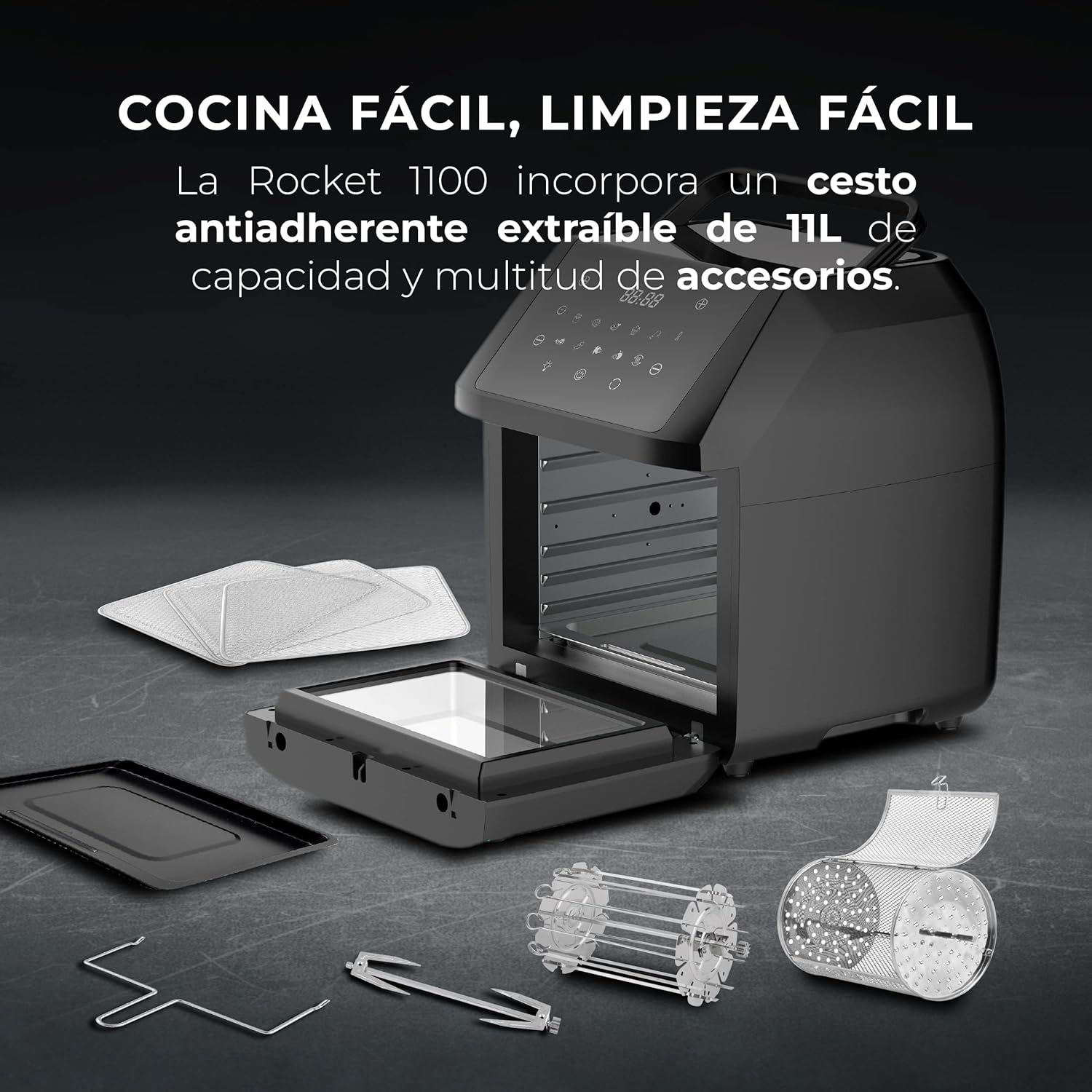
Figure 2: The air fryer with its various included accessories, such as racks, baking tray, U-handle, rotisserie spit, rotating basket, and skewers.
4. Setup
- Unpacking: Carefully remove all packaging materials and promotional labels from the appliance.
- Initial Cleaning: Before first use, wipe the main unit with a damp cloth. Wash all removable accessories (racks, basket, tray, etc.) with warm soapy water, rinse thoroughly, and dry completely.
- Placement: Place the air fryer on a stable, level, and heat-resistant surface. Ensure there is at least 10 cm (4 inches) of clear space around the back and sides of the appliance for adequate air circulation.
- Power Connection: Plug the power cord into a grounded electrical outlet. Ensure the voltage matches the specifications of your appliance (220 Volts).
5. Operating Instructions
The MasterPro Airfryer Rocket 1100 offers both preset programs and manual control for cooking.
5.1 Preheating
For best results, preheat the air fryer for 3-5 minutes before adding food. Select your desired temperature and time, then press the start button. The appliance will indicate when preheating is complete.
5.2 Using Preset Programs
The appliance features 10 preset cooking programs for common dishes.

Figure 3: The LED touch screen displaying the 10 preset cooking programs and manual controls.
- Place your food inside the air fryer using the appropriate accessory (e.g., rotating basket for fries, racks for chicken wings).
- Press the 'Menu' button on the LED touch screen to cycle through the 10 preset programs.
- Once you select a program, the default time and temperature will be displayed.
- Press the 'Start/Pause' button to begin cooking.
- The appliance will automatically shut off when the program is complete.
5.3 Manual Operation
For custom cooking, you can manually set the temperature and time.
- Place your food inside the air fryer.
- Use the temperature control buttons (usually '+' and '-') to set the desired temperature between 80°C and 200°C.
- Use the time control buttons (usually '+' and '-') to set the desired cooking time up to 60 minutes.
- Press the 'Start/Pause' button to begin cooking.
- The appliance will automatically shut off when the timer reaches zero.

Figure 4: Illustration of the 360° hot air circulation technology inside the air fryer, ensuring even cooking.
5.4 Using Accessories
- Rotating Basket: Ideal for fries, nuts, or other small items that require constant tumbling for even cooking. Insert it into the rotisserie slots.
- Rotisserie Spit: Use for whole chickens or larger cuts of meat. Secure the food with the forks and insert the spit into the rotisserie slots.
- Racks: Use for multi-level cooking, such as dehydrating fruits or cooking multiple batches of food.
- Baking Tray: Suitable for baking cakes, pizzas, or catching drips from food cooked on racks.
- U-Handle: Use this tool to safely remove hot accessories like the rotating basket or rotisserie spit from the appliance.
6. Maintenance and Cleaning
Regular cleaning ensures optimal performance and extends the life of your air fryer.
- Unplug and Cool: Always unplug the appliance and allow it to cool completely before cleaning.
- Exterior: Wipe the exterior of the air fryer with a damp cloth. Do not use abrasive cleaners.
- Interior: Clean the interior cavity with a damp cloth and mild detergent. For stubborn food residue, use a non-abrasive sponge.
- Accessories: All removable accessories (basket, racks, tray, spit, skewers) are dishwasher safe. Alternatively, wash them with warm soapy water, rinse, and dry thoroughly. The non-stick basket should be handled with care to preserve its coating.
- Storage: Ensure all parts are clean and dry before storing the appliance in a cool, dry place.
7. Troubleshooting
| Problem | Possible Cause | Solution |
|---|---|---|
| Appliance does not turn on | Not plugged in; Power outlet malfunction; Appliance not assembled correctly. | Ensure the power cord is securely plugged into a working outlet. Check if the main unit is properly closed. |
| Food is not cooked evenly | Overcrowding; Incorrect temperature/time; Food not shaken/turned. | Do not overcrowd the basket/racks. Adjust temperature and time as needed. Shake or turn food halfway through cooking. |
| White smoke coming from appliance | Grease residue from previous use; Cooking fatty foods. | Clean the appliance and accessories thoroughly after each use. For fatty foods, ensure proper ventilation and consider using less oil. |
| Food is not crispy | Too much moisture; Not enough oil (for certain recipes); Overcrowding. | Pat food dry before cooking. Add a small amount of oil if desired. Cook in smaller batches. |
8. Specifications
| Feature | Specification |
|---|---|
| Brand | MasterPRO |
| Model Number | BGMP-9310 |
| Color | Black |
| Dimensions (L x W x H) | 39 x 39 x 44.7 cm |
| Capacity | 11 Liters |
| Power | 1800 Watts |
| Voltage | 220 Volts |
| Material | Stainless steel and PVC |
| Automatic Shut-off | No |
| Features | 10 preset functions, Timer, Easy cleaning, Touch screen |
| Item Weight | 9 Kilograms |
| Recommended Uses | Oil-free frying, baking, dehydrating, roasting |
9. Warranty and Support
This MasterPro Airfryer Rocket 1100 comes with a 2-year availability for spare parts. For warranty claims, technical support, or service inquiries, please contact your retailer or the MasterPRO customer service department. Please have your model number (BGMP-9310) and proof of purchase ready.


