
1. Product Overview
The Septpenta Digital Inclinometer is a versatile measuring tool designed for precise angle and slope measurements. It features a magnetic base for secure attachment to metallic surfaces, a backlit LCD display for clear readings, and multiple measurement modes to suit various applications.
Key Features:
- High Accuracy: Provides measurement accuracy of ±0.2° with a reading value of 0.1°. Measuring range is 4 x 90° and 2 x 180°.
- Backlit LCD Display: Ensures easy readability even in low-light conditions, with a data locking function for convenience.
- Magnetic Base: Equipped with a strong magnet on the bottom for secure attachment to metal objects, facilitating hands-free operation.
- Versatile Measurement: Supports relative and absolute measurement conversion, as well as angle and slope conversion.
- Multi-Purpose Tool: Functions as a protractor, inclinometer, and leveling instrument, suitable for woodworking, automotive repair, and construction.

2. Safety Information
Please read these product instructions carefully before use to ensure correct and safe operation.
- Keep the device away from strong magnetic fields to avoid interference with measurements.
- Do not expose the device to extreme temperatures or direct sunlight for prolonged periods.
- Avoid dropping the device or subjecting it to strong impacts.
- Do not attempt to disassemble or modify the device, as this will void the warranty and may cause damage.
- Ensure batteries are inserted correctly according to polarity markings. Remove batteries if the device will not be used for an extended period.
3. Product Components and Controls

- LCD Display: Shows angle measurements, battery status, and mode indicators.
- HOLD Button: Freezes the current measurement on the display.
- ON/OFF Button: Powers the device on or off.
- ZERO Button: Used for zero calibration and switching between absolute and relative measurement modes.
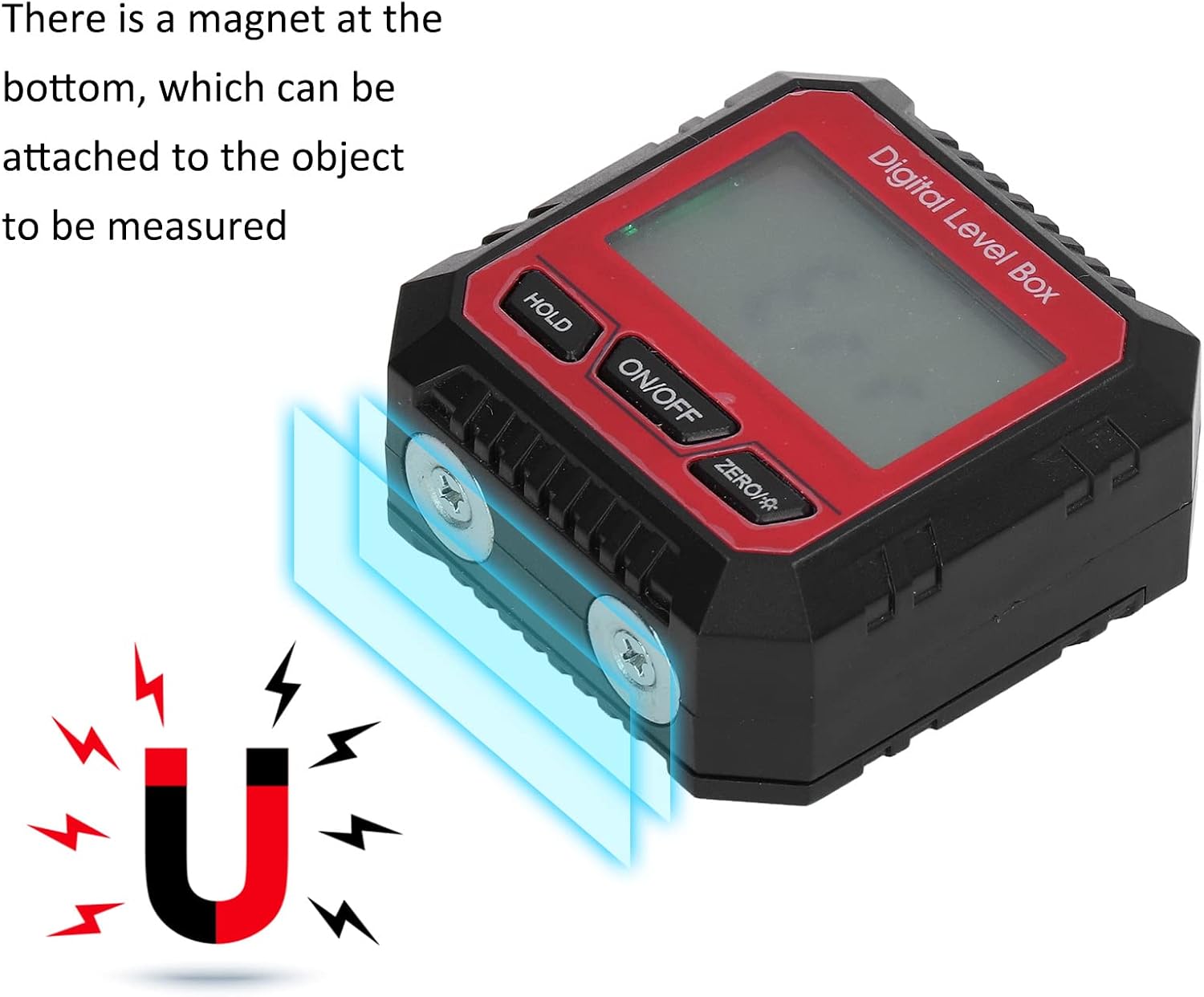
The bottom of the inclinometer features strong magnets, enabling it to be securely attached to ferrous metal surfaces for hands-free operation and stable readings.
4. Setup
4.1 Battery Installation
- Locate the battery compartment cover on the back of the device.
- Slide or unclip the cover to open the compartment.
- Insert two AAA dry batteries, ensuring correct polarity (+/-) as indicated inside the compartment.
- Close the battery compartment cover securely.
5. Operating Instructions
5.1 Power On/Off
- Press the ON/OFF button once to turn the device on.
- Press and hold the ON/OFF button for approximately 3 seconds to turn the device off.
5.2 Zero Calibration
To ensure accurate measurements, it is recommended to perform a zero calibration on a known level surface before use.
- Place the inclinometer on a flat, stable, and truly horizontal surface.
- Press the ZERO button. The display will show '0.00°', indicating that the current position is set as the reference zero.
5.3 Absolute and Relative Measurement
- Absolute Measurement: When the device is first turned on, it defaults to absolute measurement mode, displaying the angle relative to the true horizontal plane.
- Relative Measurement: After performing a zero calibration (as described in 5.2), the device enters relative measurement mode. All subsequent measurements will be relative to the newly set zero reference. Pressing the ZERO button again will switch back to absolute measurement.
5.4 Hold Function
- Press the HOLD button once to freeze the current reading on the LCD display.
- Press the HOLD button again to release the reading and resume live measurement.
5.5 Angle Measurement Examples

6. Applications
The Septpenta Digital Inclinometer is suitable for a wide range of applications requiring precise angle and level measurements:
- Wood Processing: Accurate cutting of wood angles for furniture manufacturing, framing, and other carpentry tasks.
- Auto Repair Industry: Precise control of tire assembly angles, chassis alignment, and other automotive adjustments.
- Machining and Manufacturing: Accurate positioning of machine tool working angles and rotation angles of booms.
- Construction: Leveling surfaces, setting slopes for drainage, and verifying angles in structural work.

7. Specifications
| Parameter | Value |
|---|---|
| Item Type | Inclinometer |
| Material | Plastic ABS |
| Product Size | Approx. 5.3 x 5.3 x 2.7 cm / 2.1 x 2.1 x 1.1 in |
| Measuring Range | 4 x 90° (0-360°) and 2 x 180° |
| Display Resolution | 0.05° (for <100°), 0.1° (for 100°~180°) |
| Accuracy | ±0.2° |
| Repeatability | 0.1° |
| Working Temperature | 0°C~40°C |
| Battery Type | 2 x AAA dry batteries (not included) |
| Weight | Approx. 57g / 2oz |

8. Maintenance
- Cleaning: Wipe the device with a soft, dry cloth. Do not use abrasive cleaners or solvents.
- Storage: Store the inclinometer in a dry place, away from direct sunlight and extreme temperatures. Remove batteries if storing for extended periods to prevent leakage.
- Calibration: Regularly perform zero calibration on a known level surface to maintain measurement accuracy.
9. Troubleshooting
- Display Not Turning On: Check if batteries are inserted correctly and have sufficient charge. Replace batteries if necessary.
- Inaccurate Readings: Perform a zero calibration on a known level surface. Ensure the measurement surface is clean and stable. Avoid strong magnetic interference.
- Display Flickering: This may indicate low battery power. Replace batteries.
10. Warranty and Support
For warranty information or technical support, please refer to the documentation included with your purchase or contact Septpenta customer service through the retailer where the product was purchased. Please have your model number (Septpentamg4ba2g13z-11) and purchase date available when contacting support.