
Introduction
This manual provides detailed instructions for the assembly, operation, maintenance, and troubleshooting of your Vigosit Gaming Chair with Footrest. Please read this manual thoroughly before assembly and use to ensure proper function and longevity of your chair. Keep this manual for future reference.
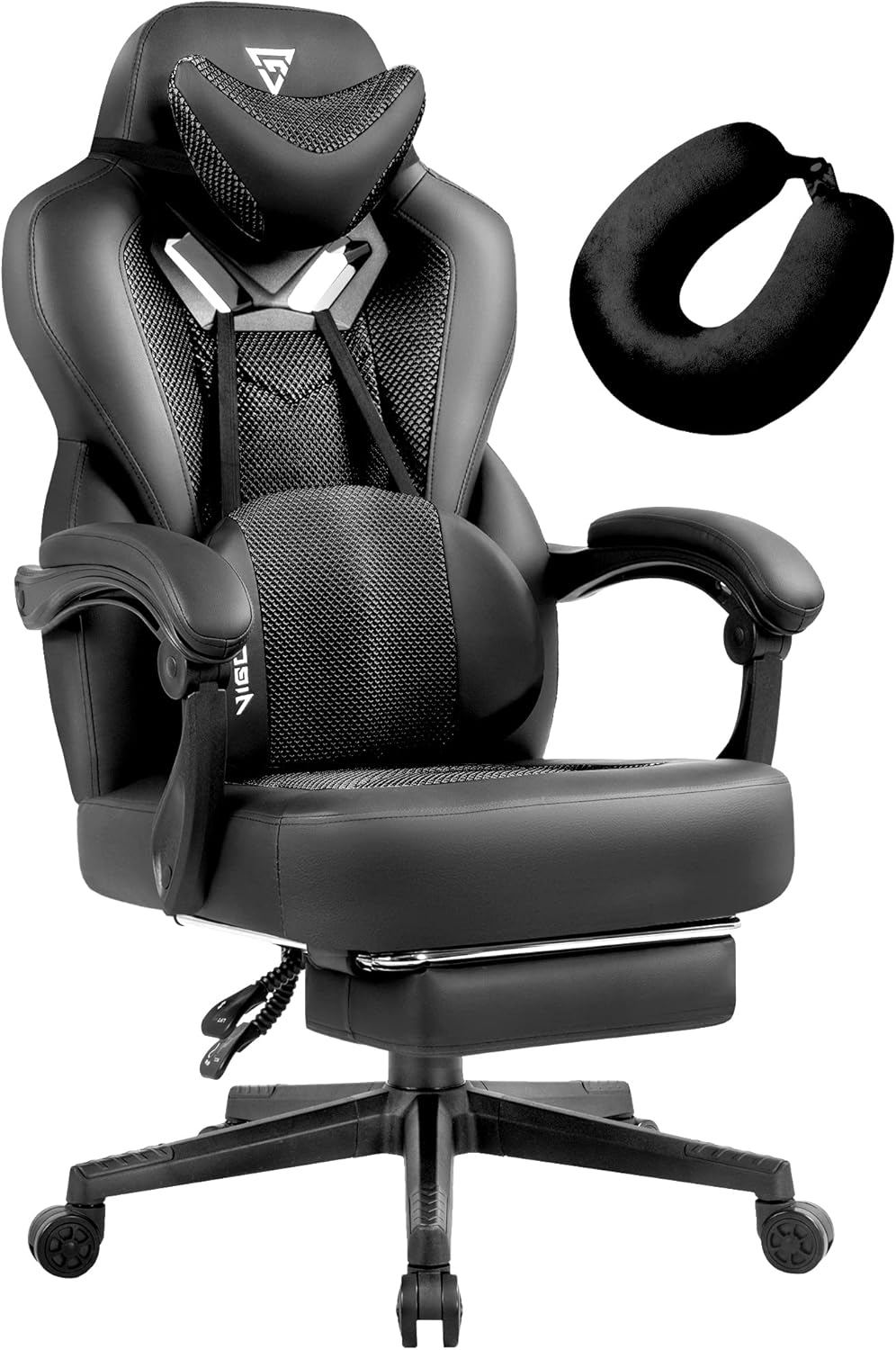
Image: The Vigosit Gaming Chair with its included footrest and neck pillow.
Safety Information
To prevent injury and damage to the chair, please observe the following safety guidelines:
- Do not exceed the maximum weight capacity of 350 lbs (158.75 kg).
- Ensure all screws and bolts are securely tightened before use. Periodically check and re-tighten as necessary.
- Keep hands and fingers clear of moving parts, especially during recline and height adjustment.
- Do not stand on the chair or use it as a step stool.
- Avoid placing heavy objects on the armrests, as this may cause instability or damage.
Setup and Assembly
Your Vigosit Gaming Chair requires assembly. A detailed installation manual in PDF format is included with your purchase and can be accessed via the provided link: Installation Manual (PDF). Follow the steps below as a general guide:
- Unpack Components: Carefully remove all parts from the packaging and lay them out on a clean, flat surface. Verify all components are present according to the parts list in the detailed manual.
- Assemble the Base: Attach the caster wheels to the five-star base. Insert the gas lift cylinder into the center hole of the base.
- Attach Armrests to Seat: Secure the armrests to the seat cushion using the designated screws.
- Attach Backrest to Seat: Connect the backrest to the seat assembly, ensuring proper alignment.
- Install Mechanism: Attach the multi-functional tilt mechanism to the underside of the seat cushion.
- Connect Seat to Base: Place the assembled seat and backrest onto the gas lift cylinder.
- Attach Lumbar and Headrest Pillows: Position and secure the lumbar support pillow and headrest pillow as desired.

Image: An exploded view showing the main components and features of the Vigosit Gaming Chair.
Operating Instructions
Your Vigosit Gaming Chair is designed with multiple adjustable features to enhance your comfort and support during extended periods of use, whether for gaming, office work, reading, or napping.
Height Adjustment
To adjust the chair's height, locate the lever on the right side, beneath the seat. While seated, pull the lever up to lower the chair. To raise the chair, lift the lever while standing or with minimal weight on the seat.
Recline Function
The chair features a 90° to 155° reclining backrest. To recline, pull the recline lever located on the right side of the chair, near the armrest. Lean back to the desired angle and release the lever to lock the position. To return to an upright position, pull the lever again and lean forward.

Image: The Vigosit Gaming Chair shown in a reclined position, highlighting its adjustable backrest.
Retractable Footrest
For added comfort, especially when reclining, pull out the footrest located beneath the seat. Extend it fully until it locks into place. To retract, push it back under the seat until it is fully stowed.

Image: The Vigosit Gaming Chair with its retractable footrest extended for relaxation.
360-Degree Swivel
The chair is equipped with a 360-degree swivel function, allowing for easy rotation and mobility without needing to move the entire chair base.
Lumbar Support with Massage Function
The ergonomic lumbar pillow provides support for your lower back. It also features a massage function. Connect the USB cable from the lumbar pillow to a compatible USB power source (e.g., computer USB port, power bank, or USB wall adapter) to activate the massage feature.
Image: A close-up view of the ergonomic lumbar pillow, highlighting its design and massage function.
Headrest and Neck Pillow
The chair includes a soft headrest integrated into the backrest and an additional memory foam neck pillow for enhanced head and neck support. Adjust the position of the neck pillow as needed for optimal comfort.
Image: An illustration detailing the two headrest supports, including the memory foam neck pillow.
Maintenance
Proper maintenance ensures the longevity and appearance of your Vigosit Gaming Chair:
- Cleaning: Wipe clean with a damp cloth. For tougher spots, use a mild soap solution and then wipe with a clean, damp cloth. Avoid harsh chemicals or abrasive cleaners.
- Regular Checks: Periodically inspect all bolts and screws to ensure they are tight. Re-tighten as necessary to maintain stability and prevent wobbling.
- Caster Care: Keep the caster wheels free of hair and debris to ensure smooth rolling.
- Fabric Care: The unique PU leather mesh stitching fabric is designed for breathability and wear resistance. Avoid sharp objects that could puncture or tear the material.

Image: A cross-section diagram illustrating the breathable and durable material layers used in the chair's construction.
Troubleshooting
If you encounter issues with your Vigosit Gaming Chair, refer to the following common problems and solutions:
| Problem | Possible Cause | Solution |
|---|---|---|
| Chair wobbles or feels unstable | Loose screws or bolts. | Check and re-tighten all assembly screws, especially those connecting the armrests, backrest, and mechanism to the seat. |
| Chair does not recline or lock in position | Recline mechanism obstruction or damage. | Ensure no objects are obstructing the mechanism. If the issue persists, contact customer support. |
| Chair does not adjust height properly (sinks or won't raise) | Gas lift cylinder malfunction. | This may indicate a faulty gas lift cylinder. Contact customer support for replacement options. |
| Massage function on lumbar pillow not working | USB power issue or internal malfunction. | Ensure the USB cable is securely connected to a working power source. Try a different USB port or adapter. If still not working, the unit may be faulty; contact customer support. |
| Armrests feel loose or flimsy | Loose armrest attachment screws. | Tighten the screws securing the armrests to the seat. Note that armrests are designed to move with the recline function. |
Specifications
Key specifications for the Vigosit Gaming Chair:
- Brand: Vigosit
- Color: Black Dark
- Product Dimensions: 25"D x 23"W x 48.5"H
- Size: Normal Seat Cushion
- Special Features: Adjustable Height, Swivel, Ergonomic Design, Foot Rest, Head Support, Massage Lumbar Support
- Recommended Uses: Gaming, Office
- Maximum Weight Recommendation: 350 Pounds (158.75 kg)
- Style: Modern
- Material: PU Leather, Mesh, Sponge Fill
- Reclining Position Count: 3 (90°-155°)
- Chair Backrest Width: 23 Inches
- Item Weight: 48.4 pounds (21.95 kg)
- Model Number: 32b39a42-f6ad-4d2d-810e-1d5dcbfca6e0
- UPC: 783970448576

Image: A technical diagram illustrating the widened seat cushion and backrest design for enhanced comfort.

Image: A demonstration of the chair undergoing a weight capacity test, highlighting its robust construction.
Warranty Information
Vigosit provides the following warranty for your gaming chair:
- One-Month Replacement Service: For initial defects or issues within one month of purchase.
- One-Year Parts Quality Warranty: Covers quality-related issues for components for up to one year from the date of purchase.
Please retain your proof of purchase for warranty claims.
Customer Support
For any questions, concerns, or assistance with your Vigosit Gaming Chair, our customer service team is available 24/7 to provide support.
- Seller: VIGOSIT US
- Brand Store: Visit the official Vigosit store on Amazon for more products and information: Vigosit Amazon Store
When contacting support, please have your model number (32b39a42-f6ad-4d2d-810e-1d5dcbfca6e0) and purchase details ready to expedite assistance.

Image: Customer support representatives ready to assist with inquiries.