
Ricoh WG-7
Contents
Ricoh WG-7 Waterproof Digital Camera User Manual
Model: WG-7
1. Introduction
This manual provides essential information for the safe and effective use of your Ricoh WG-7 Waterproof Digital Camera. Please read this manual thoroughly before using the camera and keep it for future reference.
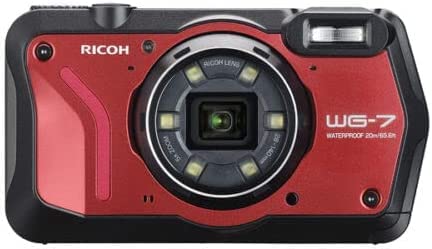
Figure 1: Ricoh WG-7 Waterproof Digital Camera. This image displays the front of the camera, highlighting its rugged design, the central lens with surrounding LED lights, and the flash unit. The camera body is predominantly red with black accents.
The Ricoh WG-7 is designed for durability, featuring waterproof, dustproof, and freeze-proof capabilities. It can operate underwater up to 65 feet (20 meters) for two hours, withstand drops from 6.9 feet (2.1 meters), and resist up to 220 pounds (100 kilograms) of force. Its ergonomic design ensures a secure grip in various conditions.
2. What's in the Box
Upon opening the package, ensure all components are present:
- Ricoh WG-7 Camera Body
3. Setup
3.1. Charging the Battery
- Insert the rechargeable battery (not included with camera body only) into the camera.
- Connect the USB cable (not included with camera body only) to the camera's USB port and the other end to a USB power adapter (not included with camera body only).
- Plug the USB power adapter into a wall outlet. The charging indicator light will illuminate.
- Charging is complete when the indicator light turns off.
3.2. Inserting a Memory Card
The Ricoh WG-7 supports SD, SDHC, and SDXC memory cards. Ensure the camera is turned off before inserting or removing the card.
- Open the battery/card compartment cover on the side of the camera.
- Insert the memory card into the slot with the label facing the correct direction until it clicks into place.
- Close the compartment cover securely to maintain waterproof integrity.
4. Operating the Camera
4.1. Powering On/Off
Press and hold the power button located on the top of the camera to turn it on or off.
4.2. Basic Photography
- Shooting Mode: Rotate the mode dial to select your desired shooting mode (e.g., Auto, Program, Scene).
- Zoom: Use the zoom lever around the shutter button to adjust the optical zoom (5x optical zoom).
- Focusing: Half-press the shutter button to focus. The camera will confirm focus with a beep and an indicator on the screen.
- Taking a Photo: Fully press the shutter button to capture the image.
4.3. Video Recording (4K Support)
The Ricoh WG-7 supports 4K video recording.
- Switch to video recording mode using the mode dial or dedicated video button.
- Press the record button to start recording.
- Press the record button again to stop recording.
4.4. Underwater Use
Before using the camera underwater, ensure all compartment covers (battery/card, USB/HDMI) are securely closed and locked. The camera is waterproof up to 20 meters (65 feet) for up to two hours.
After underwater use, rinse the camera thoroughly with fresh water and dry it completely before opening any compartments.
5. Maintenance and Care
- Cleaning the Camera Body: Wipe the camera body with a soft, damp cloth. For stubborn dirt, use a mild detergent.
- Cleaning the Lens: Use a lens brush or a soft, lint-free cloth specifically designed for camera lenses. Avoid touching the lens surface with your fingers.
- Storage: Store the camera in a cool, dry place away from direct sunlight and extreme temperatures.
- Waterproof Seals: Regularly inspect the rubber seals around the battery/card and port covers for any dirt, sand, or damage. Clean them gently with a soft cloth. Do not use sharp objects.
6. Troubleshooting
| Problem | Possible Cause | Solution |
|---|---|---|
| Camera does not power on. | Battery is depleted or incorrectly inserted. | Charge the battery. Ensure the battery is inserted correctly. |
| Images are blurry. | Lens is dirty; camera is out of focus; insufficient light. | Clean the lens. Ensure the camera focuses correctly. Use flash or increase ISO in low light. |
| Memory card error. | Card is full, corrupted, or incompatible. | Delete unnecessary files. Format the card (this will erase all data). Try a different, compatible card. |
| Water inside camera. | Compartment covers not securely closed; damaged seals. | Immediately turn off the camera and remove the battery. Do not attempt to use it. Contact Ricoh customer support for service. |
7. Specifications
| Feature | Detail |
|---|---|
| Model Name | WG-7 |
| Brand | Ricoh |
| Effective Pixels | Approximately 20 million pixels |
| Optical Zoom | 5x |
| Image Stabilization | Digital, Optical |
| Video Recording | Supports 4K video |
| Waterproof Depth | Up to 20 meters (65 feet) for 2 hours |
| Shockproof | Withstands drops from 2.1 meters (6.9 feet) |
| Crushproof | Resists up to 100 kilograms (220 pounds) of force |
| Freeze-proof | Down to -10 degrees Celsius (14 degrees Fahrenheit) |
| Product Dimensions | 1.14 x 4.85 x 2.44 inches |
| Item Weight | 1.24 pounds |
| Supported File Format | JPEG |
| Photo Sensor Technology | CMOS |
8. Warranty and Support
For warranty information and technical support, please refer to the official Ricoh website or contact Ricoh customer service directly.
Ricoh Official Website: www.ricoh-imaging.co.jp/english/
Please have your camera's model number (WG-7) and serial number ready when contacting support.
Ask a question about this manual
Ask about setup, troubleshooting, compatibility, parts, safety, or missing instructions. Manuals+ will review the question and use this page’s manual context to help answer it.