
Fender SFX II 2 x 100W
Fender SFX II 2 x 100W Acoustic Guitar Amplifier Instruction Manual
Model: SFX II 2 x 100W
Brand: Fender
1. Introduction
The Fender SFX II 2 x 100W Acoustic Guitar Amplifier is a powerful and portable system designed for acoustic guitar and vocal performance. It features two independent channels, each equipped with studio-quality effects. The amplifier incorporates Fender's proprietary Stereo Field Expansion (SFX) technology, which enhances effects for a room-filling, immersive sound experience. Additional features include Bluetooth wireless audio streaming and a 90-second looper, making it suitable for various performance and practice scenarios.
2. Important Safety Information
Please read and understand all safety instructions before operating this amplifier. Retain this manual for future reference.
- Power Source: Connect the amplifier only to a power supply of the type described in this manual or marked on the unit. Ensure the voltage matches your region's standard.
- Ventilation: Do not block any ventilation openings. Install in accordance with the manufacturer's instructions. Adequate airflow is essential to prevent overheating.
- Water and Moisture: Do not use this apparatus near water or expose it to dripping or splashing. Keep liquids away from the amplifier.
- Heat: Do not install near any heat sources such as radiators, heat registers, stoves, or other apparatus (including amplifiers) that produce heat.
- Cleaning: Clean only with a dry cloth. Unplug the amplifier from the wall outlet before cleaning.
- Servicing: Do not attempt to service this product yourself as opening or removing covers may expose you to dangerous voltage or other hazards. Refer all servicing to qualified service personnel.
- Cables: Protect the power cord from being walked on or pinched, particularly at plugs, convenience receptacles, and the point where they exit from the apparatus.
3. Package Contents
Upon unpacking, please verify that all items listed below are included in your package:
- Fender SFX II 2 x 100W Acoustic Guitar Amplifier
- Power Cable
- Fender Instrument Cable (with spiral shielding and nickel-plated connectors)
- Amperstand Guitar Cradle (with micro-suction material and 'ashtray' for small items)
- Fender Clip-On Tuner
- 24-Pack of Fender Picks (assorted gauges)
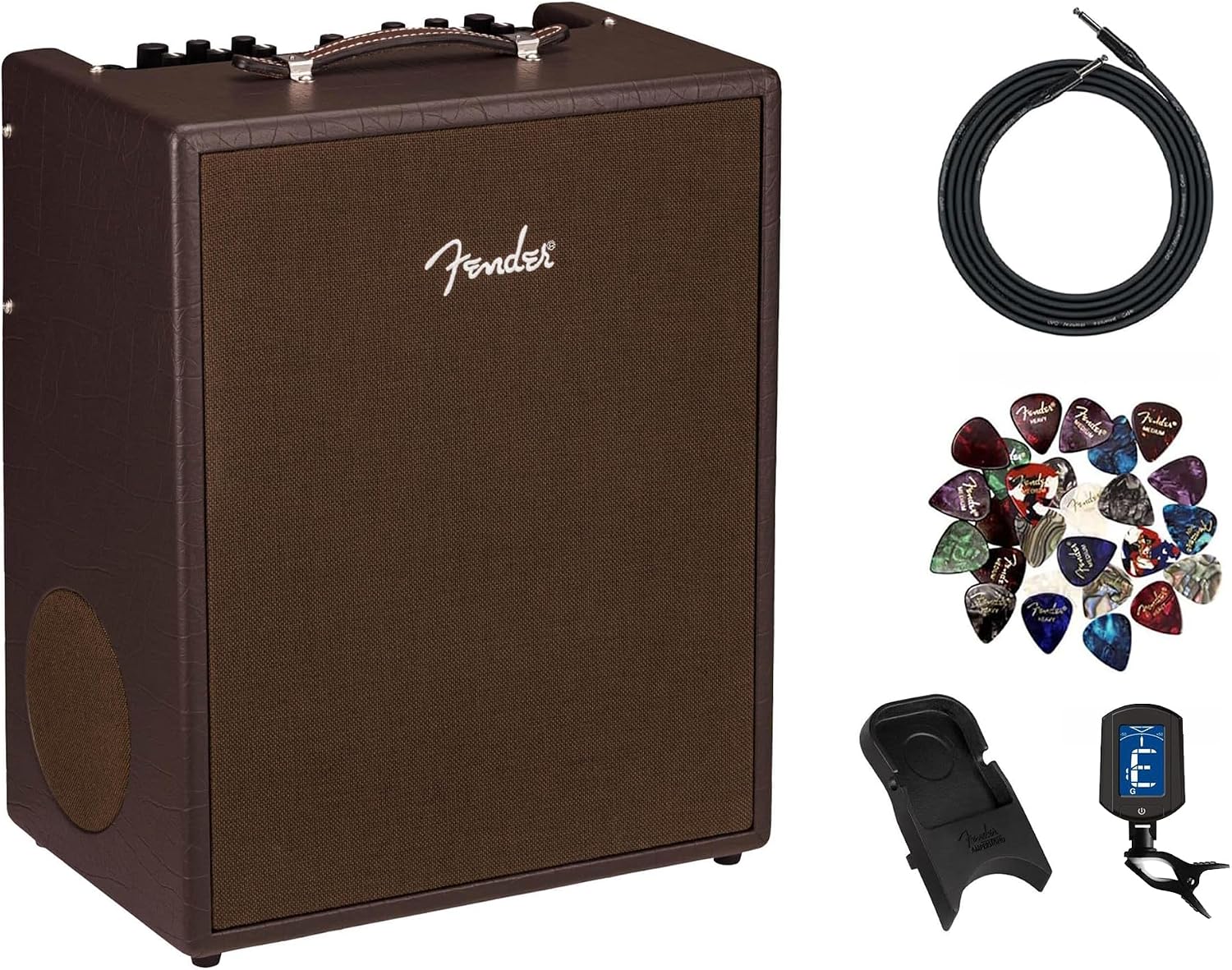
Image: The Fender SFX II Acoustic Guitar Amplifier shown with its included accessories: an instrument cable, an Amperstand guitar cradle, a clip-on tuner, and a pack of guitar picks.
4. Setup
4.1 Unpacking and Placement
Carefully remove the amplifier and all accessories from the packaging. Place the amplifier on a stable, flat surface. Ensure there is adequate space around the unit for ventilation, especially at the rear and sides.

Image: An angled view of the Fender SFX II Acoustic Guitar Amplifier, showcasing its brown vinyl finish and front grille.
4.2 Power Connection
- Ensure the amplifier's power switch is in the OFF position.
- Connect the supplied power cable to the AC input on the rear panel of the amplifier.
- Plug the other end of the power cable into a grounded electrical outlet.
4.3 Connecting Instruments and Microphones
The SFX II features two balanced 1/4" - XLR combination inputs, allowing for versatile connectivity.
- For Acoustic Guitar: Use a standard 1/4" instrument cable (like the included Fender instrument cable) to connect your guitar to either Channel 1 or Channel 2.
- For Microphone: Use an XLR cable to connect a microphone to either Channel 1 or Channel 2.
- Auxiliary Input: For connecting external audio devices (e.g., smartphone, MP3 player), use a 1/8" (3.5 mm) stereo cable to the AUXILIARY INPUT.
5. Controls and Connections
5.1 Front Panel Controls

Image: A close-up view of the Fender SFX II Amplifier's top-mounted control panel, showing knobs and buttons for both channels and the looper.
| Control | Description |
|---|---|
| POWER Switch | Turns the amplifier ON or OFF. The POWER indicator LED illuminates when the unit is on. |
| CHANNEL 1 / CHANNEL 2 Inputs | Balanced 1/4" - XLR combination jacks for connecting instruments or microphones. |
| VOLUME (Channels 1 & 2) | Adjusts the overall output level for each respective channel. |
| PHASE (Channels 1 & 2) | Reverses the phase of the input signal, which can help reduce feedback with acoustic instruments. |
| LOW, MID, HIGH (Channels 1 & 2) | Three-band equalizer controls to shape the tone of each channel (Bass, Midrange, Treble). |
| FX SELECT (Channels 1 & 2) | Rotary switch to select one of eight built-in effects for each channel: Room Reverb, Hall Reverb, Echo, Delay, Chorus, Vibratone, Delay+Chorus, and Delay+Reverb. |
| FX LEVEL (Channels 1 & 2) | Adjusts the intensity or mix of the selected effect for each channel. |
| STEREO SFX | Activates Fender's proprietary Stereo Field Expansion technology, enhancing the spatial depth of the effects. |
| LOOPER Controls | Includes RECORD/DUB, PLAY/STOP, and UNDO buttons for creating and managing 90-second loops. |
| PAIR Button (Bluetooth) | Initiates Bluetooth pairing mode for connecting external audio devices. |
5.2 Rear Panel Connections

Image: A detailed view of the Fender SFX II Amplifier's rear panel, showing various input and output jacks, including XLR line outputs, headphone output, and USB port.
| Connection | Description |
|---|---|
| PHONES Output | 3.5mm stereo headphone output for silent practice or monitoring. |
| AUX IN | 1/8" (3.5 mm) stereo input for connecting external audio devices like smartphones or MP3 players. |
| LINE OUT (LEFT/RIGHT XLR) | Two XLR line outputs for connecting the amplifier to a PA system, mixing console, or recording interface. Selectable for Channel 1/2, Stereo/Mono, and Ground Lift. |
| USB Jack | USB port for direct digital recording to a computer. |
6. Operating Instructions
6.1 Powering On/Off
To power on the amplifier, ensure all connections are secure, then flip the POWER switch to the ON position. The power indicator LED will illuminate. To power off, flip the POWER switch to the OFF position.
6.2 Adjusting Channel Volume and Tone
After connecting your instrument or microphone, slowly increase the VOLUME knob for the respective channel. Use the LOW, MID, and HIGH EQ controls to shape your desired tone. Experiment with the PHASE switch to minimize feedback, especially in live settings.
6.3 Using Effects
Each channel has its own independent effects section. Rotate the FX SELECT knob to choose from eight available effects. Adjust the FX LEVEL knob to control the amount of effect applied to the signal. Engage the STEREO SFX button for an enhanced, wider soundstage for all effects.
6.4 Bluetooth Audio Streaming
The amplifier supports Bluetooth connectivity for streaming audio from your mobile device. This is ideal for playing along with backing tracks or for intermission music.
- Press the PAIR button on the amplifier's control panel. The Bluetooth indicator light will begin to flash.
- On your mobile device, navigate to your Bluetooth settings and select "Fender SFX II" from the list of available devices.
- Once paired, the Bluetooth indicator light on the amplifier will glow solid. You can now play audio from your device through the amplifier.
6.5 Looper Functionality
The built-in 90-second looper allows you to record and layer audio phrases.
- RECORD/DUB: Press once to start recording. Press again to overdub (add new layers to an existing loop).
- PLAY/STOP: Press once to play the current loop. Press again to stop playback. Hold to clear the loop.
- UNDO: Press to undo the last recorded overdub.
6.6 USB Recording
Connect the amplifier to your computer via the USB port on the rear panel. The amplifier will function as an audio interface, allowing you to record your performance directly into your preferred Digital Audio Workstation (DAW) software.
7. Maintenance and Care
Proper care will ensure the longevity and optimal performance of your Fender SFX II amplifier.
- Cleaning: Use a soft, dry cloth to wipe down the exterior of the amplifier. For stubborn dirt, a slightly damp cloth can be used, but ensure no moisture enters the vents or controls. Avoid abrasive cleaners or solvents.
- Storage: When not in use, store the amplifier in a cool, dry place away from direct sunlight and extreme temperatures. If storing for extended periods, consider using a dust cover.
- Handling: Always lift the amplifier using the integrated handle. Avoid dropping or subjecting the unit to strong impacts.
- Ventilation: Regularly check that the ventilation openings are clear of dust and debris to prevent overheating.
8. Troubleshooting
If you encounter issues with your amplifier, refer to the table below for common problems and their solutions.
| Problem | Possible Cause | Solution |
|---|---|---|
| No sound output | Power not connected; Volume too low; Instrument/mic cable faulty; Speaker damaged. | Check power cable and outlet; Increase channel and master volume; Test with a different cable; Contact support if speaker is suspected. |
| Distorted sound | Input signal too high; EQ settings extreme; Faulty cable. | Reduce instrument/mic output or amplifier channel volume; Adjust EQ to a neutral setting; Try a different cable. |
| Feedback (howling sound) | Microphone/instrument too close to amplifier; Phase issue. | Move away from the amplifier; Engage the PHASE switch on the affected channel. |
| Bluetooth not pairing | Amplifier not in pairing mode; Device too far; Interference. | Press the PAIR button; Ensure device is within range; Move away from other wireless devices. |
| Looper not recording/playing | Loop memory full; Incorrect button sequence. | Hold PLAY/STOP to clear existing loop; Refer to Looper Functionality section for correct operation. |
9. Specifications
| Feature | Detail |
|---|---|
| Model Name | Acoustic SFX II |
| Model Number | AUS-2314500000-COMBO-PRO-V2 |
| Wattage | 2 x 100 Watts (200W total) |
| Voltage | 120V MX (North America) |
| Inputs | Two (2) Balanced 1/4" - XLR Combination, 1/8" (3.5 mm) Stereo Auxiliary Input |
| Outputs | Two XLR Line Outputs (Selectable for Channel 1/2, Stereo/Mono, Ground Lift), One 3.5mm Stereo Headphone Output, USB Jack |
| Effects | Room Reverb, Hall Reverb, Echo, Delay, Chorus, Vibratone, Delay+Chorus, Delay+Reverb (per channel, enhanced by SFX circuitry and side-firing speaker) |
| Connectivity | Bluetooth, USB |
| Dimensions (H x W x D) | 19.3 x 23 x 14 inches (approx. 49 x 58.4 x 35.6 cm) |
| Item Weight | 27.1 pounds (approx. 12.3 kg) |
| Material | Vinyl (covering) |
| Color | Brown |
10. Warranty and Support
Fender products are manufactured to the highest quality standards and are backed by a manufacturer's warranty. For specific warranty terms and conditions, please refer to the warranty card included with your product or visit the official Fender website.
For technical support, service, or replacement parts, please contact Fender customer service through their official website or authorized service centers. When contacting support, please have your amplifier's model name and serial number (located on the rear panel) readily available.
Ask a question about this manual
Ask about setup, troubleshooting, compatibility, parts, safety, or missing instructions. Manuals+ will review the question and use this page’s manual context to help answer it.