
1. Introduction
This manual provides detailed instructions for the safe and effective operation of your SEBRUANC Stage Light with Barn Doors, Model ZQ01066. This LED Par Light features warm and cool white COB spotlights, DMX512 control, sound activation, automatic programs, and master-slave functionality. Please read this manual thoroughly before use and retain it for future reference.
2. Safety Information
- Electrical Safety: Ensure the power supply voltage matches the requirements specified on the unit. Always connect to a grounded outlet. Disconnect power before cleaning or servicing.
- Heat: The fixture can become hot during operation. Allow sufficient cooling time before handling. Ensure adequate ventilation around the unit.
- Placement: Install the fixture in a well-ventilated area, away from flammable materials. Do not expose to rain or moisture.
- Eye Safety: Do not look directly into the light source when the fixture is operating, as it can cause eye damage.
- Maintenance: Refer all servicing to qualified personnel. Do not attempt to repair the unit yourself.
3. Package Contents
Verify that all items are present upon unpacking:
- Stage Light with Barn Doors (1 unit)
- Mounting Bracket (2 units)
- Screws (2 units)
- Power Cord (1 unit)
- Instruction Manual (1 unit)
4. Product Overview
The SEBRUANC Stage Light is a versatile COB LED par light designed for various event lighting needs. It features adjustable color temperature with 2-in-1 cold white and warm white illumination, providing a smooth color mixing and wash effect. The integrated barn doors allow for precise control over light direction and spill.
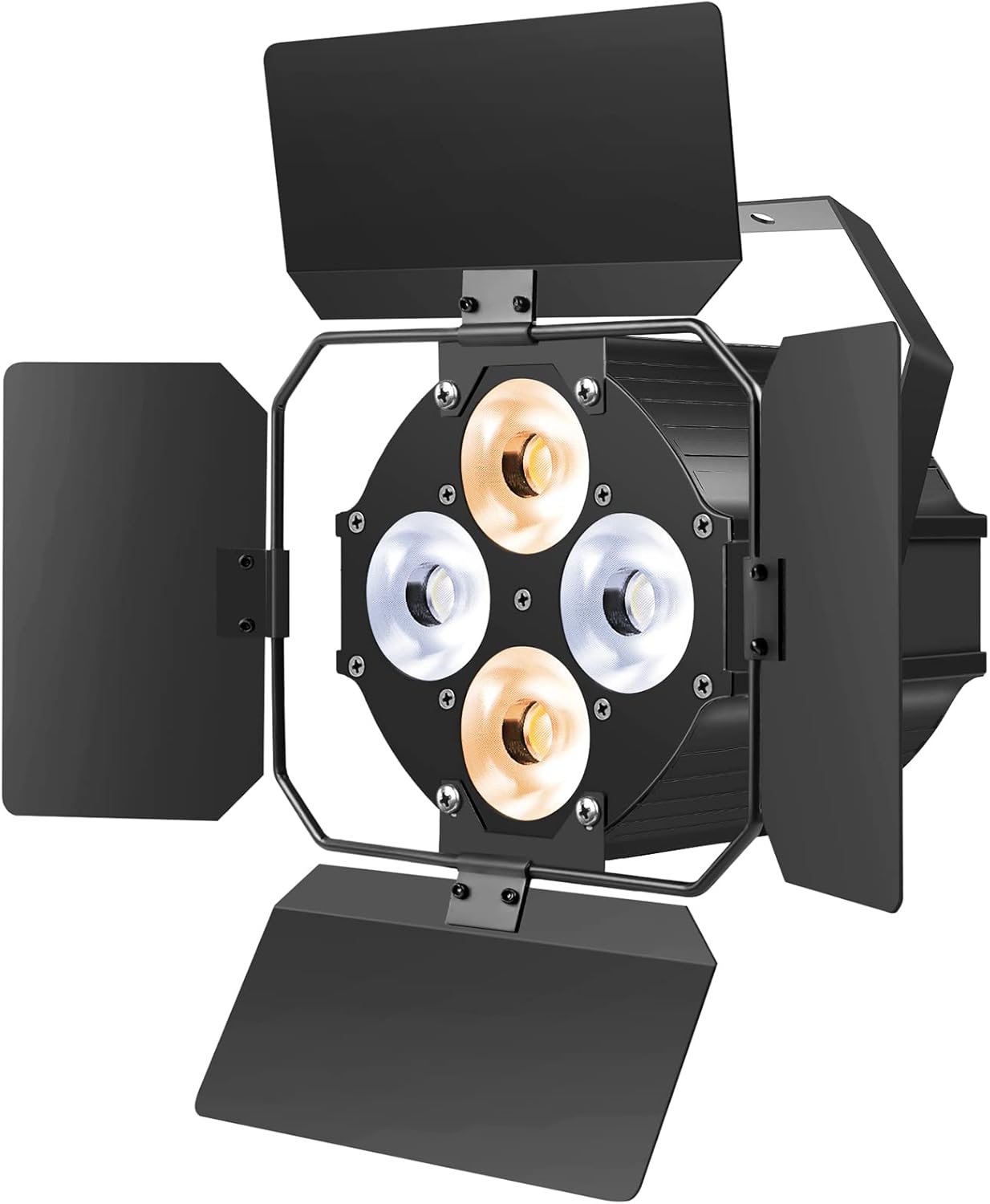
Image 1: Front view of the SEBRUANC Stage Light with barn doors open, showing the four COB LED elements (two warm white, two cool white).

Image 2: Diagram illustrating the adjustable color temperature feature of the COB LED Par, ranging from warm to cool white, with examples of how different color temperatures affect object appearance.
5. Setup Instructions
Follow these steps for proper installation and connection of your stage light:
5.1 Mounting
The fixture comes with dual mounting brackets for flexible installation. It can be hung from a truss, mounted on a wall, or placed on the ground.
- Attach the mounting brackets to the sides of the fixture using the provided screws.
- Securely fasten the fixture to a stable surface or truss using appropriate clamps (not included) or hardware. Ensure the mounting point can support the weight of the fixture.
- Adjust the angle of the light as needed and tighten the bracket knobs to lock it in place.

Image 3: Illustration of the stage light's dimensions (5.7"L x 5.7"W x 4.7"H) and examples of easy setup, including placement on the floor and installation on a T-bar.
5.2 Connections
Connect the power cord and DMX cables as required for your setup.
- Power Connection: Insert the included power cord into the Power IN connector on the rear of the fixture. Connect the other end to a suitable power outlet.
- DMX Connection (Optional): For DMX control, connect a DMX cable from your DMX controller's output to the DMX IN port of the first fixture. For multiple fixtures, daisy-chain them by connecting the DMX OUT of the first fixture to the DMX IN of the next, and so on.
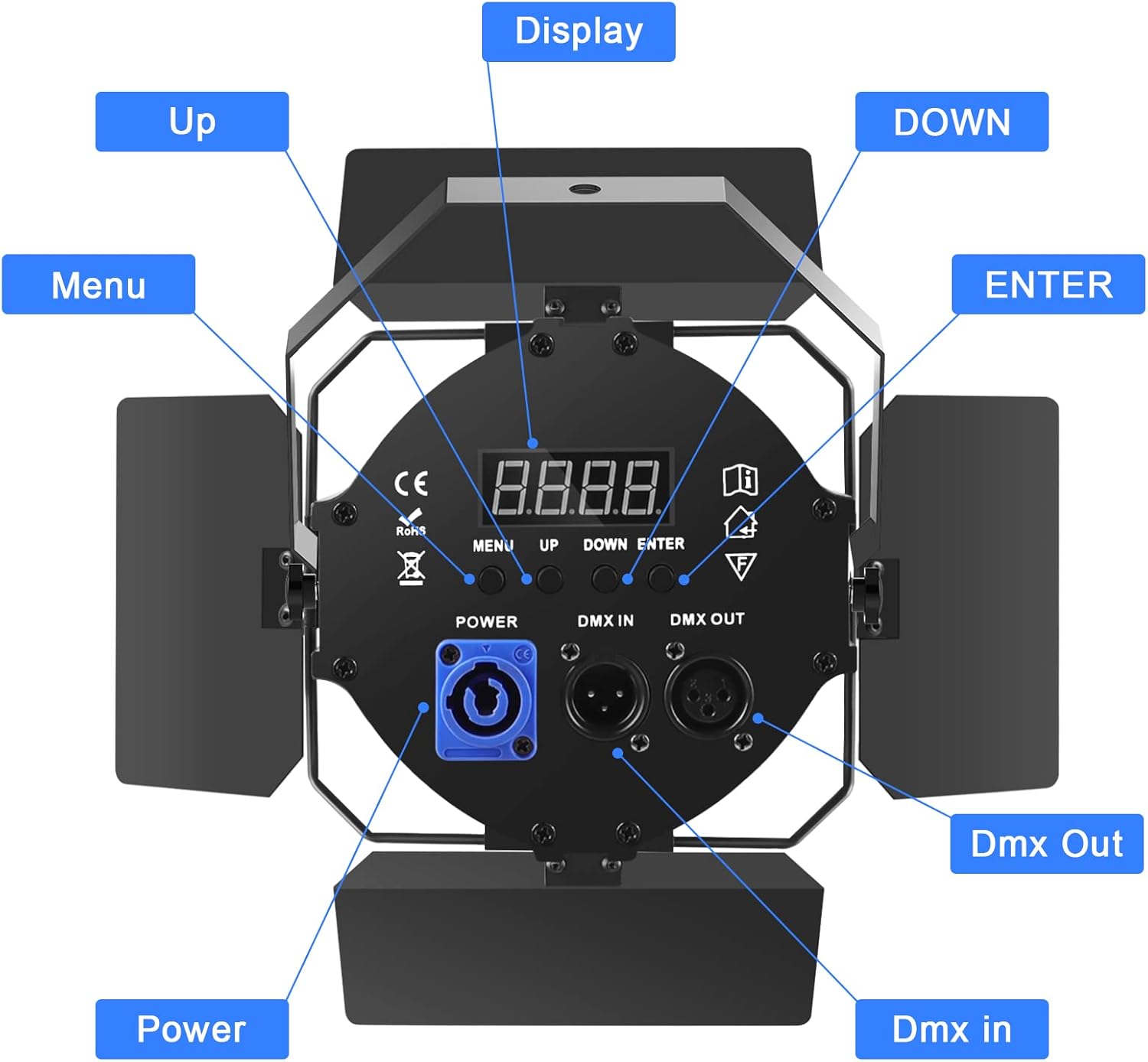
Image 4: Close-up of the stage light's rear panel, highlighting the display, control buttons (Menu, Up, Down, Enter), PowerCon input, DMX In, and DMX Out ports.
6. Operating Instructions
The SEBRUANC Stage Light offers multiple control modes. Use the control panel on the rear of the fixture to navigate settings.
6.1 Control Panel Functions
- Display: Shows current mode and parameter values.
- MENU: Cycles through the main menu options.
- UP/DOWN: Adjusts parameter values or navigates menu options.
- ENTER: Confirms selection or saves changes.
6.2 Control Modes
The fixture supports four primary control modes:
- DMX512 Mode: Allows professional control via a DMX controller. Set the DMX address using the control panel. Refer to the DMX channel chart (not provided in this manual, typically found in a separate DMX guide) for specific channel functions.
- Sound Activated Mode: The light reacts to ambient sound, changing patterns and intensity based on audio input.
- Automatic Mode (Self-Propelled): The fixture runs through pre-programmed internal light shows and patterns without external input.
- Master-Slave Mode: Connect multiple fixtures via DMX cables. Set one fixture as the 'Master' and others as 'Slave' units. The slave units will mimic the master's operation.

Image 5: Visual representation of the four available control modes: Master-Slave, Sound Activated, DMX512, and Self-Propelled (Automatic).
7. Maintenance
Regular maintenance ensures optimal performance and longevity of your stage light.
- Cleaning: Periodically clean the lens and exterior casing with a soft, lint-free cloth. Do not use abrasive cleaners or solvents. Ensure the fixture is unplugged and cool before cleaning.
- Fan Cleaning: Ensure the cooling fan and vents are free from dust and debris to maintain proper heat dissipation.
- Storage: When not in use, store the fixture in a dry, dust-free environment.
8. Troubleshooting
If you encounter issues, refer to the following common problems and solutions:
| Problem | Possible Cause | Solution |
|---|---|---|
| Light does not turn on | No power supply; Faulty power cord/outlet | Check power connection, try a different outlet or power cord. |
| No DMX control | Incorrect DMX address; Faulty DMX cable; Incorrect DMX mode selected | Verify DMX address settings. Check DMX cables for damage. Ensure fixture is in DMX mode. |
| Light flickers or shuts off intermittently | Loose DMX connection; Overheating; Internal fault | Ensure DMX cables are securely connected. Check for proper ventilation. If problem persists, contact support. |
| DMX address not retained after power cycle | Specific unit behavior or internal memory issue | Some units may require re-entering the DMX address after power loss. If this is unexpected, contact support. |
9. Specifications
| Feature | Detail |
|---|---|
| Model Number | ZQ01066 |
| Brand | SEBRUANC |
| Light Source Type | Light Emitting Diode (COB) |
| Light Source Wattage | 120 Watts |
| Bulb Features | Warm and Cool White (2-in-1) |
| Color Rendering Index (CRI) | 95 |
| Control Modes | DMX512, Sound Activated, Automatic, Master-Slave |
| Material | Iron |
| Finish Type | Iron |
| Power Source | Corded Electric |
| Voltage | 2.2E+2 Volts (220V) |
| Item Weight | 4.44 pounds (2.02 Kilograms) |
| Product Dimensions | 5.7"L x 5.7"W x 4.7"H |
| Mounting Type | Wall Mount (with bracket) |
| Light Direction | Adjustable |
10. Warranty and Support
For warranty information or technical support, please refer to the seller's policies or contact the manufacturer directly. Keep your purchase receipt as proof of purchase.