

Product Overview
The Ledlenser MH5 is a versatile and powerful headlamp designed for outdoor enthusiasts. It features an Advanced Focus System for seamless beam adjustment, Smart Light Technology for customizable light functions, and a rechargeable battery for convenience. Its innovative design allows it to be easily detached and used as a handheld light or clipped to clothing.
Key Features
- Advanced Focus System: Allows for seamless transition between a broad floodlight and a sharply focused spot beam.
- Rapid Focus: Enables quick, one-handed adjustment of the light beam.
- Smart Light Technology: Provides 3 programmable light functions to suit various needs.
- Rechargeable: Equipped with a rechargeable battery, reducing waste and long-term costs.
- 2-in-1 Headlamp: The light unit can be detached from the headband for use as a handheld light or clipped to gear.
- Dust & Water Protection (IP54): Offers protection against dust ingress and splashing water.
- Dual Power Source: Compatible with both the included rechargeable battery and standard AA batteries.

Image: Two individuals wearing Ledlenser MH5 headlamps, illuminating their path during an outdoor activity at dusk, demonstrating the headlamp's utility in low-light conditions.
Setup
Battery Installation and Charging
- Initial Charge: Before first use, fully charge the included Lithium-Ion battery.
- Battery Compartment: Locate the battery compartment on the headlamp unit. Gently open it.
- Insert Battery: Insert the provided 14500 Lithium-Ion rechargeable battery, ensuring correct polarity (+/-). The MH5 also supports standard AA batteries for alternative power.
- Close Compartment: Securely close the battery compartment.
- Charging: Connect the magnetic charging cable to the charging port on the headlamp. Connect the other end to a USB power source. The charging indicator light will show charging status.
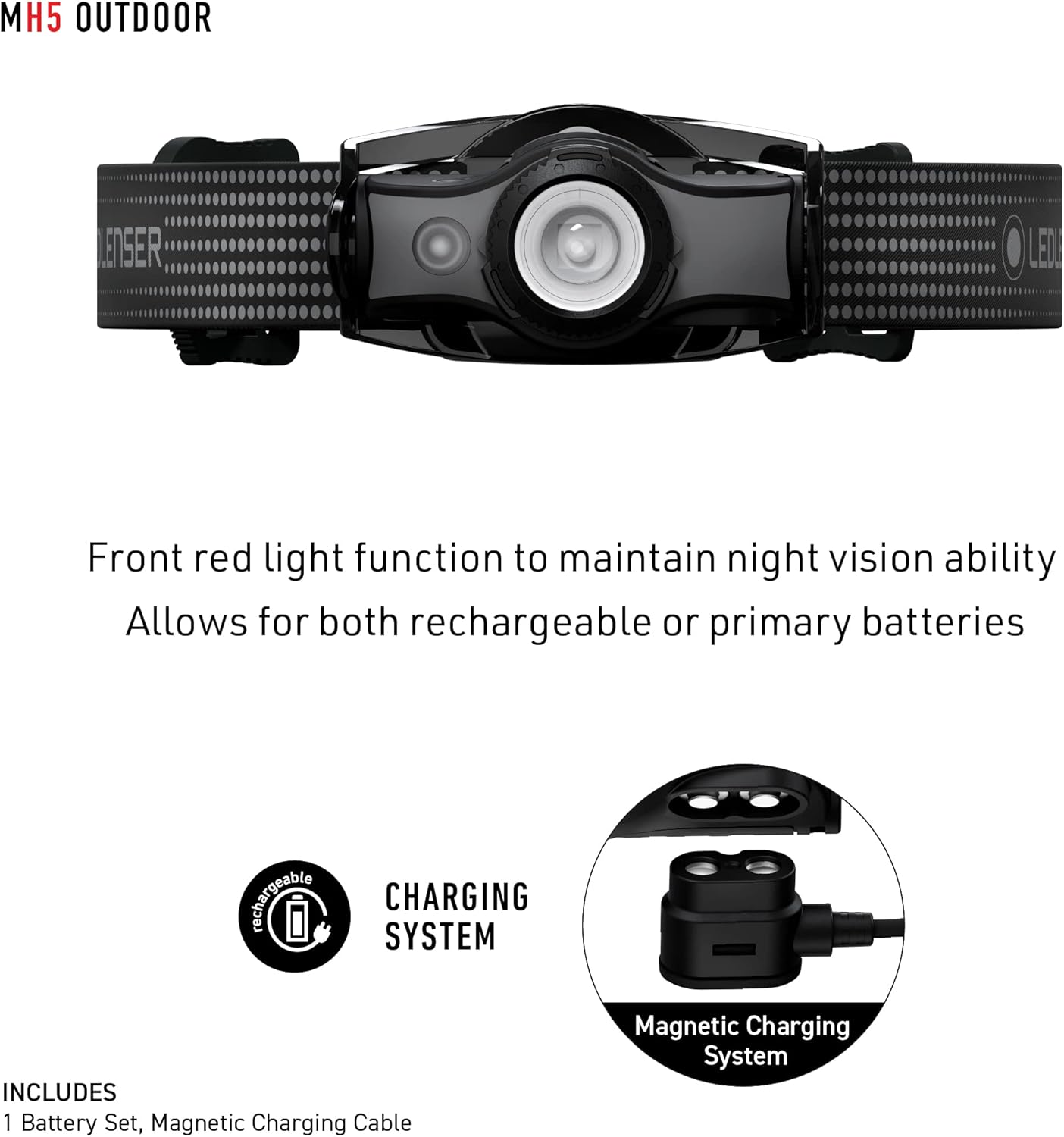
Image: A close-up view of the Ledlenser MH5 headlamp showing the magnetic charging system, with the magnetic connector attached to the charging port.
Operating Instructions
Power On/Off and Light Modes
- Power Button: The main power button is located on the top of the headlamp unit.
- Turn On/Off: Press the power button once to turn the headlamp on. Press again to cycle through light modes (Power, Low Power, Red Light). Press and hold to turn off.
- Light Functions:
- Power Mode: Provides maximum brightness (up to 400 lumens) for strong illumination.
- Low Power Mode: Offers reduced brightness (down to 20 lumens) for extended runtime or close-range tasks.
- Red Light: Activates a red LED, useful for preserving night vision.

Image: A person wearing the Ledlenser MH5 headlamp, checking their watch in a dimly lit environment, illustrating the practical use of the headlamp's various light functions and its performance range (20-400 lumens, 40-180m beam distance, 4-35h run time).
Advanced Focus System and Light Angle Swivel
- Focus Adjustment: To adjust the beam from a wide flood to a narrow spot, slide the bezel of the light unit forward or backward. This can be done with one hand.
- Light Angle: The headlamp unit can be swiveled up to 60 degrees vertically to direct the light precisely where needed.

Image: A detailed view of the Ledlenser MH5 headlamp highlighting the 60-degree light angle swivel and the Rapid Focus mechanism for seamless beam adjustment (spot to flood).
2-in-1 Functionality
- Detaching the Light Unit: The headlamp unit can be easily removed from the headband by gently pulling it away from its mount.
- Handheld Use: Once detached, the unit can be held as a small flashlight.
- Clip-on Use: The integrated clip on the back of the light unit allows it to be attached to clothing, backpack straps, or other gear.
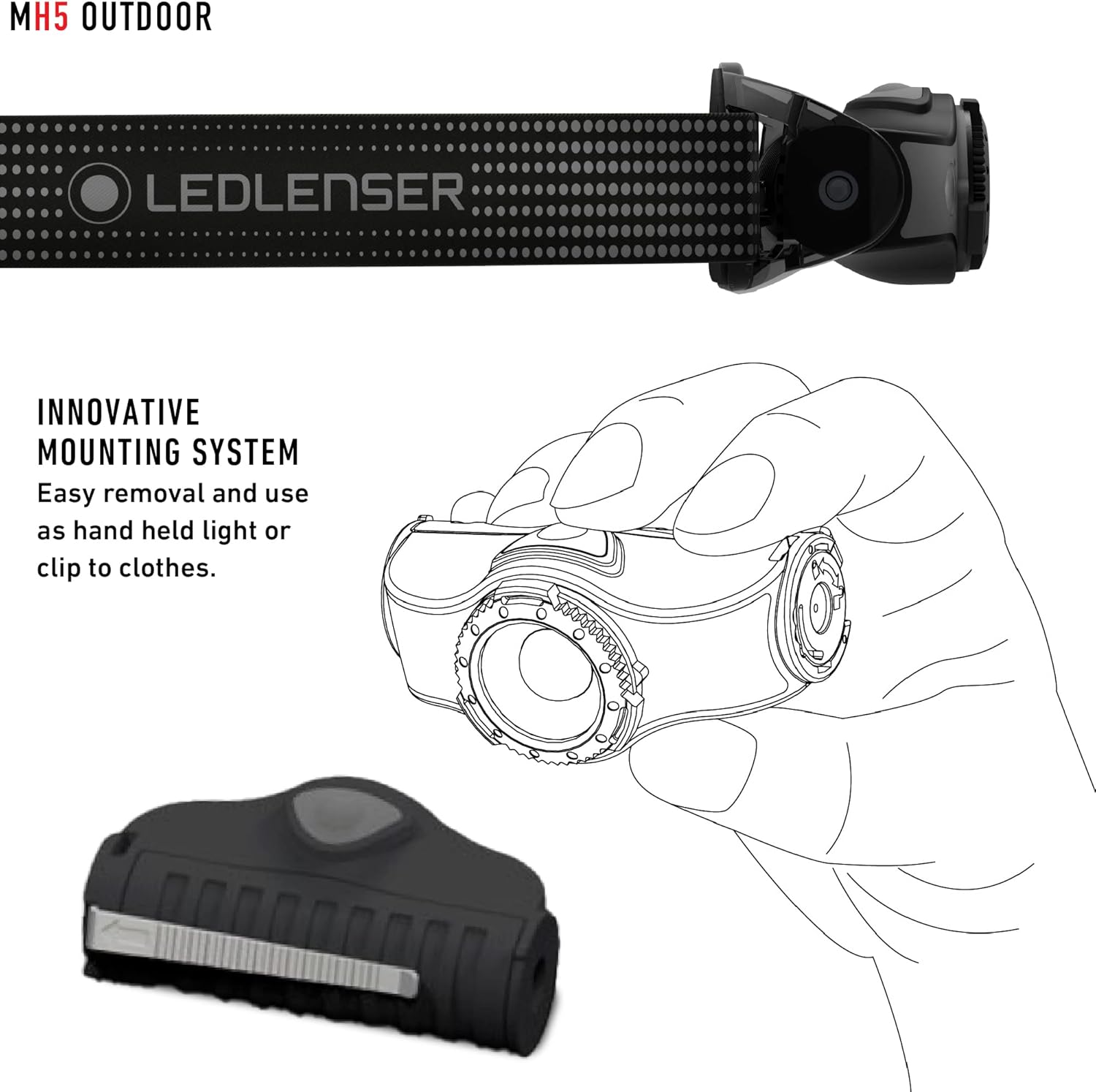
Image: An illustration demonstrating the innovative mounting system of the Ledlenser MH5, showing how the light unit can be easily removed from the headband for use as a handheld light or clipped onto clothing.
Care and Maintenance
- Cleaning: Wipe the headlamp with a soft, damp cloth. Do not use abrasive cleaners or solvents. Ensure the charging port is clean and free of debris, especially before charging.
- Battery Care: For optimal battery life, charge the battery regularly and avoid fully discharging it for extended periods. If storing the headlamp for a long time, remove the battery.
- Water Resistance: The MH5 is rated IP54, meaning it is protected against dust ingress and splashing water from any direction. It is not designed for submersion.
- Storage: Store the headlamp in a cool, dry place away from direct sunlight and extreme temperatures.
Troubleshooting Guide
| Problem | Possible Cause | Solution |
|---|---|---|
| Headlamp does not turn on. | Battery is depleted or incorrectly inserted. | Charge the battery. Check battery polarity and ensure it is properly seated. |
| Headlamp does not charge. | Magnetic charging port is dirty or cable is not properly connected. | Clean the magnetic charging contacts on both the headlamp and the cable. Ensure the cable is securely attached to a working USB power source. |
| Difficulty switching between light modes (e.g., white to red). | Incorrect button press sequence or timing. | Refer to the "Operating Instructions" section for precise button press sequences. Ensure a firm, deliberate press. |
| Light beam is not focusing correctly. | Focus mechanism might be obstructed or stiff. | Gently clean around the focusing bezel. Apply slight, even pressure when sliding to adjust focus. |
Technical Specifications
| Feature | Detail |
|---|---|
| Model | MH5 (Item model number: 880536) |
| Brightness | Up to 400 Lumens (White Light) |
| Beam Distance | Up to 180 meters |
| Runtime | Up to 35 hours |
| Power Source | Rechargeable Lithium-Ion battery (included), also compatible with AA batteries |
| Water Resistance | IP54 (Dust & Water Protected) |
| Weight | Approximately 7 ounces (200 grams) |
| Included Components | Headlamp, 1 Lithium Ion battery, Magnetic Charging Cable |
Warranty and Customer Support
Ledlenser products are manufactured to high-quality standards and come with a manufacturer's warranty. For specific warranty details, registration, or to obtain customer support, please visit the official Ledlenser website or contact their customer service department.
You can find more information and contact details on the Ledlenser Store on Amazon or the official Ledlenser website.


