
1. Introduction
Thank you for choosing the PUZILOZA 70W RGBW IP65 LED Par Stage Light. This device is designed to provide versatile and vibrant lighting effects for various events and venues. Its robust IP65 waterproof rating ensures reliable performance in outdoor conditions. Please read this manual thoroughly before operation to ensure safe and correct usage.
2. Safety Information
- Power Supply: Ensure the power supply voltage matches the specifications (240V).
- Installation: Install the fixture securely using the provided brackets. Ensure proper ventilation.
- Water Resistance: While rated IP65 waterproof, avoid submerging the unit. Ensure all connections are sealed when used outdoors.
- Maintenance: Disconnect power before any cleaning or maintenance. Refer to the maintenance section for detailed instructions.
- Eye Safety: Do not stare directly into the light source, as it can cause eye damage.
3. Package Contents
Verify that all items are present upon unpacking:
- 1 x PUZILOZA 70W RGBW IP65 LED Par Stage Light
- 1 x Power Cable
- 1 x User Manual
- Mounting Brackets and Screws

Image: The PUZILOZA 70W RGBW IP65 LED Par Stage Light shown with its mounting bracket and power cable.
4. Product Overview
The PUZILOZA 70W RGBW IP65 LED Par Stage Light features 14 RGBW 4-in-1 LED beads, offering a wide range of color mixing capabilities. Its durable aluminum housing ensures longevity and protection against environmental elements.

Front view of the LED Par Light, showcasing the 14 LED beads.

Product dimensions (29L x 29W x 17H cm) and 180-degree adjustable angle bracket.

Rear view showing the control panel (MENU, UP, DOWN, ENTER buttons), DMX In/Out, and Power In/Out ports.

The IP65 waterproof rating ensures protection against water jets and dust, suitable for outdoor use.
5. Setup
- Unpacking: Carefully remove the light fixture and all accessories from the packaging.
- Mounting: Attach the flexible dual brackets to the light using the provided screws. The brackets allow for floor standing, truss mounting, or ceiling hanging. Ensure the fixture is securely fastened to prevent accidental falls.
- Power Connection: Connect the power cable to the "POWER IN" port on the rear of the unit. Plug the other end into a compatible 240V power outlet.
- DMX Connection (Optional): If using DMX control, connect a DMX cable from your DMX controller to the "DMX IN" port. For multiple units, connect from "DMX OUT" of the first unit to "DMX IN" of the next, forming a daisy chain.
6. Operating Instructions
The light can be operated in several modes:
6.1 Control Panel Navigation
Use the buttons on the rear panel to navigate menus and select modes:
- MENU: Accesses the main menu or cycles through options.
- UP: Increases values or moves up through menu options.
- DOWN: Decreases values or moves down through menu options.
- ENTER: Confirms selection or enters a submenu.
6.2 Operating Modes
- DMX Mode: Allows external control via a DMX controller. Supports 4 or 8 DMX channels for precise control over color, dimmer, and strobe effects. Consult your DMX controller's manual for specific channel assignments.
- Auto Mode: The fixture runs through pre-programmed light shows automatically. Use the control panel to select different auto programs or adjust speed.
- Master-Slave Mode: Connect multiple units via DMX cables. Set one unit as the "Master" and others as "Slave." The slave units will synchronize their effects with the master unit.
- Sound Active Mode: The light reacts to ambient sound or music, creating dynamic lighting effects. Adjust sensitivity via the control panel.

Image: Examples of the vibrant RGBW color mixing capabilities of the LED Par Light.
7. Maintenance
- Cleaning: Regularly clean the lens and housing with a soft, lint-free cloth to maintain optimal light output. Do not use abrasive cleaners.
- Inspection: Periodically check power and DMX cables for damage. Ensure all mounting hardware is secure.
- Storage: When not in use for extended periods, store the fixture in a dry, dust-free environment.
8. Troubleshooting
| Problem | Possible Cause | Solution |
|---|---|---|
| Light does not turn on | No power supply; Faulty cable | Check power connection and outlet; Replace power cable if damaged. |
| No DMX control | Incorrect DMX address; Faulty DMX cable; Incorrect DMX mode selected | Verify DMX address settings; Check DMX cable connections; Ensure DMX mode is active on the fixture. |
| Light flickers or behaves erratically | Unstable power; DMX signal interference | Ensure stable power source; Check DMX connections and consider a DMX terminator. |
| Sound Active mode not responding | Microphone sensitivity too low; No sound input | Adjust microphone sensitivity in the menu; Ensure sound is present near the fixture. |
9. Specifications
| Feature | Specification |
|---|---|
| Model Number | XH-01072 |
| Brand | PUZILOZA |
| Light Source | 14 x RGBW 4-in-1 LEDs |
| Power | 70W (Rated), 140W (Max Supported) |
| Voltage | 240 Volt |
| Luminous Flux | 1400 Lumen (Max) |
| DMX Channels | 4/8 CH |
| Control Modes | DMX, Auto, Master-Slave, Sound Active |
| Dimmer | 0-100% Electronic Dimmer |
| Material | Aluminum |
| IP Rating | IP65 (Waterproof) |
| Dimensions (L x W x H) | 29L x 29W x 17H cm |
| Weight | 3.3 Kilograms |
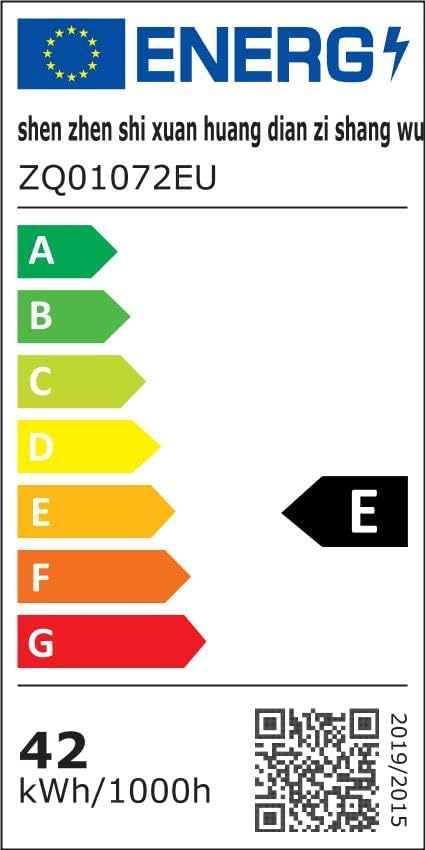
Image: Energy efficiency label for the product. For more details, visit eprel.ec.europa.eu/qr/2332913.
10. Warranty and Support
Specific warranty information and direct support contact details are not provided within this manual. For warranty claims or technical assistance, please refer to the retailer or the official PUZILOZA website where the product was purchased.