1. Introduction
The GODIAG ECU IMMO Kit, comprising the GT105 ECU IMMO Prog AD and the GT107 DSG Gearbox Data Read/Write Adapter, is designed for professional automotive maintenance engineers. This kit facilitates the cloning, diagnosis, and repair of DSG Gearbox ECUs. It enables reading, writing, and adapting data for DSG Gearbox ECUs using various software platforms such as PCMFlash, PCMTuner, and Kessv2.
The GT107 adapter offers both automatic and manual selection modes for PCMFlash software, allowing flexible data reading and writing. It also supports manual mode for other software like Kessv2, DQ200, DQ250, and DQ500. Additionally, the GT107 can directly read and write DSG transmission data using a car battery, providing clear communication status during the process.
The GT105 breakout box provides a complete protocol ECU interconnect line for ECU programming and power adjustment, featuring independent OBD2 PIN 4 (body GND) and PIN 5 (signal GND) for specialized module programming. These pins can be switched between short circuit and open circuit as needed.
2. Package Contents
Please verify that all items listed below are included in your package:
- 1 x Godiag ECU IMMO Prog AD (GT105)
- 1 x DSG adapter (GT107)
- 1 x Power cord with battery clip
- 1 x Sample (may vary)
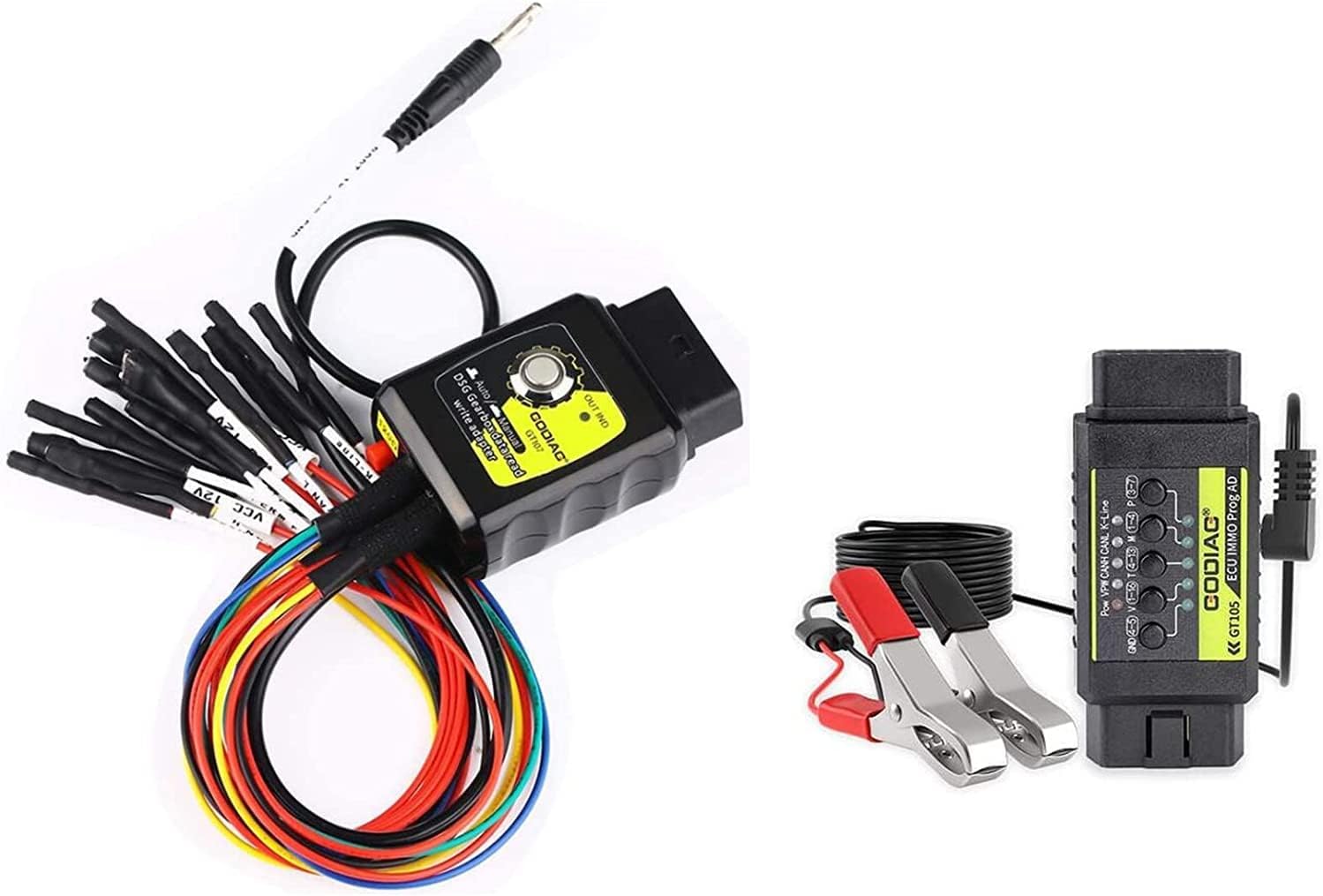
Figure 2.1: Contents of the GODIAG ECU IMMO Kit, including the GT105 breakout box, GT107 adapter, and connecting cables.
3. Key Features
3.1. GODIAG GT107 DSG Gearbox Data Read/Write Adapter
- Reads and writes DSG transmission data.
- Supports reading and writing for DQ250, DQ200, VL381, VL300, DQ500, DL501 gearbox TCUs.
- Compatible with PCMTuner module 58, KESS v2, KTM bank, and other similar software.
- Features auto and manual selection modes for PCMFlash software.
- Allows direct data reading and writing with car battery power, with communication status monitoring.
3.2. GODIAG GT105 ECU IMMO Prog AD
- Provides a complete protocol ECU interconnect line for ECU programming and power adjustment.
- Independent OBD2 PIN 4 (body GND) and PIN 5 (signal GND) for special module programming.
- PIN 4 and PIN 5 can be switched between short circuit and open circuit.
- Equipped with a pure copper female seat for durability and long service life.
- Battery clip treated with salt spray for corrosion resistance.
- DC car battery cable (0.75mm² 2-core sheathed) supports DC5.5*2.5/DC5.5*2.1 interface.
- DC plug includes a resettable 7A fuse for protection.
- Suitable for DC power connection and dedicated lab connections.
- High-quality OBD2 universal jumper.

Figure 3.1: Visual representation of the GT107 and GT105 highlighting their primary functions and capabilities.
4. Setup and Connection
Proper connection is crucial for successful operation. Follow these steps carefully:
4.1. Basic Connection for Data Operations
- Connect the GODIAG GT107 to the ECU of the gearbox.
- Connect the GODIAG ECU IMMO Prog (GT105) and connect it to the vehicle's battery for power.
- Utilize the GODIAG GT107 to select either "Auto" or "Manual" mode as required by your software.
- Connect your diagnostic software (e.g., PCMFlash, PCMTuner J2534 passthru) to the GT107.
- Connect your computer to the GT105/GT107 setup to open the software and select the appropriate mode.

Figure 4.1: Connection diagram for the GODIAG GT107 and GT105 to a vehicle's ECU and power source.
4.2. Connection for DSG Gearbox Cloning (Example with PCMFlash)
For cloning DSG gearbox data, ensure all components are connected as per the diagram below:
Figure 4.2: Detailed connection diagram for PCMFlash DSG gearbox cloning using the GODIAG kit.
5. Operating Instructions
5.1. Data Read/Write for DSG Gearbox
The GODIAG GT107 supports reading and writing data for various DSG gearbox TCUs, including DQ250, DQ200, VL381, VL300, DQ500, and DL501. This can be done using compatible software such as PCMFlash, PCMTuner, Kessv2, and KTM bank.
When using PCMFlash software, the GT107 offers both an "Auto" and a "Manual" selection. For other software like Kessv2, DQ200, DQ250, DQ500, you can typically select "Manual" mode.
Important Note: Please select the corresponding mode in your software for data reading and writing to ensure proper communication.
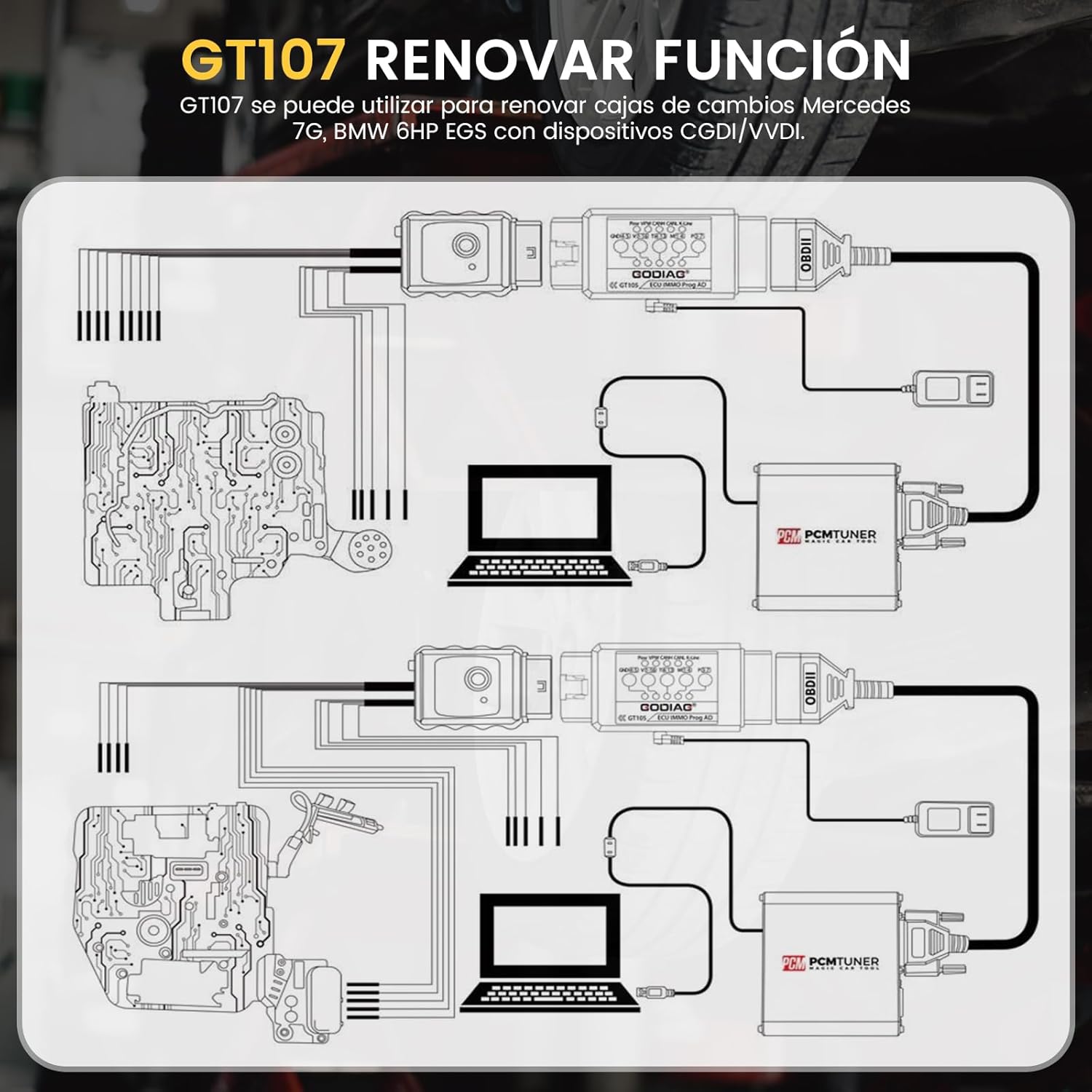
Figure 5.1: The dual mode switch on the GODIAG GT107 for selecting 'Auto' or 'Manual' operation.
5.2. GT107 Renew Function
The GT107 can be utilized for renewing Mercedes 7G and BMW 6HP EGS gearboxes when used with CGDI/VVDI devices. This function allows for advanced gearbox maintenance and adaptation.

Figure 5.2: Diagram showing the application of GT107 for gearbox renew functions.
5.3. Wide Range of Vehicle Assistance
The GODIAG GT107 also supports diagnostic and renew functions for a broad range of vehicles, including specific Mercedes-Benz (e.g., 8-benz VGS (722.9), 8-benz SGT (VGS-NAG3)), GM (G-M GPIO 4L60E), Volvo Gearbox, BMW 7-speed dual-clutch gearboxes (GETAG 7DCT), and BMW Temtic DK9, 7F 8HP gearboxes with appropriate devices.
Figure 5.3: Examples of vehicle brands and gearbox types supported by the GT107.
6. Technical Specifications
| Attribute | Value |
|---|---|
| Manufacturer | GODIAG |
| Brand | GODIAG |
| Model | GT107 |
| Product Dimensions | 22 x 11 x 3.99 cm |
| Item Model Number | SE161 |
| Manufacturer Part Number | SE161 |
| Item Weight | 399 g |
| Power Source | Adaptor / Vehicle Battery |
| First Available Date | 22 Oct. 2022 |
7. Maintenance
To ensure the longevity and optimal performance of your GODIAG ECU IMMO Kit, follow these maintenance guidelines:
- Cleaning: Use a soft, dry cloth to clean the exterior of the devices. Avoid using abrasive cleaners or solvents that could damage the plastic or electronic components.
- Storage: Store the kit in a cool, dry place away from direct sunlight, extreme temperatures, and high humidity. Keep it in its original packaging or a protective case when not in use to prevent dust accumulation and physical damage.
- Cable Care: Inspect all cables and connectors regularly for signs of wear, fraying, or damage. Replace any damaged cables immediately to prevent electrical issues or poor connections.
- Connector Protection: Keep the connectors clean and free of debris. Avoid forcing connectors into ports, which can cause damage to both the device and the vehicle's ports.
8. Troubleshooting
If you encounter issues while using your GODIAG ECU IMMO Kit, consider the following common troubleshooting steps:
- No Power/No Indicator Lights:
- Ensure the power cord with battery clips is securely connected to a functional 12V vehicle battery.
- Check the resettable 7A fuse on the DC plug of the GT105. If tripped, disconnect power, wait a few moments, and reconnect.
- Verify all cable connections are firm and correct.
- Communication Errors:
- Confirm that the GT107 is correctly connected to the gearbox ECU.
- Ensure your diagnostic software (PCMFlash, PCMTuner, Kessv2, etc.) is up-to-date and properly installed.
- Verify that the correct mode (Auto/Manual) is selected in both the GT107 and your software.
- Check the vehicle's battery voltage; low voltage can cause communication issues.
- Ensure the vehicle's ignition is in the correct position (e.g., ON, but engine OFF) as required by your software.
- Software Not Recognizing Device:
- Install or update the necessary drivers for the GODIAG devices on your computer.
- Try connecting to a different USB port on your computer.
- Restart your computer and the diagnostic software.
- Incorrect Data Read/Write:
- Double-check that you have selected the correct TCU model (DQ250, DQ200, etc.) in your software.
- Ensure the software version is compatible with the specific gearbox you are working on.
- Verify that the PIN 4 and PIN 5 switches on the GT105 are set correctly for your application.
9. Warranty and Support
For warranty information, technical support, or service inquiries regarding your GODIAG ECU IMMO Kit GT105 Plus GT107, please refer to the documentation provided with your purchase or contact GODIAG customer support directly through their official website or authorized distributors. Keep your purchase receipt as proof of purchase for warranty claims.