
1. Introduction
This manual provides essential information for setting up, operating, maintaining, and troubleshooting your realme 9i 5G smartphone. The realme 9i 5G is equipped with a Dimensity 810 chipset, a 50 MP AI Triple Camera, and a 16.76 cm (6.6 inch) FHD+ display with a 90 Hz refresh rate, offering a smooth user experience.
2. Setup
2.1 Unboxing and Initial Inspection
Carefully unpack your realme 9i 5G smartphone. Ensure all components are present and undamaged. The box contents typically include:
- realme 9i 5G Smartphone
- Screen Protector (pre-applied or in box)
- USB Cable
2.2 SIM Card and Storage Installation
The realme 9i 5G supports Dual SIM cards. Locate the SIM card tray on the side of the device. Use the provided SIM ejector tool to open the tray. Insert your Nano-SIM cards and, if applicable, a microSD card into the designated slots. Ensure the cards are correctly oriented before reinserting the tray into the phone.
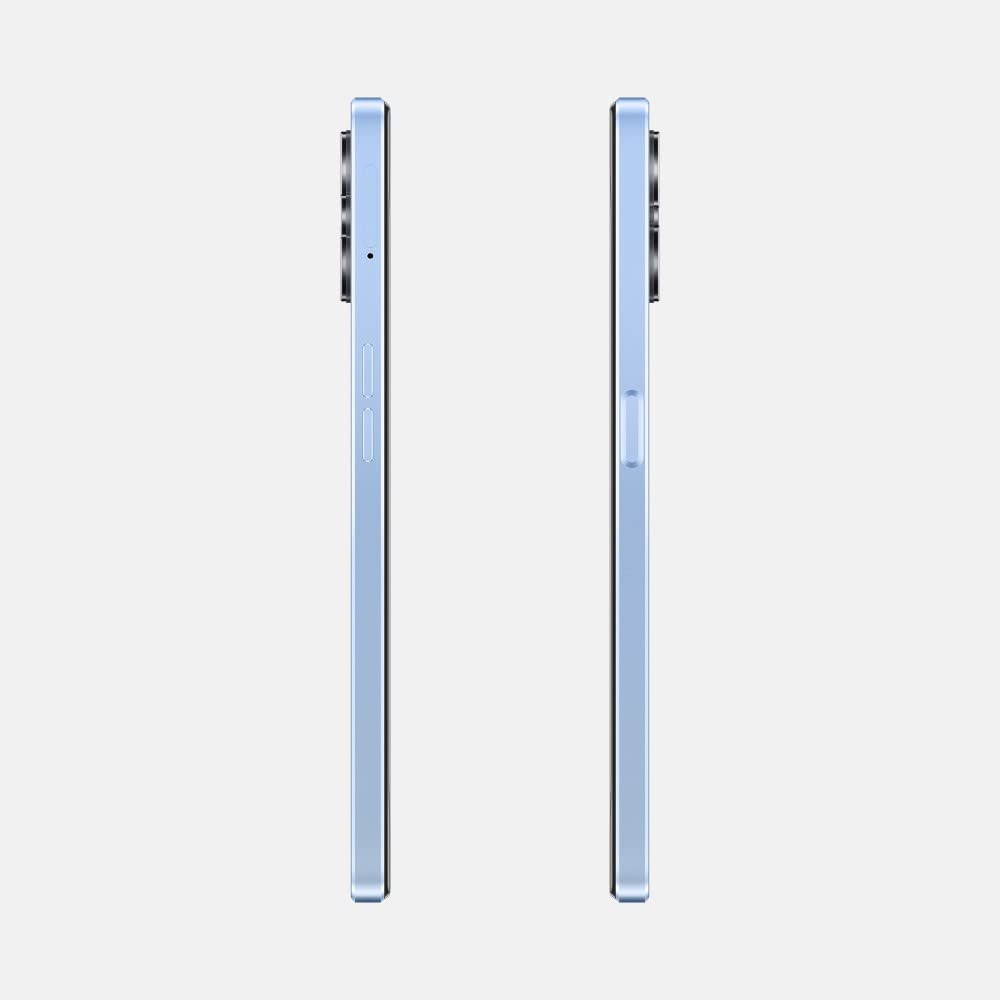
Image: Side view of the realme 9i 5G, illustrating the location of the SIM card tray and volume buttons.
2.3 Initial Power On and Setup Wizard
Press and hold the Power button (located on the side) until the realme logo appears. Follow the on-screen instructions to complete the initial setup, which includes selecting your language, connecting to Wi-Fi, and setting up your Google account.
2.4 Charging the Device
Connect the USB Type-C cable to the charging port at the bottom of the phone and plug the other end into a power adapter. The device supports fast charging. A full charge typically takes approximately 1.2 hours.

Image: Bottom view of the realme 9i 5G, highlighting the USB Type-C charging port and speaker grille.
3. Operating Instructions
3.1 Basic Navigation
The realme 9i 5G features a responsive touchscreen interface. Use gestures such as tapping, swiping, pinching, and spreading to navigate through menus, open applications, and interact with content.

Image: Front view of the realme 9i 5G, showcasing its display.
3.2 Fingerprint Recognition
For enhanced security, the device includes fingerprint recognition. You can set up your fingerprint to unlock the phone and authorize purchases. Access the security settings to register your fingerprints.
3.3 Camera Usage
The realme 9i 5G is equipped with a 50 MP AI Triple Camera system on the rear and an 8 MP front camera. Open the Camera application to access various shooting modes, including Aperture Priority. Tap the shutter button to capture photos or videos.

Image: Rear view of the realme 9i 5G, highlighting the triple camera module.
3.4 Connectivity
Your device supports 5G cellular technology, Wi-Fi, and Bluetooth for seamless connectivity. Access the Settings menu to manage your network connections, pair Bluetooth devices, and configure Wi-Fi networks.
3.5 Battery Management
The realme 9i 5G features a 5000 mAh Lithium-Ion battery. To optimize battery life, adjust screen brightness, close unused applications, and enable power-saving modes when necessary. Avoid extreme temperatures to prolong battery health.
4. Maintenance
4.1 Cleaning Your Device
To clean your realme 9i 5G, use a soft, lint-free cloth. For stubborn smudges, slightly dampen the cloth with water or a screen cleaner designed for electronics. Avoid using harsh chemicals or abrasive materials, as these can damage the screen and finish.
4.2 Software Updates
Regularly check for and install software updates to ensure your device has the latest features, security patches, and performance improvements. You can find update options in the device's Settings menu.
4.3 Water Resistance
The realme 9i 5G is designed with a degree of water resistance. However, it is not waterproof. Avoid submerging the device in water or exposing it to high-pressure water jets. Liquid damage is typically not covered under warranty.
5. Troubleshooting
If you encounter issues with your realme 9i 5G, consider the following basic troubleshooting steps:
- Device Not Powering On: Ensure the battery is charged. Connect the phone to a charger for at least 15 minutes before attempting to power it on again.
- Charging Problems: Check the USB cable and charger for damage. Try a different cable or power outlet. Ensure the charging port is clean and free of debris.
- Network Connectivity Issues: Restart the device. Check if Airplane Mode is off. Verify your SIM card is properly inserted and your mobile data plan is active. For Wi-Fi, try forgetting and rejoining the network.
- Applications Crashing: Clear the cache of the problematic application or reinstall it. Ensure your device's software is up to date.
- Slow Performance: Close unnecessary background applications. Clear storage space by deleting old files or uninstalling unused apps.
For more complex issues or if the problem persists, please contact realme customer support or visit an authorized service center.
6. Specifications
| Feature | Specification |
|---|---|
| Brand | realme |
| Model | 9i 5G |
| Operating System | Android 12.0 |
| RAM | 4 GB |
| CPU Model | Snapdragon (Dimensity 810 chipset) |
| Memory Storage Capacity | 64 GB (as per product title, though specs list 4GB RAM as storage capacity) |
| Colour | Soulful Blue |
| SIM Card Slot Count | Dual SIM |
| Connector Type | USB Type C |
| Biometric Security | Fingerprint Recognition |
| Water Resistance Level | Water Resistant |
| Headphones Jack | No headphone jack |
| Rear Camera Resolution | 50 MP (Main) + 2 MP + 2 MP |
| Front Camera Resolution | 8 MP |
| Battery Capacity | 5000 Milliamp Hours (Lithium-Ion) |
| Battery Charge Time | 1.2 Hours |
| Screen Size | 6.6 Inches |
| Display Resolution | 1080 x 2400 Pixels |
| Refresh Rate | 90 Hz |
| Display Type | LCD |
| Cellular Technology | 5G |
| Wireless Network Technology | Wi-Fi, Bluetooth |
7. Warranty and Support
7.1 Warranty Information
Your realme 9i 5G smartphone comes with a 1-year manufacturer or Brand warranty from the date of purchase. This warranty covers manufacturing defects. Please retain your proof of purchase for warranty claims. The warranty does not cover damage caused by misuse, accidents, unauthorized repairs, or liquid damage.
7.2 Manufacturer Contact
For warranty service, technical support, or inquiries, please contact the manufacturer:
Oppo Mobiles India Private Limited5th Floor, Tower-B, Building No. 8,
DLF Cyber City, Gurugram, Haryana-122002, India
You may also visit the official realme website for support resources and contact information.